
- AJAX 教程
- AJAX - 首頁
- AJAX - 什麼是 AJAX?
- AJAX - 歷史
- AJAX - 動態網站與靜態網站
- AJAX - 技術
- AJAX - 動作
- AJAX - XMLHttpRequest
- AJAX - 傳送請求
- AJAX - 請求型別
- AJAX - 處理響應
- AJAX - 處理二進位制資料
- AJAX - 提交表單
- AJAX - 檔案上傳
- AJAX - FormData 物件
- AJAX - 傳送 POST 請求
- AJAX - 傳送 PUT 請求
- AJAX - 傳送 JSON 資料
- AJAX - 傳送資料物件
- AJAX - 監控進度
- AJAX - 狀態碼
- AJAX - 應用
- AJAX - 瀏覽器相容性
- AJAX - 示例
- AJAX - 瀏覽器支援
- AJAX - XMLHttpRequest
- AJAX - 資料庫操作
- AJAX - 安全性
- AJAX - 問題
- Fetch API 基礎
- Fetch API - 基礎
- Fetch API 與 XMLHttpRequest
- Fetch API - 瀏覽器相容性
- Fetch API - 頭部資訊
- Fetch API - 請求
- Fetch API - 響應
- Fetch API - 主體資料
- Fetch API - 憑據
- Fetch API - 傳送 GET 請求
- Fetch API - 傳送 POST 請求
- Fetch API - 傳送 PUT 請求
- Fetch API - 傳送 JSON 資料
- Fetch API - 傳送資料物件
- Fetch API - 自定義請求物件
- Fetch API - 上傳檔案
- Fetch API - 處理二進位制資料
- Fetch API - 狀態碼
- Stream API 基礎
- Stream API - 基礎
- Stream API - 可讀流
- Stream API - 可寫流
- Stream API - 變換流
- Stream API - 請求物件
- Stream API - 響應體
- Stream API - 錯誤處理
- AJAX 有用資源
- AJAX - 快速指南
- AJAX - 有用資源
- AJAX - 討論
AJAX - 資料庫操作
為了清晰地說明使用 AJAX 從資料庫訪問資訊有多容易,我們將動態地構建 MySQL 查詢並在“ajax.html”上顯示結果。但在繼續之前,讓我們先做好準備工作。使用以下命令建立一個表。
注意 − 我們假設您擁有執行以下 MySQL 操作的足夠許可權。
CREATE TABLE 'ajax_example' (
   'name' varchar(50) NOT NULL,
   'age' int(11) NOT NULL,
   'sex' varchar(1) NOT NULL,
   'wpm' int(11) NOT NULL,
   PRIMARY KEY  ('name')
)
現在使用以下 SQL 語句將以下資料匯入此表:
INSERT INTO 'ajax_example' VALUES ('Jerry', 120, 'm', 20);
INSERT INTO 'ajax_example' VALUES ('Regis', 75, 'm', 44);
INSERT INTO 'ajax_example' VALUES ('Frank', 45, 'm', 87);
INSERT INTO 'ajax_example' VALUES ('Jill', 22, 'f', 72);
INSERT INTO 'ajax_example' VALUES ('Tracy', 27, 'f', 0);
INSERT INTO 'ajax_example' VALUES ('Julie', 35, 'f', 90);
客戶端 HTML 檔案
現在讓我們來看一下客戶端 HTML 檔案 ajax.html,它包含以下程式碼:
示例
<html>
<body>
<script language = "javascript" type = "text/javascript">
   <!--
   //Browser Support Code
   function ajaxFunction() {
      var ajaxRequest; // The variable that makes Ajax possible!
      try {
         // Opera 8.0+, Firefox, Safari
         ajaxRequest = new XMLHttpRequest();
      } catch (e) {
         // Internet Explorer Browsers
         try {
            ajaxRequest = new ActiveXObject("Msxml2.XMLHTTP");
         } catch (e) {
            try {
               ajaxRequest = new ActiveXObject("Microsoft.XMLHTTP");
            } catch (e) {
               // Something went wrong
               alert("Your browser broke!");
               return false;
            }
         }
      }
      // Create a function that will receive data
      // sent from the server and will update
      // div section in the same page.
      ajaxRequest.onreadystatechange = function() {
         if(ajaxRequest.readyState == 4) {
            var ajaxDisplay = document.getElementById('ajaxDiv');
            ajaxDisplay.innerHTML = ajaxRequest.responseText;
         }
      }
      // Now get the value from user and pass it to
      // server script.
      var age = document.getElementById('age').value;
      var wpm = document.getElementById('wpm').value;
      var sex = document.getElementById('sex').value;
      var queryString = "?age = " + age ;
      queryString +=  "&wpm = " + wpm + "&sex = " + sex;
      ajaxRequest.open("GET", "ajax-example.php" + queryString, true);
      ajaxRequest.send(null);
   }
   //-->
</script>
<form name = 'myForm'>
   Max Age: <input type = 'text' id = 'age' /> <br />
   Max WPM: <input type = 'text' id = 'wpm' /> <br />
   Sex:
   <select id = 'sex'>
   <option value = "m">m</option>
   <option value = "f">f</option>
   </select>
   <input type = 'button' onclick = 'ajaxFunction()' value = 'Query MySQL'/>
</form>
<div id = 'ajaxDiv'>Your result will display here</div>
</body>
</html>
注意 − 查詢中傳遞變數的方式符合 HTTP 標準,並採用 formA。
URL?variable1 = value1;&variable2 = value2;
以上程式碼將為您提供如下所示的螢幕:
輸出
輸入後,您的結果將顯示在此部分。
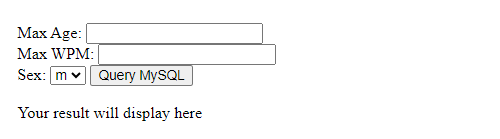
注意 − 這是一個虛擬螢幕。
伺服器端 PHP 檔案
您的客戶端指令碼已準備好。現在,我們必須編寫伺服器端指令碼,該指令碼將從資料庫中獲取年齡、每分鐘打字數和性別,並將其傳送回客戶端。將以下程式碼放入檔案“ajax-example.php”中。
<?php
$dbhost = "localhost";
$dbuser = "dbusername";
$dbpass = "dbpassword";
$dbname = "dbname";

//Connect to MySQL Server
mysql_connect($dbhost, $dbuser, $dbpass);

//Select Database
mysql_select_db($dbname) or die(mysql_error());

// Retrieve data from Query String
$age = $_GET['age'];
$sex = $_GET['sex'];
$wpm = $_GET['wpm'];

// Escape User Input to help prevent SQL Injection
$age = mysql_real_escape_string($age);
$sex = mysql_real_escape_string($sex);
$wpm = mysql_real_escape_string($wpm);

//build query
$query = "SELECT * FROM ajax_example WHERE sex = '$sex'";

if(is_numeric($age))
   $query .= " AND age <= $age";

if(is_numeric($wpm))
   $query .= " AND wpm <= $wpm";

//Execute query
$qry_result = mysql_query($query) or die(mysql_error());

//Build Result String
$display_string = "<table>";
$display_string .= "<tr>";
$display_string .= "<th>Name</th>";
$display_string .= "<th>Age</th>";
$display_string .= "<th>Sex</th>";
$display_string .= "<th>WPM</th>";
$display_string .= "</tr>";

// Insert a new row in the table for each person returned
while($row = mysql_fetch_array($qry_result)) {
   $display_string .= "<tr>";
   $display_string .= "<td>$row[name]</td>";
   $display_string .= "<td>$row[age]</td>";
   $display_string .= "<td>$row[sex]</td>";
   $display_string .= "<td>$row[wpm]</td>";
   $display_string .= "</tr>";
}

echo "Query: " . $query . "<br />";
$display_string .= "</table>";

echo $display_string;
?>
現在嘗試在最大年齡或任何其他框中輸入有效值(例如,120),然後單擊查詢 MySQL 按鈕。
輸入後,您的結果將顯示在此部分。
如果您已成功完成本課,那麼您就知道如何將 MySQL、PHP、HTML 和 Javascript 結合起來編寫 AJAX 應用程式。
廣告