
- WML 教程
- WML - 主頁
- WML - 概覽
- WML - 環境
- WML - 語法
- WML - 元素
- WML - 註釋
- WML - 變數
- WML - 格式化
- WML - 字型
- WML - 影像
- WML - 表格
- WML - 連結
- WML - 任務
- WML - 輸入
- WML - 提交資料
- WML - 伺服器指令碼
- WML - 事件
- WML - 計時器
- WML - 模板
- WML - DTD
- WML2 - 教程
- WML 參考手冊
- WML - 實體
- WML - 標籤參考手冊
- WML 實用資源
- WML - 快速指南
- WML - 實用資源
- WML - 討論
WML <onpick> 標記
如果你正在使用選擇選單,那麼 onpick 屬性將是一個便捷的解決方式。無需編寫大量程式碼允許使用者在選擇某一選項後跳轉到另一張卡片,你只需將目標放置在 onpick 屬性中。以下程式碼片段不包含 onpick 屬性
示例
以下示例展示了 onpick 屬性與 <option> 元素配合使用的用法。
<?xml version="1.0"?>
<!DOCTYPE wml PUBLIC "-//WAPFORUM//DTD WML 1.2//EN"
"http://www.wapforum.org/DTD/wml12.dtd">

<wml>

<card id="tutorials" title="Main Menu">
<p>
  Select a tutorial :
  <select title="tutorials" name="selection_list">
    <option onpick="#xhtml">XHTML Tutorial</option>
    <option onpick="#wap">WAP Tutorial</option>
  </select>
</p>
</card>
<card id="xhtml" title="XHTML Tutorial">
<p>
Go through our XHTML tutorial
</p>
</card>

<card id="wap" title="WAP Tutorial">
<p>
Go through our WAP tutorial
</p>
</card>
</wml>
載入此程式後,將顯示以下螢幕
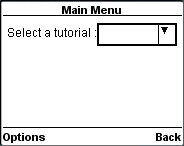
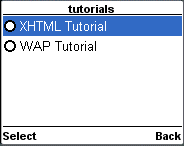
現在,突出顯示下拉框並選擇它。它將提供以下兩個選項
載入此程式後,將顯示以下螢幕
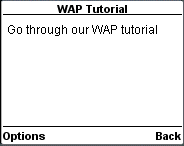
現在,假設你從列表中選擇 WAP 教程,然後將顯示以下螢幕
廣告