
- WML 教程
- WML - 首頁
- WML - 概述
- WML - 環境
- WML - 語法
- WML - 元素
- WML - 註釋
- WML - 變數
- WML - 格式化
- WML - 字型
- WML - 圖片
- WML - 表格
- WML - 連結
- WML - 任務
- WML - 輸入
- WML - 提交資料
- WML - 伺服器指令碼
- WML - 事件
- WML - 定時器
- WML - 模板
- WML - DTD
- WML2 - 教程
- WML 參考
- WML - 實體
- WML - 標籤參考
- WML 有用資源
- WML - 快速指南
- WML - 有用資源
- WML - 討論
- accept
- prev
- help
- reset
- options
- delete
- unknown
- x-*
- vnd.*
WML <do> 標籤
<do> 標籤可用於在使用者點選螢幕上的單詞/短語時啟用任務。
屬性
此元素支援以下屬性
| 屬性 | 值 | 描述 |
|---|---|---|
| name | 文字 | 設定 <do> 元素的名稱。 |
| label | 字串 | 設定 <do> 元素的標籤。 |
| type |
| 定義 <do> 元素的型別。 |
| value | 數字 | 指定定時器超時的時間。超時以十分之一秒為單位。 |
| class | class_data | 設定元素的類名。 |
| id | 元素ID | 元素的唯一ID。 |
示例
以下示例顯示了 <do> 元素與 <go> 元素一起使用的示例。
<?xml version="1.0"?>
<!DOCTYPE wml PUBLIC "-//WAPFORUM//DTD WML 1.3//EN"
"http://www.wapforum.org/DTD/wml13.dtd">

<wml>
  <template>
    <do name="main_menu" type="accept" label="Chapters">
      <go href="chapters"/>
    </do>
    <do name="menu_1" type="accept" label="Chapter 1">

      <go href="#chapter1"/>
    </do>
    <do name="menu_2" type="accept" label="Chapter 2">
      <go href="#chapter2"/>
    </do>
    <do name="menu_3" type="accept" label="Chapter 3">

      <go href="#chapter3"/>
    </do>
    <do name="menu_4" type="accept" label="Chapter 4">
      <go href="#chapter4"/>
    </do>
  </template>

  <card id="chapters" title="WML Tutorial">
    <p>
      Select One Chapter:<br/>
      <anchor>
        <go href="#chapter1"/>

        Chapter 1: WML Overview
      </anchor><br />

      <anchor>
        <go href="#chapter2"/>
        Chapter 2: WML Environment
      </anchor><br />

      <anchor>
        <go href="#chapter3"/>
        Chapter 3: WML Syntax
      </anchor><br />

      <anchor>
        <go href="#chapter4"/>

        Chapter 4: WML Elements
      </anchor><br />
    </p>
  </card>

  <card id="chapter1" title="WML Tutorial Ch1">
    <p>

      <em>Chapter 1: WML Introduction</em><br/>
      ...
    </p>
  </card>

  <card id="chapter2" title="WML Tutorial Ch2">

    <p>
      <em>Chapter 2: WML Environment</em><br/>
      ...
    </p>
  </card>

  <card id="chapter3" title="WML Tutorial Ch3">
    <p>
      <em>Chapter 3: WML Syntax</em><br/>
      ...
    </p>
  </card>

  <card id="chapter4" title="WML Tutorial Ch4">
    <p>
      <em>Chapter 4: WML Elements</em><br/>
      ...
    </p>

  </card>
</wml>
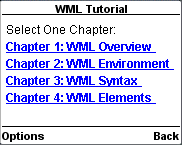
這將生成以下選單,現在您可以瀏覽所有章節。
廣告