
- VueJS 教程
- VueJS - 首頁
- VueJS - 概述
- VueJS - 環境搭建
- VueJS - 簡介
- VueJS - 例項
- VueJS - 模板
- VueJS - 元件
- VueJS - 計算屬性
- VueJS - 偵聽器
- VueJS - 資料繫結
- VueJS - 事件
- VueJS - 渲染
- VueJS - 過渡與動畫
- VueJS - 指令
- VueJS - 路由
- VueJS - 混入
- VueJS - 渲染函式
- VueJS - 響應式介面
- VueJS - 示例
- VueJS 有用資源
- VueJS - 快速指南
- VueJS - 有用資源
- VueJS - 討論
VueJS - 例項
要開始使用 VueJS,我們需要建立 Vue 的例項,稱為根 Vue 例項。
語法
var app = new Vue({
   // options
})
讓我們看一個例子來了解 Vue 建構函式中需要包含哪些內容。
<html>
   <head>
      <title>VueJs Instance</title>
      <script type = "text/javascript" src = "js/vue.js"></script>
   </head>
   <body>
      <div id = "vue_det">
         <h1>Firstname : {{firstname}}</h1>
         <h1>Lastname : {{lastname}}</h1>
         <h1>{{mydetails()}}</h1>
      </div>
      <script type = "text/javascript" src = "js/vue_instance.js"></script>
   </body>
</html>
vue_instance.js
var  vm = new Vue({
   el: '#vue_det',
   data: {
      firstname : "Ria",
      lastname  : "Singh",
      address    : "Mumbai"
   },
   methods: {
      mydetails : function() {
         return "I am "+this.firstname +" "+ this.lastname;
      }
   }
})
對於 Vue,有一個名為el的引數。它獲取 DOM 元素的 id。在上面的例子中,我們有 id#vue_det。它是 div 元素的 id,存在於 .html 中。
<div id = "vue_det"></div>
現在,我們接下來要做的任何操作都會影響 div 元素,而不會影響其外部。
接下來,我們定義了 data 物件。它具有值 firstname、lastname 和 address。
相同的值分配在 div 內部。例如,
<div id = "vue_det">
   <h1>Firstname : {{firstname}}</h1>
   <h1>Lastname : {{lastname}}</h1>
</div>
Firstname : {{firstname}} 的值將在插值(即 {{}})中替換為 data 物件中分配的值,即 Ria。lastname 也是如此。
接下來,我們有 methods,其中我們定義了一個函式 mydetails 和一個返回值。它在 div 內部分配為
<h1>{{mydetails()}}</h1>
因此,在 {{} } 中呼叫函式 mydetails。Vue 例項中返回的值將列印在 {{}} 中。請檢視輸出以供參考。
輸出
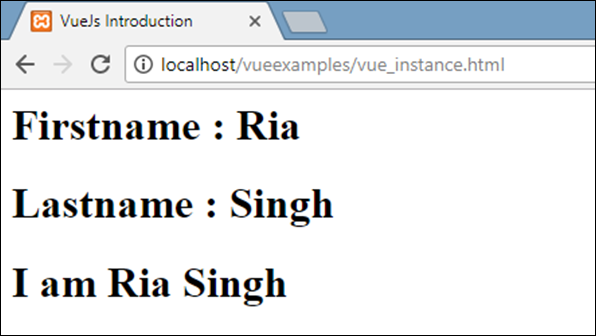
現在,我們需要將選項傳遞給 Vue 建構函式,主要包括 data、template、要掛載的元素、methods、回撥等。
讓我們看看要傳遞給 Vue 的選項。
#data - 此型別的資料可以是物件或函式。Vue 將其屬性轉換為 getter/setter 以使其具有反應性。
讓我們看看如何在選項中傳遞資料。
示例
<html>
   <head>
      <title>VueJs Introduction</title>
      <script type = "text/javascript" src = "js/vue.js"></script>
   </head>
   <body>
      <script type = "text/javascript">
         var _obj = { fname: "Raj", lname: "Singh"}

         // direct instance creation
         var vm = new Vue({
            data: _obj
         });
         console.log(vm.fname);
         console.log(vm.$data);
         console.log(vm.$data.fname);
      </script>
   </body>
</html>
輸出

console.log(vm.fname); // 列印 Raj
console.log(vm.$data); 列印如上所示的完整物件
console.log(vm.$data.fname); // 列印 Raj
如果存在元件,則必須從函式中引用 data 物件,如下面的程式碼所示。
<html>
   <head>
      <title>VueJs Introduction</title>
      <script type = "text/javascript" src = "js/vue.js"></script>
   </head>
   <body>
      <script type = "text/javascript">
         var _obj = { fname: "Raj", lname: "Singh"};

         // direct instance creation
         var vm = new Vue({
            data: _obj
         });
         console.log(vm.fname);
         console.log(vm.$data);
         console.log(vm.$data.fname);

         // must use function when in Vue.extend()
         var Component = Vue.extend({
            data: function () {
               return _obj
            }
         });
         var myComponentInstance = new Component();
         console.log(myComponentInstance.lname);
         console.log(myComponentInstance.$data);
      </script>
   </body>
</html>
在元件的情況下,data 是一個函式,它與 Vue.extend 一起使用,如上所示。data 是一個函式。例如,
data: function () {
   return _obj
}
要從元件中引用 data,我們需要建立其例項。例如,
var myComponentInstance = new Component();
要從 data 中獲取詳細資訊,我們需要執行與上面父元件相同的操作。例如。
console.log(myComponentInstance.lname);
console.log(myComponentInstance.$data);
以下是瀏覽器中顯示的詳細資訊。
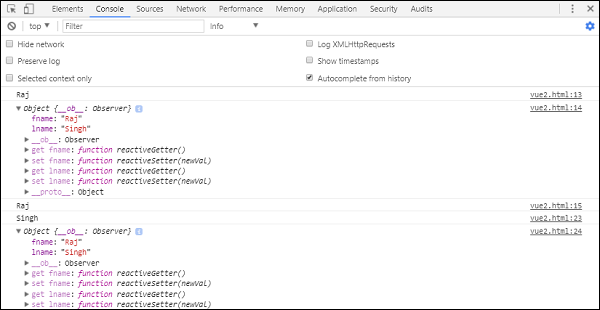
Props - props 的型別是字串或物件的陣列。它採用基於陣列或基於物件的語法。據說它們是用於從父元件接收資料的屬性。
示例 1
Vue.component('props-demo-simple', {
   props: ['size', 'myMessage']
})
示例 2
Vue.component('props-demo-advanced', {
   props: {
      // just type check
      height: Number,

      // type check plus other validations
      age: {
         type: Number,
         default: 0,
         required: true,
         validator: function (value) {
            return value >= 0
         }
      }
   }
})
propsData - 用於單元測試。
Type - 字串陣列。例如,{ [key: string]: any }。它需要在建立 Vue 例項期間傳遞。
示例
var Comp = Vue.extend({
   props: ['msg'],
   template: '<div>{{ msg }}</div>'
})
var vm = new Comp({
   propsData: {
      msg: 'hello'
   }
})
Computed - 型別:{ [key: string]: Function | { get: Function, set: Function } }
示例
<html>
   <head>
      <title>VueJs Introduction</title>
      <script type = "text/javascript" src = "js/vue.js"></script>
   </head>
   <body>
      <script type = "text/javascript">
         var vm = new Vue({
            data: { a: 2 },
            computed: {

               // get only, just need a function
               aSum: function () {
                  return this.a + 2;
               },

               // both get and set
               aSquare: {
                  get: function () {
                     return this.a*this.a;
                  },
                  set: function (v) {
                     this.a = v*2;
                  }
               }
            }
         })
         console.log(vm.aSquare);  // -> 4
         vm.aSquare = 3;
         console.log(vm.a);       // -> 6
         console.log(vm.aSum); // -> 8
      </script>
   </body>
</html>
Computed 有兩個函式aSum和aSquare。
函式 aSum 只是返回this.a+2。函式 aSquare 再次有兩個函式get和set。
變數 vm 是 Vue 的例項,它呼叫 aSquare 和 aSum。同樣,vm.aSquare = 3 呼叫 aSquare 中的 set 函式,而 vm.aSquare 呼叫 get 函式。我們可以在瀏覽器中檢查輸出,其外觀如下面的螢幕截圖所示。
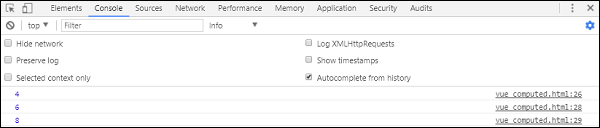
Methods - 方法需要包含在 Vue 例項中,如下面的程式碼所示。我們可以使用 Vue 物件訪問該函式。
<html>
   <head>
      <title>VueJs Introduction</title>
      <script type = "text/javascript" src = "js/vue.js"></script>
   </head>
   <body>
      <script type = "text/javascript">
         var vm = new Vue({
            data: { a: 5 },
            methods: {
               asquare: function () {
                  this.a *= this.a;
               }
            }
         })
         vm.asquare();
         console.log(vm.a); // 25
      </script>
   </body>
</html>
Methods 是 Vue 建構函式的一部分。讓我們使用 Vue 物件vm.asquare ()呼叫該方法,屬性a的值在asquare函式中更新。a 的值從 1 更改為 25,並且在下面的瀏覽器控制檯中反映了相同的變化。
