
- VueJS 教程
- VueJS - 主頁
- VueJS - 概覽
- VueJS - 環境設定
- VueJS - 簡介
- VueJS - 例項
- VueJS - 模板
- VueJS - 元件
- VueJS - 計算屬性
- VueJS - 偵聽屬性
- VueJS - 繫結
- VueJS - 事件
- VueJS - 渲染
- VueJS - 過渡和動畫
- VueJS - 指令
- VueJS - 路由
- VueJS - 混合
- VueJS - 渲染函式
- VueJS - 響應式介面
- VueJS - 示例
- VueJS 有用資源
- VueJS - 快速指南
- VueJS - 有用資源
- VueJS - 討論
VueJS - 示例
示例 1:貨幣轉換器
<html>
   <head>
      <title>VueJs Instance</title>
      <script type = "text/javascript" src = "js/vue.js"></script>
   </head>
   <body>
      <style>
         #databinding{
            padding: 20px 15px 15px 15px;
            margin: 0 0 25px 0;
            width: auto;
            background-color: #e7e7e7;
         }
         span, option, input {
            font-size:25px;
         }
      </style>

      <div id = "databinding" style = "">
         <h1>Currency Converter</h1>
         <span>Enter Amount:</span><input type = "number" v-model.number = "amount" placeholder = "Enter Amount" /><br/><br/>
         <span>Convert From:</span>
         <select v-model = "convertfrom" style = "width:300px;font-size:25px;">
            <option v-for = "(a, index) in currencyfrom"  v-bind:value = "a.name">{{a.desc}}</option>
         </select>
         <span>Convert To:</span>
         <select v-model = "convertto" style = "width:300px;font-size:25px;">
            <option v-for = "(a, index) in currencyfrom" v-bind:value = "a.name">{{a.desc}}</option>
         </select><br/><br/>
         <span> {{amount}} {{convertfrom}} equals {{finalamount}} {{convertto}}</span>
      </div>

      <script type = "text/javascript">
         var vm = new Vue({
            el: '#databinding',
            data: {
               name:'',
               currencyfrom : [
                  {name : "USD", desc:"US Dollar"},
                  {name:"EUR", desc:"Euro"},
                  {name:"INR", desc:"Indian Rupee"},
                  {name:"BHD", desc:"Bahraini Dinar"}
               ],
               convertfrom: "INR",
               convertto:"USD",
               amount :""
            },
            computed :{
               finalamount:function() {
                  var to = this.convertto;
                  var from = this.convertfrom;
                  var final;
                  switch(from) {
                     case "INR":
                     if (to == "USD") {
                        final = this.amount * 0.016;
                     }
                     if (to == "EUR") {
                        final = this.amount * 0.013;
                     }
                     if (to == "INR") {
                        final = this.amount;
                     }
                     if (to == "BHD") {
                        final = this.amount * 0.0059;
                     }
                     break;
                     case "USD":
                     if (to == "INR") {
                        final = this.amount * 63.88;
                     }
                     if (to == "EUR") {
                        final = this.amount * 0.84;
                     }
                     if (to == "USD") {
                        final = this.amount;
                     }
                     if (to == "BHD") {
                        final = this.amount * 0.38;
                     }
                     break;
                     case "EUR":
                     if (to == "INR") {
                        final = this.amount * 76.22;
                     }
                     if (to == "USD") {
                        final = this.amount * 1.19;
                     }
                     if (to == "EUR") {
                        final = this.amount;
                     }
                     if (to == "BHD") {
                        final = this.amount * 0.45;
                     }
                     break;
                     case "BHD":
                     if (to == "INR") {
                        final = this.amount *169.44;
                     }
                     if (to == "USD") {
                        final = this.amount * 2.65;
                     }
                     if (to == "EUR") {
                        final = this.amount * 2.22;
                     }
                     if (to == "BHD") {
                        final = this.amount;
                     }
                     break
                  }
                  return final;
               }
            }
         });
      </script>
   </body>
</html>
輸出(轉換為美元)

輸出:轉換為巴林第納爾

說明 - 在上述示例中,我們建立了一個貨幣轉換器,可將一種貨幣的值轉換為選定的另一種貨幣值。我們建立了兩個貨幣下拉框。當我們在文字框中輸入要轉換的金額時,轉換後金額會顯示在下方。我們使用計算屬性對貨幣轉換執行必要的計算。
示例 2:客戶詳細資訊
<html>
   <head>
      <title>VueJs Instance</title>
      <script type = "text/javascript" src = "js/vue.js"></script>
   </head>
   <body>
      <style>
         #databinding{
            padding: 20px 15px 15px 15px;
            margin: 0 0 25px 0;
            width: auto;
         }
         span, option, input {
            font-size:20px;
         }
         .Table{
            display: table;
            width:80%;
         }
         .Title{
            display: table-caption;
            text-align: center;
            font-weight: bold;
            font-size: larger;
         }
         .Heading{
            display: table-row;
            font-weight: bold;
            text-align: center;
         }
         .Row{
            display: table-row;
         }
         .Cell{
            display: table-cell;
            border: solid;
            border-width: thin;
            padding-left: 5px;
            padding-right: 5px;
            width:30%;
         }
      </style>

      <div id = "databinding" style = "">
         <h1>Customer Details</h1>
         <span>First Name</span>
         <input type = "text" placeholder = "Enter First Name" v-model = "fname"/>
         <span>Last Name</span>
         <input type = "text" placeholder = "Enter Last Name" v-model = "lname"/>
         <span>Address</span>
         <input type = "text" placeholder = "Enter Address" v-model = "addr"/>
         <button v-on:click = "showdata" v-bind:style = "styleobj">Add</button>
         <br/>
         <br/>
         <customercomponent
            v-for = "(item, index) in custdet"
            v-bind:item = "item"
            v-bind:index = "index"
            v-bind:itr = "item"
            v-bind:key = "item.fname"
            v-on:removeelement = "custdet.splice(index, 1)">
         </customercomponent>
      </div>

      <script type = "text/javascript">
         Vue.component('customercomponent',{
            template : '<div class = "Table"><div class = "Row"  v-bind:style = "styleobj"><div class = "Cell"><p>{{itr.fname}}</p></div><div class = "Cell"><p>{{itr.lname}}</p></div><div class = "Cell"><p>{{itr.addr}}</p></div><div class = "Cell"><p><button v-on:click = "$emit(\'removeelement\')">X</button></p></div></div></div>',
            props: ['itr', 'index'],
            data: function() {
               return {
                  styleobj : {
                     backgroundColor:this.getcolor(),
                     fontSize : 20
                  }
               }
            },
            methods:{
               getcolor : function() {
                  if (this.index % 2) {
                     return "#FFE633";
                  } else {
                     return "#D4CA87";
                  }
               }
            }
         });
         var vm = new Vue({
            el: '#databinding',
            data: {
               fname:'',
               lname:'',
               addr : '',
               custdet:[],
               styleobj: {
                  backgroundColor: '#2196F3!important',
                  cursor: 'pointer',
                  padding: '8px 16px',
                  verticalAlign: 'middle',
               }
            },
            methods :{
               showdata : function() {
                  this.custdet.push({
                     fname: this.fname,
                     lname: this.lname,
                     addr : this.addr
                  });
                  this.fname = "";
                  this.lname = "";
                  this.addr = "";
               }
            }
         });
      </script>
   </body>
</html>
輸出

刪除後的輸出
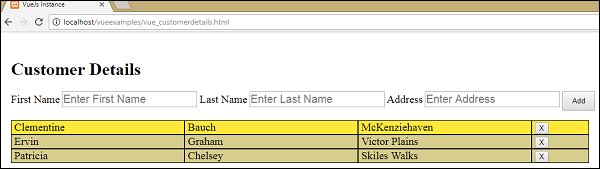
說明 - 在上述示例中,我們有三個文字框用於輸入姓名、姓氏和地址。有一個新增按鈕,它會將文字框中輸入的值以帶有刪除按鈕的表格格式新增進去。
表格格式使用元件建立。單擊按鈕透過 emit 事件與父元件進行互動,以從陣列中刪除元素。輸入的值儲存在陣列中,並透過 Prop 屬性與子元件共享。
廣告