
- TestRail 教程
- TestRail - 首頁
- TestRail - 簡介
- TestRail - 功能
- TestRail - 免費試用
- TestRail - 登入
- TestRail - 儀表盤
- TestRail - 邀請使用者
- TestRail - 新增專案
- TestRail - 測試用例 - 模組
- TestRail - 測試用例 - 用例
- TestRail - 匯入測試用例 - CSV
- TestRail - 匯入測試用例 - XML
- TestRail - 匯出測試用例
- TestRail - 測試執行
- TestRail - 重新執行
- TestRail - 自定義表格
- TestRail - 複製/移動測試用例
- TestRail - 里程碑
- TestRail - 測試計劃和配置
- TestRail - 待辦事項和通知
- TestRail - 報表
- 進度和活動跟蹤
- TestRail - 新增多個測試結果
- TestRail - 高階搜尋選項
- TestRail - 最佳化列印
- TestRail - 快捷鍵
- TestRail 有用資源
- TestRail - 快速指南
- TestRail - 有用資源
- TestRail - 討論
TestRail - 匯入測試用例 XML
使用者可以使用 XML 檔案一次建立多個測試用例和模組。匯入 XML 資料需要兩個步驟。
- XML 檔案規則
- 將檔案匯入系統
XML 檔案規則
建立 XML 檔案時,必須考慮以下幾點
XML 格式應為樹狀結構。它應以模組、測試用例和子模組開頭。
XML 格式如下所示
<section>
   <name>Login Functionality<name>
   <description>All test case related to login functionality. Positive and negative test cases</description>
   <case>
      <id>C2</id>
      <title>Correct Username and Passwordcombination</title>
      <template>Test Case (Text)<template>
      <type>Other<type>
      <priority>Medium<priority>
      <estimate/>
      <references/>
      <custom>
         <preconds>Login page should display</preconds>
         <steps>1. Enter correct username 2.enter correct password</steps>
         <expected>Usershould able to login successfully.</expected>
      </custom>
   </case>
</section>
<case> 標籤支援 TestRail 中測試用例的所有屬性,例如標題、估算、優先順序、文字欄位、前提條件、步驟、預期結果等
自定義欄位分組在<custom>標籤下。
下表列出了各種自定義欄位型別的匯入格式
| 型別 | 示例值 | 描述 |
|---|---|---|
| 複選框 | TRUE | "true" 或 "false"(不含引號) |
| 日期 | 01-07-2010 | yyyy-mm-dd 格式的有效 XML 日期字串 |
| 下拉列表 | <id>5</id> | 值 ID(如在管理區域的自定義欄位選項中配置)位於<id>標籤中 |
| 整數 | 1022 | 一個簡單的整數 |
| 里程碑 | <id>2</id> | 里程碑的 ID 位於<id>標籤中 |
| 多選 |
<item> <id>1</id> </item> <item> <id>2</id> </item> |
一個<item>記錄列表,每個記錄都有其自己的 ID(因此,類似於下拉列表值列表) |
| 步驟 |
<step>
   <index>1</index>
   <content>Step 1</content>
   <expected>Result 1</expected>
</step>
<step>
    <index>2</index><content>Step 2</content>
</step>
|
一個<step>記錄列表,每個記錄都有其自己的索引、內容和可選的預期結果 |
| 字串/文字 | Foobar | 一個簡單的字串 |
| URL(連結) | http//google.com/ | 一個簡單的 URL 字串 |
| 使用者 | <id>3</id> | 使用者的 ID 位於<id>標籤中 |
匯入 CSV 檔案
轉到“測試用例”選項卡。
點選右側的匯入測試用例圖示,然後選擇“從 XML 匯入”選項。
以下螢幕截圖顯示了匯入測試用例圖示和 XML 選擇
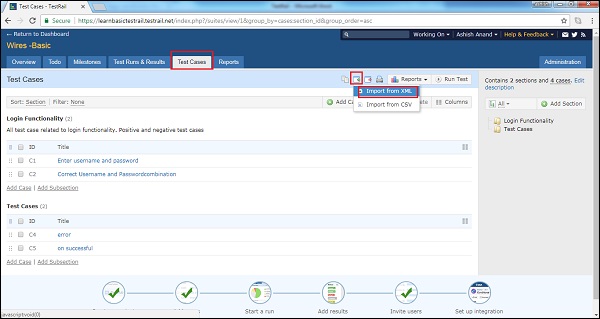
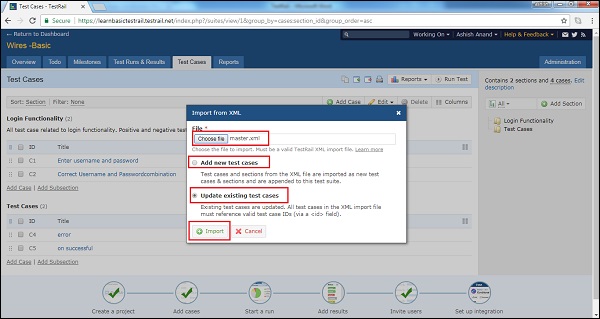
它將開啟“從 XML 匯入”嚮導。瀏覽並上傳 XML 檔案。
使用者可以新增新的測試用例以及更新現有的測試用例。
選擇後,點選“匯入”按鈕。
以下螢幕截圖顯示瞭如何匯出 XML 檔案
廣告