- Swing 教程
- Swing - 首頁
- Swing - 概述
- Swing - 環境
- Swing - 控制元件
- Swing - 事件處理
- Swing - 事件類
- Swing - 事件監聽器
- Swing - 事件介面卡
- Swing - 佈局
- Swing - 選單
- Swing - 容器
- Swing 有用資源
- Swing - 快速指南
- Swing - 有用資源
- Swing - 討論
Swing - JOptionPane 類
介紹
JOptionPane 類是一個元件,它提供標準方法來彈出一個標準對話方塊以獲取值或通知使用者某些資訊。
類宣告
以下是 javax.swing.JOptionPane 類的宣告:
public class JOptionPane
   extends JComponent
      implements Accessible
欄位
以下是 javax.swing.JOptionPane 類的欄位:
static int CANCEL_OPTION - 如果選擇取消,則來自類方法的返回值。
static int CLOSED_OPTION - 如果使用者在不選擇任何內容的情況下關閉視窗,則來自類方法的返回值,很可能這應該被視為 CANCEL_OPTION 或 NO_OPTION。
static int DEFAULT_OPTION - 型別表示外觀和感覺不應提供任何選項,只使用來自 JOptionPane 的選項。
static int ERROR_MESSAGE - 用於錯誤訊息。
protected Icon icon - 面板中使用的圖示。
static string ICON_PROPERTY - 圖示的繫結屬性名稱。
static int INFORMATION_MESSAGE - 用於資訊訊息。
static string INITIAL_SELECTION_VALUE_PROPERTY - initialSelectionValue 的繫結屬性名稱。
static string INITIAL_VALUE_PROPERTY - initialValue 的繫結屬性名稱。
protected Object initialSelectionValue - 要在 selectionValues 中選擇的初始值。
protected Object initialValue - 應在選項中最初選擇的的值。
static string INPUT_VALUE_PROPERTY - inputValue 的繫結屬性名稱。
protected Object inputValue - 使用者輸入的值。
protected Object message - 要顯示的訊息。
static string MESSAGE_PROPERTY - message 的繫結屬性名稱。
static string MESSAGE_TYPE_PROPERTY - type 的繫結屬性名稱。
static int OK_CANCEL_OPTION - 用於 showConfirmDialog 的型別。
protected int messageType - 訊息型別。
static int NO_OPTION - 如果選擇否,則來自類方法的返回值。
static int OK_OPTION - 如果選擇確定,則來自類方法的返回值。
static string OPTION_TYPE_PROPERTY - optionType 的繫結屬性名稱。
protected Object[] options - 要顯示給使用者的選項。
static string OPTIONS_PROPERTY - option 的繫結屬性名稱。
protected int optionType - 選項型別,DEFAULT_OPTION、YES_NO_OPTION、YES_NO_CANCEL_OPTION 或 OK_CANCEL_OPTION 之一。
static int PLAIN_MESSAGE - 不使用圖示。
static int QUESTION_MESSAGE - 用於問題。
static string SELECTION_VALUES_PROPERTY - selectionValues 的繫結屬性名稱。
protected Object[] selectionValues - 使用者可以從中選擇的陣列值。
static Object UNINITIALIZED_VALUE - 指示使用者尚未選擇值。
protected Object value - 當前選定的值,將是有效選項,或 UNINITIALIZED_VALUE 或 null。
static string VALUE_PROPERTY - value 的繫結屬性名稱。
static string WANTS_INPUT_PROPERTY - wantsInput 的繫結屬性名稱。
protected boolean wantsInput - 如果為真,則將為使用者提供 UI 小部件以獲取輸入。
static int WARNING_MESSAGE - 用於警告訊息。
static int YES_NO_CANCEL_OPTION - 用於 showConfirmDialog 的型別。
static int YES_NO_OPTION - 用於 showConfirmDialog 的型別。
static int YES_OPTION - 如果選擇是,則來自類方法的返回值。
類建構函式
| 序號 | 建構函式 & 描述 |
|---|---|
| 1 |
JOptionPane() 建立一個帶有測試訊息的 JOptionPane。 |
| 2 |
JOptionPane(Object message) 建立一個 JOptionPane 例項,以使用普通訊息訊息型別和 UI 提供的預設選項顯示訊息。 |
| 3 |
JOptionPane(Object message, int messageType) 建立一個 JOptionPane 例項,以使用指定的 messageType 和預設選項顯示訊息。 |
| 4 |
JOptionPane(Object message, int messageType, int optionType) 建立一個 JOptionPane 例項,以使用指定的 messageType 和選項顯示訊息。 |
| 5 |
JOptionPane(Object message, int messageType, int optionType, Icon icon) 建立一個 JOptionPane 例項,以使用指定的 messageType、選項和圖示顯示訊息。 |
| 6 |
JOptionPane(Object message, int messageType, int optionType, Icon icon, Object[] options) 建立一個 JOptionPane 例項,以使用指定的 messageType、圖示和選項顯示訊息。 |
| 7 |
JOptionPane(Object message, int messageType, int optionType, Icon icon, Object[] options, Object initialValue) 建立一個 JOptionPane 例項,以使用指定的 messageType、圖示和選項顯示訊息,並指定最初選擇的選項。 |
類方法
| 序號 | 方法 & 描述 |
|---|---|
| 1 |
JDialog createDialog(Component parentComponent, String title) 建立一個新的 JDialog 並將其返回,該 JDialog 包裹在父元件的框架中,並以父元件為中心。 |
| 2 |
JDialog createDialog(String title) 建立一個新的無父 JDialog 並將其返回,該 JDialog 具有指定的標題。 |
| 3 |
JInternalFrame createInternalFrame(Component parentComponent, String title) 建立並返回一個 JInternalFrame 例項。 |
| 4 |
AccessibleContext getAccessibleContext() 返回與此 JOptionPane 關聯的 AccessibleContext。 |
| 5 |
static JDesktopPane getDesktopPaneForComponent(Component parentComponent) 返回指定元件的桌面窗格。 |
| 6 |
static Frame getFrameForComponent(Component parentComponent) 返回指定元件的 Frame。 |
| 7 |
Icon getIcon() 返回此面板顯示的圖示。 |
| 8 |
Object getInitialSelectionValue() 返回最初顯示給使用者的輸入值。 |
| 9 |
Object getInitialValue() 返回初始值。 |
| 10 |
Object getInputValue() 返回使用者輸入的值,如果 wantsInput 為真。 |
| 11 |
int getMaxCharactersPerLineCount() 返回要在訊息中放置在一行上的最大字元數。 |
| 12 |
Object getMessage() 返回此面板顯示的訊息物件。 |
| 13 |
int getMessageType() 返回訊息型別。 |
| 14 |
Object[] getOptions() 返回使用者可以做出的選擇。 |
| 15 |
int getOptionType() 返回顯示的選項型別。 |
| 16 |
static Frame getRootFrame() 返回 Frame,用於在未提供 Frame 的類方法中使用。 |
| 17 |
Object[] getSelectionValues() 返回輸入選擇值。 |
| 18 |
OptionPaneUI getUI() 返回實現此元件 L&F 的 UI 物件。 |
| 19 |
String getUIClassID() 返回實現此元件 L&F 的 UI 類的名稱。 |
| 20 |
Object getValue() 返回使用者選擇的值。 |
| 21 |
boolean getWantsInput() 返回 wantsInput 屬性的值。 |
| 22 |
protected String paramString() 返回此 JOptionPane 的字串表示形式。 |
| 23 |
void selectInitialValue() 請求選擇初始值,這將使焦點設定到初始值。 |
| 24 |
void setIcon(Icon newIcon) 設定要顯示的圖示。 |
| 25 |
void setInitialSelectionValue(Object newValue) 設定最初顯示為使用者選擇的值。 |
| 26 |
void setInitialValue(Object newInitialValue) 設定要啟用的初始值 - 面板最初顯示時具有焦點的元件。 |
| 27 |
void setInputValue(Object newValue) 設定使用者選擇或輸入的輸入值。 |
| 28 |
void setMessage(Object newMessage) 設定選項面板的訊息物件。 |
| 29 |
void setMessageType(int newType) 設定選項面板的訊息型別。 |
| 30 |
void setOptions(Object[] newOptions) 設定此面板顯示的選項。 |
| 31 |
void setOptionType(int newType) 設定要顯示的選項。 |
| 32 |
static voidsetRootFrame(Frame newRootFrame) 設定 Frame,用於在未提供 Frame 的類方法中使用。 |
| 33 |
void setSelectionValues(Object[] newValues) 設定提供給使用者一列專案以供選擇的窗格的輸入選擇值。 |
| 34 |
void setUI(OptionPaneUI ui) 設定實現此元件 L&F 的 UI 物件。 |
| 35 |
void setValue(Object newValue) 設定使用者選擇的值。 |
| 36 |
void setWantsInput(boolean newValue) 設定 wantsInput 屬性。 |
| 37 |
static int showConfirmDialog(Component parentComponent, Object message) 彈出一個具有是、否和取消選項的對話方塊;標題為“選擇一個選項”。 |
| 38 |
static int showConfirmDialog(Component parentComponent, Object message, String title, int optionType) 彈出一個對話方塊,其中選項的數量由 optionType 引數確定。 |
| 39 |
static int showConfirmDialog(Component parentComponent, Object message, String title, int optionType, int messageType) 彈出一個對話方塊,其中選項的數量由 optionType 引數確定,其中 messageType 引數確定要顯示的圖示。 |
| 40 |
static int showConfirmDialog(Component parentComponent, Object message, String title, int optionType, int messageType, Icon icon) 彈出一個具有指定圖示的對話方塊,其中選項的數量由 optionType 引數確定。 |
| 41 |
static String showInputDialog(Component parentComponent, Object message) 顯示一個詢問訊息對話方塊,請求來自父元件的使用者輸入。 |
| 42 |
static String showInputDialog(Component parentComponent, Object message, Object initialSelectionValue) 顯示一個詢問訊息對話方塊,請求來自使用者輸入並作為父元件。 |
| 43 |
static String showInputDialog(Component parentComponent, Object message, String title, int essageType) 顯示一個對話方塊,請求來自父元件的使用者輸入,該對話方塊具有標題 title 和訊息型別 messageType。 |
| 44 |
static Object showInputDialog(Component parentComponent, Object message, String title, int messageType, Icon icon, Object[] selectionValues, Object initialSelectionValue) 在阻塞對話方塊中提示使用者輸入,其中可以指定初始選擇、可能的選擇以及所有其他選項。 |
| 45 |
static String showInputDialog(Object message) 顯示一個詢問訊息對話方塊,請求使用者輸入。 |
| 46 |
static String showInputDialog(Object message, Object initialSelectionValue) 顯示一個詢問訊息對話方塊,請求使用者輸入,輸入值初始化為 initialSelectionValue。 |
| 47 |
static int showInternalConfirmDialog(Component parentComponent, Object message) 彈出一個內部對話方塊面板,提供“是”、“否”和“取消”選項;標題為“選擇一個選項”。 |
| 48 |
static int showInternalConfirmDialog(Component parentComponent, Object message, String title, int optionType) 彈出一個內部對話方塊面板,選項數量由 optionType 引數決定。 |
| 49 |
static int showInternalConfirmDialog(Component parentComponent, Object message, String title, int optionType, int messageType) 彈出一個內部對話方塊面板,選項數量由 optionType 引數決定, messageType 引數決定顯示的圖示。 |
| 50 |
static int showInternalConfirmDialog(Component parentComponent, Object message, String title, int optionType, int messageType, Icon icon) 彈出一個帶有指定圖示的內部對話方塊面板,選項數量由 optionType 引數決定。 |
| 51 |
static String showInternalInputDialog(Component parentComponent, Object message) 顯示一個內部詢問訊息對話方塊,請求使用者輸入,並將其作為 parentComponent 的子元件。 |
| 52 |
static String showInternalInputDialog(Component parentComponent, Object message, String title, int messageType) 顯示一個內部對話方塊,請求使用者輸入,並將其作為 parentComponent 的子元件,對話方塊標題為 title,訊息型別為 messageType。 |
| 53 |
static Object showInternalInputDialog(Component parentComponent, Object message, String title, int messageType, Icon icon, Object[] selectionValues, Object initialSelectionValue) 在阻塞的內部對話方塊中提示使用者輸入,可以指定初始選擇、可選選擇和其他所有選項。 |
| 54 |
static voidshowInternalMessageDialog(Component parentComponent, Object message) 彈出一個內部確認對話方塊面板。 |
| 55 |
static voidshowInternalMessageDialog(Component parentComponent, Object message, String title, int messageType) 彈出一個內部對話方塊面板,使用由 messageType 引數決定的預設圖示顯示訊息。 |
| 56 |
static voidshowInternalMessageDialog(Component parentComponent, Object message, String title, int messageType, Icon icon) 彈出一個內部對話方塊面板顯示訊息,指定所有引數。 |
| 57 |
static voidshowMessageDialog(Component parentComponent, Object message) 彈出一個標題為“訊息”的資訊訊息對話方塊。 |
| 58 |
static voidshowMessageDialog(Component parentComponent, Object message, String title, int messageType) 彈出一個對話方塊,使用由 messageType 引數決定的預設圖示顯示訊息。 |
| 59 |
static voidshowMessageDialog(Component parentComponent, Object message, String title, int messageType, Icon icon) 彈出一個對話方塊顯示訊息,指定所有引數。 |
| 60 |
static int showOptionDialog(Component parentComponent, Object message, String title, int optionType, int messageType, Icon icon, Object[] options, Object initialValue) 彈出一個帶有指定圖示的對話方塊,初始選擇由 initialValue 引數決定,選項數量由 optionType 引數決定。 |
| 61 |
void updateUI() 來自 UIManager 的通知,表示 L&F 已更改。 |
| 62 |
static int showInternalOptionDialog(Component parentComponent, Object message, String title, int optionType, int messageType, Icon icon, Object[] options, Object initialValue) 彈出一個帶有指定圖示的內部對話方塊面板,初始選擇由 initialValue 引數決定,選項數量由 optionType 引數決定。 |
繼承的方法
此類繼承自以下類:
- javax.swing.JComponent
- java.awt.Container
- java.awt.Component
- java.lang.Object
JOptionPane 示例
使用任意編輯器在例如 D:/ > SWING > com > tutorialspoint > gui > 中建立以下 Java 程式。
SwingControlDemo.java
package com.tutorialspoint.gui;

import java.awt.*;
import java.awt.event.*;
import javax.swing.*;

public class SwingControlDemo {
   private JFrame mainFrame;
   private JLabel headerLabel;
   private JLabel statusLabel;
   private JPanel controlPanel;

   public SwingControlDemo(){
      prepareGUI();
   }
   public static void main(String[] args){
      SwingControlDemo  swingControlDemo = new SwingControlDemo();
      swingControlDemo.showDialogDemo();
   }
   private void prepareGUI(){
      mainFrame = new JFrame("Java Swing Examples");
      mainFrame.setSize(400,400);
      mainFrame.setLayout(new GridLayout(3, 1));

      mainFrame.addWindowListener(new WindowAdapter() {
         public void windowClosing(WindowEvent windowEvent){
            System.exit(0);
         }
      });
      headerLabel = new JLabel("", JLabel.CENTER);
      statusLabel = new JLabel("",JLabel.CENTER);
      statusLabel.setSize(350,100);

      controlPanel = new JPanel();
      controlPanel.setLayout(new FlowLayout());

      mainFrame.add(headerLabel);
      mainFrame.add(controlPanel);
      mainFrame.add(statusLabel);
      mainFrame.setVisible(true);
   }
   private void showDialogDemo(){
      headerLabel.setText("Control in action: JOptionPane");

      JButton okButton = new JButton("OK");
      JButton javaButton = new JButton("Yes/No");
      JButton cancelButton = new JButton("Yes/No/Cancel");

      okButton.addActionListener(new ActionListener() {
         public void actionPerformed(ActionEvent e) {
            JOptionPane.showMessageDialog(mainFrame, "Welcome to TutorialsPoint.com");
         }
      });
      javaButton.addActionListener(new ActionListener() {
         public void actionPerformed(ActionEvent e) {
            int output = JOptionPane.showConfirmDialog(mainFrame
               , "Click any button"
               ,"TutorialsPoint.com"
               ,JOptionPane.YES_NO_OPTION);

            if(output == JOptionPane.YES_OPTION){
               statusLabel.setText("Yes selected.");
            } else if(output == JOptionPane.NO_OPTION){
               statusLabel.setText("No selected.");
            }
         }
      });
      cancelButton.addActionListener(new ActionListener() {
         public void actionPerformed(ActionEvent e) {
            int output = JOptionPane.showConfirmDialog(mainFrame
               , "Click any button"
               ,"TutorialsPoint.com"
               ,JOptionPane.YES_NO_CANCEL_OPTION,
               JOptionPane.INFORMATION_MESSAGE);

            if(output == JOptionPane.YES_OPTION){
               statusLabel.setText("Yes selected.");
            } else if(output == JOptionPane.NO_OPTION){
               statusLabel.setText("No selected.");
            } else if(output == JOptionPane.CANCEL_OPTION){
               statusLabel.setText("Cancel selected.");
            }
         }
      });
      controlPanel.add(okButton);
      controlPanel.add(javaButton);
      controlPanel.add(cancelButton);
      mainFrame.setVisible(true);
   }
}
使用命令提示符編譯程式。轉到 D:/ > SWING 並輸入以下命令。
D:\SWING>javac com\tutorialspoint\gui\SwingControlDemo.java
如果未出現錯誤,則表示編譯成功。使用以下命令執行程式。
D:\SWING>java com.tutorialspoint.gui.SwingControlDemo
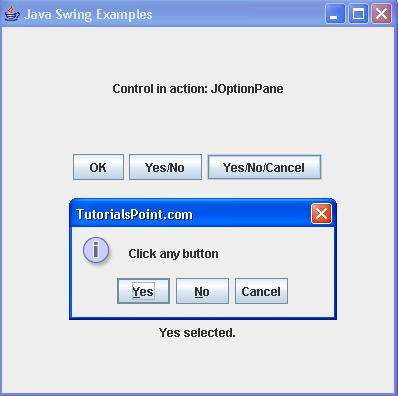
驗證以下輸出。