- Swing 教程
- Swing - 首頁
- Swing - 概述
- Swing - 環境
- Swing - 控制元件
- Swing - 事件處理
- Swing - 事件類
- Swing - 事件監聽器
- Swing - 事件介面卡
- Swing - 佈局
- Swing - 選單
- Swing - 容器
- Swing 有用資源
- Swing - 快速指南
- Swing - 有用資源
- Swing - 討論
Swing - JFrame 類
簡介
JFrame 類是 java.awt.Frame 的擴充套件版本,它增加了對 JFC/Swing 元件體系結構的支援。
類宣告
以下是 javax.swing.JFrame 類的宣告:
public class JFrame
   extends Frame
      implements WindowConstants, Accessible, RootPaneContainer
欄位
以下是 java.awt.Component 類的欄位:
protected AccessibleContext accessibleContext - 可訪問上下文屬性。
static int EXIT_ON_CLOSE - 退出應用程式的預設視窗關閉操作。
protected JRootPane rootPane - 管理此框架的 contentPane 和可選的 menuBar 以及 glassPane 的 JRootPane 例項。
protected boolean rootPaneCheckingEnabled - 如果為 true,則對 add 和 setLayout 的呼叫將轉發到 contentPane。
類建構函式
| 序號 | 建構函式和描述 |
|---|---|
| 1 |
JFrame() 構造一個最初不可見的新的框架。 |
| 2 |
JFrame(GraphicsConfiguration gc) 在螢幕裝置的指定 GraphicsConfiguration 中建立一個具有空白標題的 Frame。 |
| 3 |
JFrame(String title) 建立一個新的、最初不可見的具有指定標題的 Frame。 |
| 4 |
JFrame(String title, GraphicsConfiguration gc) 使用指定的標題和螢幕裝置的指定 GraphicsConfiguration 建立一個 JFrame。 |
類方法
| 序號 | 方法和描述 |
|---|---|
| 1 |
protected void addImpl(Component comp, Object constraints, int index) 新增指定的子元件。 |
| 2 |
protected JRootPane createRootPane() 由建構函式方法呼叫以建立預設的 rootPane。 |
| 3 |
protected void frameInit() 由建構函式呼叫以正確初始化 JFrame。 |
| 4 |
AccessibleContext getAccessibleContext() 獲取與此 JFrame 關聯的 AccessibleContext。 |
| 5 |
Container getContentPane() 返回此框架的 contentPane 物件。 |
| 6 |
int getDefaultCloseOperation() 返回使用者在此框架上啟動“關閉”時發生的操作。 |
| 7 |
Component getGlassPane() 返回此框架的 glassPane 物件。 |
| 8 |
Graphics getGraphics() 為此元件建立一個圖形上下文。 |
| 9 |
JMenuBar getJMenuBar() 返回在此框架上設定的選單欄。 |
| 10 |
JLayeredPane getLayeredPane() 返回此框架的 layeredPane 物件。 |
| 11 |
JRootPane getRootPane() 返回此框架的 rootPane 物件。 |
| 12 |
TransferHandler getTransferHandler() 獲取 transferHandler 屬性。 |
| 13 |
static boolean isDefaultLookAndFeelDecorated() 如果新建立的 JFrame 的視窗裝飾由當前外觀和感覺提供,則返回 true。 |
| 14 |
protected boolean isRootPaneCheckingEnabled() 返回是否將對 add 和 setLayout 的呼叫轉發到 contentPane。 |
| 15 |
protected String paramString() 返回此 JFrame 的字串表示形式。 |
| 16 |
protected void processWindowEvent(WindowEvent e) 處理在此元件上發生的視窗事件。 |
| 17 |
void remove(Component comp) 從容器中刪除指定的元件。 |
| 18 |
void repaint(long time, int x, int y, int width, int height) 在 time 毫秒內重新繪製此元件的指定矩形。 |
| 19 |
void setContentPane(Container contentPane) 設定 contentPane 屬性。 |
| 20 |
void setDefaultCloseOperation(int operation) 設定使用者在此框架上啟動“關閉”時預設發生的操作。 |
| 21 |
static void setDefaultLookAndFeelDecorated(boolean defaultLookAndFeelDecorated) 提供一個提示,指示是否應由當前外觀和感覺為新建立的 JFrame 提供其視窗裝飾(例如邊框、關閉視窗的小部件、標題等)。 |
| 22 |
void setGlassPane(Component glassPane) 設定 glassPane 屬性。 |
| 23 |
void setIconImage(Image image) 設定要顯示為此視窗圖示的影像。 |
| 24 |
void setJMenuBar(JMenuBar menubar) 設定此框架的選單欄。 |
| 25 |
void setLayeredPane(JLayeredPane layeredPane) 設定 layeredPane 屬性。 |
| 26 |
void setLayout(LayoutManager manager) 設定 LayoutManager。 |
| 27 |
protected void setRootPane(JRootPane root) 設定 rootPane 屬性。 |
| 28 |
protected void setRootPaneCheckingEnabled(boolean enabled) 設定是否將對 add 和 setLayout 的呼叫轉發到 contentPane。 |
| 29 |
void setTransferHandler(TransferHandler newHandler) 設定 transferHandler 屬性,這是一種支援將資料傳輸到此元件的機制。 |
| 30 |
void update(Graphics g) 只調用 paint(g)。 |
繼承的方法
此類繼承自以下類的方法:
- java.awt.Frame
- java.awt.Window
- java.awt.Container
- java.awt.Component
- java.lang.Object
JFrame 示例
使用您選擇的任何編輯器建立以下 Java 程式,例如在 D:/ > SWING > com > tutorialspoint > gui >
SwingContainerDemo.java
package com.tutorialspoint.gui;

import java.awt.*;
import java.awt.event.*;
import javax.swing.*;

public class SwingContainerDemo {
   private JFrame mainFrame;
   private JLabel headerLabel;
   private JLabel statusLabel;
   private JPanel controlPanel;
   private JLabel msglabel;

   public SwingContainerDemo(){
      prepareGUI();
   }
   public static void main(String[] args){
      SwingContainerDemo  swingContainerDemo = new SwingContainerDemo();
      swingContainerDemo.showJFrameDemo();
   }
   private void prepareGUI(){
      mainFrame = new JFrame("Java Swing Examples");
      mainFrame.setSize(400,400);
      mainFrame.setLayout(new GridLayout(3, 1));

      mainFrame.addWindowListener(new WindowAdapter() {
         public void windowClosing(WindowEvent windowEvent){
            System.exit(0);
         }
      });
      headerLabel = new JLabel("", JLabel.CENTER);
      statusLabel = new JLabel("",JLabel.CENTER);
      statusLabel.setSize(350,100);
      msglabel = new JLabel("Welcome to TutorialsPoint SWING Tutorial.", JLabel.CENTER);

      controlPanel = new JPanel();
      controlPanel.setLayout(new FlowLayout());

      mainFrame.add(headerLabel);
      mainFrame.add(controlPanel);
      mainFrame.add(statusLabel);
      mainFrame.setVisible(true);
   }
   private void showJFrameDemo(){
      headerLabel.setText("Container in action: JFrame");
      final JFrame frame = new JFrame();
      frame.setSize(300, 300);
      frame.setLayout(new FlowLayout());
      frame.add(msglabel);

      frame.addWindowListener(new WindowAdapter() {
         public void windowClosing(WindowEvent windowEvent){
            frame.dispose();
         }
      });
      JButton okButton = new JButton("Open a Frame");
      okButton.addActionListener(new ActionListener() {
         public void actionPerformed(ActionEvent e) {
            statusLabel.setText("A Frame shown to the user.");
            frame.setVisible(true);
         }
      });
      controlPanel.add(okButton);
      mainFrame.setVisible(true);
   }
}
使用命令提示符編譯程式。轉到 D:/ > SWING 並鍵入以下命令。
D:\SWING>javac com\tutorialspoint\gui\SwingContainerDemo.java
如果未發生錯誤,則表示編譯成功。使用以下命令執行程式。
D:\SWING>java com.tutorialspoint.gui.SwingContainerDemo
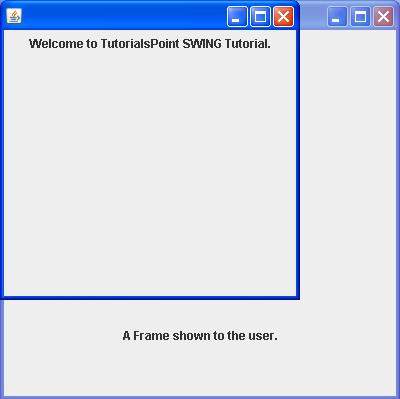
驗證以下輸出。