- Swing 教程
- Swing - 首頁
- Swing - 概述
- Swing - 環境
- Swing - 控制元件
- Swing - 事件處理
- Swing - 事件類
- Swing - 事件監聽器
- Swing - 事件介面卡
- Swing - 佈局
- Swing - 選單
- Swing - 容器
- Swing 有用資源
- Swing - 快速指南
- Swing - 有用資源
- Swing - 討論
Swing - JButton 類
介紹
JButton 類是按鈕的一個實現。此元件帶有一個標籤,按下時會生成一個事件。它也可以包含一個影像。
類宣告
以下是javax.swing.JButton類的宣告:
public class JButton
   extends AbstractButton
      implements Accessible
類建構函式
| 序號 | 建構函式和描述 |
|---|---|
| 1 |
JButton() 建立一個沒有設定文字或圖示的按鈕。 |
| 2 |
JButton(Action a) 建立一個按鈕,其屬性取自提供的 Action。 |
| 3 |
JButton(Icon icon) 建立一個帶圖示的按鈕。 |
| 4 |
JButton(String text) 建立一個帶文字的按鈕。 |
| 5 |
JButton(String text, Icon icon) 建立一個帶有初始文字和圖示的按鈕。 |
類方法
| 序號 | 方法和描述 |
|---|---|
| 1 |
AccessibleContext getAccessibleContext() 獲取與此 JButton 關聯的 AccessibleContext。 |
| 2 |
String getUIClassID() 返回一個字串,該字串指定呈現此元件的 L&F 類的名稱。 |
| 3 |
boolean isDefaultButton() 獲取 defaultButton 屬性的值,如果為 true,則表示此按鈕是其 JRootPane 的當前預設按鈕。 |
| 4 |
boolean isDefaultCapable() 獲取 defaultCapable 屬性的值。 |
| 5 |
protected String paramString() 返回此 JButton 的字串表示形式。 |
| 6 |
void removeNotify() 重寫 JComponent.removeNotify 以檢查此按鈕當前是否設定為 RootPane 上的預設按鈕。如果是,則將 RootPane 的預設按鈕設定為 null,以確保 RootPane 不保留對無效按鈕引用的引用。 |
| 7 |
void setDefaultCapable(boolean defaultCapable) 設定 defaultCapable 屬性,該屬性決定此按鈕是否可以成為其根窗格的預設按鈕。 |
| 8 |
void updateUI() 將 UI 屬性重置為當前外觀和風格中的值。 |
繼承的方法
此類繼承自以下類的方法:
- javax.swing.AbstractButton
- javax.swing.JComponent
- java.awt.Container
- java.awt.Component
- java.lang.Object
JButton 示例
使用您選擇的任何編輯器建立以下 Java 程式,例如在D:/ > SWING > com > tutorialspoint > gui >
SwingControlDemo.java
package com.tutorialspoint.gui;

import java.awt.*;
import java.awt.event.*;
import javax.swing.*;

public class SwingControlDemo {
   private JFrame mainFrame;
   private JLabel headerLabel;
   private JLabel statusLabel;
   private JPanel controlPanel;

   public SwingControlDemo(){
      prepareGUI();
   }
   public static void main(String[] args){
      SwingControlDemo  swingControlDemo = new SwingControlDemo();
      swingControlDemo.showButtonDemo();
   }
   private void prepareGUI(){
      mainFrame = new JFrame("Java Swing Examples");
      mainFrame.setSize(400,400);
      mainFrame.setLayout(new GridLayout(3, 1));

      mainFrame.addWindowListener(new WindowAdapter() {
         public void windowClosing(WindowEvent windowEvent){
            System.exit(0);
         }
      });
      headerLabel = new JLabel("", JLabel.CENTER);
      statusLabel = new JLabel("",JLabel.CENTER);
      statusLabel.setSize(350,100);

      controlPanel = new JPanel();
      controlPanel.setLayout(new FlowLayout());

      mainFrame.add(headerLabel);
      mainFrame.add(controlPanel);
      mainFrame.add(statusLabel);
      mainFrame.setVisible(true);
   }
   private static ImageIcon createImageIcon(String path, String description) {
      java.net.URL imgURL = SwingControlDemo.class.getResource(path);
      if (imgURL != null) {
         return new ImageIcon(imgURL, description);
      } else {
         System.err.println("Couldn't find file: " + path);
         return null;
      }
   }
   private void showButtonDemo(){
      headerLabel.setText("Control in action: Button");

      //resources folder should be inside SWING folder.
      ImageIcon icon = createImageIcon("/resources/java_icon.png","Java");

      JButton okButton = new JButton("OK");
      JButton javaButton = new JButton("Submit", icon);
      JButton cancelButton = new JButton("Cancel", icon);
      cancelButton.setHorizontalTextPosition(SwingConstants.LEFT);

      okButton.addActionListener(new ActionListener() {
         public void actionPerformed(ActionEvent e) {
            statusLabel.setText("Ok Button clicked.");
         }
      });
      javaButton.addActionListener(new ActionListener() {
         public void actionPerformed(ActionEvent e) {
            statusLabel.setText("Submit Button clicked.");
         }
      });
      cancelButton.addActionListener(new ActionListener() {
         public void actionPerformed(ActionEvent e) {
            statusLabel.setText("Cancel Button clicked.");
         }
      });
      controlPanel.add(okButton);
      controlPanel.add(javaButton);
      controlPanel.add(cancelButton);

      mainFrame.setVisible(true);
   }
}
使用命令提示符編譯程式。轉到D:/ > SWING並鍵入以下命令。
D:\SWING>javac com\tutorialspoint\gui\SwingControlDemo.java
如果未出現錯誤,則表示編譯成功。使用以下命令執行程式。
D:\SWING>java com.tutorialspoint.gui.SwingControlDemo
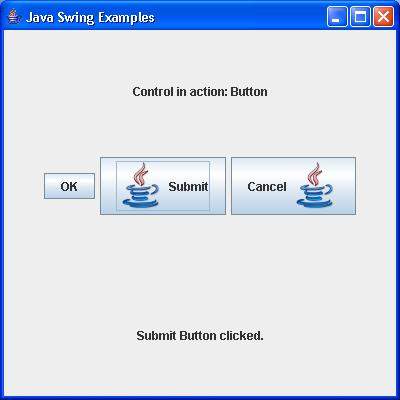
驗證以下輸出。