
- SQLAlchemy 教程
- SQLAlchemy - 首頁
- SQLAlchemy - 介紹
- SQLAlchemy Core
- 表示式語言
- 連線到資料庫
- 建立表
- SQL 表示式
- 執行表示式
- 選擇行
- 使用文字 SQL
- 使用別名
- 使用 UPDATE 表示式
- 使用 DELETE 表示式
- 使用多表
- 使用多表更新
- 按引數順序的更新
- 多表刪除
- 使用聯接
- 使用連線
- 使用函式
- 使用集合運算
- SQLAlchemy ORM
- 宣告對映
- 建立會話
- 新增物件
- 使用查詢
- 更新物件
- 應用篩選器
- 篩選器運算子
- 返回列表和標量
- 文字 SQL
- 建立關係
- 與相關物件協同
- 使用聯接
- 常見的關係運算符
- 急切載入
- 刪除相關物件
- 多對多的關係
- 方言
- SQLAlchemy 有用資源
- SQLAlchemy - 快速指南
- SQLAlchemy - 有用資源
- SQLAlchemy - 討論
與相關物件協同
在本章中,我們將重點關注 SQLAlchemy ORM 中的相關物件。
現在,當我們建立一個 Customer 物件時,一個空白的發票集合將以 Python 列表的形式存在。
c1 = Customer(name = "Gopal Krishna", address = "Bank Street Hydarebad", email = "gk@gmail.com")
c1.invoices 的發票屬性將是一個空列表。我們可以像下面這樣向列表中分配項 −
c1.invoices = [Invoice(invno = 10, amount = 15000), Invoice(invno = 14, amount = 3850)]
讓我們使用會話物件將此物件提交到資料庫,如下所示 −
from sqlalchemy.orm import sessionmaker
Session = sessionmaker(bind = engine)
session = Session()
session.add(c1)
session.commit()
這將自動為 clients 和 invoices 表生成 INSERT 查詢 −
INSERT INTO customers (name, address, email) VALUES (?, ?, ?)
('Gopal Krishna', 'Bank Street Hydarebad', 'gk@gmail.com')
INSERT INTO invoices (custid, invno, amount) VALUES (?, ?, ?)
(2, 10, 15000)
INSERT INTO invoices (custid, invno, amount) VALUES (?, ?, ?)
(2, 14, 3850)
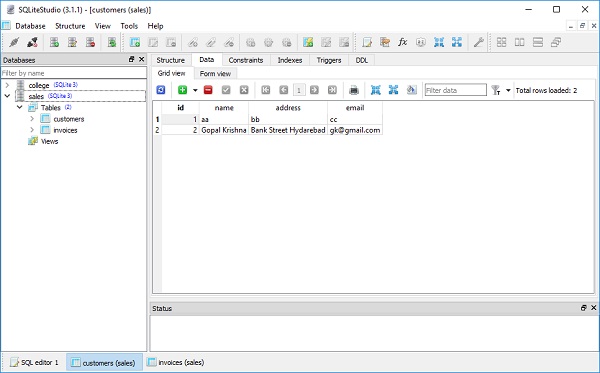
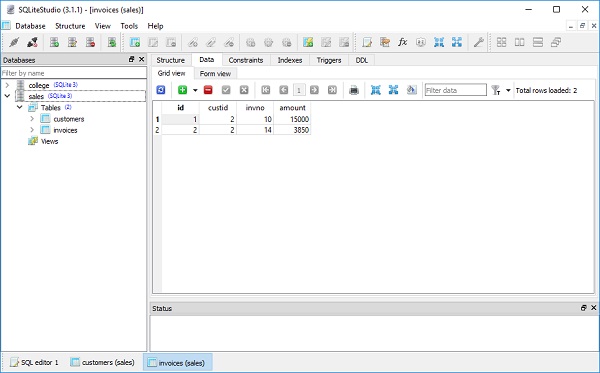
現在,讓我們在 SQLiteStudio 的表檢視中檢視 clients 表和 invoices 表的內容 −
你可以透過使用以下命令在建構函式中提供發票的對映屬性來構造 Customer 物件 −
c2 = [
   Customer(
      name = "Govind Pant",
      address = "Gulmandi Aurangabad",
      email = "gpant@gmail.com",
      invoices = [Invoice(invno = 3, amount = 10000),
      Invoice(invno = 4, amount = 5000)]
   )
]
或者使用會話物件的 add_all() 函式新增要新增的物件列表,如下所示 −
rows = [
   Customer(
      name = "Govind Kala",
      address = "Gulmandi Aurangabad",
      email = "kala@gmail.com",
      invoices = [Invoice(invno = 7, amount = 12000), Invoice(invno = 8, amount = 18500)]),

   Customer(
      name = "Abdul Rahman",
      address = "Rohtak",
      email = "abdulr@gmail.com",
      invoices = [Invoice(invno = 9, amount = 15000),
      Invoice(invno = 11, amount = 6000)
   ])
]

session.add_all(rows)
session.commit()
廣告