- Spring WS 教程
- Spring WS - 首頁
- Spring WS - 概覽
- Spring WS - 環境搭建
- Spring WS - 第一個應用
- Spring WS - 靜態 WSDL
- Spring WS - 編寫伺服器
- Spring WS - 伺服器單元測試
- Spring WS - 編寫客戶端
- Spring WS - 客戶端單元測試
- Spring WS 有用資源
- Spring WS - 快速指南
- Spring WS - 有用資源
- Spring WS - 討論
Spring WS - 第一個應用
讓我們開始使用 Spring-WS 框架編寫一個基於 SOAP 的實際 Web 服務。在使用 Spring-WS 框架編寫我們的第一個示例之前,我們必須確保 Spring-WS 環境已正確設定,如Spring Web Services - 環境搭建章節中所述。我們假設讀者對 Eclipse IDE 有一定的基本使用知識。
因此,讓我們繼續編寫一個簡單的 Spring WS 應用程式,該應用程式將公開一個 Web 服務方法,以便在人力資源門戶中預訂假期。
契約優先方法
Spring-WS 使用契約優先方法,這意味著我們應該在編寫任何基於 JAVA 的實現程式碼之前準備好我們的XML 結構。我們正在定義一個 LeaveRequest 物件,它具有子物件 – Leave 和 Employee。
以下是所需的 XML 結構:
Leave.xml
<Leave xmlns = "https://tutorialspoint.tw/hr/schemas">
   <StartDate>2016-07-03</StartDate>
   <EndDate>2016-07-07</EndDate>
</Leave>
Employee.xml
<Employee xmlns = "https://tutorialspoint.tw/hr/schemas">
   <Number>404</Number>
   <FirstName>Mahesh</FirstName>
   <LastName>Parashar</LastName>
</Employee>
LeaveRequest.xml
<LeaveRequest xmlns = "https://tutorialspoint.tw/hr/schemas">
   <Leave>
      <StartDate>2016-07-03</StartDate>
      <EndDate>2016-07-07</EndDate>
   </Leave>

   <Employee>
      <Number>404</Number>
      <FirstName>Mahesh</FirstName>
      <LastName>Parashar</LastName>
   </Employee>
</LeaveRequest>
hr.xsd
<xs:schema xmlns:xs = "http://www.w3.org/2001/XMLSchema"
   xmlns:hr = "https://tutorialspoint.tw/hr/schemas"
   elementFormDefault = "qualified"
   targetNamespace = "https://tutorialspoint.tw/hr/schemas">

   <xs:element name = "LeaveRequest">
      <xs:complexType>
         <xs:all>
            <xs:element name = "Leave" type = "hr:LeaveType"/>
            <xs:element name = "Employee" type = "hr:EmployeeType"/>
         </xs:all>
      </xs:complexType>
   </xs:element>

   <xs:complexType name = "LeaveType">
      <xs:sequence>
         <xs:element name = "StartDate" type = "xs:date"/>
         <xs:element name = "EndDate" type = "xs:date"/>
      </xs:sequence>
   </xs:complexType>

   <xs:complexType name = "EmployeeType">
      <xs:sequence>
         <xs:element name = "Number" type = "xs:integer"/>
         <xs:element name = "FirstName" type = "xs:string"/>
         <xs:element name = "LastName" type = "xs:string"/>
      </xs:sequence>
   </xs:complexType>
</xs:schema>
建立專案
現在讓我們開啟一個命令控制檯,轉到 C:\MVN 目錄並執行以下mvn命令。
C:\MVN>mvn archetype:generate -DarchetypeGroupId = org.springframework.ws
-DarchetypeArtifactId = spring-ws-archetype -DgroupId = com.tutorialspoint.hr
-DartifactId = leaveService
Maven 將開始處理並建立完整的 Java 應用程式專案結構。
[INFO] Scanning for projects...
[INFO]
[INFO] ------------------------------------------------------------------------
[INFO] Building Maven Stub Project (No POM) 1
[INFO] ------------------------------------------------------------------------
[INFO]
[INFO] Using property: groupId = com.tutorialspoint.hr
[INFO] Using property: artifactId = leaveService
Define value for property 'version':  1.0-SNAPSHOT: :
[INFO] Using property: package = com.tutorialspoint.hr
Confirm properties configuration:
groupId: com.tutorialspoint.hr
artifactId: leaveService
version: 1.0-SNAPSHOT
package: com.tutorialspoint.hr
 Y: :
[INFO] -------------------------------------------------------------------------
---
[INFO] Using following parameters for creating project from Old (1.x) Archetype:
 spring-ws-archetype:2.0.0-M1
[INFO] -------------------------------------------------------------------------
---
[INFO] Parameter: groupId, Value: com.tutorialspoint.hr
[INFO] Parameter: packageName, Value: com.tutorialspoint.hr
[INFO] Parameter: package, Value: com.tutorialspoint.hr
[INFO] Parameter: artifactId, Value: leaveService
[INFO] Parameter: basedir, Value: C:\mvn
[INFO] Parameter: version, Value: 1.0-SNAPSHOT
[INFO] project created from Old (1.x) Archetype in dir: C:\mvn\leaveService
[INFO] ------------------------------------------------------------------------
[INFO] BUILD SUCCESS
[INFO] ------------------------------------------------------------------------
[INFO] Total time: 35.989 s
[INFO] Finished at: 2017-01-21T11:18:31+05:30
[INFO] Final Memory: 17M/178M
[INFO] ------------------------------------------------------------------------
現在轉到C:/MVN目錄。我們將看到一個名為leaveService(如 artifactId 中指定的)的 Java 應用程式專案。更新 pom.xml 並將 HumanResourceService.java 和 HumanResourceServiceImpl.java 新增到以下資料夾中 – C:\MVN\leaveService\src\main\java\com\tutorialspoint\hr\service 資料夾。完成後,將 LeaveEndpoint.java 新增到以下資料夾中 – C:\MVN\leaveService\src\main\java\com\tutorialspoint\hr\ws 資料夾。
pom.xml
<?xml version = "1.0" encoding = "UTF-8"?>
<project xmlns = "http://maven.apache.org/POM/4.0.0"
   xmlns:xsi = "http://www.w3.org/2001/XMLSchema-instance"
   xsi:schemaLocation = "http://maven.apache.org/POM/4.0.0
   http://maven.apache.org/maven-v4_0_0.xsd">

   <modelVersion>4.0.0</modelVersion>
   <groupId>com.tutorialspoint.hr</groupId>
   <artifactId>leaveService</artifactId>
   <packaging>war</packaging>
   <version>1.0-SNAPSHOT</version>
   <name>leaveService Spring-WS Application</name>
   <url>http://www.springframework.org/spring-ws</url>

   <build>
      <finalName>leaveService</finalName>
   </build>

   <dependencies>
      <dependency>
         <groupId>org.springframework.ws</groupId>
         <artifactId>spring-ws-core</artifactId>
         <version>2.4.0.RELEASE</version>
      </dependency>

      <dependency>
         <groupId>jdom</groupId>
         <artifactId>jdom</artifactId>
         <version>1.0</version>
      </dependency>

      <dependency>
         <groupId>jaxen</groupId>
         <artifactId>jaxen</artifactId>
         <version>1.1</version>
      </dependency>

      <dependency>
         <groupId>wsdl4j</groupId>
         <artifactId>wsdl4j</artifactId>
         <version>1.6.2</version>
      </dependency>
   </dependencies>
</project>
HumanResourceService.java
package com.tutorialspoint.hr.service;

import java.util.Date;

public interface HumanResourceService {
   void bookLeave(Date startDate, Date endDate, String name);
}
HumanResourceServiceImpl.java
package com.tutorialspoint.hr.service;

import java.util.Date;
import org.springframework.stereotype.Service;

@Service
public class HumanResourceServiceImpl implements HumanResourceService {
   public void bookLeave(Date startDate, Date endDate, String name) {
      System.out.println("Booking holiday for [" + startDate + "-" + endDate + "]
         for [" + name + "] ");
   }
}
LeaveEndpoint.java
package com.tutorialspoint.hr.ws;

import java.text.SimpleDateFormat;
import java.util.Date;

import org.springframework.beans.factory.annotation.Autowired;
import org.springframework.ws.server.endpoint.annotation.Endpoint;
import org.springframework.ws.server.endpoint.annotation.PayloadRoot;
import org.springframework.ws.server.endpoint.annotation.RequestPayload;

import com.tutorialspoint.hr.service.HumanResourceService;
import org.jdom.Element;
import org.jdom.JDOMException;
import org.jdom.Namespace;
import org.jdom.xpath.XPath;

@Endpoint
public class LeaveEndpoint {
   private static final String NAMESPACE_URI = "https://tutorialspoint.tw/hr/schemas";
   private XPath startDateExpression;
   private XPath endDateExpression;
   private XPath nameExpression;
   private HumanResourceService humanResourceService;

   @Autowired
   public LeaveEndpoint(HumanResourceService humanResourceService) throws JDOMException {
      this.humanResourceService = humanResourceService;

      Namespace namespace = Namespace.getNamespace("hr", NAMESPACE_URI);

      startDateExpression = XPath.newInstance("//hr:StartDate");
      startDateExpression.addNamespace(namespace);

      endDateExpression = XPath.newInstance("//hr:EndDate");
      endDateExpression.addNamespace(namespace);

      nameExpression = XPath.newInstance("concat(//hr:FirstName,' ',//hr:LastName)");
      nameExpression.addNamespace(namespace);
   }

   @PayloadRoot(namespace = NAMESPACE_URI, localPart = "LeaveRequest")
   public void handleLeaveRequest(@RequestPayload Element leaveRequest) throws Exception {
      SimpleDateFormat dateFormat = new SimpleDateFormat("yyyy-MM-dd");
      Date startDate = dateFormat.parse(startDateExpression.valueOf(leaveRequest));
      Date endDate = dateFormat.parse(endDateExpression.valueOf(leaveRequest));
      String name = nameExpression.valueOf(leaveRequest);

      humanResourceService.bookLeave(startDate, endDate, name);
   }
}
/WEB-INF/spring-ws-servlet.xml
<beans xmlns = "http://www.springframework.org/schema/beans"
   xmlns:xsi = "http://www.w3.org/2001/XMLSchema-instance"
   xmlns:context = "http://www.springframework.org/schema/context"
   xmlns:sws = "http://www.springframework.org/schema/web-services"
   xsi:schemaLocation = "http://www.springframework.org/schema/beans

   http://www.springframework.org/schema/beans/spring-beans-3.0.xsd
   http://www.springframework.org/schema/web-services
   http://www.springframework.org/schema/web-services/web-services-2.0.xsd
   http://www.springframework.org/schema/context
   http://www.springframework.org/schema/context/spring-context-3.0.xsd">

   <context:component-scan base-package = "com.tutorialspoint.hr"/>
   <bean id = "humanResourceService"
      class = "com.tutorialspoint.hr.service.HumanResourceServiceImpl" />
   <sws:annotation-driven/>

   <sws:dynamic-wsdl id = "leave"
      portTypeName = "HumanResource"
      locationUri = "/leaveService/"
      targetNamespace = "https://tutorialspoint.tw/hr/definitions">
      <sws:xsd location = "/WEB-INF/hr.xsd"/>
   </sws:dynamic-wsdl>
</beans>
/WEB-INF/web.xml
<web-app xmlns = "http://java.sun.com/xml/ns/j2ee"
   xmlns:xsi = "http://www.w3.org/2001/XMLSchema-instance"
   xsi:schemaLocation = "http://java.sun.com/xml/ns/j2ee
   http://java.sun.com/xml/ns/j2ee/web-app_2_4.xsd"
   version = "2.4">

   <display-name>TutorialsPoint HR Leave Service</display-name>
   <servlet>
      <servlet-name>spring-ws</servlet-name>
      <servlet-class>
         org.springframework.ws.transport.http.MessageDispatcherServlet
      </servlet-class>
      <init-param>
         <param-name>transformWsdlLocations</param-name>
         <param-value>true</param-value>
      </init-param>
   </servlet>

   <servlet-mapping>
      <servlet-name>spring-ws</servlet-name>
      <url-pattern>/*</url-pattern>
   </servlet-mapping>
</web-app>
/WEB-INF/hr.xsd
<xs:schema xmlns:xs = "http://www.w3.org/2001/XMLSchema"
   xmlns:hr = "https://tutorialspoint.tw/hr/schemas"
   elementFormDefault = "qualified"
   targetNamespace = "https://tutorialspoint.tw/hr/schemas">

   <xs:element name = "LeaveRequest">
      <xs:complexType>
         <xs:all>
            <xs:element name = "Leave" type = "hr:LeaveType"/>
            <xs:element name = "Employee" type = "hr:EmployeeType"/>
         </xs:all>
      </xs:complexType>
   </xs:element>

   <xs:complexType name = "LeaveType">
      <xs:sequence>
         <xs:element name = "StartDate" type = "xs:date"/>
         <xs:element name = "EndDate" type = "xs:date"/>
      </xs:sequence>
   </xs:complexType>

   <xs:complexType name = "EmployeeType">
      <xs:sequence>
         <xs:element name = "Number" type = "xs:integer"/>
         <xs:element name = "FirstName" type = "xs:string"/>
         <xs:element name = "LastName" type = "xs:string"/>
      </xs:sequence>
   </xs:complexType>
</xs:schema>
構建專案
現在讓我們開啟命令控制檯,轉到 C:\MVN\leaveService 目錄並執行以下mvn命令。
C:\MVN\leaveService>mvn clean package
Maven 將開始構建專案。
[INFO] Scanning for projects...
[INFO]
[INFO] ------------------------------------------------------------------------
[INFO] Building leaveService Spring-WS Application 1.0-SNAPSHOT
[INFO] ------------------------------------------------------------------------
[INFO]
[INFO] --- maven-clean-plugin:2.5:clean (default-clean) @ leaveService ---
[INFO] Deleting C:\mvn\leaveService\target
[INFO]
[INFO] --- maven-resources-plugin:2.6:resources (default-resources) @ leaveServi
ce ---
[WARNING] Using platform encoding (Cp1252 actually) to copy filtered resources,
i.e. build is platform dependent!
[INFO] Copying 0 resource
[INFO]
[INFO] --- maven-compiler-plugin:3.1:compile (default-compile) @ leaveService --
-
[INFO] Changes detected - recompiling the module!
[WARNING] File encoding has not been set, using platform encoding Cp1252, i.e. b
uild is platform dependent!
[INFO] Compiling 3 source files to C:\mvn\leaveService\target\classes
[INFO]
[INFO] --- maven-resources-plugin:2.6:testResources (default-testResources) @ le
aveService ---
[WARNING] Using platform encoding (Cp1252 actually) to copy filtered resources,
i.e. build is platform dependent!
[INFO] skip non existing resourceDirectory C:\mvn\leaveService\src\test\resource
s
[INFO]
[INFO] --- maven-compiler-plugin:3.1:testCompile (default-testCompile) @ leaveSe
rvice ---
[INFO] No sources to compile
[INFO]
[INFO] --- maven-surefire-plugin:2.12.4:test (default-test) @ leaveService ---
[INFO] No tests to run.
[INFO]
[INFO] --- maven-war-plugin:2.2:war (default-war) @ leaveService ---
[INFO] Packaging webapp
[INFO] Assembling webapp [leaveService] in [C:\mvn\leaveService\target\leaveServ
ice]
[INFO] Processing war project
[INFO] Copying webapp resources [C:\mvn\leaveService\src\main\webapp]
[INFO] Webapp assembled in [7159 msecs]
[INFO] Building war: C:\mvn\leaveService\target\leaveService.war
[INFO] WEB-INF\web.xml already added, skipping
[INFO] ------------------------------------------------------------------------
[INFO] BUILD SUCCESS
[INFO] ------------------------------------------------------------------------
[INFO] Total time: 19.667 s
[INFO] Finished at: 2017-01-21T11:56:43+05:30
[INFO] Final Memory: 18M/173M
[INFO] ------------------------------------------------------------------------
在 Eclipse 中匯入專案
按照以下步驟在 Eclipse 中匯入專案。
開啟 Eclipse。
選擇檔案 → 匯入 →選項。
選擇 Maven 專案選項。單擊下一步按鈕。
選擇專案位置,即使用 Maven 建立的leaveService 專案所在的位置。
單擊完成按鈕。
執行專案
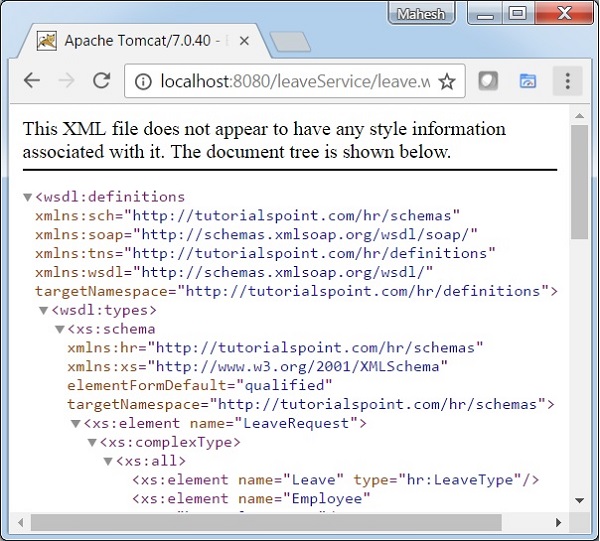
完成原始檔和配置檔案的建立後,匯出應用程式。右鍵單擊應用程式,使用匯出 → WAR 檔案選項並將 leaveService.war 檔案儲存在 Tomcat 的 webapps 資料夾中。
啟動 Tomcat 伺服器並確保我們能夠使用標準瀏覽器從 webapps 資料夾訪問其他網頁。嘗試訪問 URL – https://:8080/leaveService/leave.wsdl,如果 Spring Web 應用程式一切正常,我們應該會看到以下螢幕。