
- Spring Boot 和 H2 教程
- Spring Boot 和 H2 - 主頁
- Spring Boot 和 H2 - 概述
- Spring Boot 和 H2 - 設定環境
- Spring Boot 和 H2 - 設定工程
- Spring Boot 和 H2 - REST API
- Spring Boot 和 H2 - H2 控制檯
- Spring Boot 和 H2 示例
- Spring Boot 和 H2 - 新增記錄
- Spring Boot 和 H2 - 獲取記錄
- Spring Boot 和 H2 - 獲取所有記錄
- Spring Boot 和 H2 - 更新記錄
- Spring Boot 和 H2 - 刪除記錄
- Spring Boot 和 H2 - 單元測試控制器
- Spring Boot 和 H2 - 單元測試服務
- Spring Boot 和 H2 - 單元測試資料庫
- Spring Boot 和 H2 有用資源
- Spring Boot 和 H2 - 快速指南
- Spring Boot 和 H2 - 有用資源
- Spring Boot 和 H2 - 討論
Spring Boot 和 H2 - 獲取記錄
現在讓我們更新到目前為止建立的專案,準備一個完整的獲取記錄 API 並對其進行測試。
更新服務
// Use repository.findById() to get Employee entity by Id
public Employee getEmployeeById(int id) {
   return repository.findById(id).get();
}
EmployeeService
package com.tutorialspoint.service;

import java.util.ArrayList;
import java.util.List;
import org.springframework.beans.factory.annotation.Autowired;
import org.springframework.stereotype.Service;
import com.tutorialspoint.entity.Employee;
import com.tutorialspoint.repository.EmployeeRepository;

@Service
public class EmployeeService {

   @Autowired
   EmployeeRepository repository;

   // get an employee by ud
   public Employee getEmployeeById(int id) {
      return repository.findById(id).get();
   }

   // to be implemented
   public List<Employee> getAllEmployees(){
      return null;
   }

   // create or update an employee
   public void saveOrUpdate(Employee employee) {
      repository.save(employee);
   }

   // to be implemented
   public void deleteEmployeeById(int id) {
   }
}
更新控制器
// Use service.getEmployeeById() to get Employee entity from database
@GetMapping("/employee/{id}")
public Employee getEmployee(@PathVariable("id") int id) {
   return employeeService.getEmployeeById(id);
}
EmployeeController
package com.tutorialspoint.controller;

import java.util.List;
import org.springframework.beans.factory.annotation.Autowired;
import org.springframework.web.bind.annotation.DeleteMapping;
import org.springframework.web.bind.annotation.GetMapping;
import org.springframework.web.bind.annotation.PathVariable;
import org.springframework.web.bind.annotation.PostMapping;
import org.springframework.web.bind.annotation.PutMapping;
import org.springframework.web.bind.annotation.RequestBody;
import org.springframework.web.bind.annotation.RequestMapping;
import org.springframework.web.bind.annotation.RestController;
import com.tutorialspoint.entity.Employee;
import com.tutorialspoint.service.EmployeeService;

@RestController
@RequestMapping(path = "/emp")
public class EmployeeController {

   @Autowired
   EmployeeService employeeService;

   // to be implemented
   @GetMapping("/employees")
   public List<Employee> getAllEmployees(){
      return null;
   }

   // get an employee by id
   @GetMapping("/employee/{id}")
   public Employee getEmployee(@PathVariable("id") int id) {
      return employeeService.getEmployeeById(id);
   }

   // to be implemented
   @DeleteMapping("/employee/{id}")
   public void deleteEmployee(@PathVariable("id") int id) {
   }

   // create an employee
   @PostMapping("/employee")
   public void addEmployee(@RequestBody Employee employee) {
      employeeService.saveOrUpdate(employee);
   }

   // to be implemented
   @PutMapping("/employee")
   public void updateEmployee(@RequestBody Employee employee) {
   }
}
執行應用程式
在 Eclipse 中,執行在 應用程式設定 期間準備的 Employee Application 配置
Eclipse 控制檯將顯示類似的輸出。
[INFO] Scanning for projects...
...
2024-08-21T15:01:29.377+05:30  INFO 14180 --- [springboot-h2] [  restartedMain] o.s.b.d.a.OptionalLiveReloadServer       : LiveReload server is running on port 35729
2024-08-21T15:01:29.426+05:30  INFO 14180 --- [springboot-h2] [  restartedMain] o.s.b.w.embedded.tomcat.TomcatWebServer  : Tomcat started on port 8080 (http) with context path '/'
2024-08-21T15:01:29.434+05:30  INFO 14180 --- [springboot-h2] [  restartedMain] c.t.s.SpringbootH2Application            : Started SpringbootH2Application in 6.729 seconds (process running for 7.28)
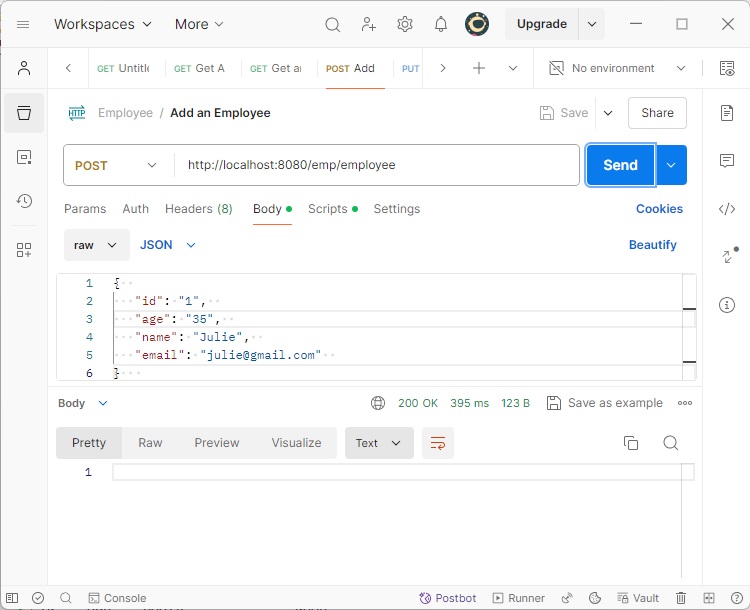
伺服器啟動並執行後,使用 Postman 發起一個 POST 請求 −
在 POSTMAN 中設定以下引數。
HTTP 方法 − POST
URL − https://:8080/emp/employee
BODY − 員工 JSON
{
   "id": "1",
   "age": "35",
   "name": "Julie",
   "email": "julie@gmail.com"
}
點擊發送按鈕,檢查響應狀態是否為“OK”。
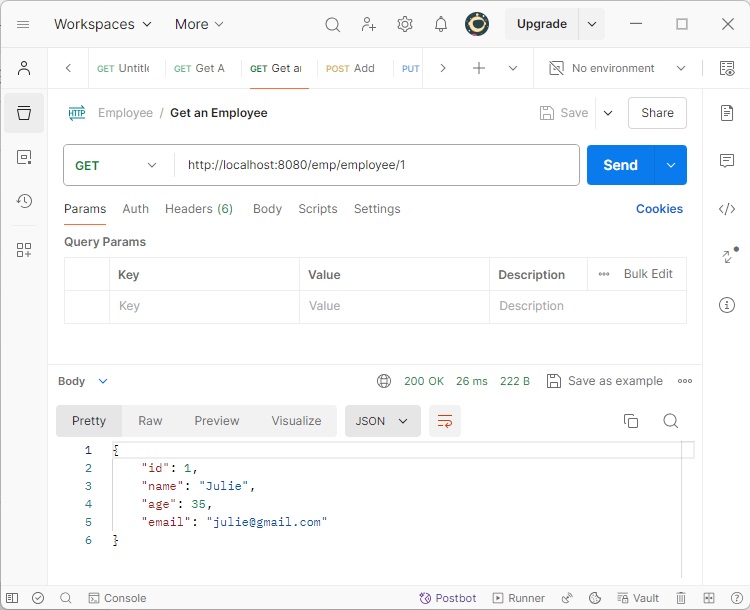
現在發起一個 GET 請求,以獲取該記錄。
在 POSTMAN 中設定以下引數。
HTTP 方法 − GET
URL − https://:8080/emp/employee/1
點擊發送按鈕,並驗證響應。
廣告