
- Spring Batch 教程
- Spring Batch - 首頁
- Spring Batch - 概述
- Spring Batch - 環境配置
- Spring Batch - 架構
- Spring Batch - 應用
- Spring Batch - 配置
- 讀取器、寫入器和處理器
- Spring Batch - 基礎應用
- Spring Batch - XML 到 MySQL
- Spring Batch - CSV 到 XML
- Spring Batch - MySQL 到 XML
- Spring Batch - MySQL 到平面檔案
- Spring Batch 有用資源
- Spring Batch 快速指南
- Spring Batch - 有用資源
- Spring Batch - 討論
Spring Batch 快速指南
Spring Batch - 概述
批處理是一種處理模式,它涉及執行一系列無需使用者互動的自動化複雜作業。批處理處理大量資料,並執行很長時間。
許多企業應用程式需要處理海量資料才能執行涉及以下操作:
基於時間的事件,例如定期計算。
在大型資料集上重複處理的定期應用程式。
處理和驗證以事務方式提供的資料的應用程式。
因此,批處理用於企業應用程式中執行此類事務。
什麼是 Spring Batch?
Spring Batch 是一個輕量級框架,用於開發企業應用程式中使用的批處理應用程式。
除了批次處理外,此框架還提供以下功能:
- 包括日誌記錄和跟蹤
- 事務管理
- 作業處理統計
- 作業重啟
- 跳過和資源管理
您還可以使用其分割槽技術擴充套件 Spring Batch 應用程式。
Spring Batch 的特性
以下是 Spring Batch 的顯著特性:
靈活的 - Spring Batch 應用程式很靈活。您只需更改 XML 檔案即可更改應用程式中的處理順序。
可維護性 - Spring Batch 應用程式易於維護。Spring Batch 作業包含步驟,每個步驟都可以解耦、測試和更新,而不會影響其他步驟。
可擴充套件性 - 使用分割槽技術,您可以擴充套件 Spring Batch 應用程式。這些技術允許您:
並行執行作業的步驟。
並行執行單個執行緒。
可靠性 - 如果發生任何故障,您可以透過解耦步驟從停止的地方重新啟動作業。
支援多種檔案格式 - Spring Batch 支援大量讀取器和寫入器,例如 XML、平面檔案、CSV、MYSQL、Hibernate、JDBC、Mongo、Neo4j 等。
多種啟動作業的方式 - 您可以使用 Web 應用程式、Java 程式、命令列等啟動 Spring Batch 作業。
除此之外,Spring Batch 應用程式還支援:
失敗後自動重試。
在批處理執行期間和完成批處理後跟蹤狀態和統計資訊。
執行併發作業。
日誌記錄、資源管理、跳過和重新啟動處理等服務。
Spring Batch - 環境配置
在本節中,我們將解釋如何在 Eclipse IDE 中設定 Spring Batch 環境。在進行安裝之前,請確保您已經在系統中安裝了 Eclipse。如果沒有,請下載並在您的系統中安裝 Eclipse。
有關 Eclipse 的更多資訊,請參閱我們的Eclipse 教程。
在 Eclipse 上設定 Spring Batch
按照以下步驟在 Eclipse 上設定 Spring Batch 環境。
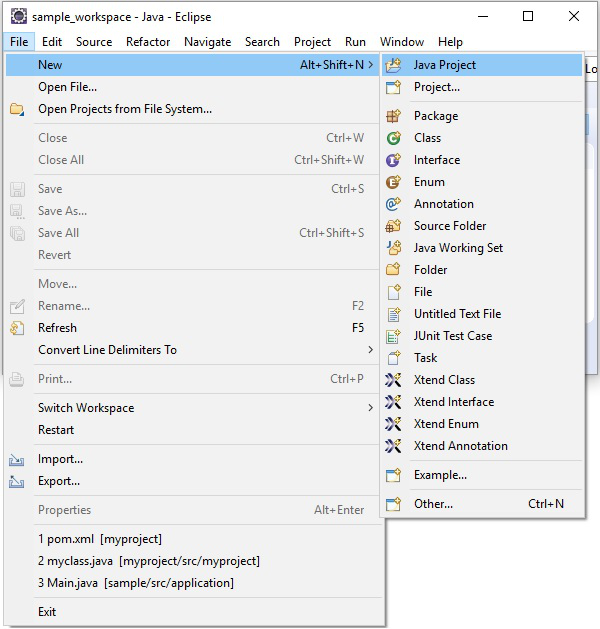
步驟 1 - 安裝 Eclipse 並建立一個新專案,如下面的螢幕截圖所示。
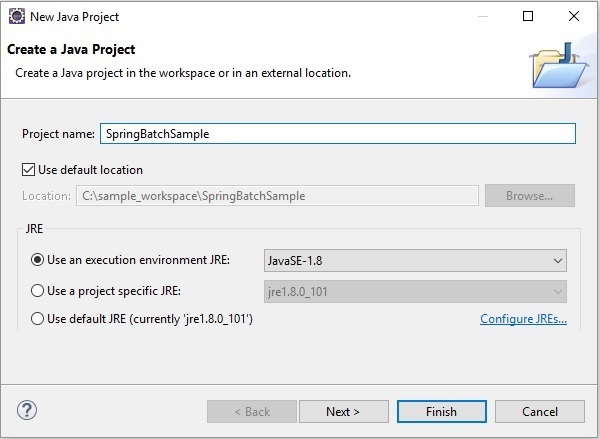
步驟 2 - 建立一個示例 Spring Batch 專案,如下所示。
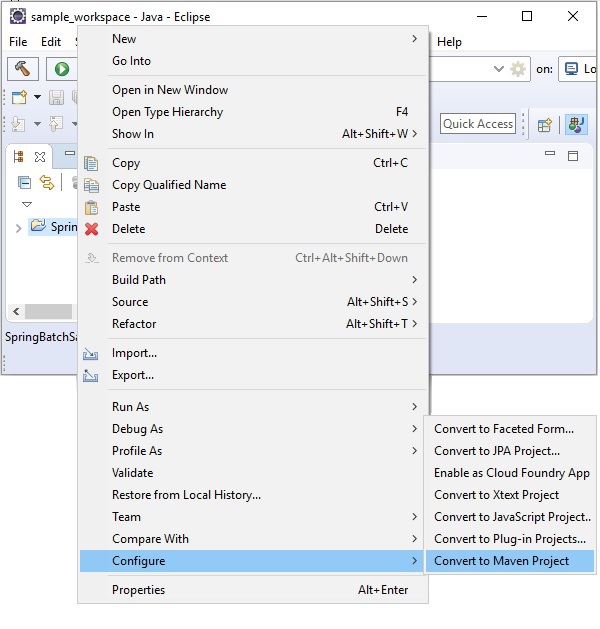
步驟 3 - 右鍵單擊專案,並將其轉換為 Maven 專案,如下所示。將其轉換為 Maven 專案後,它將為您提供一個Pom.xml 檔案,您需要在其中提及所需的依賴項。之後,這些依賴項的jar 檔案將自動下載到您的專案中。
步驟 4 - 現在,在專案的pom.xml 中,複製並貼上以下內容(Spring Batch 應用程式的依賴項),然後重新整理專案。
<project xmlns = "http://maven.apache.org/POM/4.0.0"
   xmlns:xsi = "http://www.w3.org/2001/XMLSchema-instance"
   xsi:schemaLocation = "http://maven.apache.org/POM/4.0.0
   http://maven.apache.org/maven-v4_0_0.xsd">
   <modelVersion>4.0.0</modelVersion>
   <groupId>com.tutorialspoint</groupId>
   <artifactId>SpringBatchSample</artifactId>
   <packaging>jar</packaging>
   <version>1.0-SNAPSHOT</version>
   <name>SpringBatchExample</name>
   <url>http://maven.apache.org</url>

   <properties>
      <jdk.version>1.8</jdk.version>
      <spring.version>5.3.14</spring.version>
      <spring.batch.version>4.3.4</spring.batch.version>
      <mysql.driver.version>5.1.25</mysql.driver.version>
      <junit.version>4.11</junit.version>
   </properties>

   <dependencies>
      <!-- Spring Core -->
      <dependency>
         <groupId>org.springframework</groupId>
         <artifactId>spring-core</artifactId>
         <version>${spring.version}</version>
      </dependency>

      <!-- Spring jdbc, for database -->
      <dependency>
         <groupId>org.springframework</groupId>
         <artifactId>spring-jdbc</artifactId>
         <version>${spring.version}</version>
      </dependency>

      <!-- Spring XML to/back object -->
      <dependency>
         <groupId>org.springframework</groupId>
         <artifactId>spring-oxm</artifactId>
         <version>${spring.version}</version>
      </dependency>

      <!-- MySQL database driver -->
      <dependency>
         <groupId>mysql</groupId>
         <artifactId>mysql-connector-java</artifactId>
         <version>${mysql.driver.version}</version>
      </dependency>

      <!-- Spring Batch dependencies -->
      <dependency>
         <groupId>org.springframework.batch</groupId>
         <artifactId>spring-batch-core</artifactId>
         <version>${spring.batch.version}</version>
      </dependency>

      <dependency>
         <groupId>org.springframework.batch</groupId>
         <artifactId>spring-batch-infrastructure</artifactId>
         <version>${spring.batch.version}</version>
      </dependency>

      <!-- Spring Batch unit test -->
      <dependency>
         <groupId>org.springframework.batch</groupId>
         <artifactId>spring-batch-test</artifactId>
         <version>${spring.batch.version}</version>
      </dependency>

      <!-- Junit -->
      <dependency>
         <groupId>junit</groupId>
         <artifactId>junit</artifactId>
         <version>${junit.version}</version>
         <scope>test</scope>
      </dependency>
   </dependencies>

   <build>
      <finalName>spring-batch</finalName>
      <plugins>
         <plugin>
            <groupId>org.apache.maven.plugins</groupId>
            <artifactId>maven-eclipse-plugin</artifactId>
            <version>2.9</version>
            <configuration>
               <downloadSources>true</downloadSources>
               <downloadJavadocs>false</downloadJavadocs>
            </configuration>
         </plugin>

         <plugin>
            <groupId>org.apache.maven.plugins</groupId>
            <artifactId>maven-compiler-plugin</artifactId>
            <version>2.3.2</version>
            <configuration>
               <source>${jdk.version}</source>
               <target>${jdk.version}</target>
            </configuration>
         </plugin>
      </plugins>
   </build>
</project>
Spring Batch - 架構
以下是 Spring Batch 架構的圖示。如圖所示,該架構包含三個主要元件,即應用程式、批處理核心和批處理基礎結構。
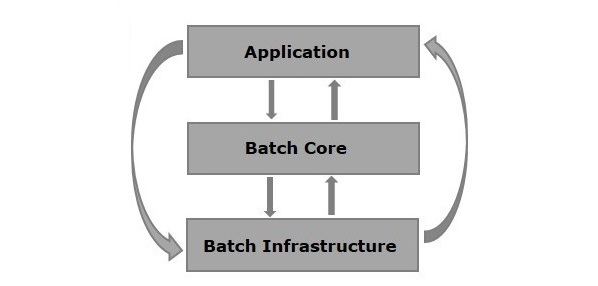
應用程式 - 此元件包含所有作業以及我們使用 Spring Batch 框架編寫的程式碼。
批處理核心 - 此元件包含控制和啟動批處理作業所需的所有 API 類。
批處理基礎結構 - 此元件包含應用程式和批處理核心元件使用的讀取器、寫入器和服務。
Spring Batch 的元件
下圖顯示了 Spring Batch 的不同元件以及它們如何相互連線。
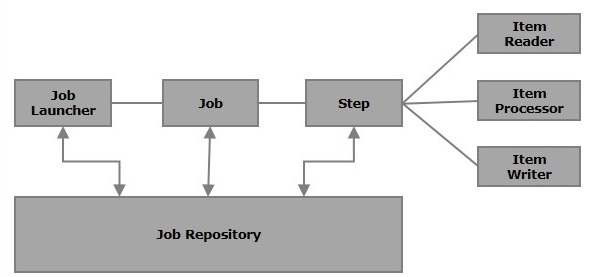
作業 (Job)
在 Spring Batch 應用程式中,作業是要執行的批處理過程。它從開始到結束無中斷地執行。此作業進一步細分為步驟(或作業包含步驟)。
我們將在 Spring Batch 中使用 XML 檔案或 Java 類配置作業。以下是 Spring Batch 中作業的 XML 配置。
<job id = "jobid">
   <step id = "step1" next = "step2"/>
   <step id = "step2" next = "step3"/>
   <step id = "step3"/>
</job>
批處理作業在<job></job>標籤內配置。它有一個名為id的屬性。在這些標籤內,我們定義步驟的定義和順序。
可重啟性 (Restartable) - 通常,當作業正在執行並且我們嘗試再次啟動它時,這被認為是重啟,它將再次啟動。為避免這種情況,您需要將restartable的值設定為false,如下所示。
<job id = "jobid" restartable = "false" >

</job>
步驟 (Step)
步驟是作業的獨立部分,其中包含定義和執行作業(其部分)所需的資訊。
如圖所示,每個步驟都由一個 ItemReader、ItemProcessor(可選)和一個 ItemWriter 組成。一個作業可以包含一個或多個步驟。
讀取器、寫入器和處理器
專案讀取器 (Item reader) 將資料從特定來源讀入 Spring Batch 應用程式,而專案寫入器 (Item writer) 將資料從 Spring Batch 應用程式寫入特定目標。
專案處理器 (Item processor) 是一個包含處理程式碼的類,該程式碼處理讀入 Spring Batch 的資料。如果應用程式讀取“n”條記錄,則處理器中的程式碼將對每條記錄執行。
如果沒有提供讀取器和寫入器,則任務 (Tasklet) 將充當 SpringBatch 的處理器。它只處理單個任務。例如,如果我們正在編寫一個包含簡單步驟的作業,我們從中讀取 MySQL 資料庫中的資料,處理它並將其寫入檔案(平面檔案),那麼我們的步驟將使用:
一個讀取器,從 MySQL 資料庫讀取。
一個寫入器,寫入平面檔案。
一個自定義處理器,根據我們的意願處理資料。
<job id = "helloWorldJob">
   <step id = "step1">
      <tasklet>
         <chunk reader = "mysqlReader" writer = "fileWriter"
            processor = "CustomitemProcessor" ></chunk>
      </tasklet>
   </step>
</ job>
Spring Batch 提供了很長的讀取器和寫入器列表。使用這些預定義的類,我們可以為它們定義 bean。我們將在接下來的章節中更詳細地討論讀取器和寫入器。
作業倉庫 (JobRepository)
Spring Batch 中的作業倉庫為 JobLauncher、Job 和 Step 實現提供建立、檢索、更新和刪除 (CRUD) 操作。我們將在 XML 檔案中定義作業倉庫,如下所示。
<job-repository id = "jobRepository"/>
除了id之外,還有一些其他(可選)選項可用。以下是具有所有選項及其預設值的作業倉庫配置。
<job-repository id = "jobRepository"
   data-source = "dataSource"
   transaction-manager = "transactionManager"
   isolation-level-for-create = "SERIALIZABLE"
   table-prefix = "BATCH_"
   max-varchar-length = "1000"/>
記憶體中倉庫 (In-Memory Repository) -如果您不想將 Spring Batch 的域物件持久化到資料庫中,您可以配置 jobRepository 的記憶體版本,如下所示。
<bean id = "jobRepository"
   class = "org.springframework.batch.core.repository.support.MapJobRepositoryFactoryBean ">
   <property name = "transactionManager" ref = "transactionManager"/>
</bean>
作業啟動器 (JobLauncher)
JobLauncher 是一個介面,它使用給定的引數集啟動 Spring Batch 作業。SampleJoblauncher 是實現JobLauncher介面的類。以下是 JobLauncher 的配置。
<bean id = "jobLauncher"
   class = "org.springframework.batch.core.launch.support.SimpleJobLauncher">
   <property name = "jobRepository" ref = "jobRepository" />
</bean>
作業例項 (JobInstance)
JobInstance 代表作業的邏輯執行;它在我們執行作業時建立。每個作業例項都透過作業的名稱以及執行時傳遞給它的引數來區分。
如果 JobInstance 執行失敗,可以再次執行相同的 JobInstance。因此,每個 JobInstance 可以有多個作業執行。
作業執行和步驟執行 (JobExecution and StepExecution)
JobExecution 和 StepExecution 是作業/步驟執行的表示。它們包含作業/步驟的執行資訊,例如啟動時間(作業/步驟)、結束時間(作業/步驟)。
Spring Batch - 應用
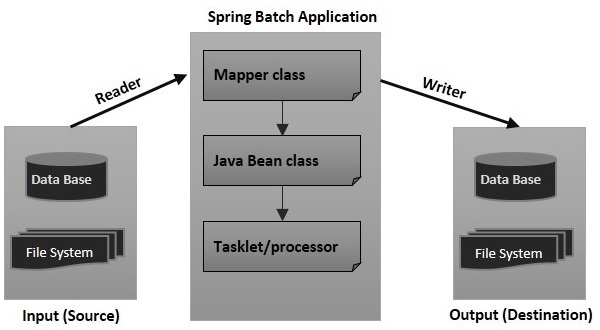
本教程中的幾乎所有示例都包含以下檔案:
- 配置檔案(XML 檔案)
- 任務/處理器(Java 類)
- 帶有 setter 和 getter 的 Java 類(Java 類(bean))
- 對映器類(Java 類)
- 啟動器類(Java 類)
配置檔案
配置檔案(XML)包含以下內容:
作業和步驟定義。
定義讀取器和寫入器的 bean。
JobLauncher、JobRepository、事務管理器和資料來源等元件的定義。
在我們的示例中,為了更好地理解,我們將其分為兩個檔案:job.xml 檔案(定義作業、步驟、讀取器和寫入器)和context.xml 檔案(作業啟動器、作業倉庫、事務管理器和資料來源)。
對映器類
根據讀取器,對映器類實現諸如行對映器、欄位集對映器等介面。它包含從讀取器獲取資料並將其設定為具有setter和getter方法(Java Bean)的 Java 類的程式碼。
Java Bean 類
具有setter和getter(Java bean)的 Java 類表示具有多個值的數。它充當輔助類。我們將資料從一個元件(讀取器、寫入器、處理器)傳遞到另一個元件,以該類的物件形式。
任務/處理器
Tasklet/處理器類包含 Spring Batch 應用程式的處理程式碼。處理器是一個類,它接受包含讀取資料的物件,處理它並返回處理後的資料(以物件的形式)。
啟動器類
此類(App.java)包含啟動 Spring Batch 應用程式的程式碼。
Spring Batch - 配置
在編寫 Spring Batch 應用程式時,我們將使用 Spring Batch 名稱空間中提供的 XML 標籤配置作業、步驟、JobLauncher、JobRepository、事務管理器、讀取器和寫入器。因此,您需要在 XML 檔案中包含此名稱空間,如下所示。
<beans xmlns = "http://www.springframework.org/schema/beans"
   xmlns:batch = "http://www.springframework.org/schema/batch"
   xmlns:xsi = "http://www.w3.org/2001/XMLSchema-instance"
   xsi:schemaLocation = "http://www.springframework.org/schema/batch

   http://www.springframework.org/schema/batch/spring-batch-2.2.xsd
   http://www.springframework.org/schema/bean
   http://www.springframework.org/schema/beans/spring-beans-3.2.xsd">
在以下部分,我們將討論 Spring Batch 名稱空間中提供的各種標籤、它們的屬性和示例。
作業 (Job)
此標籤用於定義/配置 SpringBatch 的作業。它包含一組步驟,可以使用 JobLauncher 啟動。
此標籤具有如下所示的 2 個屬性:
| 序號 | 屬性和描述 |
|---|---|
| 1 | Id 這是作業的 Id,必須為此屬性指定值。 |
| 2 | restartable 此屬性用於指定作業是否可重啟。此屬性是可選的。 |
以下是 SpringBatch 作業的 XML 配置。
<job id = "jobid" restartable = "false" >
   . . . . . . . .
   . . . . . . . .
   . . . . . . . . // Step definitions
</job>
步驟 (Step)
此標籤用於定義/配置Spring Batch作業的步驟。它具有以下三個屬性:
| 序號 | 屬性和描述 |
|---|---|
| 1 | Id 這是作業的 Id,必須為此屬性指定值。 |
| 2 | next 它是指定下一步的快捷方式。 |
| 3 | parent 它用於指定應從中繼承配置的父bean的名稱。 |
以下是Spring Batch步驟的XML配置。
<job id = "jobid">
   <step id = "step1" next = "step2"/>
   <step id = "step2" next = "step3"/>
   <step id = "step3"/>
</job>
Chunk
此標籤用於定義/配置tasklet的一個chunk。它具有以下四個屬性:
| 序號 | 屬性和描述 |
|---|---|
| 1 | reader 它表示專案讀取器bean的名稱。它接受型別為org.springframework.batch.item.ItemReader的值。 |
| 2 | writer 它表示專案寫入器bean的名稱。它接受型別為org.springframework.batch.item.ItemWriter的值。 |
| 3 | processor 它表示專案處理器bean的名稱。它接受型別為org.springframework.batch.item.ItemProcessor的值。 |
| 4 | commit-interval 它用於指定在提交事務之前要處理的專案數量。 |
以下是Spring Batch的chunk的XML配置。
<batch:step id = "step1">
   <batch:tasklet>
      <batch:chunk reader = "xmlItemReader"
         writer = "mysqlItemWriter" processor = "itemProcessor" commit-interval = "10">
      </batch:chunk>
   </batch:tasklet>
</batch:step>
作業倉庫 (JobRepository)
JobRepository Bean用於使用關係資料庫配置JobRepository。此bean與型別為org.springframework.batch.core.repository.JobRepository的類關聯。
| 序號 | 屬性和描述 |
|---|---|
| 1 | dataSource 它用於指定定義資料來源的bean名稱。 |
| 2 | transactionManager 它用於指定定義事務管理器的bean名稱。 |
| 3 | databaseType 它指定作業儲存庫中使用的關係資料庫的型別。 |
以下是JobRepository的示例配置。
<bean id = "jobRepository"
   class = "org.springframework.batch.core.repository.support.JobRepositoryFactoryBean">
   <property name = "dataSource" ref = "dataSource" />
   <property name = "transactionManager" ref="transactionManager" />
   <property name = "databaseType" value = "mysql" />
</bean>
作業啟動器 (JobLauncher)
JobLauncher bean用於配置JobLauncher。它與類org.springframework.batch.core.launch.support.SimpleJobLauncher(在我們的程式中)關聯。此bean具有一個名為jobrepository的屬性,它用於指定定義jobrepository的bean的名稱。
以下是jobLauncher的示例配置。
<bean id = "jobLauncher"
   class = "org.springframework.batch.core.launch.support.SimpleJobLauncher">
   <property name = "jobRepository" ref = "jobRepository" />
</bean>
TransactionManager
TransactionManager bean用於使用關係資料庫配置TransactionManager。此bean與型別為org.springframework.transaction.platform.TransactionManager的類關聯。
<bean id = "transactionManager"
   class = "org.springframework.batch.support.transaction.ResourcelessTransactionManager" />
DataSource
datasource bean用於配置Datasource。此bean與型別為org.springframework.jdbc.datasource.DriverManagerDataSource的類關聯。
| 序號 | 屬性和描述 |
|---|---|
| 1 | driverClassName 這指定用於連線資料庫的驅動程式的類名。 |
| 2 | url 這指定資料庫的URL。 |
| 3 | username 這指定用於連線資料庫的使用者名稱。 |
| 4 | password 這指定用於連線資料庫的密碼。 |
以下是datasource的示例配置。
<bean id = "dataSource"
   class = "org.springframework.jdbc.datasource.DriverManagerDataSource">
   <property name = "driverClassName" value = "com.mysql.cj.jdbc.Driver" />
   <property name = "url" value = "jdbc:mysql://:3306/details" />
   <property name = "username" value = "myuser" />
   <property name = "password" value = "password" />
</bean>
Spring Batch - 讀取器、寫入器和處理器
Item Reader從特定來源讀取資料到Spring Batch應用程式,而Item Writer將資料從Spring Batch應用程式寫入特定目標。
Item processor是一個包含處理程式碼的類,該程式碼處理讀取到Spring Batch中的資料。如果應用程式讀取n條記錄,則處理器中的程式碼將對每條記錄執行。
chunk是tasklet的子元素。它用於執行讀取、寫入和處理操作。我們可以在步驟中使用此元素配置讀取器、寫入器和處理器,如下所示。
<batch:job id = "helloWorldJob">
   <batch:step id = "step1">
      <batch:tasklet>
         <batch:chunk reader = "cvsFileItemReader" writer = "xmlItemWriter"
            processor = "itemProcessor" commit-interval = "10">
         </batch:chunk>
      </batch:tasklet>
   </batch:step>
</batch:job>
Spring Batch提供讀取器和寫入器,用於從各種檔案系統/資料庫讀取和寫入資料,例如MongoDB、Neo4j、MySQL、XML、平面檔案、CSV等。
要在應用程式中包含讀取器,需要為該讀取器定義一個bean,為bean中的所有必需屬性提供值,並將此類bean的id作為值傳遞給chunk元素的reader屬性(writer相同)。
ItemReader
它是步驟(批處理過程的一個步驟)中讀取資料的實體。ItemReader一次讀取一個專案。Spring Batch提供了一個介面ItemReader。所有讀取器都實現此介面。
以下是Spring Batch提供的一些預定義ItemReader類,用於從各種來源讀取資料。
| 讀取器 | 用途 |
|---|---|
| FlatFIleItemReader | 從平面檔案讀取資料。 |
| StaxEventItemReader | 從XML檔案讀取資料。 |
| StoredProcedureItemReader | 從資料庫的儲存過程中讀取資料。 |
| JDBCPagingItemReader | 從關係資料庫讀取資料。 |
| MongoItemReader | 從MongoDB讀取資料。 |
| Neo4jItemReader | 從Neo4jItemReader讀取資料。 |
我們需要透過建立bean來配置ItemReaders。以下是讀取XML檔案資料的StaxEventItemReader示例。
<bean id = "mysqlItemWriter"
   class = "org.springframework.batch.item.xml.StaxEventItemWriter">
   <property name = "resource" value = "file:xml/outputs/userss.xml" />
   <property name = "marshaller" ref = "reportMarshaller" />
   <property name = "rootTagName" value = "Tutorial" />
</bean>

<bean id = "reportMarshaller"
   class = "org.springframework.oxm.jaxb.Jaxb2Marshaller">
   <property name = "classesToBeBound">
      <list>
         <value>Tutorial</value>
      </list>
   </property>
</bean>
如觀察到的,在配置時,我們需要指定所需讀取器的相應類名,並且需要為所有必需的屬性提供值。
ItemWriter
它是批處理過程步驟中寫入資料的元素。ItemWriter一次寫入一個專案。Spring Batch提供了一個介面ItemWriter。所有寫入器都實現此介面。
以下是Spring Batch提供的一些預定義ItemWriter類,用於從各種來源讀取資料。
| 寫入器 | 用途 |
|---|---|
| FlatFIleItemWriter | 將資料寫入平面檔案。 |
| StaxEventItemWriter | 將資料寫入XML檔案。 |
| StoredProcedureItemWriter | 將資料寫入資料庫的儲存過程。 |
| JDBCPagingItemWriter | 將資料寫入關係資料庫。 |
| MongoItemWriter | 將資料寫入MongoDB。 |
| Neo4jItemWriter | 將資料寫入Neo4j。 |
同樣,我們需要透過建立bean來配置ItemWriters。以下是將資料寫入MySQL資料庫的JdbcCursorItemReader示例。
<bean id = "dbItemReader"
   class = "org.springframework.batch.item.database.JdbcCursorItemReader" scope = "step">
   <property name = "dataSource" ref = "dataSource" />
   <property name = "sql" value = "select * from tutorialsdata" />
   <property name = "rowMapper">
      <bean class = "TutorialRowMapper" />
   </property>
</bean>
Item Processor
ItemProcessor:ItemProcessor用於處理資料。當給定專案無效時,它返回null,否則它處理給定專案並返回處理後的結果。介面ItemProcessor<I,O>表示處理器。
Tasklet類 - 當沒有給出reader和writer時,Tasklet充當SpringBatch的處理器。它只處理單個任務。
我們可以透過實現包org.springframework.batch.item.ItemProcessor的介面ItemProcessor來定義自定義專案處理器。此ItemProcessor類接受一個物件,處理資料並將處理後的資料作為另一個物件返回。
在批處理過程中,如果讀取了“n”條記錄或資料元素,則對於每條記錄,它將讀取資料、處理資料並將資料寫入寫入器。為了處理資料,它依賴於傳遞的處理器。
例如,假設您編寫了載入特定PDF文件、建立新頁面、以表格格式將資料項寫入PDF的程式碼。如果執行此應用程式,它將從XML文件讀取所有資料項,將它們儲存在MySQL資料庫中,並將它們列印在給定PDF文件的各個頁面中。
示例
以下是一個示例ItemProcessor類。
import org.springframework.batch.item.ItemProcessor;

public class CustomItemProcessor implements ItemProcessor<Tutorial, Tutorial> {

   @Override
   public Tutorial process(Tutorial item) throws Exception {
      System.out.println("Processing..." + item);
      return item;
   }
}
Spring Batch - 基礎應用
本章向您展示基本的Spring Batch應用程式。它將簡單地執行一個tasklet來顯示一條訊息。
我們的Spring Batch應用程式包含以下檔案:
配置檔案 - 這是一個XML檔案,我們在這裡定義作業和作業的步驟。(如果應用程式也包含讀取器和寫入器,則讀取器和寫入器的配置也包含在此檔案中。)
Context.xml - 在此檔案中,我們將定義諸如作業儲存庫、作業啟動器和事務管理器之類的bean。
Tasklet類 - 在此類中,我們將編寫作業處理程式碼(在本例中,它顯示一條簡單的訊息)
啟動器類 - 在此類中,我們將透過執行作業啟動器來啟動批處理應用程式。
建立專案
如Spring Batch - 環境章節所述,建立一個新的Maven專案。
pom.xml
以下是此Maven專案中使用的pom.xml檔案的內容。
<project xmlns = "http://maven.apache.org/POM/4.0.0"
   xmlns:xsi = "http://www.w3.org/2001/XMLSchema-instance"
   xsi:schemaLocation = "http://maven.apache.org/POM/4.0.0
   http://maven.apache.org/maven-v4_0_0.xsd">
   <modelVersion>4.0.0</modelVersion>
   <groupId>com.tutorialspoint</groupId>
   <artifactId>SpringBatchSample</artifactId>
   <packaging>jar</packaging>
   <version>1.0-SNAPSHOT</version>
   <name>SpringBatchExample</name>
   <url>http://maven.apache.org</url>

   <properties>
      <jdk.version>21</jdk.version>
      <spring.version>5.3.14</spring.version>
      <spring.batch.version>4.3.4</spring.batch.version>
      <mysql.driver.version>5.1.25</mysql.driver.version>
      <junit.version>4.11</junit.version>
   </properties>

   <dependencies>
      <!-- Spring Core -->
      <dependency>
         <groupId>org.springframework</groupId>
         <artifactId>spring-core</artifactId>
         <version>${spring.version}</version>
      </dependency>

      <!-- Spring jdbc, for database -->
      <dependency>
         <groupId>org.springframework</groupId>
         <artifactId>spring-jdbc</artifactId>
         <version>${spring.version}</version>
      </dependency>

      <!-- Spring XML to/back object -->
      <dependency>
         <groupId>org.springframework</groupId>
         <artifactId>spring-oxm</artifactId>
         <version>${spring.version}</version>
      </dependency>

      <!-- MySQL database driver -->
      <dependency>
         <groupId>mysql</groupId>
         <artifactId>mysql-connector-java</artifactId>
         <version>${mysql.driver.version}</version>
      </dependency>

      <!-- Spring Batch dependencies -->
      <dependency>
         <groupId>org.springframework.batch</groupId>
         <artifactId>spring-batch-core</artifactId>
         <version>${spring.batch.version}</version>
      </dependency>

      <dependency>
         <groupId>org.springframework.batch</groupId>
         <artifactId>spring-batch-infrastructure</artifactId>
         <version>${spring.batch.version}</version>
      </dependency>

      <!-- Spring Batch unit test -->
      <dependency>
         <groupId>org.springframework.batch</groupId>
         <artifactId>spring-batch-test</artifactId>
         <version>${spring.batch.version}</version>
      </dependency>

      <!-- Junit -->
      <dependency>
         <groupId>junit</groupId>
         <artifactId>junit</artifactId>
         <version>${junit.version}</version>
         <scope>test</scope>
      </dependency>
   </dependencies>

   <build>
      <finalName>spring-batch</finalName>
      <plugins>
         <plugin>
            <groupId>org.apache.maven.plugins</groupId>
            <artifactId>maven-eclipse-plugin</artifactId>
            <version>2.9</version>
            <configuration>
               <downloadSources>true</downloadSources>
               <downloadJavadocs>false</downloadJavadocs>
            </configuration>
         </plugin>

         <plugin>
            <groupId>org.apache.maven.plugins</groupId>
            <artifactId>maven-compiler-plugin</artifactId>
            <version>2.3.2</version>
            <configuration>
               <source>${jdk.version}</source>
               <target>${jdk.version}</target>
            </configuration>
         </plugin>
      </plugins>
   </build>
</project>
jobConfig.xml
以下是我們的示例Spring Batch應用程式的配置檔案。在Maven專案的src > main > resources資料夾中建立此檔案。
<beans xmlns = "http://www.springframework.org/schema/beans"
   xmlns:batch = "http://www.springframework.org/schema/batch"
   xmlns:xsi = "http://www.w3.org/2001/XMLSchema-instance"
   xsi:schemaLocation = "http://www.springframework.org/schema/batch
      http://www.springframework.org/schema/batch/spring-batch-2.2.xsd
      http://www.springframework.org/schema/beans
      http://www.springframework.org/schema/beans/spring-beans-3.2.xsd ">
   <import resource="context.xml" />
   <!-- Defining a bean -->
   <bean id = "tasklet" class = "MyTasklet" />
   <!-- Defining a job-->
   <batch:job id = "helloWorldJob">
      <!-- Defining a Step -->
      <batch:step id = "step1">
         <tasklet ref = "tasklet"/>
      </batch:step>
   </batch:job>
</beans>
Context.xml
以下是我們的Spring Batch應用程式的context.xml。在Maven專案的src > main > resources資料夾中建立此檔案。
<beans xmlns = "http://www.springframework.org/schema/beans"
   xmlns:xsi = "http://www.w3.org/2001/XMLSchema-instance"
   xsi:schemaLocation = "http://www.springframework.org/schema/beans
      http://www.springframework.org/schema/beans/spring-beans-3.2.xsd">

   <bean id = "jobRepository"
      class="org.springframework.batch.core.repository.support.MapJobRepositoryFactoryBean">
      <property name = "transactionManager" ref = "transactionManager" />
   </bean>

   <bean id = "transactionManager"
      class = "org.springframework.batch.support.transaction.ResourcelessTransactionManager" />
   <bean id = "jobLauncher"
      class = "org.springframework.batch.core.launch.support.SimpleJobLauncher">
      <property name = "jobRepository" ref = "jobRepository" />
   </bean>
</beans>
Tasklet.java
以下是顯示簡單訊息的Tasklet類。在Maven專案的src > main > java資料夾中建立此類。
import org.springframework.batch.core.StepContribution;
import org.springframework.batch.core.scope.context.ChunkContext;
import org.springframework.batch.core.step.tasklet.Tasklet;
import org.springframework.batch.repeat.RepeatStatus;

public class MyTasklet implements Tasklet {

   @Override
   public RepeatStatus execute(StepContribution arg0, ChunkContext arg1) throws Exception {
      System.out.println("Hello This is a sample example of spring batch");
      return RepeatStatus.FINISHED;
   }
}
App.java
以下是啟動批處理過程的程式碼。在Maven專案的src > main > java資料夾中建立此類。
import org.springframework.batch.core.Job;
import org.springframework.batch.core.JobExecution;
import org.springframework.batch.core.JobParameters;
import org.springframework.batch.core.launch.JobLauncher;
import org.springframework.context.ApplicationContext;
import org.springframework.context.support.ClassPathXmlApplicationContext;

public class App {
   public static void main(String[] args)throws Exception {

      String[] springConfig  =  {"jobConfig.xml"};

      // Creating the application context object
      ApplicationContext context = new ClassPathXmlApplicationContext(springConfig);

      // Creating the job launcher
      JobLauncher jobLauncher = (JobLauncher) context.getBean("jobLauncher");

      // Creating the job
      Job job = (Job) context.getBean("helloWorldJob");

      // Executing the JOB
      JobExecution execution = jobLauncher.run(job, new JobParameters());
      System.out.println("Exit Status : " + execution.getStatus());
   }
}
輸出
在Eclipse中右鍵單擊專案,選擇以...執行 -> Maven構建。將目標設定為clean package並執行專案。您將看到以下輸出。
[INFO] Scanning for projects...
[INFO]
[INFO] [1m----------------< [0;36mcom.tutorialspoint:SpringBatchSample[0;1m >----------------[m
[INFO] [1mBuilding SpringBatchExample 1.0-SNAPSHOT[m
[INFO]   from pom.xml
[INFO] [1m--------------------------------[ jar ]---------------------------------[m
[INFO]
[INFO] [1m--- [0;32mclean:3.2.0:clean[m [1m(default-clean)[m @ [36mSpringBatchSample[0;1m ---[m
[INFO] Deleting C:\Users\Tutorialspoint\eclipse-workspace\SpringBatchSample\target
[INFO]
[INFO] [1m--- [0;32mresources:3.3.1:resources[m [1m(default-resources)[m @ [36mSpringBatchSample[0;1m ---[m
[WARNING] Using platform encoding (UTF-8 actually) to copy filtered resources, i.e. build is platform dependent!
[INFO] Copying 3 resources from src\main\resources to target\classes
[INFO]
[INFO] [1m--- [0;32mcompiler:2.3.2:compile[m [1m(default-compile)[m @ [36mSpringBatchSample[0;1m ---[m
[WARNING] File encoding has not been set, using platform encoding UTF-8, i.e. build is platform dependent!
[INFO] Compiling 5 source files to C:\Users\Tutorialspoint\eclipse-workspace\SpringBatchSample\target\classes
[INFO]
[INFO] [1m--- [0;32mresources:3.3.1:testResources[m [1m(default-testResources)[m @ [36mSpringBatchSample[0;1m ---[m
[WARNING] Using platform encoding (UTF-8 actually) to copy filtered resources, i.e. build is platform dependent!
[INFO] Copying 0 resource from src\test\resources to target\test-classes
[INFO]
[INFO] [1m--- [0;32mcompiler:2.3.2:testCompile[m [1m(default-testCompile)[m @ [36mSpringBatchSample[0;1m ---[m
[INFO] Nothing to compile - all classes are up to date
[INFO]
[INFO] [1m--- [0;32msurefire:3.1.2:test[m [1m(default-test)[m @ [36mSpringBatchSample[0;1m ---[m
[INFO]
[INFO] [1m--- [0;32mjar:3.3.0:jar[m [1m(default-jar)[m @ [36mSpringBatchSample[0;1m ---[m
[INFO] Building jar: C:\Users\Tutorialspoint\eclipse-workspace\SpringBatchSample\target\spring-batch.jar
[INFO] [1m------------------------------------------------------------------------[m
[INFO] [1;32mBUILD SUCCESS[m
[INFO] [1m------------------------------------------------------------------------[m
[INFO] Total time:  4.426 s
[INFO] Finished at: 2024-07-30T11:10:59+05:30
[INFO] [1m------------------------------------------------------------------------
要檢查上述SpringBatch程式的輸出,請右鍵單擊App.java類並選擇以...執行 -> Java應用程式。它將產生以下輸出:
Jul 30, 2024 11:21:25 AM org.springframework.batch.core.launch.support.SimpleJobLauncher afterPropertiesSet
INFO: No TaskExecutor has been set, defaulting to synchronous executor.
Jul 30, 2024 11:21:25 AM org.springframework.batch.core.launch.support.SimpleJobLauncher$1 run
INFO: Job: [FlowJob: [name=helloWorldJob]] launched with the following parameters: [{}]
Jul 30, 2024 11:21:25 AM org.springframework.batch.core.job.SimpleStepHandler handleStep
INFO: Executing step: [step1]
Hello This is a sample example of spring batch
Jul 30, 2024 11:21:25 AM org.springframework.batch.core.step.AbstractStep execute
INFO: Step: [step1] executed in 25ms
Jul 30, 2024 11:21:25 AM org.springframework.batch.core.launch.support.SimpleJobLauncher$1 run
INFO: Job: [FlowJob: [name=helloWorldJob]] completed with the following parameters: [{}] and the following status: [COMPLETED] in 47ms
Exit Status : COMPLETED
Spring Batch - XML 到 MySQL
在本章中,我們將建立一個使用XML讀取器和MySQL寫入器的Spring Batch應用程式。
讀取器 - 我們在應用程式中使用的讀取器是StaxEventItemReader,用於從XML文件讀取資料。
建立專案
如Spring Batch - 環境章節所述,建立一個新的Maven專案。
以下是我們在此應用程式中使用的輸入XML文件。此文件儲存指定詳細資訊的資料記錄,例如教程ID、教程作者、教程標題、提交日期、教程圖示和教程描述。
tutorial.xml
在Maven專案的src > main > resources資料夾中建立此檔案。
<?xml version="1.0" encoding="UTF-8"?>
<tutorials>
   <tutorial>
      <tutorial_id>1001</tutorial_id>
      <tutorial_author>Sanjay</tutorial_author>
      <tutorial_title>Learn Java</tutorial_title>
      <submission_date>06-05-2007</submission_date>
      <tutorial_icon>https://tutorialspoint.tw/java/images/java-minilogo.jpg</tutorial_icon>
      <tutorial_description>Java is a high-level programming language originally
         developed by Sun Microsystems and released in 1995.
         Java runs on a variety of platforms.
         This tutorial gives a complete understanding of Java.');</tutorial_description>
   </tutorial>

   <tutorial>
      <tutorial_id>1002</tutorial_id>
      <tutorial_author>Abdul S</tutorial_author>
      <tutorial_title>Learn MySQL</tutorial_title>
      <submission_date>19-04-2007</submission_date>
      <tutorial_icon>https://tutorialspoint.tw/mysql/images/mysql-minilogo.jpg</tutorial_icon>
      <tutorial_description>MySQL is the most popular
         Open Source Relational SQL database management system.
         MySQL is one of the best RDBMS being used for developing web-based software applications.
         This tutorial will give you quick start with MySQL
         and make you comfortable with MySQL programming.</tutorial_description>
   </tutorial>

   <tutorial>
      <tutorial_id>1003</tutorial_id>
      <tutorial_author>Krishna Kasyap</tutorial_author>
      <tutorial_title>Learn JavaFX</tutorial_title>
      <submission_date>06-07-2017</submission_date>
      <tutorial_icon>https://tutorialspoint.tw/javafx/images/javafx-minilogo.jpg</tutorial_icon>
      <tutorial_description>JavaFX is a Java library used to build Rich Internet Applications.
         The applications developed using JavaFX can run on various devices
         such as Desktop Computers, Mobile Phones, TVs, Tablets, etc.
         This tutorial, discusses all the necessary elements of JavaFX that are required
         to develop effective Rich Internet Applications</tutorial_description>
   </tutorial>
</tutorials>
寫入器 - 我們在應用程式中使用的寫入器是JdbcBatchItemWriter,用於將資料寫入MySQL資料庫。假設我們在名為“details”的資料庫中建立了一個MySQL表。
CREATE TABLE details.TUTORIALS(
   tutorial_id int(10) NOT NULL,
   tutorial_author VARCHAR(20),
   tutorial_title VARCHAR(50),
   submission_date VARCHAR(20),
   tutorial_icon VARCHAR(200),
   tutorial_description VARCHAR(1000)
);
處理器 - 我們在應用程式中使用的處理器是一個自定義處理器,它將每條記錄的資料寫入PDF文件。
在批處理過程中,如果讀取了“n”條記錄或資料元素,則對於每條記錄,它將讀取資料、處理資料並將資料寫入寫入器。為了處理資料,它依賴於傳遞的處理器。在本例中,在自定義處理器類中,我們編寫了載入特定PDF文件、建立新頁面、以表格格式將資料項寫入PDF的程式碼。
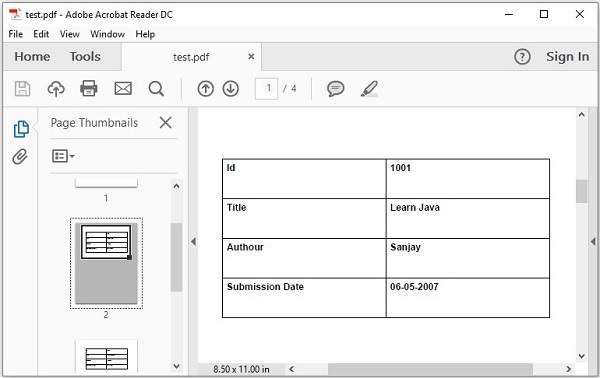
最後,如果您執行此應用程式,它將讀取XML文件中的所有資料項,並將它們儲存到MySQL資料庫中,然後在給定的PDF文件中逐頁列印它們。
pom.xml
以下是此Maven專案中使用的pom.xml檔案的內容。
<project xmlns = "http://maven.apache.org/POM/4.0.0"
   xmlns:xsi = "http://www.w3.org/2001/XMLSchema-instance"
   xsi:schemaLocation = "http://maven.apache.org/POM/4.0.0
   http://maven.apache.org/maven-v4_0_0.xsd">
   <modelVersion>4.0.0</modelVersion>
   <groupId>com.tutorialspoint</groupId>
   <artifactId>SpringBatchSample</artifactId>
   <packaging>jar</packaging>
   <version>1.0-SNAPSHOT</version>
   <name>SpringBatchExample</name>
   <url>http://maven.apache.org</url>

   <properties>
      <jdk.version>21</jdk.version>
      <spring.version>5.3.14</spring.version>
      <spring.batch.version>4.3.4</spring.batch.version>
      <mysql.driver.version>8.4.0</mysql.driver.version>
      <junit.version>4.11</junit.version>
      <pdf.version>2.0.32</pdf.version>
      <xstream.version>1.4.17</xstream.version>
   </properties>

   <dependencies>
      <!-- Spring Core -->
      <dependency>
         <groupId>org.springframework</groupId>
         <artifactId>spring-core</artifactId>
         <version>${spring.version}</version>
      </dependency>

      <!-- Spring jdbc, for database -->
      <dependency>
         <groupId>org.springframework</groupId>
         <artifactId>spring-jdbc</artifactId>
         <version>${spring.version}</version>
      </dependency>

      <!-- Spring XML to/back object -->
      <dependency>
         <groupId>org.springframework</groupId>
         <artifactId>spring-oxm</artifactId>
         <version>${spring.version}</version>
      </dependency>

      <!-- MySQL database driver -->
      <dependency>
         <groupId>com.mysql</groupId>
         <artifactId>mysql-connector-j</artifactId>
         <version>${mysql.driver.version}</version>
      </dependency>

      <!-- Spring Batch dependencies -->
      <dependency>
         <groupId>org.springframework.batch</groupId>
         <artifactId>spring-batch-core</artifactId>
         <version>${spring.batch.version}</version>
      </dependency>

      <dependency>
         <groupId>org.springframework.batch</groupId>
         <artifactId>spring-batch-infrastructure</artifactId>
         <version>${spring.batch.version}</version>
      </dependency>

      <!-- Spring Batch unit test -->
      <dependency>
         <groupId>org.springframework.batch</groupId>
         <artifactId>spring-batch-test</artifactId>
         <version>${spring.batch.version}</version>
      </dependency>

      <!-- Junit -->
      <dependency>
         <groupId>junit</groupId>
         <artifactId>junit</artifactId>
         <version>${junit.version}</version>
         <scope>test</scope>
      </dependency>

      <!-- pdfbox -->
      <dependency>
         <groupId>org.apache.pdfbox</groupId>
         <artifactId>pdfbox</artifactId>
         <version>${pdf.version}</version>
      </dependency>

      <!-- xstream -->
      <dependency>
         <groupId>com.thoughtworks.xstream</groupId>
         <artifactId>xstream</artifactId>
         <version>${xstream.version}</version>
      </dependency>

   </dependencies>

   <build>
      <finalName>spring-batch</finalName>
      <plugins>
         <plugin>
            <groupId>org.apache.maven.plugins</groupId>
            <artifactId>maven-eclipse-plugin</artifactId>
            <version>2.9</version>
            <configuration>
               <downloadSources>true</downloadSources>
               <downloadJavadocs>false</downloadJavadocs>
            </configuration>
         </plugin>

         <plugin>
            <groupId>org.apache.maven.plugins</groupId>
            <artifactId>maven-compiler-plugin</artifactId>
            <version>2.3.2</version>
            <configuration>
               <source>${jdk.version}</source>
               <target>${jdk.version}</target>
            </configuration>
         </plugin>
      </plugins>
   </build>
</project>
jobConfig.xml
以下是我們的示例Spring Batch應用程式的配置檔案。在這個檔案中,我們將定義作業和步驟。除此之外,我們還定義了ItemReader、ItemProcessor和ItemWriter的bean。(在這裡,我們將它們與各自的類關聯,並傳遞所需屬性的值來配置它們。)
在Maven專案的src > main > resources資料夾中建立此檔案。
<beans xmlns = "http://www.springframework.org/schema/beans"
   xmlns:batch = "http://www.springframework.org/schema/batch"
   xmlns:xsi = "http://www.w3.org/2001/XMLSchema-instance"
   xmlns:util = "http://www.springframework.org/schema/util"
   xsi:schemaLocation = "http://www.springframework.org/schema/batch

      http://www.springframework.org/schema/batch/spring-batch-2.2.xsd
      http://www.springframework.org/schema/beans
      http://www.springframework.org/schema/beans/spring-beans-3.2.xsd
      http://www.springframework.org/schema/util
      http://www.springframework.org/schema/util/spring-util-3.0.xsd ">

   <import resource = "context.xml" />

   <bean id = "itemProcessor" class = "CustomItemProcessor" />
   <batch:job id = "helloWorldJob">
      <batch:step id = "step1">
         <batch:tasklet>
            <batch:chunk reader = "xmlItemReader" writer = "mysqlItemWriter" processor = "itemProcessor" commit-interval="1">
            </batch:chunk>
         </batch:tasklet>
      </batch:step>
   </batch:job>

   <bean id = "xmlItemReader"
      class = "org.springframework.batch.item.xml.StaxEventItemReader">
      <property name = "fragmentRootElementName" value = "tutorial" />
      <property name = "resource" value = "classpath:tutorial.xml" />
      <property name = "unmarshaller" ref = "customUnMarshaller" />
   </bean>

   <bean id = "customUnMarshaller" class = "org.springframework.oxm.xstream.XStreamMarshaller">
      <property name = "aliases">
         <util:map id = "aliases">
            <entry key = "tutorial" value = "Tutorial" />
         </util:map>
      </property>
   </bean>
   <bean id = "mysqlItemWriter" class = "org.springframework.batch.item.database.JdbcBatchItemWriter">
      <property name = "dataSource" ref = "dataSource" />
      <property name = "sql">
         <value>
            <![CDATA[insert into details.tutorials (tutorial_id, tutorial_author, tutorial_title,
               submission_date, tutorial_icon, tutorial_description)
               values (:tutorial_id, :tutorial_author, :tutorial_title, :submission_date,
               :tutorial_icon, :tutorial_description);]]>
         </value>
      </property>

      <property name = "itemSqlParameterSourceProvider">
         <bean class = "org.springframework.batch.item.database.BeanPropertyItemSqlParameterSourceProvider" />
      </property>
   </bean>
</beans>
Context.xml
以下是我們的Spring Batch應用程式的context.xml檔案。在這個檔案中,我們將定義諸如作業儲存庫、作業啟動器和事務管理器之類的bean。
在Maven專案的src > main > resources資料夾中建立此檔案。
<beans xmlns = "http://www.springframework.org/schema/beans"
   xmlns:jdbc = "http://www.springframework.org/schema/jdbc"
   xmlns:xsi = "http://www.w3.org/2001/XMLSchema-instance"
   xsi:schemaLocation = "http://www.springframework.org/schema/beans
      http://www.springframework.org/schema/beans/spring-beans-3.2.xsd
      http://www.springframework.org/schema/jdbc
      http://www.springframework.org/schema/jdbc/spring-jdbc-3.2.xsd">

   <!-- stored job-meta in database -->
   <bean id = "jobRepository"
      class = "org.springframework.batch.core.repository.support.JobRepositoryFactoryBean">
      <property name = "dataSource" ref = "dataSource" />
      <property name = "transactionManager" ref = "transactionManager" />
      <property name = "databaseType" value = "mysql" />
   </bean>

   <bean id = "transactionManager"
   class = "org.springframework.batch.support.transaction.ResourcelessTransactionManager" />
   <bean id = "jobLauncher"
      class = "org.springframework.batch.core.launch.support.SimpleJobLauncher">
      <property name = "jobRepository" ref = "jobRepository" />
   </bean>

   <!-- connect to MySQL database -->
   <bean id = "dataSource"
      class = "org.springframework.jdbc.datasource.DriverManagerDataSource">
      <property name = "url" value = "jdbc:mysql://:3306/details" />
      <property name = "username" value = "myuser" />
      <property name = "password" value = "password" />
   </bean>

   <!-- create job-meta tables automatically -->
   <jdbc:initialize-database data-source = "dataSource">
      <jdbc:script location = "org/springframework/batch/core/schema-drop-mysql.sql"/>
      <jdbc:script location = "org/springframework/batch/core/schema-mysql.sql"/>
   </jdbc:initialize-database>
</beans>
CustomItemProcessor.java
以下是處理器類。在這個類中,我們編寫應用程式的處理程式碼。在這裡,我們載入一個PDF文件,建立一個新頁面,建立一個表格,並在表格中為每條記錄插入以下值:教程ID、教程名稱、作者、提交日期。
在Maven專案的src > main > java資料夾中建立此類。
import java.io.File;
import java.io.IOException;

import org.apache.pdfbox.pdmodel.PDDocument;
import org.apache.pdfbox.pdmodel.PDPage;
import org.apache.pdfbox.pdmodel.PDPageContentStream;
import org.apache.pdfbox.pdmodel.font.PDType1Font;
import org.springframework.batch.item.ItemProcessor;

public class CustomItemProcessor implements ItemProcessor<Tutorial, Tutorial> {

   public static void drawTable(PDPage page, PDPageContentStream contentStream,
      float y, float margin, String[][] content) throws IOException {
      final int rows = content.length;
      final int cols = content[0].length;
      final float rowHeight = 50;
      final float tableWidth = page.getMediaBox().getWidth()-(2*margin);
      final float tableHeight = rowHeight * rows;
      final float colWidth = tableWidth/(float)cols;
      final float cellMargin=5f;

      // draw the rows
      float nexty = y ;
      for (int i = 0; i <= rows; i++) {
         contentStream.drawLine(margin,nexty,margin+tableWidth,nexty);
         nexty-= rowHeight;
      }

      //draw the columns
      float nextx = margin;
      for (int i = 0; i <= cols; i++) {
         contentStream.drawLine(nextx,y,nextx,y-tableHeight);
         nextx += colWidth;
      }

      // now add the text
      contentStream.setFont(PDType1Font.HELVETICA_BOLD,12);

      float textx = margin+cellMargin;
      float texty = y-15;
      for(int i = 0; i < content.length; i++){
         for(int j = 0 ; j < content[i].length; j++){
            String text = content[i][j];
            contentStream.beginText();
            contentStream.moveTextPositionByAmount(textx,texty);
            contentStream.drawString(text);
            contentStream.endText();
            textx += colWidth;
         }

         texty-=rowHeight;
         textx = margin+cellMargin;
      }
   }


   private void createPDFDocument() throws IOException {
      // Creating PDF document object
      PDDocument document = new PDDocument();

      // Saving the document
      document.save("E:/Examples/test.pdf");

      System.out.println("PDF created");

      // Closing the document
      document.close();
   }

   @Override
   public Tutorial process(Tutorial item) throws Exception {
      System.out.println("Processing..." + item);

      createPDFDocument();

      // Creating PDF document object
      PDDocument doc = PDDocument.load(new File("E:/Examples/test.pdf"));

      // Creating a blank page
      PDPage page = new PDPage();
      doc.addPage( page );
      PDPageContentStream contentStream =  new PDPageContentStream(doc, page);

      String[][] content = {{"Id",""+item.getTutorial_id()},
      {"Title", item.getTutorial_title()},
      {"Authour", item.getTutorial_author()},
      {"Submission Date", item.getSubmission_date()}} ;
      drawTable(page, contentStream, 700, 100, content);

      contentStream.close();
      doc.save("E:/Examples/test.pdf" );
      System.out.println("Hello");
      return item;
   }
}
TutorialFieldSetMapper.java
以下是ReportFieldSetMapper類,它將資料設定到Tutorial類。
在Maven專案的src > main > java資料夾中建立此類。
import org.springframework.batch.item.file.mapping.FieldSetMapper;
import org.springframework.batch.item.file.transform.FieldSet;
import org.springframework.validation.BindException;

public class TutorialFieldSetMapper implements FieldSetMapper<Tutorial> {

   @Override
   public Tutorial mapFieldSet(FieldSet fieldSet) throws BindException {
      // instantiating the Tutorial class
      Tutorial tutorial = new Tutorial();

      // Setting the fields from XML
      tutorial.setTutorial_id(fieldSet.readInt(0));
      tutorial.setTutorial_title(fieldSet.readString(1));
      tutorial.setTutorial_author(fieldSet.readString(2));
      tutorial.setTutorial_icon(fieldSet.readString(3));
      tutorial.setTutorial_description(fieldSet.readString(4));
      return tutorial;
   }
}
Tutorial.java
以下是Tutorial類。它是一個簡單的類,包含setter和getter方法。
在Maven專案的src > main > java資料夾中建立此類。
public class Tutorial {
   private int tutorial_id;
   private String tutorial_author;
   private String tutorial_title;
   private String submission_date;
   private String tutorial_icon;
   private String tutorial_description;

   @Override
   public String toString() {
      return " [id=" + tutorial_id + ", author=" + tutorial_author
         + ", title=" + tutorial_title + ", date=" + submission_date + ", icon ="
         +tutorial_icon +", description = "+tutorial_description+"]";
   }

   public int getTutorial_id() {
      return tutorial_id;
   }

   public void setTutorial_id(int tutorial_id) {
      this.tutorial_id = tutorial_id;
   }

   public String getTutorial_author() {
      return tutorial_author;
   }

   public void setTutorial_author(String tutorial_author) {
      this.tutorial_author = tutorial_author;
   }

   public String getTutorial_title() {
      return tutorial_title;
   }

   public void setTutorial_title(String tutorial_title) {
      this.tutorial_title = tutorial_title;
   }

   public String getSubmission_date() {
      return submission_date;
   }

   public void setSubmission_date(String submission_date) {
      this.submission_date = submission_date;
   }

   public String getTutorial_icon() {
      return tutorial_icon;
   }

   public void setTutorial_icon(String tutorial_icon) {
      this.tutorial_icon = tutorial_icon;
   }

   public String getTutorial_description() {
      return tutorial_description;
   }

   public void setTutorial_description(String tutorial_description) {
      this.tutorial_description = tutorial_description;
   }
}
App.java
以下是啟動批處理過程的程式碼。在這個類中,我們將透過執行JobLauncher來啟動Batch應用程式。
在Maven專案的src > main > java資料夾中建立此類。
import org.springframework.batch.core.Job;
import org.springframework.batch.core.JobExecution;
import org.springframework.batch.core.JobParameters;
import org.springframework.batch.core.launch.JobLauncher;
import org.springframework.context.ApplicationContext;
import org.springframework.context.support.ClassPathXmlApplicationContext;

public class App {
   public static void main(String[] args) throws Exception {
      String[] springConfig  = {    "jobConfig.xml" };

      // Creating the application context object
      ApplicationContext context = new ClassPathXmlApplicationContext(springConfig);

      // Creating the job launcher
      JobLauncher jobLauncher = (JobLauncher) context.getBean("jobLauncher");

      // Creating the job
      Job job = (Job) context.getBean("helloWorldJob");

      // create the pdf
      createPDFDocument();

      // Executing the JOB
      JobExecution execution = jobLauncher.run(job, new JobParameters());
      System.out.println("Exit Status : " + execution.getStatus());
   }

   private static void createPDFDocument() throws IOException {
      // Creating PDF document object
      PDDocument document = new PDDocument();

      // Saving the document
      document.save("E:/Examples/test.pdf");

      System.out.println("PDF created");

      // Closing the document
      document.close();
   }
}
輸出
在Eclipse中右鍵單擊專案,選擇以...執行 -> Maven構建。將目標設定為clean package並執行專案。您將看到以下輸出。
[INFO] Scanning for projects...
[INFO]
[INFO] [1m----------------< [0;36mcom.tutorialspoint:SpringBatchSample[0;1m >----------------[m
[INFO] [1mBuilding SpringBatchExample 1.0-SNAPSHOT[m
[INFO]   from pom.xml
[INFO] [1m--------------------------------[ jar ]---------------------------------[m
[INFO]
[INFO] [1m--- [0;32mclean:3.2.0:clean[m [1m(default-clean)[m @ [36mSpringBatchSample[0;1m ---[m
[INFO] Deleting C:\Users\Tutorialspoint\eclipse-workspace\SpringBatchSample\target
[INFO]
[INFO] [1m--- [0;32mresources:3.3.1:resources[m [1m(default-resources)[m @ [36mSpringBatchSample[0;1m ---[m
[WARNING] Using platform encoding (UTF-8 actually) to copy filtered resources, i.e. build is platform dependent!
[INFO] Copying 3 resources from src\main\resources to target\classes
[INFO]
[INFO] [1m--- [0;32mcompiler:2.3.2:compile[m [1m(default-compile)[m @ [36mSpringBatchSample[0;1m ---[m
[WARNING] File encoding has not been set, using platform encoding UTF-8, i.e. build is platform dependent!
[INFO] Compiling 5 source files to C:\Users\Tutorialspoint\eclipse-workspace\SpringBatchSample\target\classes
[INFO]
[INFO] [1m--- [0;32mresources:3.3.1:testResources[m [1m(default-testResources)[m @ [36mSpringBatchSample[0;1m ---[m
[WARNING] Using platform encoding (UTF-8 actually) to copy filtered resources, i.e. build is platform dependent!
[INFO] Copying 0 resource from src\test\resources to target\test-classes
[INFO]
[INFO] [1m--- [0;32mcompiler:2.3.2:testCompile[m [1m(default-testCompile)[m @ [36mSpringBatchSample[0;1m ---[m
[INFO] Nothing to compile - all classes are up to date
[INFO]
[INFO] [1m--- [0;32msurefire:3.1.2:test[m [1m(default-test)[m @ [36mSpringBatchSample[0;1m ---[m
[INFO]
[INFO] [1m--- [0;32mjar:3.3.0:jar[m [1m(default-jar)[m @ [36mSpringBatchSample[0;1m ---[m
[INFO] Building jar: C:\Users\Tutorialspoint\eclipse-workspace\SpringBatchSample\target\spring-batch.jar
[INFO] [1m------------------------------------------------------------------------[m
[INFO] [1;32mBUILD SUCCESS[m
[INFO] [1m------------------------------------------------------------------------[m
[INFO] Total time:  3.495 s
[INFO] Finished at: 2024-07-31T12:14:52+05:30
[INFO] [1m------------------------------------------------------------------------[m
要檢查上述SpringBatch程式的輸出,請右鍵單擊App.java類並選擇以...執行 -> Java應用程式。它將產生以下輸出:
Jul 31, 2024 12:16:16 PM org.springframework.batch.core.launch.support.SimpleJobLauncher afterPropertiesSet
INFO: No TaskExecutor has been set, defaulting to synchronous executor.
PDF created
Jul 31, 2024 12:16:19 PM org.springframework.batch.core.launch.support.SimpleJobLauncher$1 run
INFO: Job: [FlowJob: [name=helloWorldJob]] launched with the following parameters: [{}]
Jul 31, 2024 12:16:20 PM org.springframework.batch.core.job.SimpleStepHandler handleStep
INFO: Executing step: [step1]
Security framework of XStream not explicitly initialized, using predefined black list on your own risk.
Processing... [id=1001, author=Sanjay, title=Learn Java, date=06-05-2007, icon =https://tutorialspoint.tw/java/images/java-minilogo.jpg, description = Java is a high-level programming language originally
         developed by Sun Microsystems and released in 1995.
         Java runs on a variety of platforms.
         This tutorial gives a complete understanding of Java.');]
Processing... [id=1002, author=Abdul S, title=Learn MySQL, date=19-04-2007, icon =https://tutorialspoint.tw/mysql/images/mysql-minilogo.jpg, description = MySQL is the most popular
         Open Source Relational SQL database management system.
         MySQL is one of the best RDBMS being used for developing web-based software applications.
         This tutorial will give you quick start with MySQL
         and make you comfortable with MySQL programming.]
Processing... [id=1003, author=Krishna Kasyap, title=Learn JavaFX, date=06-07-2017, icon =https://tutorialspoint.tw/javafx/images/javafx-minilogo.jpg, description = JavaFX is a Java library used to build Rich Internet Applications.
         The applications developed using JavaFX can run on various devices
         such as Desktop Computers, Mobile Phones, TVs, Tablets, etc.
         This tutorial, discusses all the necessary elements of JavaFX that are required
         to develop effective Rich Internet Applications]
Jul 31, 2024 12:16:21 PM org.springframework.batch.core.step.AbstractStep execute
INFO: Step: [step1] executed in 1s232ms
Jul 31, 2024 12:16:21 PM org.springframework.batch.core.launch.support.SimpleJobLauncher$1 run
INFO: Job: [FlowJob: [name=helloWorldJob]] completed with the following parameters: [{}] and the following status: [COMPLETED] in 1s484ms
Exit Status : COMPLETED
如果您驗證資料庫中的details.tutorial表,它將顯示以下輸出:
| tutorial_id | tutorial_author | tutorial_title | submission_date | tutorial_icon | tutorial_description |
|---|---|---|---|---|---|
| 1001 | Sanjay | 學習Java | 06-05-2007 | https://tutorialspoint.tw/java/images/java-mini-logo.jpg | Java是一種高階程式語言,最初由Sun Microsystems開發,並於1995年釋出。Java可在各種平臺上執行。本教程將全面講解Java。 |
| 1002 | Abdul S | 學習MySQL | 19-04-2007 | https://tutorialspoint.tw/mysql/images/mysql-minilogo.jpg | MySQL是最流行的開源關係型SQL資料庫管理系統。MySQL是用於開發基於Web的軟體應用程式的最佳RDBMS之一。本教程將快速入門MySQL,並讓您輕鬆掌握MySQL程式設計。 |
| 1003 | 學習JavaFX | Krishna Kasyap | 06-07-2017 | https://tutorialspoint.tw/javafx/images/javafx-minilogo.jpg | MySQL是最流行的開源關係型SQL資料庫管理系統。MySQL是用於開發基於Web的軟體應用程式的最佳RDBMS之一。本教程將快速入門MySQL,並讓您輕鬆掌握MySQL程式設計。 |



這將生成一個PDF檔案,每頁顯示如下所示的記錄。
Spring Batch - CSV 到 XML
在本章中,我們將建立一個簡單的Spring Batch應用程式,該應用程式使用CSV讀取器和XML寫入器。
讀取器 - 我們在應用程式中使用的讀取器是FlatFileItemReader,用於從CSV檔案讀取資料。
寫入器 - 我們在應用程式中使用的寫入器是StaxEventItemWriter,用於將資料寫入XML檔案。
處理器 - 我們在應用程式中使用的處理器是一個自定義處理器,它只打印從CSV檔案讀取的記錄。
建立專案
如Spring Batch - 環境章節所述,建立一個新的Maven專案。
以下是我們在本應用程式中使用的輸入CSV檔案。此文件包含指定教程ID、教程作者、教程標題、提交日期、教程圖示和教程描述等詳細資訊的資料記錄。
report.csv
在Maven專案的src > main > resources資料夾中建立此檔案。
1001, "Sanjay", "Learn Java", 06/05/2007
1002, "Abdul S", "Learn MySQL", 19/04/2007
1003, "Krishna Kasyap", "Learn JavaFX", 06/07/2017
pom.xml
以下是此Maven專案中使用的pom.xml檔案的內容。
<project xmlns = "http://maven.apache.org/POM/4.0.0"
   xmlns:xsi = "http://www.w3.org/2001/XMLSchema-instance"
   xsi:schemaLocation = "http://maven.apache.org/POM/4.0.0
   http://maven.apache.org/maven-v4_0_0.xsd">
   <modelVersion>4.0.0</modelVersion>
   <groupId>com.tutorialspoint</groupId>
   <artifactId>SpringBatchSample</artifactId>
   <packaging>jar</packaging>
   <version>1.0-SNAPSHOT</version>
   <name>SpringBatchExample</name>
   <url>http://maven.apache.org</url>

   <properties>
      <jdk.version>21</jdk.version>
      <spring.version>5.3.14</spring.version>
      <spring.batch.version>4.3.4</spring.batch.version>
      <mysql.driver.version>8.4.0</mysql.driver.version>
      <junit.version>4.11</junit.version>
      <pdf.version>2.0.32</pdf.version>
      <xstream.version>1.4.17</xstream.version>
      <jaxb.version>2.3.1</jaxb.version>
      <jaxb.impl.version>2.3.4</jaxb.impl.version>
   </properties>

   <dependencies>
      <!-- Spring Core -->
      <dependency>
         <groupId>org.springframework</groupId>
         <artifactId>spring-core</artifactId>
         <version>${spring.version}</version>
      </dependency>

      <!-- Spring jdbc, for database -->
      <dependency>
         <groupId>org.springframework</groupId>
         <artifactId>spring-jdbc</artifactId>
         <version>${spring.version}</version>
      </dependency>

      <!-- Spring XML to/back object -->
      <dependency>
         <groupId>org.springframework</groupId>
         <artifactId>spring-oxm</artifactId>
         <version>${spring.version}</version>
      </dependency>

      <!-- MySQL database driver -->
      <dependency>
         <groupId>com.mysql</groupId>
         <artifactId>mysql-connector-j</artifactId>
         <version>${mysql.driver.version}</version>
      </dependency>

      <!-- Spring Batch dependencies -->
      <dependency>
         <groupId>org.springframework.batch</groupId>
         <artifactId>spring-batch-core</artifactId>
         <version>${spring.batch.version}</version>
      </dependency>

      <dependency>
         <groupId>org.springframework.batch</groupId>
         <artifactId>spring-batch-infrastructure</artifactId>
         <version>${spring.batch.version}</version>
      </dependency>

      <!-- Spring Batch unit test -->
      <dependency>
         <groupId>org.springframework.batch</groupId>
         <artifactId>spring-batch-test</artifactId>
         <version>${spring.batch.version}</version>
      </dependency>

      <!-- Junit -->
      <dependency>
         <groupId>junit</groupId>
         <artifactId>junit</artifactId>
         <version>${junit.version}</version>
         <scope>test</scope>
      </dependency>

      <!-- pdfbox -->
      <dependency>
         <groupId>org.apache.pdfbox</groupId>
         <artifactId>pdfbox</artifactId>
         <version>${pdf.version}</version>
      </dependency>

      <!-- xstream -->
      <dependency>
         <groupId>com.thoughtworks.xstream</groupId>
         <artifactId>xstream</artifactId>
         <version>${xstream.version}</version>
      </dependency>

      <!-- jaxb-api -->
      <dependency>
         <groupId>javax.xml.bind</groupId>
         <artifactId>jaxb-api</artifactId>
         <version>${jaxb.version}</version>
      </dependency>

      <!-- JAXB RI -->
      <dependency>
         <groupId>com.sun.xml.bind</groupId>
         <artifactId>jaxb-impl</artifactId>
         <version>${jaxb.impl.version}</version>
      </dependency>

   </dependencies>

   <build>
      <finalName>spring-batch</finalName>
      <plugins>
         <plugin>
            <groupId>org.apache.maven.plugins</groupId>
            <artifactId>maven-eclipse-plugin</artifactId>
            <version>2.9</version>
            <configuration>
               <downloadSources>true</downloadSources>
               <downloadJavadocs>false</downloadJavadocs>
            </configuration>
         </plugin>

         <plugin>
            <groupId>org.apache.maven.plugins</groupId>
            <artifactId>maven-compiler-plugin</artifactId>
            <version>2.3.2</version>
            <configuration>
               <source>${jdk.version}</source>
               <target>${jdk.version}</target>
            </configuration>
         </plugin>
      </plugins>
   </build>
</project>
jobConfig.xml
以下是我們的示例Spring Batch應用程式的配置檔案。在這個檔案中,我們將定義作業和步驟。除此之外,我們還定義了ItemReader、ItemProcessor和ItemWriter的bean。(在這裡,我們將它們與各自的類關聯,並傳遞所需屬性的值來配置它們。)
在Maven專案的src > main > resources資料夾中建立此檔案。
<beans xmlns = "http://www.springframework.org/schema/beans"
   xmlns:batch = "http://www.springframework.org/schema/batch"
   xmlns:xsi = "http://www.w3.org/2001/XMLSchema-instance"
   xsi:schemaLocation = "http://www.springframework.org/schema/batch
      http://www.springframework.org/schema/batch/spring-batch-2.2.xsd
      http://www.springframework.org/schema/beans
      http://www.springframework.org/schema/beans/spring-beans-3.2.xsd">

   <import resource = "context.xml" />

   <bean id = "report" class = "Report" scope = "prototype" />
   <bean id = "itemProcessor" class = "CustomItemProcessor" />

   <batch:job id = "helloWorldJob">

      <batch:step id = "step1">

         <batch:tasklet>
            <batch:chunk reader = "cvsFileItemReader" writer = "xmlItemWriter"
               processor = "itemProcessor" commit-interval = "10">
            </batch:chunk>
         </batch:tasklet>
      </batch:step>
   </batch:job>

   <bean id = "cvsFileItemReader"
      class = "org.springframework.batch.item.file.FlatFileItemReader">
      <property name = "resource" value = "classpath:report.csv" />
      <property name = "lineMapper">
         <bean
            class = "org.springframework.batch.item.file.mapping.DefaultLineMapper">
            <property name = "lineTokenizer">
               <bean
                  class = "org.springframework.batch.item.file.transform.DelimitedLineTokenizer">
                  <property name = "names" value = "tutorial_id,
                     tutorial_author, Tutorial_title, submission_date" />
               </bean>
            </property>

            <property name = "fieldSetMapper">
               <bean class = "ReportFieldSetMapper" />
            </property>
         </bean>
      </property>
   </bean>

   <bean id = "xmlItemWriter"
      class = "org.springframework.batch.item.xml.StaxEventItemWriter">
      <property name = "resource" value = "file:tutorials.xml" />
      <property name = "marshaller" ref = "reportMarshaller" />
      <property name = "rootTagName" value = "tutorials" />
   </bean>

   <bean id = "reportMarshaller"
      class = "org.springframework.oxm.jaxb.Jaxb2Marshaller">
      <property name = "classesToBeBound">
         <list>
            <value>Tutorial</value>
         </list>
      </property>
   </bean>
</beans>
Context.xml
以下是我們的Spring Batch應用程式的context.xml檔案。在這個檔案中,我們將定義諸如作業儲存庫、作業啟動器和事務管理器之類的bean。
在Maven專案的src > main > resources資料夾中建立此檔案。
<beans xmlns = "http://www.springframework.org/schema/beans"
   xmlns:jdbc = "http://www.springframework.org/schema/jdbc"
   xmlns:xsi = "http://www.w3.org/2001/XMLSchema-instance"
   xsi:schemaLocation = "http://www.springframework.org/schema/beans
      http://www.springframework.org/schema/beans/spring-beans-3.2.xsd
      http://www.springframework.org/schema/jdbc
      http://www.springframework.org/schema/jdbc/spring-jdbc-3.2.xsd">
   <!-- stored job-meta in database -->
   <bean id = "jobRepository"
      class = "org.springframework.batch.core.repository.support.JobRepositoryFactoryBean">
      <property name = "dataSource" ref = "dataSource" />
      <property name = "transactionManager" ref = "transactionManager" />
      <property name = "databaseType" value = "mysql" />
   </bean>

   <bean id = "transactionManager"
      class = "org.springframework.batch.support.transaction.ResourcelessTransactionManager" />
   <bean id = "jobLauncher"
      class = "org.springframework.batch.core.launch.support.SimpleJobLauncher">
      <property name = "jobRepository" ref = "jobRepository" />
   </bean>

   <bean id = "dataSource" class = "org.springframework.jdbc.datasource.DriverManagerDataSource">
      <property name = "url" value = "jdbc:mysql://:3306/details" />
      <property name = "username" value = "myuser" />
      <property name = "password" value = "password" />
   </bean>

   <!-- create job-meta tables automatically -->
   <jdbc:initialize-database data-source = "dataSource">
      <jdbc:script location = "org/springframework/batch/core/schema-drop-mysql.sql" />
      <jdbc:script location = "org/springframework/batch/core/schema-mysql.sql" />
   </jdbc:initialize-database>
</beans>
CustomItemProcessor.java
以下是處理器類。在這個類中,我們編寫應用程式的處理程式碼。在這裡,我們列印每條記錄的內容。
在Maven專案的src > main > java資料夾中建立此類。
import org.springframework.batch.item.ItemProcessor;

public class CustomItemProcessor implements ItemProcessor<Tutorial, Tutorial> {

   @Override
   public Tutorial process(Tutorial item) throws Exception {
      System.out.println("Processing..." + item);
      return item;
   }
}
TutorialFieldSetMapper.java
以下是TutorialFieldSetMapper類,它將資料設定到Tutorial類。
在Maven專案的src > main > java資料夾中建立此類。
import org.springframework.batch.item.file.mapping.FieldSetMapper;
import org.springframework.batch.item.file.transform.FieldSet;
import org.springframework.validation.BindException;

public class TutorialFieldSetMapper implements FieldSetMapper<Tutorial> {

   @Override
   public Tutorial mapFieldSet(FieldSet fieldSet) throws BindException {

      //Instantiating the report object
      Tutorial tutorial = new Tutorial();

      //Setting the fields
      tutorial.setTutorial_id(fieldSet.readInt(0));
      tutorial.setTutorial_author(fieldSet.readString(1));
      tutorial.setTutorial_title(fieldSet.readString(2));
      tutorial.setSubmission_date(fieldSet.readString(3));

      return tutorial;
   }
}
Tutorial.java類
以下是Tutorial類。它是一個簡單的Java類,包含setter和getter方法。在這個類中,我們使用註釋將此類的方法與XML檔案的標籤關聯。
在Maven專案的src > main > java資料夾中建立此類。
import javax.xml.bind.annotation.XmlAttribute;
import javax.xml.bind.annotation.XmlElement;
import javax.xml.bind.annotation.XmlRootElement;

@XmlRootElement(name = "tutorial")
public class Tutorial {
   private int tutorial_id;
   private String tutorial_author;
   private String tutorial_title;
   private String submission_date;

   @XmlAttribute(name = "tutorial_id")
   public int getTutorial_id() {
      return tutorial_id;
   }

   public void setTutorial_id(int tutorial_id) {
      this.tutorial_id = tutorial_id;
   }

   @XmlElement(name = "tutorial_author")
   public String getTutorial_author() {
      return tutorial_author;
   }
   public void setTutorial_author(String tutorial_author) {
      this.tutorial_author = tutorial_author;
   }

   @XmlElement(name = "tutorial_title")
   public String getTutorial_title() {
      return tutorial_title;
   }

   public void setTutorial_title(String tutorial_title) {
      this.tutorial_title = tutorial_title;
   }

   @XmlElement(name = "submission_date")
   public String getSubmission_date() {
      return submission_date;
   }

   public void setSubmission_date(String submission_date) {
      this.submission_date = submission_date;
   }

   @Override
   public String toString() {
      return "  [Tutorial id=" + tutorial_id +
         ",Tutorial Author=" + tutorial_author  +
         ",Tutorial Title=" + tutorial_title +
         ",Submission Date=" + submission_date + "]";
   }
}
App.java
以下是啟動批處理過程的程式碼。在這個類中,我們將透過執行JobLauncher來啟動批處理應用程式。
在Maven專案的src > main > java資料夾中建立此類。
import org.springframework.batch.core.Job;
import org.springframework.batch.core.JobExecution;
import org.springframework.batch.core.JobParameters;
import org.springframework.batch.core.launch.JobLauncher;
import org.springframework.context.ApplicationContext;
import org.springframework.context.support.ClassPathXmlApplicationContext;

public class App {
   public static void main(String[] args) throws Exception {

      String[] springConfig  =  { "jobConfig.xml" };

      // Creating the application context object
      ApplicationContext context = new ClassPathXmlApplicationContext(springConfig);

      // Creating the job launcher
      JobLauncher jobLauncher = (JobLauncher) context.getBean("jobLauncher");

      // Creating the job
      Job job = (Job) context.getBean("helloWorldJob");

      // Executing the JOB
      JobExecution execution = jobLauncher.run(job, new JobParameters());
      System.out.println("Exit Status : " + execution.getStatus());
   }
}
輸出
在Eclipse中右鍵單擊專案,選擇以...執行 -> Maven構建。將目標設定為clean package並執行專案。您將看到以下輸出。
[INFO] Scanning for projects...
[INFO]
[INFO] [1m----------------< [0;36mcom.tutorialspoint:SpringBatchSample[0;1m >----------------[m
[INFO] [1mBuilding SpringBatchExample 1.0-SNAPSHOT[m
[INFO]   from pom.xml
[INFO] [1m--------------------------------[ jar ]---------------------------------[m
[INFO]
[INFO] [1m--- [0;32mclean:3.2.0:clean[m [1m(default-clean)[m @ [36mSpringBatchSample[0;1m ---[m
[INFO] Deleting C:\Users\Tutorialspoint\eclipse-workspace\SpringBatchSample\target
[INFO]
[INFO] [1m--- [0;32mresources:3.3.1:resources[m [1m(default-resources)[m @ [36mSpringBatchSample[0;1m ---[m
[WARNING] Using platform encoding (UTF-8 actually) to copy filtered resources, i.e. build is platform dependent!
[INFO] Copying 4 resources from src\main\resources to target\classes
[INFO]
[INFO] [1m--- [0;32mcompiler:2.3.2:compile[m [1m(default-compile)[m @ [36mSpringBatchSample[0;1m ---[m
[WARNING] File encoding has not been set, using platform encoding UTF-8, i.e. build is platform dependent!
[INFO] Compiling 5 source files to C:\Users\Tutorialspoint\eclipse-workspace\SpringBatchSample\target\classes
[INFO]
[INFO] [1m--- [0;32mresources:3.3.1:testResources[m [1m(default-testResources)[m @ [36mSpringBatchSample[0;1m ---[m
[WARNING] Using platform encoding (UTF-8 actually) to copy filtered resources, i.e. build is platform dependent!
[INFO] Copying 0 resource from src\test\resources to target\test-classes
[INFO]
[INFO] [1m--- [0;32mcompiler:2.3.2:testCompile[m [1m(default-testCompile)[m @ [36mSpringBatchSample[0;1m ---[m
[INFO] Nothing to compile - all classes are up to date
[INFO]
[INFO] [1m--- [0;32msurefire:3.1.2:test[m [1m(default-test)[m @ [36mSpringBatchSample[0;1m ---[m
[INFO]
[INFO] [1m--- [0;32mjar:3.3.0:jar[m [1m(default-jar)[m @ [36mSpringBatchSample[0;1m ---[m
[INFO] Building jar: C:\Users\Tutorialspoint\eclipse-workspace\SpringBatchSample\target\spring-batch.jar
[INFO] [1m------------------------------------------------------------------------[m
[INFO] [1;32mBUILD SUCCESS[m
[INFO] [1m------------------------------------------------------------------------[m
[INFO] Total time:  3.323 s
[INFO] Finished at: 2024-07-31T12:54:04+05:30
[INFO] [1m------------------------------------------------------------------------[m
要檢查上述SpringBatch程式的輸出,請右鍵單擊App.java類並選擇以...執行 -> Java應用程式。它將產生以下輸出:
Jul 31, 2024 1:00:16 PM org.springframework.batch.core.launch.support.SimpleJobLauncher afterPropertiesSet
INFO: No TaskExecutor has been set, defaulting to synchronous executor.
Jul 31, 2024 1:00:19 PM org.springframework.batch.core.launch.support.SimpleJobLauncher$1 run
INFO: Job: [FlowJob: [name=helloWorldJob]] launched with the following parameters: [{}]
Jul 31, 2024 1:00:19 PM org.springframework.batch.core.job.SimpleStepHandler handleStep
INFO: Executing step: [step1]
Processing...  [Tutorial id=1001,Tutorial Author=Sanjay,Tutorial Title=Learn Java,Submission Date=06/05/2007]
Processing...  [Tutorial id=1002,Tutorial Author=Abdul S,Tutorial Title=Learn MySQL,Submission Date=19/04/2007]
Processing...  [Tutorial id=1003,Tutorial Author=Krishna Kasyap,Tutorial Title=Learn JavaFX,Submission Date=06/07/2017]
Jul 31, 2024 1:00:20 PM org.springframework.batch.core.step.AbstractStep execute
INFO: Step: [step1] executed in 215ms
Jul 31, 2024 1:00:20 PM org.springframework.batch.core.launch.support.SimpleJobLauncher$1 run
INFO: Job: [FlowJob: [name=helloWorldJob]] completed with the following parameters: [{}] and the following status: [COMPLETED] in 540ms
Exit Status : COMPLETED
這將生成一個XML檔案(根資料夾中的tutorials.xml),內容如下所示。
<?xml version = "1.0" encoding = "UTF-8"?>
<tutorials>
   <tutorial tutorial_id = "1001">
      <submission_date>06/05/2007</submission_date>
      <tutorial_author>Sanjay</tutorial_author>
      <tutorial_title>Learn Java</tutorial_title>
   </tutorial>

   <tutorial tutorial_id = "1002">
      <submission_date>19/04/2007</submission_date>
      <tutorial_author>Abdul S</tutorial_author>
      <tutorial_title>Learn MySQL</tutorial_title>
   </tutorial>

   <tutorial tutorial_id = "1003">
      <submission_date>06/07/2017</submission_date>
      <tutorial_author>Krishna Kasyap</tutorial_author>
      <tutorial_title>Learn JavaFX</tutorial_title>
   </tutorial>
</tutorials>
Spring Batch - MySQL 到 XML
在本章中,我們將建立一個Spring Batch應用程式,該應用程式使用MySQL讀取器和XML寫入器。
讀取器 - 我們在應用程式中使用的讀取器是JdbcCursorItemReader,用於從MySQL資料庫讀取資料。
假設我們在MySQL資料庫中建立了一個表,如下所示:
CREATE TABLE details.tutorialsdata(
   tutorial_id int NOT NULL,
   tutorial_author VARCHAR(20),
   tutorial_title VARCHAR(20),
   submission_date VARCHAR(20)
);
假設我們已向其中插入以下記錄。
mysql> select * from tutorialsdata;
+-------------+-----------------+----------------+-----------------+
| tutorial_id | tutorial_author | tutorial_title | submission_date |
+-------------+-----------------+----------------+-----------------+
|         101 | Sanjay          | Learn Java     | 06-05-2007      |
|         102 | Abdul S         | Learn MySQL    | 19-04-2007      |
|         103 | Krishna Kasyap  | Learn JavaFX   | 06-07-2017      |
+-------------+-----------------+----------------+-----------------+
3 rows in set (0.00 sec)
寫入器 - 我們在應用程式中使用的寫入器是StaxEventItemWriter,用於將資料寫入XML檔案。
處理器 - 我們在應用程式中使用的處理器是一個自定義處理器,它只打印從CSV檔案讀取的記錄。
建立專案
如Spring Batch - 環境章節所述,建立一個新的Maven專案。
pom.xml
以下是此Maven專案中使用的pom.xml檔案的內容。
<project xmlns = "http://maven.apache.org/POM/4.0.0"
   xmlns:xsi = "http://www.w3.org/2001/XMLSchema-instance"
   xsi:schemaLocation = "http://maven.apache.org/POM/4.0.0
   http://maven.apache.org/maven-v4_0_0.xsd">
   <modelVersion>4.0.0</modelVersion>
   <groupId>com.tutorialspoint</groupId>
   <artifactId>SpringBatchSample</artifactId>
   <packaging>jar</packaging>
   <version>1.0-SNAPSHOT</version>
   <name>SpringBatchExample</name>
   <url>http://maven.apache.org</url>

   <properties>
      <jdk.version>21</jdk.version>
      <spring.version>5.3.14</spring.version>
      <spring.batch.version>4.3.4</spring.batch.version>
      <mysql.driver.version>8.4.0</mysql.driver.version>
      <junit.version>4.11</junit.version>
      <pdf.version>2.0.32</pdf.version>
      <xstream.version>1.4.17</xstream.version>
      <jaxb.version>2.3.1</jaxb.version>
      <jaxb.impl.version>2.3.4</jaxb.impl.version>
   </properties>

   <dependencies>
      <!-- Spring Core -->
      <dependency>
         <groupId>org.springframework</groupId>
         <artifactId>spring-core</artifactId>
         <version>${spring.version}</version>
      </dependency>

      <!-- Spring jdbc, for database -->
      <dependency>
         <groupId>org.springframework</groupId>
         <artifactId>spring-jdbc</artifactId>
         <version>${spring.version}</version>
      </dependency>

      <!-- Spring XML to/back object -->
      <dependency>
         <groupId>org.springframework</groupId>
         <artifactId>spring-oxm</artifactId>
         <version>${spring.version}</version>
      </dependency>

      <!-- MySQL database driver -->
      <dependency>
         <groupId>com.mysql</groupId>
         <artifactId>mysql-connector-j</artifactId>
         <version>${mysql.driver.version}</version>
      </dependency>

      <!-- Spring Batch dependencies -->
      <dependency>
         <groupId>org.springframework.batch</groupId>
         <artifactId>spring-batch-core</artifactId>
         <version>${spring.batch.version}</version>
      </dependency>

      <dependency>
         <groupId>org.springframework.batch</groupId>
         <artifactId>spring-batch-infrastructure</artifactId>
         <version>${spring.batch.version}</version>
      </dependency>

      <!-- Spring Batch unit test -->
      <dependency>
         <groupId>org.springframework.batch</groupId>
         <artifactId>spring-batch-test</artifactId>
         <version>${spring.batch.version}</version>
      </dependency>

      <!-- Junit -->
      <dependency>
         <groupId>junit</groupId>
         <artifactId>junit</artifactId>
         <version>${junit.version}</version>
         <scope>test</scope>
      </dependency>

      <!-- pdfbox -->
      <dependency>
         <groupId>org.apache.pdfbox</groupId>
         <artifactId>pdfbox</artifactId>
         <version>${pdf.version}</version>
      </dependency>

      <!-- xstream -->
      <dependency>
         <groupId>com.thoughtworks.xstream</groupId>
         <artifactId>xstream</artifactId>
         <version>${xstream.version}</version>
      </dependency>

      <!-- jaxb-api -->
      <dependency>
         <groupId>javax.xml.bind</groupId>
         <artifactId>jaxb-api</artifactId>
         <version>${jaxb.version}</version>
      </dependency>

      <!-- JAXB RI -->
      <dependency>
         <groupId>com.sun.xml.bind</groupId>
         <artifactId>jaxb-impl</artifactId>
         <version>${jaxb.impl.version}</version>
      </dependency>

   </dependencies>

   <build>
      <finalName>spring-batch</finalName>
      <plugins>
         <plugin>
            <groupId>org.apache.maven.plugins</groupId>
            <artifactId>maven-eclipse-plugin</artifactId>
            <version>2.9</version>
            <configuration>
               <downloadSources>true</downloadSources>
               <downloadJavadocs>false</downloadJavadocs>
            </configuration>
         </plugin>

         <plugin>
            <groupId>org.apache.maven.plugins</groupId>
            <artifactId>maven-compiler-plugin</artifactId>
            <version>2.3.2</version>
            <configuration>
               <source>${jdk.version}</source>
               <target>${jdk.version}</target>
            </configuration>
         </plugin>
      </plugins>
   </build>
</project>
jobConfig.xml
以下是我們的示例Spring Batch應用程式的配置檔案。在這個檔案中,我們將定義作業和步驟。除此之外,我們還定義了ItemReader、ItemProcessor和ItemWriter的bean。(在這裡,我們將它們與各自的類關聯,並傳遞所需屬性的值來配置它們。)
在Maven專案的src > main > resources資料夾中建立此檔案。
<beans xmlns = "http://www.springframework.org/schema/beans"
   xmlns:batch = "http://www.springframework.org/schema/batch"
   xmlns:xsi = "http://www.w3.org/2001/XMLSchema-instance"
   xmlns:util = "http://www.springframework.org/schema/util"
   xsi:schemaLocation = " http://www.springframework.org/schema/batch
      http://www.springframework.org/schema/batch/spring-batch-2.2.xsd
      http://www.springframework.org/schema/beans
      http://www.springframework.org/schema/beans/spring-beans-3.2.xsd">

   <import resource = "context.xml" />

   <bean id = "report" class = "Report" scope = "prototype" />
   <bean id = "itemProcessor" class = "CustomItemProcessor" />

   <batch:job id = "helloWorldJob">
      <batch:step id = "step1">
         <batch:tasklet>
            <batch:chunk reader = "dbItemReader"
               writer = "mysqlItemWriter" processor = "itemProcessor" commit-interval = "10">
            </batch:chunk>
         </batch:tasklet>
      </batch:step>
   </batch:job>

   <bean id = "dbItemReader"
      class = "org.springframework.batch.item.database.JdbcCursorItemReader" scope = "step">
      <property name = "dataSource" ref = "dataSource" />
      <property name = "sql" value = "select * from tutorialsdata" />
      <property name = "rowMapper">
         <bean class = "TutorialRowMapper" />
      </property>
   </bean>
   <bean id = "mysqlItemWriter"
      class = "org.springframework.batch.item.xml.StaxEventItemWriter">
      <property name = "resource" value = "file:tutorials.xml" />
      <property name = "marshaller" ref = "reportMarshaller" />
      <property name = "rootTagName" value = "tutorials" />
   </bean>

   <bean id = "reportMarshaller" class = "org.springframework.oxm.jaxb.Jaxb2Marshaller">
      <property name = "classesToBeBound">
         <list>
            <value>Tutorial</value>
         </list>
      </property>
   </bean>
</beans>
Context.xml
以下是我們的Spring Batch應用程式的context.xml檔案。在這個檔案中,我們將定義諸如作業儲存庫、作業啟動器和事務管理器之類的bean。
在Maven專案的src > main > resources資料夾中建立此檔案。
<beans xmlns = " http://www.springframework.org/schema/beans"
   xmlns:jdbc = "http://www.springframework.org/schema/jdbc"
   xmlns:xsi = "http://www.w3.org/2001/XMLSchema-instance"
   xsi:schemaLocation = "http://www.springframework.org/schema/beans
      http://www.springframework.org/schema/beans/spring-beans-3.2.xsd
      http://www.springframework.org/schema/jdbc
      http://www.springframework.org/schema/jdbc/spring-jdbc-3.2.xsd ">

   <!-- stored job-meta in database -->
   <bean id = "jobRepository"
      class = "org.springframework.batch.core.repository.support.JobRepositoryFactoryBean">
      <property name = "dataSource" ref = "dataSource" />
      <property name = "transactionManager" ref = "transactionManager" />
      <property name = "databaseType" value = "mysql" />
   </bean>

   <bean id = "transactionManager"
      class = "org.springframework.batch.support.transaction.ResourcelessTransactionMana ger" />
   <bean id = "jobLauncher"
      class = "org.springframework.batch.core.launch.support.SimpleJobLauncher">
      <property name = "jobRepository" ref = "jobRepository" />
   </bean>

   <!-- connect to MySQL database -->
   <bean id = "dataSource"
      class = "org.springframework.jdbc.datasource.DriverManagerDataSource">
      <property name = "url" value = "jdbc:mysql://:3306/details" />
      <property name = "username" value = "myuser" />
      <property name = "password" value = "password" />
   </bean>

   <!-- create job-meta tables automatically -->
   <jdbc:initialize-database data-source = "dataSource">
      <jdbc:script location = "org/springframework/batch/core/schema-drop-mysql.sql" />
      <jdbc:script location = "org/springframework/batch/core/schema-mysql.sql" />
   </jdbc:initialize-database>
</beans>
CustomItemProcessor.java
以下是處理器類。在這個類中,我們編寫應用程式的處理程式碼。在這裡,我們列印每條記錄的內容。
在Maven專案的src > main > java資料夾中建立此類。
import org.springframework.batch.item.ItemProcessor;

public class CustomItemProcessor implements ItemProcessor<Tutorial, Tutorial> {

   @Override
   public Tutorial process(Tutorial item) throws Exception {
      System.out.println("Processing..." + item);
      return item;
   }
}
TutorialRowMapper.java
以下是TutorialRowMapper類,它將資料設定到Tutorial類。
在Maven專案的src > main > java資料夾中建立此類。
import java.sql.ResultSet;
import java.sql.SQLException;
import org.springframework.jdbc.core.RowMapper;

public class TutorialRowMapper implements RowMapper<Tutorial> {

   @Override
   public Tutorial mapRow(ResultSet rs, int rowNum) throws SQLException {

      Tutorial tutorial = new Tutorial();
      tutorial.setTutorial_id(rs.getInt("tutorial_id"));
      tutorial.setTutorial_author(rs.getString("tutorial_author"));
      tutorial.setTutorial_title(rs.getString("tutorial_title"));
      tutorial.setSubmission_date(rs.getString("submission_date"));
      return tutorial;
   }
}
Tutorial.java
以下是Tutorial類。它是一個簡單的Java類,包含setter和getter方法。在這個類中,我們使用註釋將此類的方法與XML檔案的標籤關聯。
在Maven專案的src > main > java資料夾中建立此類。
import javax.xml.bind.annotation.XmlAttribute;
import javax.xml.bind.annotation.XmlElement;
import javax.xml.bind.annotation.XmlRootElement;

@XmlRootElement(name = "tutorial")
public class Tutorial {
   private int tutorial_id;
   private String tutorial_author;
   private String tutorial_title;
   private String submission_date;

   @XmlAttribute(name = "tutorial_id")
   public int getTutorial_id() {
      return tutorial_id;
   }

   public void setTutorial_id(int tutorial_id) {
      this.tutorial_id = tutorial_id;
   }

   @XmlElement(name = "tutorial_author")
   public String getTutorial_author() {
      return tutorial_author;
   }
   public void setTutorial_author(String tutorial_author) {
      this.tutorial_author = tutorial_author;
   }

   @XmlElement(name = "tutorial_title")
   public String getTutorial_title() {
      return tutorial_title;
   }

   public void setTutorial_title(String tutorial_title) {
      this.tutorial_title = tutorial_title;
   }

   @XmlElement(name = "submission_date")
   public String getSubmission_date() {
      return submission_date;
   }

   public void setSubmission_date(String submission_date) {
      this.submission_date = submission_date;
   }

   @Override
   public String toString() {
      return "  [Tutorial id=" + tutorial_id +
         ",Tutorial Author=" + tutorial_author  +
         ",Tutorial Title=" + tutorial_title +
         ",Submission Date=" + submission_date + "]";
   }
}
App.java
以下是啟動批處理過程的程式碼。在這個類中,我們將透過執行JobLauncher來啟動Batch應用程式。
在Maven專案的src > main > java資料夾中建立此類。
import org.springframework.batch.core.Job;
import org.springframework.batch.core.JobExecution;
import org.springframework.batch.core.JobParameters;
import org.springframework.batch.core.launch.JobLauncher;
import org.springframework.context.ApplicationContext;
import org.springframework.context.support.ClassPathXmlApplicationContext;

public class App {
   public static void main(String[] args) throws Exception {

      String[] springConfig  =  { "jobConfig.xml" };

      // Creating the application context object
      ApplicationContext context = new ClassPathXmlApplicationContext(springConfig);

      // Creating the job launcher
      JobLauncher jobLauncher = (JobLauncher) context.getBean("jobLauncher");

      // Creating the job
      Job job = (Job) context.getBean("helloWorldJob");

      // Executing the JOB
      JobExecution execution = jobLauncher.run(job, new JobParameters());
      System.out.println("Exit Status : " + execution.getStatus());
   }
}
輸出
在Eclipse中右鍵單擊專案,選擇以...執行 -> Maven構建。將目標設定為clean package並執行專案。您將看到以下輸出。
[INFO] Scanning for projects...
[INFO]
[INFO] [1m----------------< [0;36mcom.tutorialspoint:SpringBatchSample[0;1m >----------------[m
[INFO] [1mBuilding SpringBatchExample 1.0-SNAPSHOT[m
[INFO]   from pom.xml
[INFO] [1m--------------------------------[ jar ]---------------------------------[m
[INFO]
[INFO] [1m--- [0;32mclean:3.2.0:clean[m [1m(default-clean)[m @ [36mSpringBatchSample[0;1m ---[m
[INFO] Deleting C:\Users\Tutorialspoint\eclipse-workspace\SpringBatchSample\target
[INFO]
[INFO] [1m--- [0;32mresources:3.3.1:resources[m [1m(default-resources)[m @ [36mSpringBatchSample[0;1m ---[m
[WARNING] Using platform encoding (UTF-8 actually) to copy filtered resources, i.e. build is platform dependent!
[INFO] Copying 4 resources from src\main\resources to target\classes
[INFO]
[INFO] [1m--- [0;32mcompiler:2.3.2:compile[m [1m(default-compile)[m @ [36mSpringBatchSample[0;1m ---[m
[WARNING] File encoding has not been set, using platform encoding UTF-8, i.e. build is platform dependent!
[INFO] Compiling 5 source files to C:\Users\Tutorialspoint\eclipse-workspace\SpringBatchSample\target\classes
[INFO]
[INFO] [1m--- [0;32mresources:3.3.1:testResources[m [1m(default-testResources)[m @ [36mSpringBatchSample[0;1m ---[m
[WARNING] Using platform encoding (UTF-8 actually) to copy filtered resources, i.e. build is platform dependent!
[INFO] Copying 0 resource from src\test\resources to target\test-classes
[INFO]
[INFO] [1m--- [0;32mcompiler:2.3.2:testCompile[m [1m(default-testCompile)[m @ [36mSpringBatchSample[0;1m ---[m
[INFO] Nothing to compile - all classes are up to date
[INFO]
[INFO] [1m--- [0;32msurefire:3.1.2:test[m [1m(default-test)[m @ [36mSpringBatchSample[0;1m ---[m
[INFO]
[INFO] [1m--- [0;32mjar:3.3.0:jar[m [1m(default-jar)[m @ [36mSpringBatchSample[0;1m ---[m
[INFO] Building jar: C:\Users\Tutorialspoint\eclipse-workspace\SpringBatchSample\target\spring-batch.jar
[INFO] [1m------------------------------------------------------------------------[m
[INFO] [1;32mBUILD SUCCESS[m
[INFO] [1m------------------------------------------------------------------------[m
[INFO] Total time:  3.323 s
[INFO] Finished at: 2024-07-31T12:54:04+05:30
[INFO] [1m------------------------------------------------------------------------[m
要檢查上述SpringBatch程式的輸出,請右鍵單擊App.java類並選擇以...執行 -> Java應用程式。它將產生以下輸出:
Jul 31, 2024 1:24:13 PM org.springframework.batch.core.launch.support.SimpleJobLauncher afterPropertiesSet
INFO: No TaskExecutor has been set, defaulting to synchronous executor.
Jul 31, 2024 1:24:16 PM org.springframework.batch.core.launch.support.SimpleJobLauncher$1 run
INFO: Job: [FlowJob: [name=helloWorldJob]] launched with the following parameters: [{}]
Jul 31, 2024 1:24:16 PM org.springframework.batch.core.job.SimpleStepHandler handleStep
INFO: Executing step: [step1]
Processing...  [Tutorial id=101,Tutorial Author=Sanjay,Tutorial Title=Learn Java,Submission Date=06-05-2007]
Processing...  [Tutorial id=102,Tutorial Author=Abdul S,Tutorial Title=Learn MySQL,Submission Date=19-04-2007]
Processing...  [Tutorial id=103,Tutorial Author=Krishna Kasyap,Tutorial Title=Learn JavaFX,Submission Date=06-07-2017]
Jul 31, 2024 1:24:16 PM org.springframework.batch.core.step.AbstractStep execute
INFO: Step: [step1] executed in 312ms
Jul 31, 2024 1:24:16 PM org.springframework.batch.core.launch.support.SimpleJobLauncher$1 run
INFO: Job: [FlowJob: [name=helloWorldJob]] completed with the following parameters: [{}] and the following status: [COMPLETED] in 666ms
Exit Status : COMPLETED
這將生成一個XML檔案(根資料夾中的tutorials.xml),內容如下所示。
<?xml version="1.0" encoding="UTF-8"?>
<tutorials>
   <tutorial tutorial_id="101">
      <submission_date>06-05-2007</submission_date>
      <tutorial_author>Sanjay</tutorial_author>
      <tutorial_title>Learn Java</tutorial_title>
   </tutorial>
   <tutorial tutorial_id="102">
      <submission_date>19-04-2007</submission_date>
      <tutorial_author>Abdul S</tutorial_author>
      <tutorial_title>Learn MySQL</tutorial_title>
   </tutorial>
   <tutorial tutorial_id="103">
      <submission_date>06-07-2017</submission_date>
      <tutorial_author>Krishna Kasyap</tutorial_author>
      <tutorial_title>Learn JavaFX</tutorial_title>
   </tutorial>
</tutorials>
Spring Batch - MySQL 到平面檔案
在本章中,我們將建立一個Spring Batch應用程式,該應用程式使用MySQL讀取器和平面檔案寫入器(.txt)。
讀取器 - 我們在應用程式中使用的讀取器是JdbcCursorItemReader,用於從MySQL資料庫讀取資料。
假設我們在MySQL資料庫中建立了一個表,如下所示。
CREATE TABLE details.tutorialsdata(
   tutorial_id int NOT NULL,
   tutorial_author VARCHAR(20),
   tutorial_title VARCHAR(20),
   submission_date VARCHAR(20)
);
假設我們已向其中插入以下記錄。
mysql> select * from tutorialsdata;
+-------------+-----------------+----------------+-----------------+
| tutorial_id | tutorial_author | tutorial_title | submission_date |
+-------------+-----------------+----------------+-----------------+
|         101 | Sanjay          | Learn Java     | 06-05-2007      |
|         102 | Abdul S         | Learn MySQL    | 19-04-2007      |
|         103 | Krishna Kasyap  | Learn JavaFX   | 06-07-2017      |
+-------------+-----------------+----------------+-----------------+
3 rows in set (0.00 sec)
寫入器 - 我們在應用程式中使用的寫入器是FlatFileItemWriter,用於將資料寫入平面檔案(.txt)。
處理器 - 我們在應用程式中使用的處理器是一個自定義處理器,它只打印從CSV檔案讀取的記錄。
建立專案
如Spring Batch - 環境章節所述,建立一個新的Maven專案。
pom.xml
以下是此Maven專案中使用的pom.xml檔案的內容。
<project xmlns = "http://maven.apache.org/POM/4.0.0"
   xmlns:xsi = "http://www.w3.org/2001/XMLSchema-instance"
   xsi:schemaLocation = "http://maven.apache.org/POM/4.0.0
   http://maven.apache.org/maven-v4_0_0.xsd">
   <modelVersion>4.0.0</modelVersion>
   <groupId>com.tutorialspoint</groupId>
   <artifactId>SpringBatchSample</artifactId>
   <packaging>jar</packaging>
   <version>1.0-SNAPSHOT</version>
   <name>SpringBatchExample</name>
   <url>http://maven.apache.org</url>

   <properties>
      <jdk.version>21</jdk.version>
      <spring.version>5.3.14</spring.version>
      <spring.batch.version>4.3.4</spring.batch.version>
      <mysql.driver.version>8.4.0</mysql.driver.version>
      <junit.version>4.11</junit.version>
      <pdf.version>2.0.32</pdf.version>
      <xstream.version>1.4.17</xstream.version>
      <jaxb.version>2.3.1</jaxb.version>
      <jaxb.impl.version>2.3.4</jaxb.impl.version>
   </properties>

   <dependencies>
      <!-- Spring Core -->
      <dependency>
         <groupId>org.springframework</groupId>
         <artifactId>spring-core</artifactId>
         <version>${spring.version}</version>
      </dependency>

      <!-- Spring jdbc, for database -->
      <dependency>
         <groupId>org.springframework</groupId>
         <artifactId>spring-jdbc</artifactId>
         <version>${spring.version}</version>
      </dependency>

      <!-- Spring XML to/back object -->
      <dependency>
         <groupId>org.springframework</groupId>
         <artifactId>spring-oxm</artifactId>
         <version>${spring.version}</version>
      </dependency>

      <!-- MySQL database driver -->
      <dependency>
         <groupId>com.mysql</groupId>
         <artifactId>mysql-connector-j</artifactId>
         <version>${mysql.driver.version}</version>
      </dependency>

      <!-- Spring Batch dependencies -->
      <dependency>
         <groupId>org.springframework.batch</groupId>
         <artifactId>spring-batch-core</artifactId>
         <version>${spring.batch.version}</version>
      </dependency>

      <dependency>
         <groupId>org.springframework.batch</groupId>
         <artifactId>spring-batch-infrastructure</artifactId>
         <version>${spring.batch.version}</version>
      </dependency>

      <!-- Spring Batch unit test -->
      <dependency>
         <groupId>org.springframework.batch</groupId>
         <artifactId>spring-batch-test</artifactId>
         <version>${spring.batch.version}</version>
      </dependency>

      <!-- Junit -->
      <dependency>
         <groupId>junit</groupId>
         <artifactId>junit</artifactId>
         <version>${junit.version}</version>
         <scope>test</scope>
      </dependency>

      <!-- pdfbox -->
      <dependency>
         <groupId>org.apache.pdfbox</groupId>
         <artifactId>pdfbox</artifactId>
         <version>${pdf.version}</version>
      </dependency>

      <!-- xstream -->
      <dependency>
         <groupId>com.thoughtworks.xstream</groupId>
         <artifactId>xstream</artifactId>
         <version>${xstream.version}</version>
      </dependency>

      <!-- jaxb-api -->
      <dependency>
         <groupId>javax.xml.bind</groupId>
         <artifactId>jaxb-api</artifactId>
         <version>${jaxb.version}</version>
      </dependency>

      <!-- JAXB RI -->
      <dependency>
         <groupId>com.sun.xml.bind</groupId>
         <artifactId>jaxb-impl</artifactId>
         <version>${jaxb.impl.version}</version>
      </dependency>

   </dependencies>

   <build>
      <finalName>spring-batch</finalName>
      <plugins>
         <plugin>
            <groupId>org.apache.maven.plugins</groupId>
            <artifactId>maven-eclipse-plugin</artifactId>
            <version>2.9</version>
            <configuration>
               <downloadSources>true</downloadSources>
               <downloadJavadocs>false</downloadJavadocs>
            </configuration>
         </plugin>

         <plugin>
            <groupId>org.apache.maven.plugins</groupId>
            <artifactId>maven-compiler-plugin</artifactId>
            <version>2.3.2</version>
            <configuration>
               <source>${jdk.version}</source>
               <target>${jdk.version}</target>
            </configuration>
         </plugin>
      </plugins>
   </build>
</project>
jobConfig.xml
以下是我們的示例Spring Batch應用程式的配置檔案。在這個檔案中,我們將定義作業和步驟。除此之外,我們還定義了ItemReader、ItemProcessor和ItemWriter的bean。(在這裡,我們將它們與各自的類關聯,並傳遞所需屬性的值來配置它們。)
在Maven專案的src > main > resources資料夾中建立此檔案。
<beans xmlns = "http://www.springframework.org/schema/beans"
   xmlns:batch = "http://www.springframework.org/schema/batch"
   xmlns:xsi = "http://www.w3.org/2001/XMLSchema-instance"
   xmlns:util = "http://www.springframework.org/schema/util"
   xsi:schemaLocation = "http://www.springframework.org/schema/batch

      http://www.springframework.org/schema/batch/spring-batch-2.2.xsd
      http://www.springframework.org/schema/beans
      http://www.springframework.org/schema/beans/spring-beans-3.2.xsd">

   <import resource = "context.xml" />
   <bean id = "tutorial" class = "Tutorial" scope = "prototype" />
   <bean id = "itemProcessor" class = "CustomItemProcessor" />

   <batch:job id = "helloWorldJob">
      <batch:step id = "step1">
         <batch:tasklet>
            <batch:chunk reader = "mysqlItemReader"
               writer = "flatFileItemWriter" processor = "itemProcessor"
               commit-interval = "10">
            </batch:chunk>
         </batch:tasklet>
      </batch:step>
   </batch:job>

   <bean id = "mysqlItemReader"
      class = "org.springframework.batch.item.database.JdbcCursorItemReader" >
      <property name = "dataSource" ref = "dataSource" />
      <property name = "sql" value = "select * from details.tutorialsdata" />
      <property name = "rowMapper">
         <bean class = "TutorialRowMapper" />
      </property>
   </bean>

   <bean id = "flatFileItemWriter"
      class = " org.springframework.batch.item.file.FlatFileItemWriter">
      <property name = "resource" value = "file:tutorials.txt"/>
      <property name = "lineAggregator">
         <bean class = " org.springframework.batch.item.file.transform.PassThroughLineAggregator"/>
      </property>
   </bean>
</beans>
Context.xml
以下是我們的Spring Batch應用程式的context.xml檔案。在這個檔案中,我們將定義諸如作業儲存庫、作業啟動器和事務管理器之類的bean。
在Maven專案的src > main > resources資料夾中建立此檔案。
<beans xmlns = "http://www.springframework.org/schema/beans"
   xmlns:xsi = "http://www.w3.org/2001/XMLSchema-instance"
   xmlns:jdbc = "http://www.springframework.org/schema/jdbc"
   xsi:schemaLocation = "http://www.springframework.org/schema/beans
      http://www.springframework.org/schema/beans/spring-beans-3.2.xsd
      http://www.springframework.org/schema/jdbc
      http://www.springframework.org/schema/jdbc/spring-jdbc-3.2.xsd ">

   <!-- stored job-meta in database -->
   <bean id = "jobRepository"
      class = "org.springframework.batch.core.repository.support.JobRepositoryFactoryBean">
      <property name = "dataSource" ref = "dataSource" />
      <property name = "transactionManager" ref = "transactionManager" />
      <property name = "databaseType" value = "mysql" />
   </bean>

   <bean id = "transactionManager"
      class = "org.springframework.batch.support.transaction.ResourcelessTransactionManager" />

   <bean id = "dataSource"
      class = "org.springframework.jdbc.datasource.DriverManagerDataSource">
      <property name = "url" value = "jdbc:mysql://:3306/details" />
      <property name = "username" value = "myuser" />
      <property name = "password" value = "password" />
   </bean>

   <bean id = "jobLauncher"
      class = "org.springframework.batch.core.launch.support.SimpleJobLauncher">
      <property name = "jobRepository" ref = "jobRepository" />
   </bean>

   <!-- create job-meta tables automatically -->
   <jdbc:initialize-database data-source = "dataSource">
      <jdbc:script location = "org/springframework/batch/core/schema-drop-mysql.sql" />
      <jdbc:script location = "org/springframework/batch/core/schema-mysql.sql" />
   </jdbc:initialize-database>
</beans>
CustomItemProcessor.java
以下是處理器類。在這個類中,我們編寫應用程式的處理程式碼。在這裡,我們列印每條記錄的內容。
在Maven專案的src > main > java資料夾中建立此類。
import org.springframework.batch.item.ItemProcessor;

// Implementing the ItemProcessor interface
public class CustomItemProcessor implements ItemProcessor<Tutorial, Tutorial> {

   @Override
   public Tutorial process(Tutorial item) throws Exception {
      System.out.println("Processing..." + item);
      return item;
   }
}
TutorialRowMapper.java
以下是TutorialRowMapper類,它將資料設定到Tutorial類。
在Maven專案的src > main > java資料夾中建立此類。
public class TutorialRowMapper implements RowMapper<Tutorial> {

   @Override
   public Tutorial mapRow(ResultSet rs, int rowNum) throws SQLException {

      Tutorial tutorial = new Tutorial();

      tutorial.setTutorial_id(rs.getInt("tutorial_id"));
      tutorial.setTutorial_title(rs.getString("tutorial_title"));
      tutorial.setTutorial_author(rs.getString("tutorial_author"));
      tutorial.setSubmission_date(rs.getString("submission_date"));
      return tutorial;
   }
}
Tutorial.java
以下是Tutorial類。它是一個簡單的Java類,包含setter和getter方法。在這個類中,我們使用註釋將此類的方法與XML檔案的標籤關聯。
在Maven專案的src > main > java資料夾中建立此類。
import javax.xml.bind.annotation.XmlAttribute;
import javax.xml.bind.annotation.XmlElement;
import javax.xml.bind.annotation.XmlRootElement;

@XmlRootElement(name = "tutorial")
public class Tutorial {
   private int tutorial_id;
   private String tutorial_author;
   private String tutorial_title;
   private String submission_date;

   @XmlAttribute(name = "tutorial_id")
   public int getTutorial_id() {
      return tutorial_id;
   }

   public void setTutorial_id(int tutorial_id) {
      this.tutorial_id = tutorial_id;
   }

   @XmlElement(name = "tutorial_author")
   public String getTutorial_author() {
      return tutorial_author;
   }
   public void setTutorial_author(String tutorial_author) {
      this.tutorial_author = tutorial_author;
   }

   @XmlElement(name = "tutorial_title")
   public String getTutorial_title() {
      return tutorial_title;
   }

   public void setTutorial_title(String tutorial_title) {
      this.tutorial_title = tutorial_title;
   }

   @XmlElement(name = "submission_date")
   public String getSubmission_date() {
      return submission_date;
   }

   public void setSubmission_date(String submission_date) {
      this.submission_date = submission_date;
   }

   @Override
   public String toString() {
      return "  [Tutorial id=" + tutorial_id +
         ",Tutorial Author=" + tutorial_author  +
         ",Tutorial Title=" + tutorial_title +
         ",Submission Date=" + submission_date + "]";
   }
}
App.java
以下是啟動批處理過程的程式碼。在這個類中,我們將透過執行JobLauncher來啟動Batch應用程式。
在Maven專案的src > main > java資料夾中建立此類。
import org.springframework.batch.core.Job;
import org.springframework.batch.core.JobExecution;
import org.springframework.batch.core.JobParameters;
import org.springframework.batch.core.launch.JobLauncher;
import org.springframework.context.ApplicationContext;
import org.springframework.context.support.ClassPathXmlApplicationContext;

public class App {

   public static void main(String[] args) throws Exception {

      String[] springConfig  =  { "jobConfig.xml" };

      // Creating the application context object
      ApplicationContext context = new ClassPathXmlApplicationContext(springConfig);

      // Creating the job launcher
      JobLauncher jobLauncher = (JobLauncher) context.getBean("jobLauncher");

      // Creating the job
      Job job = (Job) context.getBean("helloWorldJob");

      // Executing the JOB
      JobExecution execution = jobLauncher.run(job, new JobParameters());
      System.out.println("Exit Status : " + execution.getStatus());
   }
}
輸出
在Eclipse中右鍵單擊專案,選擇以...執行 -> Maven構建。將目標設定為clean package並執行專案。您將看到以下輸出。
[INFO] Scanning for projects...
[INFO]
[INFO] [1m----------------< [0;36mcom.tutorialspoint:SpringBatchSample[0;1m >----------------[m
[INFO] [1mBuilding SpringBatchExample 1.0-SNAPSHOT[m
[INFO]   from pom.xml
[INFO] [1m--------------------------------[ jar ]---------------------------------[m
[INFO]
[INFO] [1m--- [0;32mclean:3.2.0:clean[m [1m(default-clean)[m @ [36mSpringBatchSample[0;1m ---[m
[INFO] Deleting C:\Users\Tutorialspoint\eclipse-workspace\SpringBatchSample\target
[INFO]
[INFO] [1m--- [0;32mresources:3.3.1:resources[m [1m(default-resources)[m @ [36mSpringBatchSample[0;1m ---[m
[WARNING] Using platform encoding (UTF-8 actually) to copy filtered resources, i.e. build is platform dependent!
[INFO] Copying 4 resources from src\main\resources to target\classes
[INFO]
[INFO] [1m--- [0;32mcompiler:2.3.2:compile[m [1m(default-compile)[m @ [36mSpringBatchSample[0;1m ---[m
[WARNING] File encoding has not been set, using platform encoding UTF-8, i.e. build is platform dependent!
[INFO] Compiling 5 source files to C:\Users\Tutorialspoint\eclipse-workspace\SpringBatchSample\target\classes
[INFO]
[INFO] [1m--- [0;32mresources:3.3.1:testResources[m [1m(default-testResources)[m @ [36mSpringBatchSample[0;1m ---[m
[WARNING] Using platform encoding (UTF-8 actually) to copy filtered resources, i.e. build is platform dependent!
[INFO] Copying 0 resource from src\test\resources to target\test-classes
[INFO]
[INFO] [1m--- [0;32mcompiler:2.3.2:testCompile[m [1m(default-testCompile)[m @ [36mSpringBatchSample[0;1m ---[m
[INFO] Nothing to compile - all classes are up to date
[INFO]
[INFO] [1m--- [0;32msurefire:3.1.2:test[m [1m(default-test)[m @ [36mSpringBatchSample[0;1m ---[m
[INFO]
[INFO] [1m--- [0;32mjar:3.3.0:jar[m [1m(default-jar)[m @ [36mSpringBatchSample[0;1m ---[m
[INFO] Building jar: C:\Users\Tutorialspoint\eclipse-workspace\SpringBatchSample\target\spring-batch.jar
[INFO] [1m------------------------------------------------------------------------[m
[INFO] [1;32mBUILD SUCCESS[m
[INFO] [1m------------------------------------------------------------------------[m
[INFO] Total time:  3.323 s
[INFO] Finished at: 2024-07-31T13:35:50+05:30
[INFO] [1m------------------------------------------------------------------------[m
要檢查上述SpringBatch程式的輸出,請右鍵單擊App.java類並選擇以...執行 -> Java應用程式。它將產生以下輸出:
Jul 31, 2024 1:36:25 PM org.springframework.batch.core.launch.support.SimpleJobLauncher afterPropertiesSet
INFO: No TaskExecutor has been set, defaulting to synchronous executor.
Jul 31, 2024 1:36:28 PM org.springframework.batch.core.launch.support.SimpleJobLauncher$1 run
INFO: Job: [FlowJob: [name=helloWorldJob]] launched with the following parameters: [{}]
Jul 31, 2024 1:36:28 PM org.springframework.batch.core.job.SimpleStepHandler handleStep
INFO: Executing step: [step1]
Processing...  [Tutorial id=101,Tutorial Author=Sanjay,Tutorial Title=Learn Java,Submission Date=06-05-2007]
Processing...  [Tutorial id=102,Tutorial Author=Abdul S,Tutorial Title=Learn MySQL,Submission Date=19-04-2007]
Processing...  [Tutorial id=103,Tutorial Author=Krishna Kasyap,Tutorial Title=Learn JavaFX,Submission Date=06-07-2017]
Jul 31, 2024 1:36:28 PM org.springframework.batch.core.step.AbstractStep execute
INFO: Step: [step1] executed in 191ms
Jul 31, 2024 1:36:28 PM org.springframework.batch.core.launch.support.SimpleJobLauncher$1 run
INFO: Job: [FlowJob: [name=helloWorldJob]] completed with the following parameters: [{}] and the following status: [COMPLETED] in 515ms
Exit Status : COMPLETED
這將生成一個TXT檔案(根資料夾中的tutorials.txt),內容如下所示。
  [Tutorial id=101,Tutorial Author=Sanjay,Tutorial Title=Learn Java,Submission Date=06-05-2007]
  [Tutorial id=102,Tutorial Author=Abdul S,Tutorial Title=Learn MySQL,Submission Date=19-04-2007]
  [Tutorial id=103,Tutorial Author=Krishna Kasyap,Tutorial Title=Learn JavaFX,Submission Date=06-07-2017]