- Spring核心基礎
- Spring - 首頁
- Spring - 概述
- Spring - 架構
- Spring - 環境設定
- Spring - Hello World示例
- Spring - IoC容器
- Spring - Bean定義
- Spring - Bean作用域
- Spring - Bean生命週期
- Spring - Bean後處理器
- Spring - Bean定義繼承
- Spring - 依賴注入
- Spring - 注入內部Bean
- Spring - 注入集合
- Spring - Bean自動裝配
- 基於註解的配置
- Spring - 基於Java的配置
- Spring - Spring中的事件處理
- Spring - Spring中的自定義事件
- Spring - 使用Spring框架的AOP
- Spring - JDBC框架
- Spring - 事務管理
- Spring - Web MVC框架
- Spring - 使用Log4J進行日誌記錄
- Spring問答
- Spring - 問答
- Spring有用資源
- Spring - 快速指南
- Spring - 有用資源
- Spring - 討論
Spring - 異常處理示例
以下示例展示瞭如何使用Spring MVC框架編寫一個簡單的基於Web的應用程式,該應用程式可以處理其控制器內部引發的一個或多個異常。首先,讓我們準備好一個可用的Eclipse IDE,並採取以下步驟使用Spring Web框架開發一個基於動態表單的Web應用程式:
| 步驟 | 描述 |
|---|---|
| 1 | 建立一個名為HelloWeb的動態Web專案,並在建立的專案的src資料夾下建立一個包com.tutorialspoint。 |
| 2 | 將下面提到的Spring和其他庫拖放到資料夾WebContent/WEB-INF/lib中。 |
| 3 | 在com.tutorialspoint包下建立Java類Student、StudentController和SpringException。 |
| 4 | 在WebContent/WEB-INF資料夾下建立Spring配置檔案Web.xml和HelloWeb-servlet.xml。 |
| 5 | 在WebContent/WEB-INF資料夾下建立一個名為jsp的子資料夾。在jsp子資料夾下建立檢視檔案student.jsp、result.jsp、error.jsp和ExceptionPage.jsp。 |
| 6 | 最後一步是建立所有原始檔和配置檔案的內容,並按如下所述匯出應用程式。 |
以下是Student.java檔案的內容
package com.tutorialspoint;

public class Student {
   private Integer age;
   private String name;
   private Integer id;

   public void setAge(Integer age) {
      this.age = age;
   }
   public Integer getAge() {
      return age;
   }
   public void setName(String name) {
      this.name = name;
   }
   public String getName() {
      return name;
   }
   public void setId(Integer id) {
      this.id = id;
   }
   public Integer getId() {
      return id;
   }
}
以下是SpringException.java檔案的內容
package com.tutorialspoint;

public class SpringException extends RuntimeException{
   private String exceptionMsg;

   public SpringException(String exceptionMsg) {
      this.exceptionMsg = exceptionMsg;
   }
   public String getExceptionMsg(){
      return this.exceptionMsg;
   }
   public void setExceptionMsg(String exceptionMsg) {
      this.exceptionMsg = exceptionMsg;
   }
}
以下是StudentController.java檔案的內容。在這裡,您需要使用@ExceptionHandler註釋服務方法,您可以在其中指定要處理的一個或多個異常。如果指定多個異常,則可以使用逗號分隔的值。
package com.tutorialspoint;

import org.springframework.stereotype.Controller;
import org.springframework.web.bind.annotation.ExceptionHandler;
import org.springframework.web.bind.annotation.ModelAttribute;
import org.springframework.web.bind.annotation.RequestMapping;
import org.springframework.web.bind.annotation.RequestMethod;
import org.springframework.web.servlet.ModelAndView;
import org.springframework.ui.ModelMap;

@Controller
public class StudentController {
   @RequestMapping(value = "/student", method = RequestMethod.GET)
   public ModelAndView student() {
      return new ModelAndView("student", "command", new Student());
   }
   @RequestMapping(value = "/addStudent", method = RequestMethod.POST)
   @ExceptionHandler({SpringException.class})
   public String addStudent( @ModelAttribute("HelloWeb")Student student,
      ModelMap model) {

      if(student.getName().length() < 5 ){
         throw new SpringException("Given name is too short");
      } else {
         model.addAttribute("name", student.getName());
      }

      if( student.getAge() < 10 ){
         throw new SpringException("Given age is too low");
      } else {
         model.addAttribute("age", student.getAge());
      }
      model.addAttribute("id", student.getId());
      return "result";
   }
}
以下是Spring Web配置檔案web.xml的內容
<web-app id = "WebApp_ID" version = "2.4"
   xmlns = "http://java.sun.com/xml/ns/j2ee"
   xmlns:xsi = "http://www.w3.org/2001/XMLSchema-instance"
   xsi:schemaLocation = "http://java.sun.com/xml/ns/j2ee
   http://java.sun.com/xml/ns/j2ee/web-app_2_4.xsd">

   <display-name>Spring Exception Handling</display-name>

   <servlet>
      <servlet-name>HelloWeb</servlet-name>
      <servlet-class>org.springframework.web.servlet.DispatcherServlet</servlet-class>
      <load-on-startup>1</load-on-startup>
   </servlet>

   <servlet-mapping>
      <servlet-name>HelloWeb</servlet-name>
      <url-pattern>/</url-pattern>
   </servlet-mapping>

</web-app>
以下是另一個Spring Web配置檔案HelloWeb-servlet.xml的內容
<beans xmlns = "http://www.springframework.org/schema/beans"
   xmlns:context = "http://www.springframework.org/schema/context"
   axmlns:xsi = "http://www.w3.org/2001/XMLSchema-instance"
   xsi:schemaLocation = "http://www.springframework.org/schema/beans
   http://www.springframework.org/schema/beans/spring-beans-3.0.xsd
   http://www.springframework.org/schema/context
   http://www.springframework.org/schema/context/spring-context-3.0.xsd">

   <context:component-scan base-package = "com.tutorialspoint" />

   <bean class = "org.springframework.web.servlet.view.InternalResourceViewResolver">
      <property name = "prefix" value = "/WEB-INF/jsp/" />
      <property name = "suffix" value = ".jsp" />
   </bean>

   <bean class = "org.springframework.web.servlet.handler.SimpleMappingExceptionResolver">
      <property name = "exceptionMappings">
         <props>
            <prop key = "com.tutorialspoint.SpringException">
               ExceptionPage
            </prop>
         </props>
      </property>
      <property name = "defaultErrorView" value = "error"/>
   </bean>

</beans>
在這裡,您指定了ExceptionPage作為發生SpringException時的異常檢視,如果存在任何其他型別的異常,則將使用通用檢視error。
以下是Spring檢視檔案student.jsp的內容
<%@taglib uri = "http://www.springframework.org/tags/form" prefix = "form"%>
<html>
   <head>
      <title>Spring MVC Exception Handling</title>
   </head>

   <body>
      <h2>Student Information</h2>
      <form:form method = "POST" action = "/HelloWeb/addStudent">
         <table>
            <tr>
               <td><form:label path = "name">Name</form:label></td>
               <td><form:input path = "name" /></td>
            </tr>
            <tr>
               <td><form:label path = "age">Age</form:label></td>
               <td><form:input path = "age" /></td>
            </tr>
            <tr>
               <td><form:label path = "id">id</form:label></td>
               <td><form:input path = "id" /></td>
            </tr>
            <tr>
               <td colspan = "2"><input type = "submit" value = "Submit"/></td>
            </tr>
         </table>
      </form:form>
   </body>

</html>
以下是Spring檢視檔案error.jsp的內容
<html>
   <head>
      <title>Spring Error Page</title>
   </head>

   <body>
      <p>An error occured, please contact webmaster.</p>
   </body>
</html>
以下是Spring檢視檔案ExceptionPage.jsp的內容。在這裡,您將透過${exception}訪問異常例項。
<%@taglib uri = "http://www.springframework.org/tags/form" prefix = "form"%>
<html>
   <head>
      <title>Spring MVC Exception Handling</title>
   </head>

   <body>
      <h2>Spring MVC Exception Handling</h2>
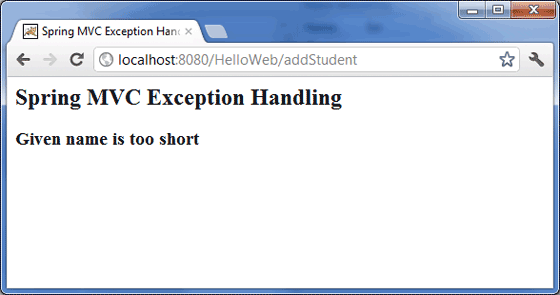
      <h3>${exception.exceptionMsg}</h3>
   </body>
</html>
以下是Spring檢視檔案result.jsp的內容
<%@taglib uri = "http://www.springframework.org/tags/form" prefix = "form"%>
<html>
   <head>
      <title>Spring MVC Form Handling</title>
   </head>

   <body>
      <h2>Submitted Student Information</h2>

      <table>
         <tr>
            <td>Name</td>
            <td>${name}</td>
         </tr>
         <tr>
            <td>Age</td>
            <td>${age}</td>
         </tr>
         <tr>
            <td>ID</td>
            <td>${id}</td>
         </tr>
      </table>
   </body>

</html>
最後,以下是需要包含在您的Web應用程式中的Spring和其他庫的列表。您只需將這些檔案拖放到WebContent/WEB-INF/lib資料夾中。
- commons-logging-x.y.z.jar
- org.springframework.asm-x.y.z.jar
- org.springframework.beans-x.y.z.jar
- org.springframework.context-x.y.z.jar
- org.springframework.core-x.y.z.jar
- org.springframework.expression-x.y.z.jar
- org.springframework.web.servlet-x.y.z.jar
- org.springframework.web-x.y.z.jar
- spring-web.jar
建立完原始檔和配置檔案後,匯出您的應用程式。右鍵單擊您的應用程式,並使用匯出 > WAR檔案選項,並將您的HelloWeb.war檔案儲存到Tomcat的webapps資料夾中。
現在啟動您的Tomcat伺服器,並確保您可以使用標準瀏覽器從webapps資料夾訪問其他網頁。現在嘗試訪問URL https://:8080/HelloWeb/student。如果您的Spring Web應用程式一切正常,您應該會看到以下結果。

輸入如上所示的值,然後單擊提交按鈕。如果您的Spring Web應用程式一切正常,您應該會看到以下結果。