
 資料結構
資料結構 網路
網路 關係型資料庫管理系統 (RDBMS)
 作業系統
作業系統 Java
Java MS Excel
 iOS
iOS HTML
HTML CSS
CSS Android
 Python
 C 程式設計
 C++
C++ C#
C# MongoDB
 MySQL
MySQL Javascript
 PHP
PHP 物理學
物理學 化學
化學 生物學
生物學 數學
數學 英語
英語 經濟學
經濟學 心理學
心理學 社會學
社會學 服裝設計
服裝設計 法學
法學將即時輸出的程序執行到 Tkinter GUI
本教程探討了使用 Python 將即時程序輸出整合到 Tkinter GUI 中。Tkinter 有助於建立視覺上吸引人的介面,而 subprocess 模組則有助於執行外部程序。透過結合這兩者並結合線程進行並行處理,開發人員可以建立響應迅速且互動式應用程式。
本教程概述了一個實際示例,以說明在基於 Tkinter 的 Python 應用程式中無縫整合即時輸出。在深入研究程式碼之前,讓我們簡要了解在 Tkinter GUI 中實現即時輸出所涉及的關鍵元件。
Tkinter − Tkinter 是 Python 的事實上的標準 GUI(圖形使用者介面)包。它提供建立視覺上吸引人且互動式使用者介面的工具。
subprocess 模組 − Python 的 subprocess 模組允許我們生成新程序,連線到它們的輸入/輸出/錯誤管道,並獲取它們的返回碼。
示例
讓我們逐步介紹一個簡單的示例,以演示在 Tkinter GUI 中執行具有即時輸出的程序。在本例中,我們將使用一個基本場景,其中命令列程序生成連續輸出。
import tkinter as tk
from tkinter import scrolledtext
import subprocess
from threading import Thread

class RealTimeOutputGUI:
   def __init__(self, root):
      self.root = root
      self.root.title("Real-time Output in Tkinter GUI")
	   root.geometry("720x250")

   # Create a scrolled text widget for real-time output
      self.output_text = scrolledtext.ScrolledText(root, wrap=tk.WORD, height=20, width=50)
      self.output_text.pack(padx=10, pady=10)

      # Button to start the process
      self.start_button = tk.Button(root, text="Start Process", command=self.start_process)
      self.start_button.pack(pady=10)

   def start_process(self):
      # Disable the button to prevent multiple process launches
      self.start_button['state'] = tk.DISABLED

      # Launch the process in a separate thread
      process_thread = Thread(target=self.run_process)
      process_thread.start()

   def run_process(self):
      # Command to simulate a process with continuous output
      command = ["python", "-u", "-c", "for i in range(5): print('Output:', i); import time; time.sleep(1)"]

      # Use subprocess to run the command
      process = subprocess.Popen(command, stdout=subprocess.PIPE, stderr=subprocess.STDOUT, text=True, bufsize=1)

      # Read and display real-time output in the GUI
      with process.stdout:
         for line in iter(process.stdout.readline, ''):
            self.output_text.insert(tk.END, line)
            self.output_text.yview(tk.END)
            self.root.update()

      # Enable the button after the process completes
      self.start_button['state'] = tk.NORMAL

# Create the Tkinter root window
root = tk.Tk()

# Instantiate the RealTimeOutputGUI class
real_time_output_gui = RealTimeOutputGUI(root)

root.mainloop()
理解程式碼結構
讓我們剖析程式碼結構,以理解 Python 指令碼如何協調 Tkinter、subprocess 和執行緒之間的互動。
Tkinter 設定 − 我們首先設定一個基本的 Tkinter GUI,其中包含一個滾動文字小部件用於顯示即時輸出,以及一個按鈕用於啟動程序。
start_process 方法 − 當用戶單擊“啟動程序”按鈕時,將呼叫此方法。它停用該按鈕以防止多次啟動程序,並啟動一個新執行緒來執行程序。
run_process 方法 − 此方法定義將要執行的實際程序。在本例中,我們使用 subprocess 來執行生成連續輸出的 Python 命令。即時輸出逐行讀取並在 Tkinter GUI 中顯示。
執行緒使用 − 我們使用 threading 模組中的 Thread 類在新執行緒中執行程序。這確保了在程序執行時 GUI 保持響應。
更新 GUI − 為了在 Tkinter GUI 中顯示即時輸出,我們使用 ScrolledText 小部件的 insert 方法。此外,呼叫 yview 方法以將捲軸保持在底部,確保始終可見最新的輸出。update 方法用於在程序執行期間重新整理 GUI。
輸出
執行此程式碼後,您將獲得以下輸出視窗:
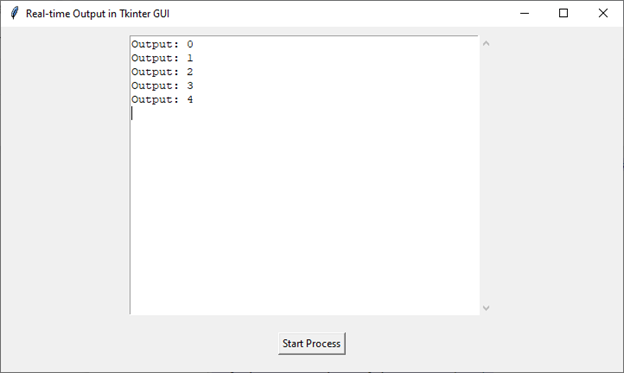
結論
總之,本教程中演示的將即時輸出整合到 Tkinter GUI 中,增強了各種 Python 應用程式的使用者體驗。透過結合用於圖形介面的 Tkinter、用於執行外部程序的subprocess 和用於並行執行的threading,開發人員可以建立響應迅速的互動式工具。

925 次瀏覽
