
 資料結構
資料結構 網路
網路 RDBMS
RDBMS 作業系統
作業系統 Java
Java MS Excel
 iOS
iOS HTML
HTML CSS
CSS Android
 Python
 C 程式設計
 C++
C++ C#
C# MongoDB
 MySQL
MySQL Javascript
 PHP
PHP 物理學
物理學 化學
化學 生物學
生物學 數學
數學 英語
英語 經濟學
經濟學 心理學
心理學 社會學
社會學 時尚設計
時尚設計 法學
法學如何在沒有 GUI 的情況下執行 Selenium(Firefox)WebDriver?
我們可以在沒有 GUI 的情況下執行 Selenium(Firefox)WebDriver。這意味著必須以**無介面 **模式啟動執行。現在無介面執行非常流行,因為它可以減少資源消耗。
設定**geckodriver **路徑後,可以在沒有 GUI 的情況下執行 Firefox。我們需要藉助**FirefoxOptions **類,透過**setHeadless **方法將此資訊分享給瀏覽器。最後,將**true **作為引數傳遞給它。
語法
FirefoxOptions op = new FirefoxOptions();
op.setHeadless(true);
WebDriver driver = new FirefoxDriver(op);
示例
程式碼實現。
import org.openqa.selenium.WebDriver;
import org.openqa.selenium.WebElement;
import org.openqa.selenium.firefox.FirefoxDriver;
import org.openqa.selenium.firefox.FirefoxOptions;
import java.util.concurrent.TimeUnit;
public class FirefoxNoGUI{
   public static void main(String[] args) {
      System.setProperty("webdriver.gecko.driver", "C:\Users\ghs6kor\Desktop\Java\geckodriver.exe");
      //FirefoxOptions object
      FirefoxOptions op = new FirefoxOptions();
      //pass true to headless mode
      op.setHeadless(true);
      // send headless information to Firefox driver
      WebDriver driver = new FirefoxDriver(op);
      // wait of 5 seconds
      driver.manage().timeouts().implicitlyWait(5, TimeUnit.SECONDS);
      driver.get("https://tutorialspoint.tw/about/about_careers.htm");
      // get page title
      System.out.println("Page Title without GUI: " + driver.getTitle());
      driver.quit();
   }
}
輸出
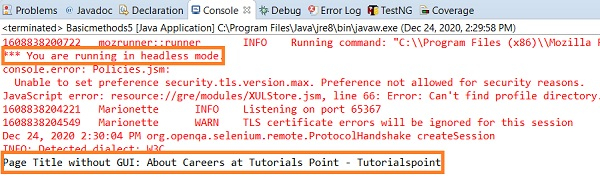

更新於: 2020 年 12 月 28 日
1K+ 人次瀏覽

廣告