
- 學習 Ruby on Rails
- Rails 2.1 首頁
- Rails 2.1 簡介
- Rails 2.1 安裝
- Rails 2.1 框架
- Rails 2.1 目錄結構
- Rails 2.1 示例
- Rails 2.1 資料庫設定
- Rails 2.1 Active Records
- Rails 2.1 遷移
- Rails 2.1 控制器
- Rails 2.1 檢視
- Rails 2.1 佈局
- Rails 2.1 腳手架
- Rails 2.1 和 AJAX
- Rails 2.1 上傳檔案
- Rails 2.1 傳送郵件
- 高階 Ruby on Rails 2.1
- Rails 2.1 RMagick 指南
- Rails 2.1 基本 HTTP 認證
- Rails 2.1 錯誤處理
- Rails 2.1 路由系統
- Rails 2.1 單元測試
- 高階 Ruby on Rails 2.1
- Rails 2.1 提示與技巧
- 快速參考指南
- 快速參考指南
- Ruby on Rails 2.1 有用資源
- Ruby on Rails 2.1 - 資源
- Ruby on Rails 2.1 - 討論
Ruby on Rails 2.1 - 傳送郵件
ActionMailer 是 Rails 元件,它使應用程式能夠傳送和接收電子郵件。在本章中,我們將瞭解如何使用 Rails 傳送電子郵件。
讓我們從使用以下命令建立 emails 專案開始。
C:\ruby> rails -d mysql emails
這裡我們使用 -d mysql 選項來指定我們希望使用 MySQL 資料庫。我們可以使用 -d 選項指定任何其他資料庫名稱,例如 oracle 或 postgress。預設情況下,Rails 使用 SQLite 資料庫。
設定資料庫
即使我們沒有在應用程式中使用資料庫,但 Rails 需要它才能繼續。所以讓我們執行以下額外步驟。
下面是建立資料庫的方法:
mysql> create database emails;
Query OK, 1 row affected (0.01 sec)

mysql> grant all privileges on emails.*
 to 'root'@'localhost' identified by 'password';
Query OK, 0 rows affected (0.00 sec)

mysql> FLUSH PRIVILEGES;
Query OK, 0 rows affected (0.00 sec)
為了指示 Rails 找到資料庫,請編輯配置檔案 ~\upload\config\database.yml 並將資料庫名稱更改為 cookbook。完成後,它應如下所示:
development:
   adapter: mysql
   encoding: utf8
   database: emails
   username: root
   password: password
   host: localhost
test:
   adapter: mysql
   encoding: utf8
   database: emails
   username: root
   password: password
   host: localhost
production:
   adapter: mysql
   encoding: utf8
   database: emails
   username: root
   password: password
   host: localhost
Action Mailer – 配置
在繼續實際工作之前,您必須按照以下步驟完成配置:
轉到 emails 專案的 config 資料夾並開啟 environment.rb 檔案,並在該檔案的底部新增以下行。
ActionMailer::Base.delivery_method = :smtp
它通知 ActionMailer 您要使用 SMTP 伺服器。如果您使用的是基於 Unix 的作業系統(例如 Mac OS X 或 Linux),也可以將其設定為 :sendmail。
在您的 environment.rb 的底部也新增以下程式碼行。
ActionMailer::Base.smtp_settings = {
   :address => "smtp.tutorialspoint.com",
   :port => 25,
   :domain => "tutorialspoint.com",
   :authentication => :login,
   :user_name => "username",
   :password => "password",
}
將每個雜湊值替換為您自己的簡單郵件傳輸協議 (SMTP) 伺服器的正確設定。如果您尚不清楚,可以從您的網際網路服務提供商處獲取此資訊。如果您使用的是標準 SMTP 伺服器,則無需更改埠號 25 和身份驗證型別。
您還可以更改預設的電子郵件訊息格式。如果您希望以 HTML 而不是純文字格式傳送電子郵件,請在 config/environment.rb 中新增以下行:
ActionMailer::Base.default_content_type = "text/html"
ActionMailer::Base.default_content_type 可以設定為 "text/plain"、"text/html" 和 "text/enriched"。預設值為 "text/plain"。
下一步是建立一個郵件程式。
生成郵件程式
使用以下命令生成郵件程式,如下所示:
C:\ruby\> cd emails
C:\ruby\emails> ruby script/generate mailer Emailer
它將在 app/models 目錄中建立一個檔案 emailer.rb。檢查此檔案的內容,如下所示:
class Emailer < ActionMailer::Base
end
現在讓我們在 ActionMailer::Base 類中建立一個方法,如下所示:
class Emailer < ActionMailer::Base
   def contact(recipient, subject, message, sent_at = Time.now)
      @subject = subject
      @recipients = recipient
      @from = 'no-reply@yourdomain.com'
      @sent_on = sent_at
      @body["title"] = 'This is title'
      @body["email"] = 'sender@yourdomain.com'
      @body["message"] = message
      @headers = {}
   end
end
contact 方法有四個引數:接收者、主題、訊息和 sent_at,它定義了何時傳送電子郵件。該方法還定義了六個標準引數,它們是每個 ActionMailer 方法的一部分:
@subject 定義電子郵件主題。
@body 是一個 Ruby 雜湊,其中包含可用於填充郵件模板的值。您建立了三個鍵值對:title、email 和 message
@recipients 是要傳送訊息的人員列表。
@from 定義電子郵件的傳送者。
@sent_on 獲取 sent_at 引數並設定電子郵件的時間戳。
@headers 是另一個雜湊,它使您能夠修改電子郵件標頭。例如,如果您想傳送純文字或 HTML 電子郵件,則可以設定電子郵件的 MIME 型別。
建立控制器
現在,我們將為該應用程式建立一個控制器,如下所示:
C:\ruby\emails> ruby script/generate controller Emailer
讓我們在 app/controllers/emailer_controller.rb 中定義一個控制器方法 sendmail,它將呼叫模型方法來發送實際的電子郵件,如下所示:
class EmailerController < ApplicationController
   def sendmail
      recipient = params[:email]
      subject = params[:subject]
      message = params[:message]
      Emailer.deliver_contact(recipient, subject, message)
      return if request.xhr?
      render :text => 'Message sent successfully'
   end
end
要使用郵件程式的 contact 方法傳送電子郵件,您必須在方法名稱的開頭新增 deliver_。如果您添加了一個 return if request.xhr?,以便在瀏覽器不支援 JavaScript 時可以轉到 Rails Java Script (RJS),然後指示方法呈現文字訊息。
您幾乎完成了,除了準備一個螢幕,您將在其中獲取使用者資訊以傳送電子郵件。讓我們在控制器中定義一個螢幕方法 index,然後在下一節中,我們將定義所有必需的檢視:
在 emailer_controller.rb 檔案中新增以下程式碼。
def index
   render :file => 'app\views\emailer\index.html.erb'
end
定義檢視
在 app\views\emails\index.html.erb 中定義一個檢視。這將被稱為應用程式的預設頁面,並允許使用者輸入訊息併發送所需的電子郵件:
<h1>Send Email</h1>
<% form_tag :action => 'sendmail' do %>
<p><label for="email_subject">Subject</label>:
<%= text_field 'email', 'subject' %></p>
<p><label for="email_recipient">Recipient</label>:
<%= text_field 'email', 'recipient' %></p>
<p><label for="email_message">Message</label><br/>
<%= text_area 'email', 'message' %></p>
<%= submit_tag "Send" %>
<% end %>
除了上述檢視之外,我們還需要一個模板,郵件程式的 contact 方法在傳送訊息時將使用它。這只是一段文字,其中散佈著標準的 Rails <%= %> 佔位符。
只需將以下程式碼放入 app/views/contact.html.erb 檔案中即可。
Hi!
You are having one email message from <%= @email %> with a title
<%= @title %>
and following is the message:
<%= @message %>
Thanks
測試準備
在測試之前,請確保您的計算機已連線到網際網路,並且您的電子郵件伺服器和 Web 伺服器正在執行。
現在,使用 http://127.0.0.1:3000/Emailer/index 測試您的應用程式。它將顯示以下螢幕,並且您可以使用此螢幕將訊息傳送給任何人。
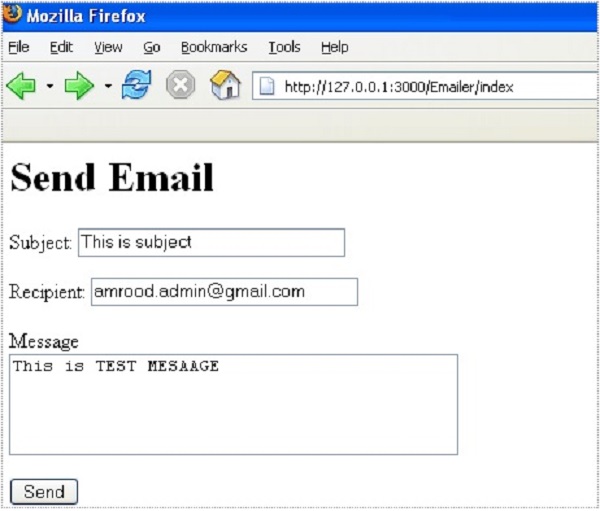
傳送訊息後,它將顯示文字訊息 - “訊息已成功傳送”。
使用 Rails 傳送 HTML 電子郵件
要以 HTML 格式傳送郵件,請確保您的檢視(.erb 檔案)生成 HTML,並在您的 emails/app/models/emailer.rb 檔案中將內容型別設定為 html,如下所示:
class Emailer < ActionMailer::Base
   def contact(recipient, subject, message, sent_at = Time.now)
      @subject = subject
      @recipients = recipient
      @from = 'no-reply@yourdomain.com'
      @sent_on = sent_at
      @body["title"] = 'This is title'
      @body["email"] = 'sender@yourdomain.com'
      @body["message"] = message
      @headers = {content_type => 'text/html'}
   end
end
有關 ActionMailer 的完整詳細資訊,請參閱標準 Ruby 文件。