
- 學習 Ruby on Rails
- Rails 2.1 首頁
- Rails 2.1 簡介
- Rails 2.1 安裝
- Rails 2.1 框架
- Rails 2.1 目錄結構
- Rails 2.1 示例
- Rails 2.1 資料庫設定
- Rails 2.1 Active Records
- Rails 2.1 資料庫遷移
- Rails 2.1 控制器
- Rails 2.1 檢視
- Rails 2.1 佈局
- Rails 2.1 腳手架
- Rails 2.1 和 AJAX
- Rails 2.1 上傳檔案
- Rails 2.1 傳送郵件
- 高階 Ruby on Rails 2.1
- Rails 2.1 RMagick 指南
- Rails 2.1 基本 HTTP 認證
- Rails 2.1 錯誤處理
- Rails 2.1 路由系統
- Rails 2.1 單元測試
- 高階 Ruby on Rails 2.1
- Rails 2.1 提示與技巧
- 快速參考指南
- 快速參考指南
- Ruby on Rails 2.1 有用資源
- Ruby on Rails 2.1 - 資源
- Ruby on Rails 2.1 - 討論
Ruby on Rails 2.1 - 腳手架
在開發 Rails 應用程式時,特別是那些主要提供資料庫中資料簡單介面的應用程式,使用腳手架方法通常很有用。
腳手架提供的不僅僅是廉價的演示效果。它還有一些好處:
您可以快速向用戶提供程式碼以獲取反饋。
您可以透過更快的成功獲得動力。
您可以透過檢視生成的程式碼來學習 Rails 的工作原理。
您可以使用腳手架作為基礎來啟動您的開發。
腳手架示例
Ruby on Rails 2.0 改變了 Rails 使用腳手架的方式。為了理解腳手架,讓我們建立一個名為cookbook的資料庫和一個名為recipes的表。
建立空的 Rails Web 應用程式
開啟命令視窗並導航到您要建立此cookbook Web 應用程式的位置。我們使用了 c:\ruby。執行以下命令以建立完整的目錄結構和所需的.yml檔案 MySQL 資料庫。
C:\ruby> rails -d mysql cookbook
在這裡,我們使用-d mysql選項來指定我們希望使用 MySQL 資料庫。我們可以使用-d選項指定任何其他資料庫名稱,例如oracle或postgress。預設情況下,Rails 使用SQLite資料庫。
設定資料庫
以下是建立資料庫的方法:
mysql> create database cookbook;
Query OK, 1 row affected (0.01 sec)

mysql> grant all privileges on cookbook.*
 to 'root'@'localhost' identified by 'password';
Query OK, 0 rows affected (0.00 sec)

mysql> FLUSH PRIVILEGES;
Query OK, 0 rows affected (0.00 sec)
為了指示 Rails 找到資料庫,請編輯配置檔案 ~\cookbook\config\database.yml 並將資料庫名稱更改為 cookbook。完成後,它應如下所示:
development:
   adapter: mysql
   encoding: utf8
   database: cookbook
   username: root
   password: password
   host: localhost
test:
   adapter: mysql
   encoding: utf8
   database: cookbook
   username: root
   password: password
   host: localhost
production:
   adapter: mysql
   encoding: utf8
   database: cookbook
   username: root
   password: password
   host: localhost
注意 - 如果您想使用 MySQL 之外的任何其他資料庫,則可以使用類似的設定來配置其他資料庫介面卡。
Rails 允許您在開發模式、測試模式或生產模式下執行,使用不同的資料庫。此應用程式對每個模式都使用相同的資料庫。
資料庫表定義
假設我們的recipes表具有以下結構:
id INT(11)
title VARCHAR(40)
chef VARCHAR(40)
instructions VARCHAR(255)
生成的腳手架程式碼
使用scaffold操作,Rails 會動態生成它所需的所有程式碼。透過執行scaffold作為指令碼,生成模型以及腳手架,以及所需的資料庫遷移指令碼,以及控制器、幫助程式和測試支援檔案,如下所示:
cookbook> ruby script/generate scaffold Recipe title:string \
chef:string instructions:text
注意使用單數名稱Recipe來建立複數表名recipes。但是,上述命令將生成以下訊息:
   exists  app/models/
   exists  app/controllers/
   exists  app/helpers/
   create  app/views/recipes
   exists  app/views/layouts/
   exists  test/functional/
   exists  test/unit/
   exists  public/stylesheets/
   create  app/views/recipes/index.html.erb
   create  app/views/recipes/show.html.erb
   create  app/views/recipes/new.html.erb
   create  app/views/recipes/edit.html.erb
   create  app/views/layouts/recipes.html.erb
   create  public/stylesheets/scaffold.css
   create  app/controllers/recipes_controller.rb
   create  test/functional/recipes_controller_test.rb
   create  app/helpers/recipes_helper.rb
   route  map.resources :recipes
dependency  model
   exists    app/models/
   exists    test/unit/
   exists    test/fixtures/
   create    app/models/recipe.rb
   create    test/unit/recipe_test.rb
   create    test/fixtures/recipes.yml
   create    db/migrate
   create    db/migrate/20080614192220_create_recipes.rb
cookbook>
現在,讓我們檢查一下幕後發生了什麼。
控制器
讓我們看看控制器背後的程式碼。此程式碼由scaffold生成器生成。如果您開啟 app/controllers/recipes_controller.rb,您會發現如下內容:
class RecipesController < ApplicationController
   # GET /recipes
   # GET /recipes.xml
   def index
      @recipes = Recipe.find(:all)

      respond_to do |format|
         format.html # index.html.erb
         format.xml  { render :xml => @recipes }
      end
   end

   # GET /recipes/1
   # GET /recipes/1.xml
   def show
      @recipe = Recipe.find(params[:id])

      respond_to do |format|
         format.html # show.html.erb
         format.xml  { render :xml => @recipe }
      end
   end

   # GET /recipes/new
   # GET /recipes/new.xml
   def new
      @recipe = Recipe.new

      respond_to do |format|
         format.html # new.html.erb
         format.xml  { render :xml => @recipe }
      end
   end

   # GET /recipes/1/edit
   def edit
      @recipe = Recipe.find(params[:id])
   end

   # POST /recipes
   # POST /recipes.xml
   def create
      @recipe = Recipe.new(params[:recipe])

      respond_to do |format|
      if @recipe.save
         flash[:notice] = 'Recipe was successfully created.'
         format.html { redirect_to(@recipe) }
         format.xml  { render :xml =>
            @recipe, :status => :created, :location => @recipe }
      else
         format.html { render :action => "new" }
         format.xml  { render :xml =>
            @recipe.errors, :status => :unprocessable_entity }
         end
      end
   end

   # PUT /recipes/1
   # PUT /recipes/1.xml
   def update
   @recipe = Recipe.find(params[:id])

   respond_to do |format|
      if @recipe.update_attributes(params[:recipe])
         flash[:notice] = 'Recipe was successfully updated.'
         format.html { redirect_to(@recipe) }
         format.xml  { head :ok }
      else
         format.html { render :action => "edit" }
         format.xml  { render :xml => @recipe.errors,
                      :status => :unprocessable_entity }
      end

   end

   # DELETE /recipes/1
   # DELETE /recipes/1.xml
   def destroy
      @recipe = Recipe.find(params[:id])
      @recipe.destroy

      respond_to do |format|
         format.html { redirect_to(recipes_url) }
         format.xml  { head :ok }
      end
   end
end
此檔案自動實現了所有方法。您可以使用這些可用方法執行任何建立、讀取、刪除或編輯操作。
當 Rails 應用程式的使用者選擇一個操作,例如“顯示” - 控制器將執行相應部分中的任何程式碼 - “def show” - 然後預設情況下將呈現相同名稱的模板 - “show.html.erb”。此預設行為可以透過覆蓋任何模板中的程式碼來覆蓋。
控制器使用 ActiveRecord 方法,例如find、find_all、new、save、update_attributes 和 destroy來將資料移動到資料庫表和從資料庫表移動資料。請注意,您不必編寫任何 SQL 語句,Rails 會自動處理。
檢視
所有檢視和相應的控制器方法都是由scaffold命令建立的,它們位於 app/views/recipes 目錄中。您將在該目錄中找到以下檔案:
index.html.erb - 這是顯示預設頁面的模板檔案,當您鍵入 http://127.0.0.1:3000/recipes 時將執行。
new.html.erb - 這是建立新食譜的模板,每當您嘗試建立新食譜時都會執行。
show.html.erb - 這是顯示資料庫中所有食譜的模板,每當您嘗試檢視所有食譜時都會執行。
edit.html.erb - 這是編輯資料庫中任何食譜的模板,每當您嘗試編輯任何食譜時都會執行。
我們建議您逐個開啟這些檔案並嘗試理解它們的原始碼。
遷移
您會在~/cookbook/db/migrate子目錄中找到一個遷移檔案。此檔案將具有以下內容:
class CreateRecipes < ActiveRecord::Migration
   def self.up
      create_table :recipes do |t|
         t.string :title
         t.string :chef
         t.text :instructions
         t.timestamps
      end
   end

   def self.down
      drop_table :recipes
   end
end
要建立資料庫中所需的檔案,請使用以下輔助指令碼。
cookbook> rake db:migrate
此命令將在您的cookbook資料庫中建立recipes和schema_migrations表。在繼續之前,請確保您已在資料庫中成功建立了所需的表。
準備測試
上述所有步驟都使您的資料庫表生動起來。它為您的資料提供了一個簡單的介面,以及以下方法:
- 建立新條目
- 編輯當前條目
- 檢視當前條目
- 銷燬當前條目
在建立或編輯條目時,腳手架將完成表單生成和處理的所有繁重工作。它甚至會提供智慧表單生成,支援以下型別的輸入:
- 簡單的文字字串
- 文字區域(或大塊文字)
- 日期選擇器
- 日期時間選擇器
現在,轉到 cookbook 目錄並使用以下命令執行 Web 伺服器:
cookbook> ruby script/server
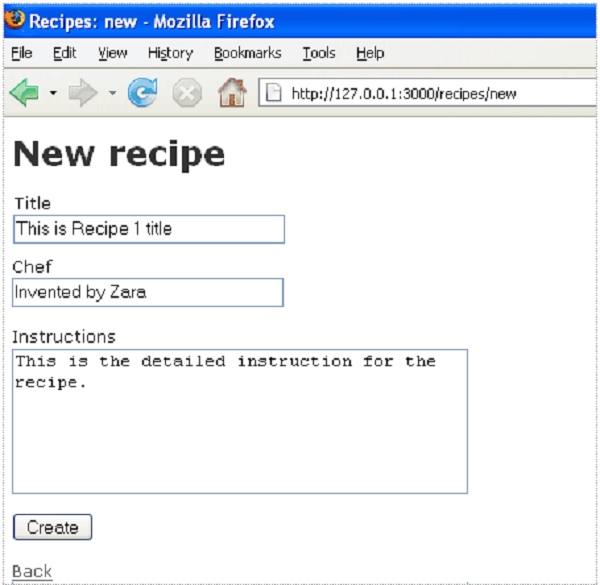
現在,開啟瀏覽器並導航到 http://127.0.0.1:3000/recipes/new。它將提供一個螢幕,用於在 recipes 表中建立新條目。螢幕截圖如下所示:
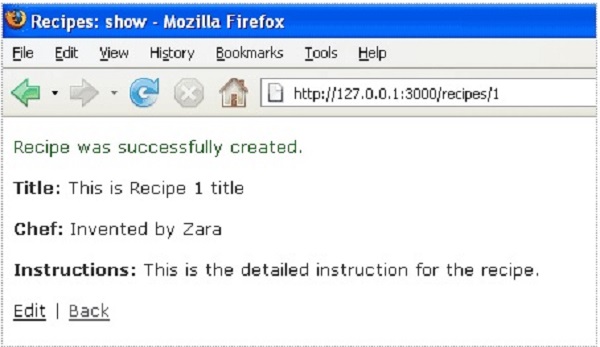
現在,在給定的文字框中輸入一些值,然後按“建立”按鈕以建立新的食譜。您的記錄將新增到 recipes 表中,並將顯示以下結果:
您可以使用編輯選項來編輯食譜,或者使用返回按鈕返回上一頁。假設您按下了返回按鈕,它將顯示資料庫中所有可用的食譜。由於我們的資料庫中只有一條記錄,它將顯示以下螢幕:
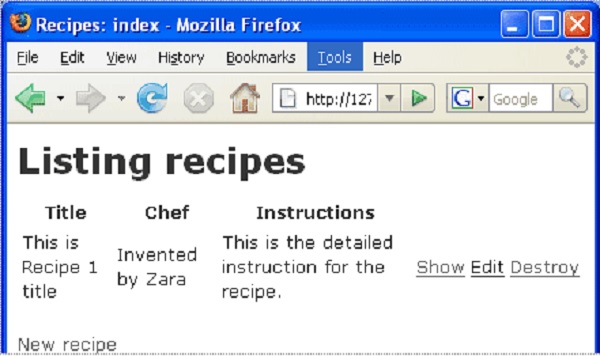
此螢幕使您可以檢視食譜表的完整詳細資訊。此外,它還提供編輯甚至刪除表的選項。
增強模型
Rails 免費為您提供了大量的錯誤處理。為了理解這一點,請向空的食譜模型新增一些驗證規則:
修改~/cookbook/app/models/recipe.rb如下,然後測試您的應用程式:
class Recipe < ActiveRecord::Base
   validates_length_of :title, :within => 1..20
   validates_uniqueness_of :title, :message => "already exists"
end
這些條目將提供自動檢查,例如:
validates_length_of - 欄位不為空且不超過長度限制。
validates_uniqueness_of - 重複值會被捕獲。我們給出了自定義訊息,而不是預設的 Rails 錯誤訊息。
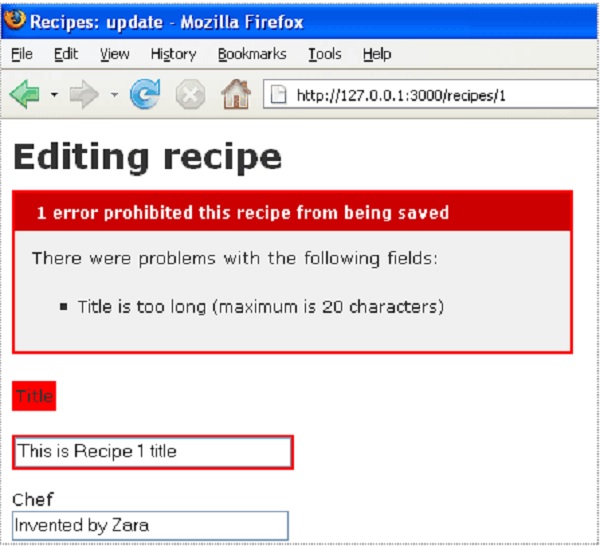
在這裡,我們嘗試在編輯現有記錄時提供一個更長的標題。由於我們添加了上述驗證,因此會產生以下錯誤訊息:
腳手架有何不同?
如果您閱讀了前面的章節,那麼您一定已經看到我們建立了列出、顯示、刪除和建立資料的方法,但是腳手架會自動完成這項工作。