
- Requests 教程
- Requests - 首頁
- Requests - 概述
- Requests - 環境搭建
- Requests - HTTP 請求是如何工作的?
- Requests - 使用 Requests
- 處理 HTTP 請求的響應
- 請求 - HTTP 請求頭
- Requests - 處理 GET 請求
- 處理 POST、PUT、PATCH 和 DELETE 請求
- Requests - 檔案上傳
- Requests - 使用 Cookie
- Requests - 處理錯誤
- Requests - 處理超時
- Requests - 處理重定向
- Requests - 處理歷史記錄
- Requests - 處理會話
- Requests - SSL 證書
- Requests - 身份驗證
- Requests - 事件鉤子
- Requests - 代理
- Requests - 使用 Requests 進行網頁抓取
- Requests 有用資源
- Requests - 快速指南
- Requests - 有用資源
- Requests - 討論
請求 - HTTP 請求頭
在上一章中,我們學習瞭如何發出請求並獲取響應。本章將更深入地探討 URL 的標頭部分。因此,我們將研究以下內容:
- 理解請求頭
- 自定義標頭
- 響應頭
理解請求頭
在瀏覽器中點選任何 URL,檢查它並在開發者工具的網路選項卡中檢視。
您將獲得響應頭、請求頭、有效負載等。
例如,考慮以下 URL:
https://jsonplaceholder.typicode.com/users
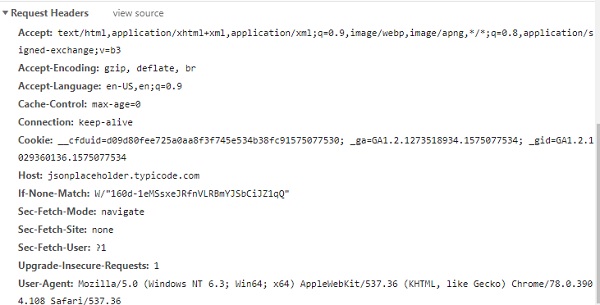
您可以按照以下步驟獲取標頭詳細資訊:
示例
import requests
getdata = requests.get('https://jsonplaceholder.typicode.com/users',
stream = True)
print(getdata.headers)
輸出
E:\prequests>python makeRequest.py
{'Date': 'Sat, 30 Nov 2019 05:15:00 GMT', 'Content-Type': 'application/json;
charset=utf-8', 'Transfer-Encoding': 'chunked', 'Connection': 'keep-alive',
'Set-Cookie': '__cfduid=d2b84ccf43c40e18b95122b0b49f5cf091575090900; expires=Mon, 30-De
c-19 05:15:00 GMT; path=/; domain=.typicode.com; HttpOnly', 'X-Powered-By':
'Express', 'Vary': 'Origin, Accept-Encoding', 'Access-Control-Allow-Credentials': 't
rue', 'Cache-Control': 'max-age=14400', 'Pragma': 'no-cache', 'Expires': '-1', '
X-Content-Type-Options': 'nosniff', 'Etag': 'W/"160d-1eMSsxeJRfnVLRBmYJSbCiJZ1qQ
"', 'Content-Encoding': 'gzip', 'Via': '1.1 vegur', 'CF-Cache-Status': 'HIT',
'Age': '2271', 'Expect-CT': 'max-age=604800,
report-uri="https://report-uri.cloudflare.com/cdn-cgi/beacon/expect-ct"', 'Server': 'cloudflare', 'CF-RAY': '53da574f
f99fc331-SIN'}
要讀取任何 HTTP 標頭,您可以執行以下操作:
getdata.headers["Content-Encoding"] // gzip
自定義標頭
您還可以將標頭髮送到被呼叫的 URL,如下所示。
示例
import requests
headers = {'x-user': 'test123'}
getdata = requests.get('https://jsonplaceholder.typicode.com/users',
headers=headers)
傳遞的標頭必須是字串、位元組字串或 Unicode 格式。請求的行為不會根據傳遞的自定義標頭而改變。
響應頭
當您在瀏覽器開發者工具的網路選項卡中檢查 URL 時,響應頭如下所示:
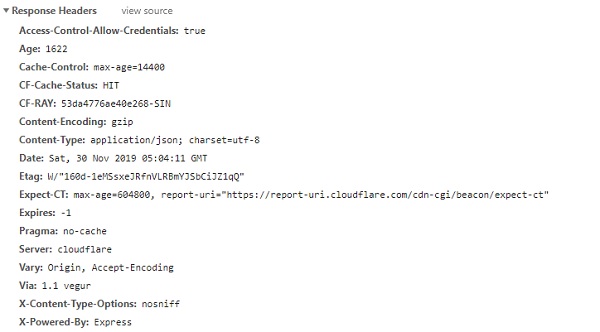
要從 requests 模組獲取標頭詳細資訊,請使用 Response.headers,如下所示:
示例
import requests
getdata = requests.get('https://jsonplaceholder.typicode.com/users')
print(getdata.headers)
輸出
E:\prequests>python makeRequest.py
{'Date': 'Sat, 30 Nov 2019 06:08:10 GMT', 'Content-Type': 'application/json;
charset=utf-8', 'Transfer-Encoding': 'chunked', 'Connection': 'keep-alive',
'Set-Cookie': '__cfduid=de1158f1a5116f3754c2c353055694e0d1575094090; expires=Mon,
30-Dec-19 06:08:10 GMT; path=/; domain=.typicode.com; HttpOnly', 'X-Powered-By':
'Express', 'Vary': 'Origin, Accept-Encoding', 'Access-Control-Allow-Credentials': 't
rue', 'Cache-Control': 'max-age=14400', 'Pragma': 'no-cache', 'Expires': '-1', '
X-Content-Type-Options': 'nosniff', 'Etag': 'W/"160d-1eMSsxeJRfnVLRBmYJSbCiJZ1qQ
"', 'Content-Encoding': 'gzip', 'Via': '1.1 vegur', 'CF-Cache-Status': 'HIT',
'Age': '5461', 'Expect-CT': 'max-age=604800, report-uri="https://report-uri.cloudf
lare.com/cdn-cgi/beacon/expect-ct"', 'Server': 'cloudflare', 'CF-RAY': '53daa52f
3b7ec395-SIN'}
您可以獲取任何所需的特定標頭,如下所示:
print(getdata.headers["Expect-CT"])
輸出
max-age=604800, report-uri="https://report-uri.cloudflare.com/cdn-cgi/beacon/exp
ect-ct
您還可以使用 get() 方法獲取標頭詳細資訊。
print(getdata.headers.get("Expect-CT"))
輸出
max-age=604800, report-uri="https://report-uri.cloudflare.com/cdn-cgi/beacon/exp
ect-ct
廣告