
- PySimpleGUI 教程
- PySimpleGUI - 首頁
- PySimpleGUI - 簡介
- PySimpleGUI - 環境設定
- PySimpleGUI - Hello World
- PySimpleGUI - 彈窗
- PySimpleGUI - 視窗類
- PySimpleGUI - 元素類
- PySimpleGUI - 事件
- PySimpleGUI - 選單欄
- PySimpleGUI - Matplotlib 整合
- PySimpleGUI - 使用 PIL
- PySimpleGUI - 偵錯程式
- PySimpleGUI - 設定
- PySimpleGUI 有用資源
- PySimpleGUI - 快速指南
- PySimpleGUI - 有用資源
- PySimpleGUI - 討論
PySimpleGUI - 框架元素
框架元素是一個容器物件,包含一個或多個其他型別的元素。它幫助以邏輯方式組織 GUI 元素。例如,屬於同一組的多個單選按鈕元素被放置在框架內。它在元素周圍形成一個矩形邊框。框架可以具有標籤,並且可以根據要求放置。
PySimpleGUI.Frame(title, layout, title_location)
title 引數是在框架的“標籤”或標題中顯示的文字。框架物件可以被視為主窗口布局的子佈局。 它也可能是元素列表的列表。
“title_location”是一個列舉字串,用於決定標籤在框架中的位置。預定義的值包括頂部、底部、左側、右側、左上角、右上角、左下角和右下角。
框架物件通常不被用作事件偵聽器。 但是,當單擊框架區域時,其標題可以更新,儘管此功能很少使用。
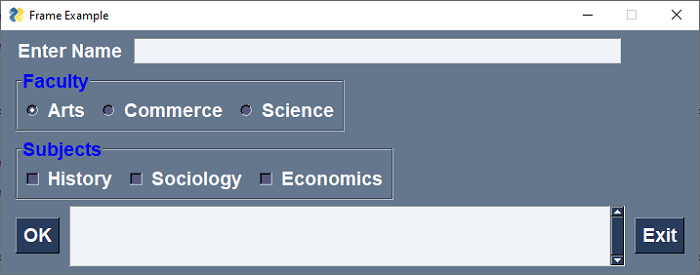
以下程式碼與複選框示例中的程式碼相同。此處,用於選擇學院和所選學院中的科目作為複選框的三個單選按鈕被放在單獨的框架中。
import PySimpleGUI as psg
psg.set_options(font=("Arial Bold", 14))
l1 = psg.Text("Enter Name")
l2 = psg.Text("Faculty")
l3 = psg.Text("Subjects")
l4 = psg.Text("Category")
l5 = psg.Multiline(" ", expand_x=True, key='-OUT-',  expand_y=True, justification='left')
t1 = psg.Input("", key='-NM-')
rb = []
rb.append(psg.Radio("Arts", "faculty", key='arts',  enable_events=True, default=True))
rb.append(psg.Radio("Commerce", "faculty", key='comm', enable_events=True))
rb.append(psg.Radio("Science", "faculty", key='sci', enable_events=True))
cb = []
cb.append(psg.Checkbox("History", key='s1'))
cb.append(psg.Checkbox("Sociology", key='s2'))
cb.append(psg.Checkbox("Economics", key='s3'))
b1 = psg.Button("OK")
b2 = psg.Button("Exit")
rlo = psg.Frame("Faculty", [rb], title_color='blue')
clo = psg.Frame("Subjects", [cb], title_color='blue')
layout = [[l1, t1], [rlo], [clo], [b1, l5, b2]]
window = psg.Window('Frame Example', layout, size=(715, 200))
程式的輸出如下所示 -
pysimplegui_element_class.htm
廣告