
- PHP 教程
- PHP - 首頁
- PHP - 簡介
- PHP - 安裝
- PHP - 歷史
- PHP - 特性
- PHP - 語法
- PHP - Hello World
- PHP - 註釋
- PHP - 變數
- PHP - Echo/Print
- PHP - var_dump
- PHP - $ 和 $$ 變數
- PHP - 常量
- PHP - 魔術常量
- PHP - 資料型別
- PHP - 型別轉換
- PHP - 型別混合
- PHP - 字串
- PHP - 布林值
- PHP - 整數
- PHP - 檔案與 I/O
- PHP - 數學函式
- PHP - Heredoc 和 Nowdoc
- PHP - 複合型別
- PHP - 檔案包含
- PHP - 日期與時間
- PHP - 標量型別宣告
- PHP - 返回型別宣告
- PHP 運算子
- PHP - 運算子
- PHP - 算術運算子
- PHP - 比較運算子
- PHP - 邏輯運算子
- PHP - 賦值運算子
- PHP - 字串運算子
- PHP - 陣列運算子
- PHP - 條件運算子
- PHP - 展開運算子
- PHP - 空值合併運算子
- PHP - 比較運算子
- PHP 控制語句
- PHP - 決策
- PHP - If…Else 語句
- PHP - Switch 語句
- PHP - 迴圈型別
- PHP - For 迴圈
- PHP - Foreach 迴圈
- PHP - While 迴圈
- PHP - Do…While 迴圈
- PHP - Break 語句
- PHP - Continue 語句
- PHP 函式
- PHP - 函式
- PHP - 函式引數
- PHP - 按值傳遞
- PHP - 按引用傳遞
- PHP - 預設引數
- PHP - 具名引數
- PHP - 可變引數
- PHP - 返回值
- PHP - 傳遞函式
- PHP - 遞迴函式
- PHP - 型別提示
- PHP - 變數作用域
- PHP - 嚴格型別
- PHP - 匿名函式
- PHP - 箭頭函式
- PHP - 可變函式
- PHP - 區域性變數
- PHP - 全域性變數
- PHP 超全域性變數
- PHP - 超全域性變數
- PHP - $GLOBALS
- PHP - $_SERVER
- PHP - $_REQUEST
- PHP - $_POST
- PHP - $_GET
- PHP - $_FILES
- PHP - $_ENV
- PHP - $_COOKIE
- PHP - $_SESSION
- PHP 檔案處理
- PHP - 檔案處理
- PHP - 開啟檔案
- PHP - 讀取檔案
- PHP - 寫入檔案
- PHP - 檔案是否存在
- PHP - 下載檔案
- PHP - 複製檔案
- PHP - 追加檔案
- PHP - 刪除檔案
- PHP - 處理 CSV 檔案
- PHP - 檔案許可權
- PHP - 建立目錄
- PHP - 列出檔案
- 面向物件 PHP
- PHP - 面向物件程式設計
- PHP - 類和物件
- PHP - 建構函式和解構函式
- PHP - 訪問修飾符
- PHP - 繼承
- PHP - 類常量
- PHP - 抽象類
- PHP - 介面
- PHP - 特性
- PHP - 靜態方法
- PHP - 靜態屬性
- PHP - 名稱空間
- PHP - 物件迭代
- PHP - 封裝
- PHP - Final 關鍵字
- PHP - 過載
- PHP - 克隆物件
- PHP - 匿名類
- PHP Web 開發
- PHP - Web 概念
- PHP - 表單處理
- PHP - 表單驗證
- PHP - 表單郵件/URL
- PHP - 完整表單
- PHP - 檔案包含
- PHP - GET 和 POST
- PHP - 檔案上傳
- PHP - Cookies
- PHP - Sessions
- PHP - Session 選項
- PHP - 傳送郵件
- PHP - 淨化輸入
- PHP - Post-Redirect-Get (PRG)
- PHP - 快閃記憶體訊息
- PHP 高階
- PHP - MySQL
- PHP.INI 檔案配置
- PHP - 陣列解構
- PHP - 編碼規範
- PHP - 正則表示式
- PHP - 錯誤處理
- PHP - Try…Catch
- PHP - Bug 除錯
- PHP - 針對 C 開發人員
- PHP - 針對 PERL 開發人員
- PHP - 框架
- PHP - Core PHP 與框架
- PHP - 設計模式
- PHP - 過濾器
- PHP - JSON
- PHP - 異常
- PHP - 特殊型別
- PHP - 雜湊
- PHP - 加密
- PHP - is_null() 函式
- PHP - 系統呼叫
- PHP - HTTP 認證
- PHP - 交換變數
- PHP - Closure::call()
- PHP - 過濾後的 unserialize()
- PHP - IntlChar
- PHP - CSPRNG
- PHP - 期望
- PHP - Use 語句
- PHP - 整數除法
- PHP - 已棄用的特性
- PHP - 已移除的擴充套件和 SAPIs
- PHP - PEAR
- PHP - CSRF
- PHP - FastCGI 程序
- PHP - PDO 擴充套件
- PHP - 內建函式
- PHP 有用資源
- PHP - 速查表
- PHP - 問答
- PHP - 快速指南
- PHP - 線上編譯器
- PHP - 有用資源
- PHP - 討論
PHP - 下載檔案
大多數現代瀏覽器允許自動下載某些型別的檔案,而無需任何伺服器端程式碼,例如 PHP 指令碼。例如,zip 檔案或 EXE 檔案。
如果 HTML 超連結指向 ZIP 或 EXE 檔案,瀏覽器會下載它並彈出儲存對話方塊。但是,文字檔案、影像檔案等不會下載,而是在瀏覽器中開啟,您可以將其儲存到本地檔案系統。
readfile() 函式
要下載此類檔案(而不是瀏覽器自動開啟它們),我們可以在 PHP 的內建函式庫中使用readfile() 函式。
readfile(string $filename,
bool $use_include_path = false,
?resource $context = null)
: int|false
此函式讀取檔案並將其寫入輸出緩衝區。
第二個引數$use_include_path 預設情況下為 false,因此當前目錄中的檔案將被下載。如果設定為true,則將搜尋新增到php.ini 配置的include_path 設定中的目錄以找到要下載的檔案。
readfile() 函式返回讀取的位元組數或 false,即使它已成功完成或未完成。
示例
以下 PHP 指令碼顯示了 readfile() 函式的使用。
要下載檔案,Content-Type 響應頭應設定為application/octect-stream。此 MIME 型別是二進位制檔案的預設型別。瀏覽器通常不會執行它,甚至不會詢問是否應該執行它。
此外,將 Content-Disposition 標頭設定為 attachment 會提示彈出“另存為”對話方塊。
<?php
   $filePath = 'welcome.png';

   // Set the Content-Type header to application/octet-stream
   header('Content-Type: application/octet-stream');

   // Set the Content-Disposition header to the filename of the downloaded file
   header('Content-Disposition: attachment; filename="'. basename($filePath).'"');

   // Read the contents of the file and output it to the browser.
   readfile($filePath);
?>
將上述指令碼儲存為文件根資料夾中的“download.php”。確保要下載的檔案位於同一資料夾中。
啟動伺服器並在瀏覽器中訪問https:///download.php。您將獲得如下所示的“另存為”對話方塊 -
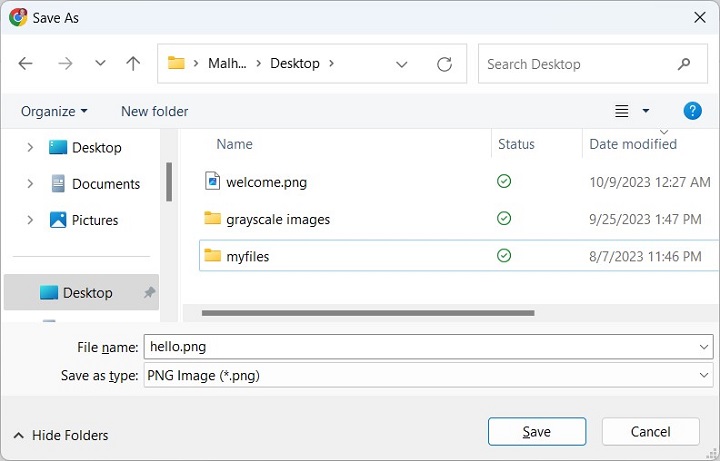
您可以選擇名稱並下載檔案。
對於大型檔案,您可以從檔案流中以特定預定義大小的塊讀取它。如果 Content-Disposition 頭設定為“attachment”(如前面的示例所示),瀏覽器會提供將其儲存到本地檔案系統中。
<?php
   $filename = 'welcome.png';

   header('Content-Type: application/octet-stream');
   header('Content-Disposition: attachment; filename="' . basename($filename) . '"');

   $handle = fopen($filename, 'rb');
   $buffer = '';
   $chunkSize = 1024 * 1024;

   ob_start();
   while (!feof($handle)) {
      $buffer = fread($handle, $chunkSize);
      echo $buffer;
      ob_flush();
      flush();
   }
   fclose($handle);
?>