
- PHP 教程
- PHP - 首頁
- PHP - 簡介
- PHP - 安裝
- PHP - 歷史
- PHP - 特性
- PHP - 語法
- PHP - Hello World
- PHP - 註釋
- PHP - 變數
- PHP - Echo/Print
- PHP - var_dump
- PHP - $ 和 $$ 變數
- PHP - 常量
- PHP - 魔術常量
- PHP - 資料型別
- PHP - 型別轉換
- PHP - 型別混合
- PHP - 字串
- PHP - 布林值
- PHP - 整數
- PHP - 檔案與 I/O
- PHP - 數學函式
- PHP - Heredoc 和 Nowdoc
- PHP - 複合型別
- PHP - 檔案包含
- PHP - 日期和時間
- PHP - 標量型別宣告
- PHP - 返回型別宣告
- PHP 運算子
- PHP - 運算子
- PHP - 算術運算子
- PHP - 比較運算子
- PHP - 邏輯運算子
- PHP - 賦值運算子
- PHP - 字串運算子
- PHP - 陣列運算子
- PHP - 條件運算子
- PHP - 展開運算子
- PHP - 空值合併運算子
- PHP - 比較符
- PHP 控制語句
- PHP - 決策
- PHP - If...Else 語句
- PHP - Switch 語句
- PHP - 迴圈型別
- PHP - For 迴圈
- PHP - Foreach 迴圈
- PHP - While 迴圈
- PHP - Do...While 迴圈
- PHP - Break 語句
- PHP - Continue 語句
- PHP 函式
- PHP - 函式
- PHP - 函式引數
- PHP - 按值傳遞
- PHP - 按引用傳遞
- PHP - 預設引數
- PHP - 具名引數
- PHP - 可變引數
- PHP - 返回值
- PHP - 傳遞函式
- PHP - 遞迴函式
- PHP - 型別提示
- PHP - 變數作用域
- PHP - 嚴格型別
- PHP - 匿名函式
- PHP - 箭頭函式
- PHP - 可變函式
- PHP - 區域性變數
- PHP - 全域性變數
- PHP 超全域性變數
- PHP - 超全域性變數
- PHP - $GLOBALS
- PHP - $_SERVER
- PHP - $_REQUEST
- PHP - $_POST
- PHP - $_GET
- PHP - $_FILES
- PHP - $_ENV
- PHP - $_COOKIE
- PHP - $_SESSION
- PHP 檔案處理
- PHP - 檔案處理
- PHP - 開啟檔案
- PHP - 讀取檔案
- PHP - 寫入檔案
- PHP - 檔案是否存在
- PHP - 下載檔案
- PHP - 複製檔案
- PHP - 追加檔案
- PHP - 刪除檔案
- PHP - 處理 CSV 檔案
- PHP - 檔案許可權
- PHP - 建立目錄
- PHP - 列出檔案
- 面向物件 PHP
- PHP - 面向物件程式設計
- PHP - 類和物件
- PHP - 建構函式和解構函式
- PHP - 訪問修飾符
- PHP - 繼承
- PHP - 類常量
- PHP - 抽象類
- PHP - 介面
- PHP - 特性
- PHP - 靜態方法
- PHP - 靜態屬性
- PHP - 名稱空間
- PHP - 物件迭代
- PHP - 封裝
- PHP - Final 關鍵字
- PHP - 過載
- PHP - 克隆物件
- PHP - 匿名類
- PHP Web 開發
- PHP - Web 概念
- PHP - 表單處理
- PHP - 表單驗證
- PHP - 表單郵件/URL
- PHP - 完整表單
- PHP - 檔案包含
- PHP - GET 和 POST
- PHP - 檔案上傳
- PHP - Cookie
- PHP - Session
- PHP - Session 選項
- PHP - 傳送郵件
- PHP - 過濾輸入
- PHP - Post-Redirect-Get (PRG)
- PHP - 快閃記憶體訊息
- PHP 高階
- PHP - MySQL
- PHP.INI 檔案配置
- PHP - 陣列解構
- PHP - 編碼規範
- PHP - 正則表示式
- PHP - 錯誤處理
- PHP - Try...Catch
- PHP - Bug 除錯
- PHP - 適用於 C 開發人員
- PHP - 適用於 Perl 開發人員
- PHP - 框架
- PHP - Core PHP 與框架
- PHP - 設計模式
- PHP - 過濾器
- PHP - JSON
- PHP - 異常
- PHP - 特殊型別
- PHP - 雜湊
- PHP - 加密
- PHP - is_null() 函式
- PHP - 系統呼叫
- PHP - HTTP 認證
- PHP - 交換變數
- PHP - Closure::call()
- PHP - 過濾後的 unserialize()
- PHP - IntlChar
- PHP - CSPRNG
- PHP - 期望
- PHP - Use 語句
- PHP - 整數除法
- PHP - 已棄用的功能
- PHP - 已移除的擴充套件和 SAPI
- PHP - PEAR
- PHP - CSRF
- PHP - FastCGI 程序
- PHP - PDO 擴充套件
- PHP - 內建函式
PHP - 完整表單
本章將表單驗證和提取 HTML 表單資料到 PHP 程式碼中的所有概念都整合在一起。下面給出的完整表單處理程式碼分為三個部分:開頭是一個 PHP 程式碼部分,用於在提交表單時查詢任何驗證錯誤,HTML 表單包含各種元素,如文字欄位、單選按鈕、選擇控制元件、複選框等。第三部分又是 PHP 程式碼,用於呈現使用者輸入的資料。
PHP 錯誤跟蹤
捕獲錯誤的程式碼位於整個指令碼的開頭。顯然,每次載入頁面時都會執行此程式碼。如果在提交表單後加載頁面,則以下部分檢查每個元素是否為空、電子郵件欄位格式是否正確以及是否選中了複選框(表示使用者同意條款)。
<?php

   // define variables and set to empty values
   $nameErr = $emailErr = $genderErr = $websiteErr = "";
   $name = $email = $gender = $class = $course = $subject = "";

   if ($_SERVER["REQUEST_METHOD"] == "POST") {
      if (empty($_POST["name"])) {
         $nameErr = "Name is required";
      } else {
         $name = test_input($_POST["name"]);
      }

      if (empty($_POST["email"])) {
         $emailErr = "Email is required";
      } else {
         $email = test_input($_POST["email"]);

         // check if e-mail address is well-formed
         if (!filter_var($email, FILTER_VALIDATE_EMAIL)) {
            $emailErr = "Invalid email format";
         }
      }

      if (empty($_POST["course"])) {
         $course = "";
      } else {
         $course = test_input($_POST["course"]);
      }

      if (empty($_POST["class"])) {
         $class = "";
      } else {
         $class = test_input($_POST["class"]);
      }

      if (empty($_POST["gender"])) {
         $genderErr = "Gender is required";
      } else {
         $gender = test_input($_POST["gender"]);
      }

      if (empty($_POST["subject"])) {
         $subjectErr = "You must select one or more subjects";
      } else {
         $subject = $_POST["subject"];
      }
   }

   function test_input($data) {
      $data = trim($data);
      $data = stripslashes($data);
      $data = htmlspecialchars($data);
      return $data;
   }
?>
HTML 表單
呈現輸入表單的 HTML 指令碼位於錯誤捕獲程式碼之後。表單設計中使用了各種表單元素。
<h2>Absolute Classes Registration Form</h2>
<p><span class = "error">* required field.</span></p>
<form method = "POST" action = "<?php echo htmlspecialchars($_SERVER["PHP_SELF"]);?>">
   <table>
      <tr>
         <td>Name:</td>
         <td>
            <input type = "text" name = "name">
            <span class = "error">* <?php echo $nameErr;?></span>
         </td>
      </tr>
      <tr>
         <td>E-mail: </td>
         <td>
            <input type = "text" name = "email">
            <span class = "error">* <?php echo $emailErr;?></span>
         </td>
      </tr>
      <tr>
         <td>Time:</td>
         <td>
            <input type = "text" name = "course">
            <span class = "error"><?php echo $websiteErr;?></span>
         </td>
      </tr>
      <tr>
         <td>Classes:</td>
         <td><textarea name = "class" rows = "5" cols = "40"></textarea></td>
      </tr>
      <tr>
         <td>Gender:</td>
         <td>
            <input type = "radio" name = "gender" value = "female">Female
            <input type = "radio" name = "gender" value = "male">Male
            <span class = "error">* <?php echo $genderErr;?></span>
         </td>
      </tr>
      <tr>
         <td>Select:</td>
         <td>
            <select name = "subject[]" size = "4" multiple>
               <option value = "Android">C</option>
               <option value = "Java">Java</option>
               <option value = "C#">C#</option>
               <option value = "Data Base">C++</option>
               <option value = "Hadoop">PHP</option>
               <option value = "VB script">Python</option>
            </select>
         </td>
      </tr>
      <tr>
         <td>Agree</td>
         <td><input type = "checkbox" name = "checked" value = "1"></td>
         <?php if(!isset($_POST['checked'])){ ?>
            <span class = "error">* <?php echo "You must agree to terms";?></span>
         <?php } ?>
      </tr>
      <tr>
         <td>
            <input type = "submit" name = "submit" value = "Submit">
         </td>
      </tr>
   </table>
</form>
請注意,表單資料會提交回同一個指令碼,因此表單的 action 屬性設定為 $_SERVER["PHP_SELF"] 超全域性變數。此部分還包含某些內聯 PHP 程式碼,這些程式碼會在相應的表單控制元件旁邊顯示錯誤訊息,例如,如果在提交表單時名稱欄位為空,則在名稱文字框旁邊顯示“名稱必填”訊息。
顯示錶單資料
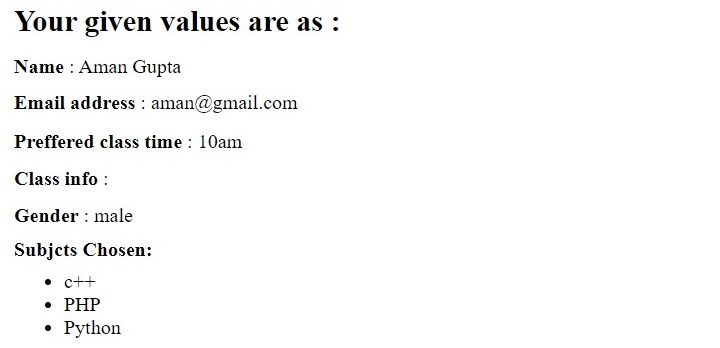
指令碼的第三部分又是 PHP 程式碼,用於回顯使用者提交的每個表單欄位的值。
<?php
   if ($_SERVER["REQUEST_METHOD"] == "POST") {
      echo "<h2>Your given values are as :</h2>";
      echo ("<p><b>Name</b> : $name</p>");
      echo ("<p><b>Email address</b> : $email</p>");
      echo ("<p><b>Preffered class time</b> : $course</p>");
      echo ("<p><b>Class info</b> : $class </p>");
      echo ("<p><b>Gender</b> : $gender</p>");
      echo "<p><b>Subjcts Chosen:</b><p>";
      if (!empty($subject)) {
         echo "<ul>";
         for($i = 0; $i < count($subject); $i++) {
            echo "<li>$subject[$i]</u/li>";
         }
         echo "</ul>";
      }
   }
?>
以下是當從伺服器的文件根資料夾執行指令碼時,在表單中填寫的一些示例資料:
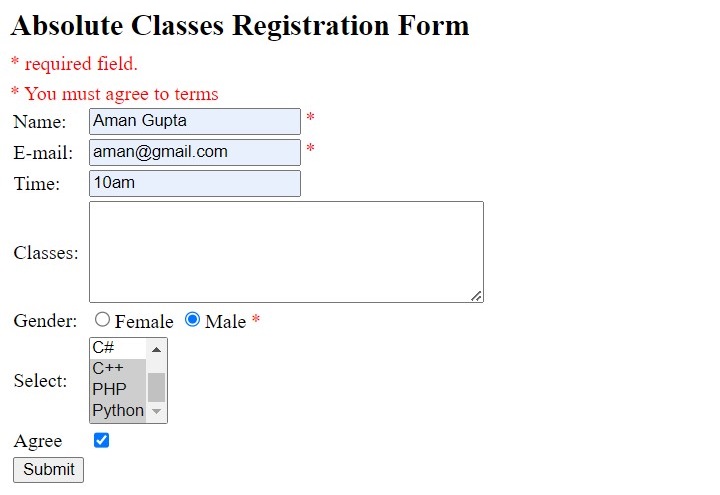
提交後,輸出如下所示:
示例
PHP 處理 HTML 表單的完整程式碼如下:
<html>
<head>
   <style>
      .error {color: #FF0000;}
   </style>
</head>
<body>
   <?php

      // define variables and set to empty values
      $nameErr = $emailErr = $genderErr = $websiteErr = "";
      $name = $email = $gender = $class = $course = $subject = "";

      if ($_SERVER["REQUEST_METHOD"] == "POST") {
         if (empty($_POST["name"])) {
            $nameErr = "Name is required";
         }else {
            $name = test_input($_POST["name"]);
         }

         if (empty($_POST["email"])) {
            $emailErr = "Email is required";
         } else {
            $email = test_input($_POST["email"]);

            // check if e-mail address is well-formed
            if (!filter_var($email, FILTER_VALIDATE_EMAIL)) {
               $emailErr = "Invalid email format";
            }
         }

         if (empty($_POST["course"])) {
            $course = "";
         } else {
            $course = test_input($_POST["course"]);
         }

         if (empty($_POST["class"])) {
            $class = "";
         } else {
            $class = test_input($_POST["class"]);
         }

         if (empty($_POST["gender"])) {
            $genderErr = "Gender is required";
         } else {
            $gender = test_input($_POST["gender"]);
         }

         if (empty($_POST["subject"])) {
            $subjectErr = "You must select one or more subjects";
         } else {
            $subject = $_POST["subject"];
         }
      }

      function test_input($data) {
         $data = trim($data);
         $data = stripslashes($data);
         $data = htmlspecialchars($data);
         return $data;
      }
   ?>
   <h2>Absolute Classes Registration Form</h2>
   <p><span class = "error">* required field.</span></p>
   <form method = "POST" action = "<?php echo htmlspecialchars($_SERVER["PHP_SELF"]);?>">
      <table>
         <tr>
            <td>Name:</td>
            <td>
               <input type = "text" name = "name">
               <span class = "error">* <?php echo $nameErr;?></span>
            </td>
         </tr>
         <tr>
            <td>E-mail: </td>
            <td>
               <input type = "text" name = "email">
               <span class = "error">* <?php echo $emailErr;?></span>
            </td>
         </tr>
         <tr>
            <td>Time:</td>
            <td>
               <input type = "text" name = "course">
               <span class = "error"><?php echo $websiteErr;?></span>
            </td>
         </tr>
         <tr>
            <td>Classes:</td>
            <td><textarea name = "class" rows = "5" cols = "40"></textarea></td>
         </tr>
         <tr>
            <td>Gender:</td>
            <td>
               <input type = "radio" name = "gender" value = "female">Female
               <input type = "radio" name = "gender" value = "male">Male
               <span class = "error">* <?php echo $genderErr;?></span>
            </td>
         </tr>
         <tr>
            <td>Select:</td>
            <td>
               <select name = "subject[]" size = "4" multiple>
                  <option value = "C">C</option>
                  <option value = "Java">Java</option>
                  <option value = "C#">C#</option>
                  <option value = "c++">C++</option>
                  <option value = "PHP">PHP</option>
                  <option value = "Python">Python</option>
               </select>
            </td>
         </tr>
         <tr>
            <td>Agree</td>
            <td><input type = "checkbox" name = "checked" value = "1"></td>
            <?php if(!isset($_POST['checked'])){ ?>
               <span class = "error">* <?php echo "You must agree to terms";?></span>
            <?php } ?>
         </tr>
         <tr>
            <td>
               <input type = "submit" name = "submit" value = "Submit">
            </td>
         </tr>
      </table>
   </form>
   <?php
      if ($_SERVER["REQUEST_METHOD"] == "POST") {
         echo "<h2>Your given values are as :</h2>";
         echo ("<p><b>Name</b> : $name</p>");
         echo ("<p><b>Email address</b> : $email</p>");
         echo ("<p><b>Preffered class time</b> : $course</p>");
         echo ("<p><b>Class info</b> : $class </p>");
         echo ("<p><b>Gender</b> : $gender</p>");
         echo "<p><b>Subjcts Chosen:</b><p>";
         if (!empty($subject)) {
            echo "<ul>";
            for($i = 0; $i < count($subject); $i++) {
               echo "<li>$subject[$i]</u/li>";
            }
            echo "</ul>";
         }
      }
   ?>
</body>
</html>
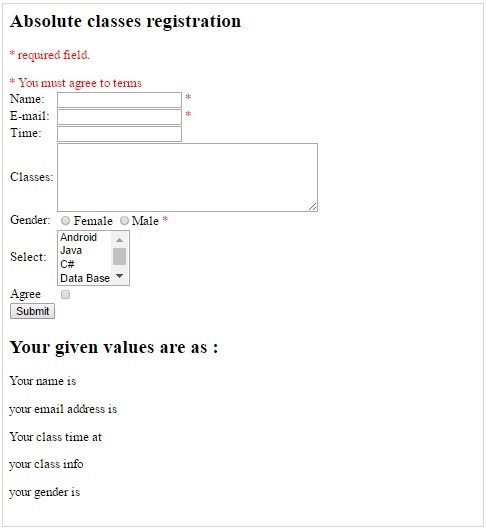
它將產生以下輸出:
廣告