
- Pascal 教程
- Pascal - 首頁
- Pascal - 概述
- Pascal - 環境設定
- Pascal - 程式結構
- Pascal - 基本語法
- Pascal - 資料型別
- Pascal - 變數型別
- Pascal - 常量
- Pascal - 運算子
- Pascal - 決策制定
- Pascal - 迴圈
- Pascal - 函式
- Pascal - 過程
- Pascal - 變數作用域
- Pascal - 字串
- Pascal - 布林值
- Pascal - 陣列
- Pascal - 指標
- Pascal - 記錄
- Pascal - 變體
- Pascal - 集合
- Pascal - 檔案處理
- Pascal - 記憶體
- Pascal - 單元
- Pascal - 日期和時間
- Pascal - 物件
- Pascal - 類
- Pascal 有用資源
- Pascal 快速指南
- Pascal - 有用資源
- Pascal - 討論
Pascal 快速指南
Pascal - 概述
Pascal 是一種通用高階語言,最初由 Niklaus Wirth 於 20 世紀 70 年代初開發。它被開發用於將程式設計作為一種系統學科進行教學,並開發可靠且高效的程式。
Pascal 是一種基於 Algol 的語言,包含了許多 Algol 的結構。Algol 60 是 Pascal 的一個子集。Pascal 提供了幾種資料型別和程式設計結構。Pascal 程式易於理解和維護。
Pascal 在教學和學術領域越來越受歡迎,原因有很多
- 易於學習。
- 結構化語言。
- 它生成透明、高效和可靠的程式。
- 它可以在各種計算機平臺上編譯。
Pascal 語言的特性
Pascal 具有以下特性:
- Pascal 是一種強型別語言。
- 它提供了廣泛的錯誤檢查。
- 它提供了幾種資料型別,如陣列、記錄、檔案和集合。
- 它提供各種程式設計結構。
- 它透過函式和過程支援結構化程式設計。
- 它支援面向物件程式設計。
關於 Pascal 的事實
Pascal 語言以法國數學家和計算機發展先驅 Blaise Pascal 的名字命名。
Niklaus Wirth 於 1970 年完成了原始 Pascal 程式語言的開發。
Pascal 基於 Algol 程式語言的塊結構風格。
Pascal 被開發為一種適合將程式設計作為系統學科進行教學的語言,其實現既可靠又高效。
ISO 7185 Pascal 標準最初於 1983 年釋出。
Pascal 是 Apple Lisa 和 Mac 早期開發中使用的一種主要高階語言。
1986 年,Apple Computer 釋出了第一個 Object Pascal 實現,1993 年,Pascal 標準委員會發布了 Pascal 的面向物件擴充套件。
為什麼要使用 Pascal?
Pascal 允許程式設計師定義複雜的結構化資料型別並構建動態和遞迴資料結構,例如列表、樹和圖。Pascal 提供了諸如記錄、列舉、子範圍、動態分配的變數以及關聯指標和集合等功能。
Pascal 允許巢狀過程定義到任何深度。這確實為將程式設計作為基於基本概念的系統學科進行學習提供了極好的程式設計環境。
Pascal 最令人驚歎的實現包括:
- Skype
- Total Commander
- TeX
- Macromedia Captivate
- Apple Lisa
- 各種 PC 遊戲
- 嵌入式系統
Pascal - 環境設定
有幾種 Pascal 編譯器和直譯器可供一般使用。其中包括:
Turbo Pascal - 提供一個 IDE 和編譯器,用於在 CP/M、CP/M-86、DOS、Windows 和 Macintosh 上執行 Pascal 程式。
Delphi - 提供編譯器以執行 Object Pascal 併為 32 位和 64 位 Windows 作業系統以及 32 位 Mac OS X 和 iOS 生成原生代碼。Embarcadero 計劃構建對 Linux 和 Android 作業系統的支援。
Free Pascal - 它是一個免費的編譯器,用於執行 Pascal 和 Object Pascal 程式。Free Pascal 編譯器是一個 32 位和 64 位的 Turbo Pascal 和 Delphi 相容的 Pascal 編譯器,適用於 Linux、Windows、OS/2、FreeBSD、Mac OS X、DOS 和其他幾個平臺。
Turbo51 - 它是一個免費的 Pascal 編譯器,用於 8051 系列微控制器,語法與 Turbo Pascal 7 相同。
Oxygene - 它是一個用於 .NET 和 Mono 平臺的 Object Pascal 編譯器。
GNU Pascal (GPC) - 它是一個 Pascal 編譯器,由 GNU 編譯器集合的前端組成。
在本教程中,我們將使用 Free Pascal。您可以從以下連結下載適合您作業系統的 Free Pascal:下載 Free Pascal
在 Linux 上安裝 Free Pascal
Free Pascal 的 Linux 發行版有三種形式:
tar.gz 版本,也可作為單獨的檔案提供。
.rpm(Red Hat 軟體包管理器)版本。
.deb(Debian)版本。
.rpm 版本的安裝程式碼:
rpm -i fpc-X.Y.Z-N.ARCH.rpm
其中 X.Y.Z 是 .rpm 檔案的版本號,ARCH 是受支援的體系結構之一(i386、x86_64 等)。
Debian 版本(如 Ubuntu)的安裝程式碼:
dpkg -i fpc-XXX.deb
其中 XXX 是 .deb 檔案的版本號。
詳情請參閱:Free Pascal 安裝指南
在 Mac 上安裝 Free Pascal
如果您使用 Mac OS X,使用 Free Pascal 最簡單的方法是從 Apple 的網站下載 Xcode 開發環境並按照簡單的安裝說明進行操作。設定好 Xcode 後,您就可以使用 Free Pascal 編譯器了。
在 Windows 上安裝 Free Pascal
對於 Windows,您將下載 Windows 安裝程式 setup.exe。這是一個普通的安裝程式。您需要執行以下步驟進行安裝:
選擇一個目錄。
選擇要安裝的軟體包部分。
可以選擇將 .pp 或 .pas 副檔名與 Free Pascal IDE 關聯起來。
詳情請參閱:Free Pascal 安裝指南
文字編輯器
這將用於鍵入您的程式。一些編輯器的示例包括 Windows 記事本、OS Edit 命令、Brief、Epsilon、EMACS 以及 vim 或 vi。
文字編輯器的名稱和版本在不同的作業系統上可能會有所不同。例如,Notepad 將在 Windows 上使用,而 vim 或 vi 可以在 Windows 以及 Linux 或 UNIX 上使用。
使用編輯器建立的檔案稱為原始檔,包含程式原始碼。Pascal 程式的原始檔通常以副檔名.pas命名。
在開始程式設計之前,請確保您已準備好一個文字編輯器,並且您有足夠的經驗來編寫計算機程式,將其儲存在檔案中,編譯它,最後執行它。
Pascal - 程式結構
在學習 Pascal 程式語言的基本構建塊之前,讓我們先看一下 Pascal 程式的最小結構,以便我們可以在接下來的章節中將其作為參考。
Pascal 程式結構
Pascal 程式主要由以下部分組成:
- 程式名稱
- Uses 命令
- 型別宣告
- 常量宣告
- 變數宣告
- 函式宣告
- 過程宣告
- 主程式塊
- 每個塊中的語句和表示式
- 註釋
每個 Pascal 程式通常都有一個標題語句、一個宣告部分和一個執行部分,並且嚴格按照此順序排列。以下格式顯示了 Pascal 程式的基本語法:
program {name of the program}
uses {comma delimited names of libraries you use}
const {global constant declaration block}
var {global variable declaration block}

function {function declarations, if any}
{ local variables }
begin
...
end;

procedure { procedure declarations, if any}
{ local variables }
begin
...
end;

begin { main program block starts}
...
end. { the end of main program block }
Pascal Hello World 示例
以下是一個簡單的 Pascal 程式碼,它將列印“Hello, World!”:
program HelloWorld;
uses crt;

(* Here the main program block starts *)
begin
   writeln('Hello, World!');
   readkey;
end.
這將產生以下結果:
Hello, World!
讓我們看一下上面程式的各個部分:
程式的第一行program HelloWorld;指示程式的名稱。
程式的第二行uses crt;是一個預處理器命令,它告訴編譯器在進行實際編譯之前包含 crt 單元。
接下來在 begin 和 end 語句之間包含的行是主程式塊。Pascal 中的每個塊都包含在一個begin語句和一個end語句中。但是,指示主程式結束的 end 語句後面跟的是句點 (.) 而不是分號 (;)。
主程式塊的begin語句是程式執行開始的地方。
(*...*)內的行將被編譯器忽略,它被用來在程式中新增註釋。
語句writeln('Hello, World!');使用 Pascal 中可用的 writeln 函式,該函式導致訊息“Hello, World!”顯示在螢幕上。
語句readkey;允許顯示暫停,直到使用者按下某個鍵。它是 crt 單元的一部分。單元類似於 Pascal 中的庫。
最後一個語句end.結束您的程式。
編譯和執行 Pascal 程式
開啟一個文字編輯器並新增上述程式碼。
將檔案儲存為hello.pas
開啟一個命令提示符並轉到儲存檔案的目錄。
在命令提示符下鍵入 fpc hello.pas 並按 Enter 鍵編譯程式碼。
如果程式碼中沒有錯誤,命令提示符將帶您進入下一行,並將生成hello可執行檔案和hello.o目標檔案。
現在,在命令提示符下鍵入hello以執行程式。
您將能夠看到“Hello World”列印在螢幕上,並且程式將等待您按下任何鍵。
$ fpc hello.pas
Free Pascal Compiler version 2.6.0 [2011/12/23] for x86_64
Copyright (c) 1993-2011 by Florian Klaempfl and others
Target OS: Linux for x86-64
Compiling hello.pas
Linking hello
8 lines compiled, 0.1 sec

$ ./hello
Hello, World!
確保 free pascal 編譯器fpc位於您的路徑中,並且您在包含原始檔 hello.pas 的目錄中執行它。
Pascal - 基本語法
您已經看到了 Pascal 程式的基本結構,因此很容易理解 Pascal 程式語言的其他基本構建塊。
變數
變數定義放在以var關鍵字開頭的塊中,後面跟著變數的定義,如下所示
var
A_Variable, B_Variable ... : Variable_Type;
Pascal 變數宣告在函式程式碼體之外,這意味著它們不在 **begin** 和 **end** 對內宣告,而是在過程/函式定義之後以及 **begin** 關鍵字之前宣告。對於全域性變數,它們在程式頭之後定義。
函式/過程
在 Pascal 中,**過程**是一組要執行的指令,沒有返回值;而 **函式** 則是一個有返回值的過程。函式/過程的定義如下所示:
Function Func_Name(params...) : Return_Value;
Procedure Proc_Name(params...);
註釋
多行註釋用花括號和星號括起來,如 (* ... *)。Pascal 允許用花括號 { ... } 括起來的單行註釋。
(* This is a multi-line comments
   and it will span multiple lines. *)

{ This is a single line comment in pascal }
大小寫敏感性
Pascal 是一種不區分大小寫的語言,這意味著您可以使用任何大小寫編寫變數、函式和過程。例如,變數 A_Variable、a_variable 和 A_VARIABLE 在 Pascal 中具有相同的含義。
Pascal 語句
Pascal 程式由語句組成。每個語句都指定程式的特定任務。這些任務可以是宣告、賦值、讀取資料、寫入資料、進行邏輯決策、轉移程式流程控制等。
例如:
readln (a, b, c);
s := (a + b + c)/2.0;
area := sqrt(s * (s - a)*(s-b)*(s-c));
writeln(area);
Pascal 中的保留字
Pascal 中的語句使用一些特定的 Pascal 詞,這些詞稱為保留字。例如,單詞 program、input、output、var、real、begin、readline、writeline 和 end 都是保留字。
以下是 Pascal 中可用的保留字列表。
| and | array | begin | case | const |
| div | do | downto | else | end |
| file | for | function | goto | if |
| in | label | mod | nil | not |
| of | or | packed | procedure | program |
| record | repeat | set | then | to |
| type | until | var | while | with |
Pascal 字元集和識別符號
Pascal 字元集包含:
所有大寫字母 (A-Z)
所有小寫字母 (a-z)
所有數字 (0-9)
特殊符號 - + * / := , . ;. () [] = {} ` 空格
Pascal 程式中的實體,如變數和常量、型別、函式、過程和記錄等,都有一個名稱或識別符號。識別符號是由字母和數字組成的序列,以字母開頭。識別符號中不能使用特殊符號和空格。
Pascal - 資料型別
實體的資料型別表示與其關聯的含義、約束、可能值、操作、函式和儲存方式。
整數、實數、布林和字元型別被稱為標準資料型別。資料型別可以分為標量、指標和結構化資料型別。標量資料型別的示例包括整數、實數、布林、字元、子範圍和列舉。結構化資料型別由標量型別構成;例如,陣列、記錄、檔案和集合。我們將在後面討論指標資料型別。
Pascal 資料型別
Pascal 資料型別可以在下圖中總結如下:

型別宣告
型別宣告用於宣告識別符號的資料型別。型別宣告的語法如下:
type-identifier-1, type-identfier-2 = type-specifier;
例如,以下宣告將變數 days 和 age 定義為整數型別,yes 和 true 定義為布林型別,name 和 city 定義為字串型別,fees 和 expenses 定義為實數型別。
type
days, age = integer;
yes, true = boolean;
name, city = string;
fees, expenses = real;
整數型別
下表提供了有關 Object Pascal 中使用的標準整數型別及其儲存大小和值範圍的詳細資訊:
| 型別 | 最小值 | 最大值 | 格式 |
|---|---|---|---|
| Integer | -2147483648 | 2147483647 | 有符號 32 位 |
| Cardinal | 0 | 4294967295 | 無符號 32 位 |
| Shortint | -128 | 127 | 有符號 8 位 |
| Smallint | -32768 | 32767 | 有符號 16 位 |
| Longint | -2147483648 | 2147483647 | 有符號 32 位 |
| Int64 | -2^63 | 2^63 - 1 | 有符號 64 位 |
| Byte | 0 | 255 | 無符號 8 位 |
| Word | 0 | 65535 | 無符號 16 位 |
| Longword | 0 | 4294967295 | 無符號 32 位 |
常量
使用常量使程式更具可讀性,並有助於將特殊量集中放在程式開頭的同一個位置。Pascal 允許宣告 *數值、邏輯、字串* 和 *字元* 常量。常量可以在程式的宣告部分透過指定 **const** 宣告來宣告。
常量型別宣告的語法如下:
const
Identifier = contant_value;
以下是一些常量宣告的示例:
VELOCITY_LIGHT = 3.0E=10;
PIE = 3.141592;
NAME = 'Stuart Little';
CHOICE = yes;
OPERATOR = '+';
所有常量宣告必須在變數宣告之前給出。
列舉型別
列舉資料型別是使用者定義的資料型別。它們允許在列表中指定值。在列舉資料型別上僅允許使用 *賦值* 運算子和 *關係* 運算子。列舉資料型別可以按如下方式宣告:
type
enum-identifier = (item1, item2, item3, ... )
以下是一些列舉型別宣告的示例:
type
SUMMER = (April, May, June, July, September);
COLORS = (Red, Green, Blue, Yellow, Magenta, Cyan, Black, White);
TRANSPORT = (Bus, Train, Airplane, Ship);
列舉型別域中列出專案的順序定義了專案的順序。例如,在列舉型別 SUMMER 中,April 在 May 之前,May 在 June 之前,依此類推。列舉型別識別符號的域不能包含數字或字元常量。
子範圍型別
子範圍型別允許變數取值範圍內的值。例如,如果選民的 *年齡* 應在 18 到 100 歲之間,則名為 age 的變數可以宣告為:
var
age: 18 ... 100;
我們將在下一節詳細介紹變數宣告。您還可以使用型別宣告定義子範圍型別。宣告子範圍型別的語法如下:
type
subrange-identifier = lower-limit ... upper-limit;
以下是一些子範圍型別宣告的示例:
const
P = 18;
Q = 90;
type
Number = 1 ... 100;
Value = P ... Q;
子範圍型別可以從已定義的列舉型別的子集中建立,例如:
type
months = (Jan, Feb, Mar, Apr, May, Jun, Jul, Aug, Sep, Oct, Nov, Dec);
Summer = Apr ... Aug;
Winter = Oct ... Dec;
Pascal - 變數型別
變數只不過是賦予儲存區域的名稱,我們的程式可以對其進行操作。Pascal 中的每個變數都有一個特定的型別,該型別決定了變數記憶體的大小和佈局;可以儲存在該記憶體中的值的範圍;以及可以應用於變數的操作集。
變數的名稱可以由字母、數字和下劃線字元組成。它必須以字母或下劃線開頭。Pascal **不區分大小寫**,因此這裡大寫和小寫字母含義相同。根據上一章中解釋的基本型別,將有以下基本變數型別:
Pascal 中的基本變數
| 序號 | 型別和描述 |
|---|---|
| 1 |
Character 通常是一個八位位元組(一個位元組)。這是一種整數型別。 |
| 2 | Integer 機器最自然的整數大小。 |
| 3 | Real 單精度浮點數。 |
| 4 | Boolean 指定 true 或 false 邏輯值。這同樣也是整數型別。 |
| 5 | Enumerated 指定使用者定義的列表。 |
| 6 | Subrange 表示變數,其值位於某個範圍內。 |
| 7 | String 儲存字元陣列。 |
Pascal 程式語言還允許定義各種其他型別的變數,我們將在後續章節中介紹,例如指標、陣列、記錄、集合和檔案等。在本節中,我們僅學習基本變數型別。
Pascal 中的變數宣告
在 Pascal 程式中使用變數之前,必須先宣告所有變數。所有變數聲明後面都跟著 *var* 關鍵字。宣告指定變數列表,後跟冒號 (:) 和型別。變數宣告的語法如下:
var
variable_list : type;
這裡,type 必須是有效的 Pascal 資料型別,包括字元、整數、實數、布林或任何使用者定義的資料型別等,而 variable_list 可以包含一個或多個以逗號分隔的識別符號名稱。這裡顯示了一些有效的變數宣告:
var
age, weekdays : integer;
taxrate, net_income: real;
choice, isready: boolean;
initials, grade: char;
name, surname : string;
在前面的教程中,我們已經討論過 Pascal 允許宣告型別。型別可以用名稱或識別符號來識別。此型別可用於定義該型別的變數。例如,
type
days, age = integer;
yes, true = boolean;
name, city = string;
fees, expenses = real;
現在,可以將如此定義的型別用於變數宣告:
var
weekdays, holidays : days;
choice: yes;
student_name, emp_name : name;
capital: city;
cost: expenses;
請注意 *type* 宣告和 *var* 宣告之間的區別。型別宣告指示型別的類別或種類,例如整數、實數等,而變數規範則指示變數可能取值的型別。您可以將 Pascal 中的 *type* 宣告與 C 中的 *typedef* 進行比較。最重要的是,變數名指的是儲存變數值的記憶體位置。型別宣告並非如此。
Pascal 中的變數初始化
變數使用冒號和等號賦值,後跟常量表達式。賦值的一般形式如下:
variable_name := value;
預設情況下,Pascal 中的變數不會初始化為零。它們可能包含垃圾值。因此,在程式中初始化變數是一個更好的實踐。可以在變數的宣告中初始化(分配初始值)變數。初始化後跟 **var** 關鍵字,初始化的語法如下:
var
variable_name : type = value;
以下是一些示例:
age: integer = 15;
taxrate: real = 0.5;
grade: char = 'A';
name: string = 'John Smith';
讓我們看一個示例,它使用了迄今為止討論過的各種型別的變數:
program Greetings;
const
message = ' Welcome to the world of Pascal ';

type
name = string;
var
firstname, surname: name;

begin
   writeln('Please enter your first name: ');
   readln(firstname);

   writeln('Please enter your surname: ');
   readln(surname);

   writeln;
   writeln(message, ' ', firstname, ' ', surname);
end.
當編譯並執行上述程式碼時,它會產生以下結果:
Please enter your first name:
John
Please enter your surname:
Smith
Welcome to the world of Pascal John Smith
列舉變數
您已經瞭解瞭如何使用簡單的變數型別,例如整數、實數和布林。現在,讓我們看看列舉型別的變數,它可以定義為:
var
var1, var2, ...  : enum-identifier;
宣告列舉型別後,您可以宣告該型別的變數。例如,
type
months = (January, February, March, April, May, June, July, August, September, October, November, December);
Var
m: months;
...
M := January;
以下示例說明了這個概念:
program exEnumeration;
type
beverage = (coffee, tea, milk, water, coke, limejuice);

var
drink:beverage;

begin
   writeln('Which drink do you want?');
   drink := limejuice;

   writeln('You can drink ', drink);
end.
當編譯並執行上述程式碼時,它會產生以下結果:
Which drink do you want?
You can drink limejuice
子範圍變數
子範圍變數宣告如下:
var
subrange-name : lowerlim ... uperlim;
子範圍變數的示例:
var
marks: 1 ... 100;
grade: 'A' ... 'E';
age: 1 ... 25;
以下程式說明了這個概念:
program exSubrange;
var
marks: 1 .. 100;
grade: 'A' .. 'E';

begin
   writeln( 'Enter your marks(1 - 100): ');
   readln(marks);

   writeln( 'Enter your grade(A - E): ');
   readln(grade);

   writeln('Marks: ' , marks, ' Grade: ', grade);
end.
當編譯並執行上述程式碼時,它會產生以下結果:
Enter your marks(1 - 100):
100
Enter your grade(A - E):
A
Marks: 100 Grade: A
Pascal - 常量
常量是在程式執行期間保持不變的實體。Pascal 僅允許宣告以下型別的常量:
- 序數型別
- 集合型別
- 指標型別(但唯一允許的值是 Nil)。
- 實數型別
- Char
- String
宣告常量
宣告常量的語法如下:
const
identifier = constant_value;
下表提供了一些有效常量宣告的示例:
實數型別常量
| 序號 | 常量型別和示例 |
|---|---|
| 1 | 序數(整數)型別常量 valid_age = 21; |
| 2 | 集合型別常量 Vowels = set of (A,E,I,O,U); |
| 3 |
指標型別常量 P = NIL; |
| 4 |
e = 2.7182818; velocity_light = 3.0E+10; |
| 5 | 字元型別常量 Operator = '+'; |
| 6 | 字串型別常量 president = 'Johnny Depp'; |
以下示例說明了這個概念:
program const_circle (input,output);
const
PI = 3.141592654;

var
r, d, c : real;   {variable declaration: radius, dia, circumference}

begin
   writeln('Enter the radius of the circle');
   readln(r);

   d := 2 * r;
   c :=  PI * d;
   writeln('The circumference of the circle is ',c:7:2);
end.
當編譯並執行上述程式碼時,它會產生以下結果:
Enter the radius of the circle
23
The circumference of the circle is 144.51
觀察程式輸出語句中的格式。變數 c 將以總共 7 位數字和 2 位小數進行格式化。Pascal 允許對數值變數進行此類輸出格式化。
Pascal - 運算子
運算子是告訴編譯器執行特定數學或邏輯操作的符號。Pascal 允許以下型別的運算子:
- 算術運算子
- 關係運算符
- 布林運算子
- 位運算子
- 集合運算子
- 字串運算子
讓我們逐一討論算術運算子、關係運算符、布林運算子和位運算子。集合運算子和字串操作將在後面討論。
算術運算子
下表顯示了 Pascal 支援的所有算術運算子。假設變數A儲存 10,變數B儲存 20,則 -
| 運算子 | 描述 | 示例 |
|---|---|---|
| + | 將兩個運算元相加 | A + B 將得到 30 |
| - | 從第一個運算元中減去第二個運算元 | A - B 將得到 -10 |
| * | 將兩個運算元相乘 | A * B 將得到 200 |
| / | 將分子除以分母 | B / A 將得到 2 |
| % | 模運算子,整數除法後的餘數 | B % A 將得到 0 |
關係運算符
下表顯示了 Pascal 支援的所有關係運算符。假設變數A儲存 10,變數B儲存 20,則 -
| 運算子 | 描述 | 示例 |
|---|---|---|
| = | 檢查兩個運算元的值是否相等,如果相等,則條件為真。 | (A = B) 為假。 |
| <> | 檢查兩個運算元的值是否不相等,如果不相等,則條件為真。 | (A <> B) 為真。 |
| > | 檢查左運算元的值是否大於右運算元的值,如果大於,則條件為真。 | (A > B) 為假。 |
| < | 檢查左運算元的值是否小於右運算元的值,如果小於,則條件為真。 | (A < B) 為真。 |
| >= | 檢查左運算元的值是否大於或等於右運算元的值,如果大於或等於,則條件為真。 | (A >= B) 為假。 |
| <= | 檢查左運算元的值是否小於或等於右運算元的值,如果小於或等於,則條件為真。 | (A <= B) 為真。 |
布林運算子
下表顯示了 Pascal 語言支援的所有布林運算子。所有這些運算子都作用於布林運算元併產生布爾結果。假設變數A儲存 true,變數B儲存 false,則 -
| 運算子 | 描述 | 示例 |
|---|---|---|
| and | 稱為布林 AND 運算子。如果兩個運算元都為真,則條件為真。 | (A and B) 為假。 |
| 以及 | 它類似於 AND 運算子,但是它保證了編譯器評估邏輯表示式的順序。從左到右,僅在必要時才評估右側運算元。 | (A and then B) 為假。 |
| or | 稱為布林 OR 運算子。如果兩個運算元中的任何一個為真,則條件為真。 | (A or B) 為真。 |
| 或者 | 它類似於布林 OR,但是它保證了編譯器評估邏輯表示式的順序。從左到右,僅在必要時才評估右側運算元。 | (A or else B) 為真。 |
| not | 稱為布林 NOT 運算子。用於反轉其運算元的邏輯狀態。如果條件為真,則邏輯 NOT 運算子將使其變為假。 | not (A and B) 為真。 |
位運算子
位運算子作用於位並執行逐位運算。所有這些運算子都作用於整數運算元併產生整數結果。位與 (&)、位或 (|) 和位非 (~) 的真值表如下所示 -
| p | q | p & q | p | q | ~p | ~q |
|---|---|---|---|---|---|
| 0 | 0 | 0 | 0 | 1 | 1 |
| 0 | 1 | 0 | 1 | 1 | 0 |
| 1 | 1 | 1 | 1 | 0 | 0 |
| 1 | 0 | 0 | 1 | 0 | 1 |
假設 A = 60;B = 13;現在以二進位制格式,它們將如下所示 -
A = 0011 1100
B = 0000 1101
-----------------
A&B = 0000 1100
A^B = 0011 0001
~A = 1100 0011
Pascal 支援的位運算子列在下表中。假設變數 A 儲存 60,變數 B 儲存 13,則
| 運算子 | 描述 | 示例 |
|---|---|---|
| & | 二進位制 AND 運算子將位複製到結果中,如果它存在於兩個運算元中。 | (A & B) 將得到 12,即 0000 1100 |
| | | 二進位制 OR 運算子將複製存在於任何一個運算元中的位。 | (A | B) 將得到 61,即 0011 1101 |
| ! | 二進位制 OR 運算子將複製存在於任何一個運算元中的位。它與 | 運算子相同。 | (A ! B) 將得到 61,即 0011 1101 |
| ~ | 二進位制一補碼運算子是一元的,其作用是“翻轉”位。 | (~A ) 將得到 -61,由於帶符號二進位制數,它以 2 的補碼形式表示為 1100 0011。 |
| << | 二進位制左移運算子。左運算元的值向左移動由右運算元指定的位數。 | A << 2 將得到 240,即 1111 0000 |
| >> | 二進位制右移運算子。左運算元的值向右移動由右運算元指定的位數。 | A >> 2 將得到 15,即 0000 1111 |
請注意,Pascal 的不同實現方式在位運算子方面有所不同。但是,我們在此使用的編譯器 Free Pascal 支援以下位運算子 -
| 運算子 | 操作 |
|---|---|
| not | 位非 |
| and | 位與 |
| or | 位或 |
| 異或 | 位異或 |
| 左移 | 位左移 |
| 右移 | 位右移 |
| << | 位左移 |
| >> | 位右移 |
Pascal 中運算子的優先順序
運算子優先順序決定了表示式中項的組合方式。這會影響表示式的計算方式。某些運算子的優先順序高於其他運算子;例如,乘法運算子的優先順序高於加法運算子。
例如 x = 7 + 3 * 2;此處,x 被賦值為 13,而不是 20,因為運算子 * 的優先順序高於 +,所以它首先與 3*2 相乘,然後加到 7 中。
在此,優先順序最高的運算子出現在表的最上面,優先順序最低的出現在最下面。在表示式中,優先順序較高的運算子將首先被計算。
| 運算子 | 優先順序 |
|---|---|
| ~, not, | 最高 |
| *, /, div, mod, and, & | |
| |, !, +, -, or, | |
| =, <>, <, <=, >, >=, in | |
| or else, and then | 最低 |
Pascal - 決策制定
決策結構要求程式設計師指定一個或多個條件,由程式進行評估或測試,以及在確定條件為真時要執行的語句或語句,以及可選地在確定條件為假時要執行的其他語句。
以下是大多數程式語言中典型的決策結構的通用形式 -

Pascal 程式語言提供了以下型別的決策語句。點選以下連結檢視其詳細資訊。
| 序號 | 語句和描述 |
|---|---|
| 1 |
if - then 語句
if - then 語句由一個布林表示式後跟一個或多個語句組成。 |
| 2 |
If-then-else 語句
if - then 語句後面可以跟一個可選的else 語句,當布林表示式為假時執行該語句。 |
| 3 |
巢狀 if 語句
您可以在另一個if或else if語句中使用一個if或else if語句。 |
| 4 |
case 語句
case語句允許將變數與其值的列表進行相等性測試。 |
| 5 |
case - else 語句
它類似於if-then-else語句。此處,else項位於case 語句之後。 |
| 6 |
巢狀 case 語句
您可以在另一個case語句中使用一個case語句。 |
Pascal - 迴圈
可能存在這樣的情況,您需要多次執行一段程式碼。通常,語句按順序執行:函式中的第一個語句首先執行,然後是第二個語句,依此類推。
程式語言提供了各種控制結構,允許更復雜的執行路徑。
迴圈語句允許我們多次執行一個語句或一組語句,以下是大多數程式語言中迴圈語句的通用形式 -
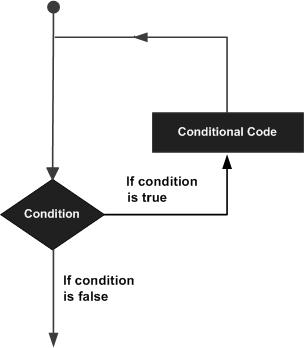
Pascal 程式語言提供了以下型別的迴圈結構來處理迴圈需求。點選以下連結檢視其詳細資訊。
| 序號 | 迴圈型別和描述 |
|---|---|
| 1 |
while-do 迴圈
在給定條件為真的情況下重複執行一個語句或一組語句。它在執行迴圈體之前測試條件。 |
| 2 |
for-do 迴圈
多次執行一系列語句,並縮寫管理迴圈變數的程式碼。 |
| 3 |
repeat-until 迴圈
類似於 while 語句,但它在迴圈體末尾測試條件。 |
| 4 |
巢狀迴圈
您可以在任何其他 while、for 或 repeat until 迴圈中使用一個或多個迴圈。 |
迴圈控制語句
迴圈控制語句更改執行的正常順序。當執行離開作用域時,在該作用域中建立的所有自動物件都將被銷燬。
Pascal 支援以下控制語句。點選以下連結檢視其詳細資訊。
| 序號 | 控制語句和描述 |
|---|---|
| 1 |
break 語句
終止loop或case語句,並將執行轉移到緊隨 loop 或 case 語句之後的語句。 |
| 2 |
continue 語句
導致迴圈跳過其主體剩餘部分,並在立即重新迭代之前立即重新測試其條件。 |
| 3 | goto 語句
將控制權轉移到帶標籤的語句。雖然不建議在程式中使用 goto 語句。 |
Pascal - 函式
子程式
子程式是一個執行特定任務的程式單元/模組。這些子程式組合在一起形成更大的程式。這基本上稱為“模組化設計”。子程式可以由子程式/程式呼叫,該子程式/程式稱為呼叫程式。
Pascal 提供兩種子程式 -
函式 - 這些子程式返回單個值。
過程 - 這些子程式不直接返回值。
函式
函式是一組共同執行任務的語句。每個 Pascal 程式至少有一個函式,即程式本身,並且大多數最簡單的程式都可以定義其他函式。
函式**宣告**告訴編譯器函式的名稱、返回型別和引數。函式**定義**提供了函式的實際主體。
Pascal 標準庫提供了許多內建函式,您的程式可以呼叫這些函式。例如,函式**AppendStr()**連線兩個字串,函式**New()**為變數動態分配記憶體,還有許多其他函式。
定義函式
在 Pascal 中,使用 function 關鍵字定義**函式**。函式定義的一般形式如下:
function name(argument(s): type1; argument(s): type2; ...): function_type;
local declarations;

begin
   ...
   < statements >
   ...
   name:= expression;
end;
Pascal 中的函式定義由函式**頭部**、區域性**宣告**和函式**體**組成。函式頭部包含關鍵字 function 和賦予函式的**名稱**。以下是函式的所有部分:
**引數** - 引數建立了呼叫程式和函式識別符號之間的聯絡,也稱為形式引數。引數就像一個佔位符。當呼叫函式時,您將值傳遞給引數。此值稱為實際引數或引數。引數列表指的是函式的引數型別、順序和數量。使用此類形式引數是可選的。這些引數可以具有標準資料型別、使用者定義的資料型別或子範圍資料型別。
出現在函式語句中的形式引數列表可以是簡單變數或帶下標的變數、陣列或結構化變數,或子程式。
**返回型別** - 所有函式都必須返回一個值,因此所有函式都必須分配一個型別。**函式型別**是函式返回值的資料型別。它可以是標準的、使用者定義的標量或子範圍型別,但不能是結構化型別。
**區域性宣告** - 區域性宣告指的是標籤、常量、變數、函式和過程的宣告,這些宣告僅適用於函式體。
**函式體** - 函式體包含定義函式功能的一組語句。它應該始終用保留字 begin 和 end 括起來。它是函式中執行所有計算的部分。函式體中必須有一個型別為 - **name := expression;** 的賦值語句,該語句將值賦給函式名。此值在執行函式時返回。主體中的最後一個語句必須是 end 語句。
以下是一個示例,展示瞭如何在 pascal 中定義函式:
(* function returning the max between two numbers *)
function max(num1, num2: integer): integer;

var
   (* local variable declaration *)
   result: integer;

begin
   if (num1 > num2) then
      result := num1

   else
      result := num2;
   max := result;
end;
函式宣告
函式**宣告**告訴編譯器函式名稱以及如何呼叫函式。函式的實際主體可以單獨定義。
函式宣告包含以下部分:
function name(argument(s): type1; argument(s): type2; ...): function_type;
對於上面定義的函式 max(),以下是函式宣告:
function max(num1, num2: integer): integer;
當您在一個原始檔中定義函式並在另一個檔案中呼叫該函式時,需要進行函式宣告。在這種情況下,您應該在呼叫函式的檔案頂部宣告該函式。
呼叫函式
在建立函式時,您會定義函式需要執行的操作。要使用函式,您必須呼叫該函式以執行定義的任務。當程式呼叫函式時,程式控制權將轉移到被呼叫函式。被呼叫函式執行定義的任務,當執行其 return 語句或到達其最後一個 end 語句時,它將程式控制權返回給主程式。
要呼叫函式,您只需將所需的引數與函式名稱一起傳遞,如果函式返回值,則可以儲存返回值。以下是一個簡單的示例,展示了用法:
program exFunction;
var
   a, b, ret : integer;

(*function definition *)
function max(num1, num2: integer): integer;
var
   (* local variable declaration *)
   result: integer;

begin
   if (num1 > num2) then
      result := num1

   else
      result := num2;
   max := result;
end;

begin
   a := 100;
   b := 200;
   (* calling a function to get max value *)
   ret := max(a, b);

   writeln( 'Max value is : ', ret );
end.
當編譯並執行上述程式碼時,它會產生以下結果:
Max value is : 200
Pascal - 過程
**過程**是子程式,它們不返回單個值,而是允許獲取一組結果。
定義過程
在 Pascal 中,使用**procedure**關鍵字定義過程。過程定義的一般形式如下:
procedure name(argument(s): type1, argument(s): type 2, ... );
   < local declarations >
begin
   < procedure body >
end;
Pascal 中的過程定義由**頭部**、區域性**宣告**和過程**體**組成。過程頭部包含關鍵字**procedure**和賦予過程的名稱。以下是過程的所有部分:
**引數** - 引數建立了呼叫程式和過程識別符號之間的聯絡,也稱為形式引數。過程引數的規則與函式相同。
**區域性宣告** - 區域性宣告指的是標籤、常量、變數、函式和過程的宣告,這些宣告僅適用於過程體。
**過程體** - 過程體包含定義過程功能的一組語句。它應該始終用保留字 begin 和 end 括起來。它是過程執行所有計算的部分。
以下是名為findMin()的過程的原始碼。此過程接受 4 個引數 x、y、z 和 m,並將前三個變數中的最小值儲存在名為 m 的變數中。變數 m 透過**引用**傳遞(稍後我們將討論透過引用傳遞引數):
procedure findMin(x, y, z: integer; var m: integer);
(* Finds the minimum of the 3 values *)

begin
   if x < y then
      m := x
   else
      m := y;

   if z <m then
      m := z;
end; { end of procedure findMin }
過程宣告
過程**宣告**告訴編譯器過程名稱以及如何呼叫過程。過程的實際主體可以單獨定義。
過程宣告具有以下語法:
procedure name(argument(s): type1, argument(s): type 2, ... );
請注意,**過程的名稱與任何型別都不相關**。對於上面定義的過程findMin(),以下是宣告:
procedure findMin(x, y, z: integer; var m: integer);
呼叫過程
在建立過程時,您會定義過程需要執行的操作。要使用該過程,您必須呼叫該過程以執行定義的任務。當程式呼叫過程時,程式控制權將轉移到被呼叫過程。被呼叫過程執行定義的任務,當到達其最後一個 end 語句時,它將控制權返回給呼叫程式。
要呼叫過程,您只需將所需的引數與過程名稱一起傳遞,如下所示:
program exProcedure;
var
   a, b, c,  min: integer;
procedure findMin(x, y, z: integer; var m: integer);
(* Finds the minimum of the 3 values *)

begin
   if x < y then
      m:= x
   else
      m:= y;

   if z < m then
      m:= z;
end; { end of procedure findMin }

begin
   writeln(' Enter three numbers: ');
   readln( a, b, c);
   findMin(a, b, c, min); (* Procedure call *)

   writeln(' Minimum: ', min);
end.
當編譯並執行上述程式碼時,它會產生以下結果:
Enter three numbers:
89 45 67
Minimum: 45
遞迴子程式
我們已經看到,程式或子程式可以呼叫另一個子程式。當子程式呼叫自身時,稱為遞迴呼叫,該過程稱為遞迴。
為了說明這個概念,讓我們計算一個數字的階乘。數字 n 的階乘定義為:
n! = n*(n-1)!
   = n*(n-1)*(n-2)!
      ...
   = n*(n-1)*(n-2)*(n-3)... 1
以下程式透過遞迴呼叫自身來計算給定數字的階乘。
program exRecursion;
var
   num, f: integer;
function fact(x: integer): integer; (* calculates factorial of x - x! *)

begin
   if x=0 then
      fact := 1
   else
      fact := x * fact(x-1); (* recursive call *)
end; { end of function fact}

begin
   writeln(' Enter a number: ');
   readln(num);
   f := fact(num);

   writeln(' Factorial ', num, ' is: ' , f);
end.
當編譯並執行上述程式碼時,它會產生以下結果:
Enter a number:
5
Factorial 5 is: 120
以下另一個示例,使用**遞迴**函式為給定數字生成**斐波那契數列**:
program recursiveFibonacci;
var
   i: integer;
function fibonacci(n: integer): integer;

begin
   if n=1 then
      fibonacci := 0

   else if n=2 then
      fibonacci := 1

   else
      fibonacci := fibonacci(n-1) + fibonacci(n-2);
end;

begin
   for i:= 1 to 10 do

   write(fibonacci (i), '  ');
end.
當編譯並執行上述程式碼時,它會產生以下結果:
0 1 1 2 3 5 8 13 21 34
子程式的引數
如果子程式(**函式或過程**)要使用引數,則必須宣告接受引數值的變數。這些變數稱為子程式的**形式引數**。
形式引數在子程式內部的行為類似於其他區域性變數,並在進入子程式時建立,並在退出時銷燬。
在呼叫子程式時,有兩種方法可以將引數傳遞給子程式:
| 序號 | 呼叫型別和描述 |
|---|---|
| 1 |
按值呼叫
此方法將引數的實際值複製到子程式的形式引數中。在這種情況下,對子程式內部引數所做的更改不會影響引數。 |
| 2 |
按引用呼叫
此方法將引數的地址複製到形式引數中。在子程式內部,該地址用於訪問呼叫中使用的實際引數。這意味著對引數所做的更改會影響引數。 |
預設情況下,Pascal 使用**按值呼叫**來傳遞引數。通常,這意味著子程式中的程式碼無法更改用於呼叫子程式的引數。我們在“Pascal - 函式”一章中使用的示例程式使用**按值呼叫**來呼叫名為 max() 的函式。
而此處提供的示例程式(exProcedure)使用**按引用呼叫**來呼叫過程 findMin()。
Pascal - 變數作用域
任何程式設計中的作用域都是程式的一個區域,其中定義的變數可以存在,並且超出該範圍變數無法訪問。在 Pascal 程式語言中,可以在三個地方宣告變數:
在子程式或塊內,稱為區域性變數
在所有子程式之外,稱為全域性變數
在子程式引數的定義中,稱為形式引數
讓我們解釋一下什麼是**區域性**變數和**全域性**變數以及形式引數。
區域性變數
在子程式或塊內宣告的變數稱為區域性變數。它們只能被子程式或程式碼塊內的語句使用。區域性變數對子程式外部的子程式是未知的。以下是用區域性變數的示例。此處,所有變數a、b和c都對名為exLocal的程式是區域性的。
program exLocal;
var
   a, b, c: integer;

begin
   (* actual initialization *)
   a := 10;
   b := 20;
   c := a + b;

   writeln('value of a = ', a , ' b =  ',  b, ' and c = ', c);
end.
當編譯並執行上述程式碼時,它會產生以下結果:
value of a = 10 b = 20 c = 30
現在,讓我們進一步擴充套件程式,讓我們建立一個名為 display 的過程,該過程將擁有自己的變數集a、b和c,並顯示它們的值,直接來自程式exLocal。
program exLocal;
var
   a, b, c: integer;
procedure display;

var
   a, b, c: integer;
begin
   (* local variables *)
   a := 10;
   b := 20;
   c := a + b;

   writeln('Winthin the procedure display');
   writeln('value of a = ', a , ' b =  ',  b, ' and c = ', c);
end;

begin
   a:= 100;
   b:= 200;
   c:= a + b;

   writeln('Winthin the program exlocal');
   writeln('value of a = ', a , ' b =  ',  b, ' and c = ', c);
   display();
end.
當編譯並執行上述程式碼時,它會產生以下結果:
Within the program exlocal
value of a = 100 b = 200 c = 300
Within the procedure display
value of a = 10 b = 20 c = 30
全域性變數
全域性變數在函式外部定義,通常在程式頂部。全域性變數將在程式的整個生命週期內保持其值,並且可以在為程式定義的任何函式內部訪問它們。
任何函式都可以訪問**全域性**變數。也就是說,全域性變數在聲明後可以在整個程式中使用。以下是用**全域性**變數和**區域性**變數的示例:
program exGlobal;
var
   a, b, c: integer;
procedure display;
var
   x, y, z: integer;

begin
   (* local variables *)
   x := 10;
   y := 20;
   z := x + y;

   (*global variables *)
   a := 30;
   b:= 40;
   c:= a + b;

   writeln('Winthin the procedure display');
   writeln(' Displaying the global variables a, b, and c');

   writeln('value of a = ', a , ' b =  ',  b, ' and c = ', c);
   writeln('Displaying the local variables x, y, and z');

   writeln('value of x = ', x , ' y =  ',  y, ' and z = ', z);
end;

begin
   a:= 100;
   b:= 200;
   c:= 300;

   writeln('Winthin the program exlocal');
   writeln('value of a = ', a , ' b =  ',  b, ' and c = ', c);

   display();
end.
當編譯並執行上述程式碼時,它會產生以下結果:
Within the program exlocal
value of a = 100 b = 200 c = 300
Within the procedure display
Displaying the global variables a, b, and c
value of a = 30 b = 40 c = 70
Displaying the local variables x, y, and z
value of x = 10 y = 20 z = 30
請注意,過程 display 可以訪問變數 a、b 和 c,這些變數相對於 display 以及它自己的區域性變數是全域性變數。程式可以為區域性變數和全域性變數使用相同的名稱,但函式內部區域性變數的值將優先。
讓我們稍微修改一下前面的示例,現在過程 display 的區域性變數與a、b、c具有相同的名稱:
program exGlobal;
var
   a, b, c: integer;
procedure display;

var
   a, b, c: integer;

begin
   (* local variables *)
   a := 10;
   b := 20;
   c := a + b;

   writeln('Winthin the procedure display');
   writeln(' Displaying the global variables a, b, and c');

   writeln('value of a = ', a , ' b =  ',  b, ' and c = ', c);
   writeln('Displaying the local variables a, b, and c');

   writeln('value of a = ', a , ' b =  ',  b, ' and c = ', c);
end;

begin
   a:= 100;
   b:= 200;
   c:= 300;

   writeln('Winthin the program exlocal');
   writeln('value of a = ', a , ' b =  ',  b, ' and c = ', c);

   display();
end.
當編譯並執行上述程式碼時,它會產生以下結果:
Within the program exlocal
value of a = 100 b = 200 c = 300
Within the procedure display
Displaying the global variables a, b, and c
value of a = 10 b = 20 c = 30
Displaying the local variables a, b, and c
value of a = 10 b = 20 c = 30
Pascal - 字串
Pascal 中的字串實際上是字元序列,帶有一個可選的大小說明。字元可以是數字、字母、空格、特殊字元或所有字元的組合。擴充套件 Pascal 根據系統和實現提供了多種型別的字串物件。我們將討論程式中使用的更常見的字串型別。
您可以透過多種方式定義字串:
**字元陣列** - 這是一串字元,它是零個或多個位元組大小的字元的序列,用單引號括起來。
**字串變數** - 如 Turbo Pascal 中定義的 String 型別的變數。
**短字串** - 帶有大小說明的 String 型別的變數。
**以 null 結尾的字串** - pchar型別的變數。
**AnsiStrings** - Ansistrings 是沒有長度限制的字串。
Pascal 僅提供一個字串運算子,即字串連線運算子 (+)。
示例
以下程式列印前四種字串。我們將在下一個示例中使用 AnsiStrings。
program exString;
var
   greetings: string;
   name: packed array [1..10] of char;
   organisation: string[10];
   message: pchar;

begin
   greetings := 'Hello ';
   message := 'Good Day!';

   writeln('Please Enter your Name');
   readln(name);

   writeln('Please Enter the name of your Organisation');
   readln(organisation);

   writeln(greetings, name, ' from ', organisation);
   writeln(message);
end.
當編譯並執行上述程式碼時,它會產生以下結果:
Please Enter your Name
John Smith
Please Enter the name of your Organisation
Infotech
Hello John Smith from Infotech
以下示例使用了更多函式,讓我們看看:
program exString;
uses sysutils;
var
   str1, str2, str3 : ansistring;
   str4: string;
   len: integer;

begin
   str1 := 'Hello ';
   str2 := 'There!';

   (* copy str1 into str3 *)
   str3 := str1;
   writeln('appendstr( str3, str1) :  ', str3 );

   (* concatenates str1 and str2 *)
   appendstr( str1, str2);
   writeln( 'appendstr( str1, str2) ' , str1 );
   str4 := str1 + str2;
   writeln('Now str4 is: ', str4);

   (* total lenghth of str4 after concatenation  *)
   len := byte(str4[0]);
   writeln('Length of the final string str4: ', len);
end.
當編譯並執行上述程式碼時,它會產生以下結果:
appendstr( str3, str1) : Hello
appendstr( str1, str2) : Hello There!
Now str4 is: Hello There! There!
Length of the final string str4: 18
Pascal 字串函式和過程
Pascal 支援廣泛的用於操作字串的函式和過程。這些子程式在實現方面有所不同。在這裡,我們列出了 Free Pascal 提供的各種字串操作子程式:
| 序號 | 函式和用途 |
|---|---|
| 1 |
function AnsiCompareStr(const S1: string; const S2: string):Integer; 比較兩個字串 |
| 2 |
function AnsiCompareText(const S1: string; const S2: string):Integer; 比較兩個字串,不區分大小寫 |
| 3 |
function AnsiExtractQuotedStr(var Src: PChar; Quote: Char):string; 去除字串中的引號 |
| 4 |
function AnsiLastChar(const S: string):PChar; 獲取字串的最後一個字元 |
| 5 |
function AnsiLowerCase(const s: string):string; 將字串轉換為全小寫 |
| 6 |
function AnsiQuotedStr(const S: string; Quote: Char):string; 為字串新增引號 |
| 7 |
function AnsiStrComp(S1: PChar;S2: PChar):Integer; 比較字串,區分大小寫 |
| 8 |
function AnsiStrIComp(S1: PChar; S2: PChar):Integer; 比較字串,不區分大小寫 |
| 9 |
function AnsiStrLComp(S1: PChar; S2: PChar; MaxLen: Cardinal):Integer; 比較字串前 L 個字元,區分大小寫 |
| 10 |
function AnsiStrLIComp(S1: PChar; S2: PChar; MaxLen: Cardinal):Integer; 比較字串前 L 個字元,不區分大小寫 |
| 11 |
function AnsiStrLastChar(Str: PChar):PChar; 獲取字串的最後一個字元 |
| 12 |
function AnsiStrLower(Str: PChar):PChar; 將字串轉換為全小寫 |
| 13 |
function AnsiStrUpper(Str: PChar):PChar; 將字串轉換為全大寫 |
| 14 |
function AnsiUpperCase(const s: string):string; 將字串轉換為全大寫 |
| 15 |
procedure AppendStr(var Dest: string; const S: string); 連線兩個字串 |
| 16 |
procedure AssignStr(var P: PString; const S: string); 在堆上分配字串的值 |
| 17 |
function CompareStr(const S1: string; const S2: string):Integer; overload; 比較兩個字串,區分大小寫 |
| 18 |
function CompareText(const S1: string; const S2: string):Integer; 比較兩個字串,不區分大小寫 |
| 19 |
procedure DisposeStr(S: PString); overload;
從堆中釋放字串 |
| 20 |
procedure DisposeStr(S: PShortString); overload; 從堆中釋放字串 |
| 21 |
function IsValidIdent( const Ident: string):Boolean; 判斷字串是否為有效的 Pascal 識別符號 |
| 22 |
function LastDelimiter(const Delimiters: string; const S: string):Integer; 查詢字串中最後一個出現的字元 |
| 23 |
function LeftStr(const S: string; Count: Integer):string; 獲取字串的前 N 個字元 |
| 24 |
function LoadStr(Ident: Integer):string; 從資源中載入字串 |
| 25 |
function LowerCase(const s: string ):string; overload; 將字串轉換為全小寫 |
| 26 |
function LowerCase(const V: variant ):string; overload; 將字串轉換為全小寫 |
| 27 |
function NewStr(const S: string):PString; overload; 在堆上分配新的字串 |
| 28 |
function RightStr(const S: string; Count: Integer):string; 獲取字串的後 N 個字元 |
| 29 |
function StrAlloc(Size: Cardinal):PChar; 為字串分配記憶體 |
| 30 |
function StrBufSize(Str: PChar):SizeUInt; 為字串預留記憶體 |
| 31 |
procedure StrDispose(Str: PChar); 從堆中釋放字串 |
| 32 |
function StrPas(Str: PChar):string; 將 PChar 轉換為 Pascal 字串 |
| 33 |
function StrPCopy(Dest: PChar; Source: string):PChar; 複製 Pascal 字串 |
| 34 |
function StrPLCopy(Dest: PChar; Source: string; MaxLen: SizeUInt):PChar; 複製 Pascal 字串的前 N 個位元組 |
| 35 |
function UpperCase(const s: string):string; 將字串轉換為全大寫 |
Pascal - 布林值
Pascal 提供了布林資料型別 Boolean,使程式設計師能夠定義、儲存和操作邏輯實體,例如常量、變數、函式和表示式等。
布林值本質上是整數型別。布林型別變數有兩個預定義的可能值:**True** 和 **False**。解析為布林值的表示式也可以賦值給布林型別。
Free Pascal 還支援 **ByteBool**、**WordBool** 和 **LongBool** 型別。這些型別分別為 Byte、Word 或 Longint 型別。
值 False 等效於 0(零),任何非零值在轉換為布林值時都被視為 True。如果將 True 的布林值賦值給 LongBool 型別的變數,則將其轉換為 -1。
需要注意的是,邏輯運算子 **and**、**or** 和 **not** 是為布林資料型別定義的。
布林資料型別的宣告
使用 var 關鍵字宣告布林型別變數。
var
boolean-identifier: boolean;
例如,
var
choice: boolean;
示例
program exBoolean;
var
exit: boolean;

choice: char;
   begin
   writeln('Do you want to continue? ');
   writeln('Enter Y/y for yes, and N/n for no');
   readln(choice);

if(choice = 'n') then
   exit := true
else
   exit := false;

if (exit) then
   writeln(' Good Bye!')
else
   writeln('Please Continue');

readln;
end.
當編譯並執行上述程式碼時,它會產生以下結果:
Do you want to continue?
Enter Y/y for yes, and N/n for no
N
Good Bye!
Y
Please Continue
Pascal - 陣列
Pascal 程式語言提供了一種稱為陣列的資料結構,它可以儲存相同型別元素的固定大小的順序集合。陣列用於儲存資料集合,但通常將陣列視為相同型別變數的集合更有用。
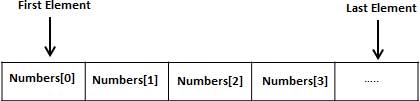
與其宣告單獨的變數,例如 number1、number2、... 和 number100,不如宣告一個數組變數,例如 numbers,並使用 numbers[1]、numbers[2] 和 ...、numbers[100] 來表示各個變數。陣列中的特定元素透過索引訪問。
所有陣列都由連續的記憶體位置組成。最低地址對應於第一個元素,最高地址對應於最後一個元素。
請注意,如果您希望從索引 0 開始的 C 樣式陣列,只需將索引從 0 開始,而不是從 1 開始。
陣列的宣告
要在 Pascal 中宣告陣列,程式設計師可以宣告型別,然後建立該陣列的變數,或者直接宣告陣列變數。
一維陣列型別宣告的一般形式為:
type
   array-identifier = array[index-type] of element-type;
其中,
**array-identifier** - 表示陣列型別的名稱。
**index-type** - 指定陣列的下標;它可以是除實數之外的任何標量資料型別
**element-type** - 指定要儲存的值的型別
例如,
type
   vector = array [ 1..25] of real;
var
   velocity: vector;
現在,velocity 是 vector 型別的變數陣列,足以容納多達 25 個實數。
要從索引 0 開始陣列,宣告將為:
type
   vector = array [ 0..24] of real;
var
   velocity: vector;
陣列下標的型別
在 Pascal 中,陣列下標可以是任何標量型別,如整數、布林值、列舉或子範圍,但實數除外。陣列下標也可以具有負值。
例如,
type
   temperature = array [-10 .. 50] of real;
var
   day_temp, night_temp: temperature;
讓我們舉另一個下標為字元型別的例子:
type
   ch_array = array[char] of 1..26;
var
   alphabet: ch_array;
下標可以是列舉型別:
type
   color = ( red, black, blue, silver, beige);
   car_color = array of [color] of boolean;
var
   car_body: car_color;
陣列的初始化
在 Pascal 中,陣列透過賦值進行初始化,可以透過指定特定的下標或使用 for-do 迴圈來初始化。
例如:
type
   ch_array = array[char] of 1..26;
var
   alphabet: ch_array;
   c: char;

begin
   ...
   for c:= 'A' to 'Z' do
   alphabet[c] := ord[m];
   (* the ord() function returns the ordinal values *)
訪問陣列元素
透過對陣列名稱進行索引來訪問元素。這是透過在陣列名稱後方方括號內放置元素的索引來完成的。例如:
a: integer;
a: = alphabet['A'];
以上語句將從名為 alphabet 的陣列中獲取第一個元素,並將該值賦給變數 a。
以下是一個示例,它將使用上述所有三個概念,即陣列的宣告、賦值和訪問:
program exArrays;
var
   n: array [1..10] of integer;   (* n is an array of 10 integers *)
   i, j: integer;

begin
   (* initialize elements of array n to 0 *)
   for i := 1 to 10 do
       n[ i ] := i + 100;   (* set element at location i to i + 100 *)
    (* output each array element's value *)

   for j:= 1 to 10 do
      writeln('Element[', j, '] = ', n[j] );
end.
當編譯並執行上述程式碼時,它會產生以下結果:
Element[1] = 101
Element[2] = 102
Element[3] = 103
Element[4] = 104
Element[5] = 105
Element[6] = 106
Element[7] = 107
Element[8] = 108
Element[9] = 109
Element[10] = 110
Pascal 陣列詳解
陣列對 Pascal 來說很重要,需要更多細節。以下是一些與陣列相關的重要的概念,Pascal 程式設計師應該清楚:
| 序號 | 概念和描述 |
|---|---|
| 1 |
多維陣列
Pascal 支援多維陣列。多維陣列最簡單的形式是二維陣列。 |
| 2 |
動態陣列
在這種型別的陣列中,初始長度為零。陣列的實際長度必須使用標準 **SetLength** 函式設定。 |
| 3 |
壓縮陣列
這些陣列是按位壓縮的,即每個字元或真值都儲存在連續的位元組中,而不是使用一個儲存單元,通常是一個字(4 個位元組或更多)。 |
| 4 |
將陣列傳遞給子程式
您可以透過指定陣列的名稱而不帶索引來將陣列的指標傳遞給子程式。 |
Pascal - 指標
Pascal 中的指標易於學習且趣味十足。一些 Pascal 程式設計任務使用指標更容易執行,而其他任務(例如動態記憶體分配)則無法在不使用指標的情況下執行。因此,學習指標成為一名完美的 Pascal 程式設計師是必要的。讓我們以簡單易懂的步驟開始學習它們。
如您所知,每個變數都是一個記憶體位置,並且每個記憶體位置都有其定義的地址,可以使用指標變數的名稱來訪問該地址,該指標變量表示記憶體中的地址。
什麼是指標?
指標是一個動態變數,其值是另一個變數的地址,即記憶體位置的直接地址。與任何變數或常量一樣,在使用指標儲存任何變數地址之前,必須先宣告它。指標變數宣告的一般形式為:
type
   ptr-identifier = ^base-variable-type;
指標型別透過在基本型別前新增向上箭頭或插入符號 (^) 來定義。基本型別定義資料項的型別。一旦定義了指標變數的型別,它只能指向該型別的項。定義指標型別後,我們可以使用 **var** 宣告來宣告指標變數。
var
   p1, p2, ... : ptr-identifier;
以下是一些有效的指標宣告:
type
   Rptr = ^real;
   Cptr = ^char;
   Bptr = ^ Boolean;
   Aptr = ^array[1..5] of real;
   date-ptr = ^ date;
      Date = record
         Day: 1..31;
         Month: 1..12;
         Year: 1900..3000;
      End;
var
   a, b : Rptr;
   d: date-ptr;
透過使用相同的插入符號 (^) 來取消引用指標變數。例如,指標 rptr 引用的關聯變數是 rptr^。可以這樣訪問:
rptr^ := 234.56;
以下示例將說明此概念:
program exPointers;
var
   number: integer;
   iptr: ^integer;

begin
   number := 100;
   writeln('Number is: ', number);

   iptr := @number;
   writeln('iptr points to a value: ', iptr^);

   iptr^ := 200;
   writeln('Number is: ', number);
   writeln('iptr points to a value: ', iptr^);
end.
當編譯並執行上述程式碼時,它會產生以下結果:
Number is: 100
iptr points to a value: 100
Number is: 200
iptr points to a value: 200
在 Pascal 中列印記憶體地址
在 Pascal 中,我們可以使用地址運算子 (@) 將變數的地址賦給指標變數。我們使用此指標來操作和訪問資料項。但是,如果由於某種原因,我們需要處理記憶體地址本身,我們需要將其儲存在字型別變數中。
讓我們擴充套件上面的示例以列印儲存在指標 iptr 中的記憶體地址:
program exPointers;
var
   number: integer;
   iptr: ^integer;
   y: ^word;

begin
   number := 100;
   writeln('Number is: ', number);
   iptr := @number;
   writeln('iptr points to a value: ', iptr^);

   iptr^ := 200;
   writeln('Number is: ', number);
   writeln('iptr points to a value: ', iptr^);
   y := addr(iptr);
   writeln(y^);
end.
當編譯並執行上述程式碼時,它會產生以下結果:
Number is: 100
iptr points to a value: 100
Number is: 200
iptr points to a value: 200
45504
NIL 指標
如果您的指標沒有要賦值的精確地址,始終建議將 **NIL** 值賦給指標變數。這是在變數宣告時完成的。分配了 **NIL** 的指標不指向任何位置。考慮以下程式:
program exPointers;
var
   number: integer;
   iptr: ^integer;
   y: ^word;

begin
   iptr := nil;
   y := addr(iptr);

   writeln('the vaule of iptr is ', y^);
end.
當編譯並執行上述程式碼時,它會產生以下結果:
The value of ptr is 0
要檢查 **nil** 指標,您可以使用以下 if 語句:
if(ptr <> nill )then     (* succeeds if p is not null *)
if(ptr = nill)then    (* succeeds if p is null *)
Pascal 指標詳解
指標有很多但簡單的概念,它們對 Pascal 程式設計非常重要。以下是一些重要的指標概念,Pascal 程式設計師應該清楚:
| 序號 | 概念和描述 |
|---|---|
| 1 |
Pascal - 指標運算
有四個算術運算子可用於指標:增量、減量、+、- |
| 2 |
Pascal - 指標陣列
您可以定義陣列來儲存多個指標。 |
| 3 |
Pascal - 指向指標的指標
Pascal 允許您對指標進行指標操作,依此類推。 |
| 4 |
在 Pascal 中將指標傳遞給子程式
透過引用或透過地址傳遞引數,都能使被呼叫子程式在呼叫子程式中更改傳遞的引數。 |
| 5 |
Pascal 中子程式的返回指標
Pascal 允許子程式返回一個指標。 |
Pascal - 記錄
Pascal 陣列允許您定義可以儲存幾種相同型別資料項的變數型別,但記錄是 Pascal 中另一種使用者定義的資料型別,它允許您組合不同型別的資料項。
記錄由不同的欄位組成。假設您想跟蹤圖書館中的書籍,您可能希望跟蹤每本書的以下屬性:
- 標題
- 作者
- 主題
- 圖書 ID
定義記錄
要定義記錄型別,您可以使用型別宣告語句。記錄型別定義如下:
type
record-name = record
   field-1: field-type1;
   field-2: field-type2;
   ...
   field-n: field-typen;
end;
以下是宣告 Book 記錄的方法:
type
Books = record
   title: packed array [1..50] of char;
   author: packed array [1..50] of char;
   subject: packed array [1..100] of char;
   book_id: integer;
end;
記錄變數以通常的方式定義為
var
   r1, r2, ... : record-name;
或者,您可以直接定義記錄型別變數,如下所示:
var
Books : record
   title: packed array [1..50] of char;
   author: packed array [1..50] of char;
   subject: packed array [1..100] of char;
   book_id: integer;
end;
訪問記錄的欄位
要訪問記錄的任何欄位,我們使用成員訪問運算子 (.)。成員訪問運算子被編碼為記錄變數名和我們希望訪問的欄位之間的句點。以下示例說明了結構的使用:
program exRecords;
type
Books = record
   title: packed array [1..50] of char;
   author: packed array [1..50] of char;
   subject: packed array [1..100] of char;
   book_id: longint;
end;

var
   Book1, Book2: Books; (* Declare Book1 and Book2 of type Books *)

begin
   (* book 1 specification *)
   Book1.title  := 'C Programming';
   Book1.author := 'Nuha Ali ';
   Book1.subject := 'C Programming Tutorial';
   Book1.book_id := 6495407;

   (* book 2 specification *)
   Book2.title := 'Telecom Billing';
   Book2.author := 'Zara Ali';
   Book2.subject := 'Telecom Billing Tutorial';
   Book2.book_id := 6495700;

   (* print Book1 info *)
   writeln ('Book 1 title : ', Book1.title);
   writeln('Book 1 author : ', Book1.author);
   writeln( 'Book 1 subject : ', Book1.subject);
   writeln( 'Book 1 book_id : ', Book1.book_id);
   writeln;

   (* print Book2 info *)
   writeln ('Book 2 title : ', Book2.title);
   writeln('Book 2 author : ', Book2.author);
   writeln( 'Book 2 subject : ', Book2.subject);
   writeln( 'Book 2 book_id : ', Book2.book_id);
end.
當編譯並執行上述程式碼時,它會產生以下結果:
Book 1 title : C Programming
Book 1 author : Nuha Ali
Book 1 subject : C Programming Tutorial
Book 1 book_id : 6495407

Book 2 title : Telecom Billing
Book 2 author : Zara Ali
Book 2 subject : Telecom Billing Tutorial
Book 2 book_id : 6495700
記錄作為子程式引數
您可以像傳遞任何其他變數或指標一樣傳遞記錄作為子程式引數。您將以與在上述示例中訪問相同的方式訪問記錄欄位:
program exRecords;
type
Books = record
   title: packed array [1..50] of char;
   author: packed array [1..50] of char;
   subject: packed array [1..100] of char;
   book_id: longint;
end;

var
   Book1, Book2: Books; (* Declare Book1 and Book2 of type Books *)

(* procedure declaration *)
procedure printBook( var book: Books );

begin
   (* print Book info *)
   writeln ('Book  title : ', book.title);
   writeln('Book  author : ', book.author);
   writeln( 'Book  subject : ', book.subject);
   writeln( 'Book book_id : ', book.book_id);
end;

begin
   (* book 1 specification *)
   Book1.title  := 'C Programming';
   Book1.author := 'Nuha Ali ';
   Book1.subject := 'C Programming Tutorial';
   Book1.book_id := 6495407;

   (* book 2 specification *)
   Book2.title := 'Telecom Billing';
   Book2.author := 'Zara Ali';
   Book2.subject := 'Telecom Billing Tutorial';
   Book2.book_id := 6495700;

   (* print Book1 info *)
   printbook(Book1);
   writeln;

   (* print Book2 info *)
   printbook(Book2);
end.
當編譯並執行上述程式碼時,它會產生以下結果:
Book 1 title : C Programming
Book 1 author : Nuha Ali
Book 1 subject : C Programming Tutorial
Book 1 book_id : 6495407

Book 2 title : Telecom Billing
Book 2 author : Zara Ali
Book 2 subject : Telecom Billing Tutorial
Book 2 book_id : 6495700
指向記錄的指標
您可以像定義指向任何其他變數的指標一樣定義指向記錄的指標,如下所示:
type
record-ptr = ^ record-name;
record-name = record
   field-1: field-type1;
   field-2: field-type2;
   ...
   field-n: field-typen;
end;
現在,您可以在上述定義的指標變數中儲存記錄型別變數的地址。要宣告建立的指標型別的變數,請使用 var 關鍵字:
var
   r1, r2, ... : record-ptr;
在使用這些指標之前,必須為記錄名型別變數建立儲存空間,這些指標將操作這些儲存空間。
new(r1);
new(r2);
要使用指向該記錄的指標訪問記錄的成員,必須使用 ^ 運算子,如下所示:
r1^.feild1 := value1;
r1^.feild2 := value2;
...
r1^fieldn := valuen;
最後,不要忘記在不再使用時釋放已使用的儲存空間:
dispose(r1);
dispose(r2);
讓我們使用指向 Books 記錄的指標重寫第一個示例。希望這將更容易理解這個概念:
program exRecords;
type
BooksPtr = ^ Books;
Books = record
   title: packed array [1..50] of char;
   author: packed array [1..50] of char;
   subject: packed array [1..100] of char;
   book_id: longint;
end;

var
  (* Declare Book1 and Book2 of pointer type that refers to Book type *)
   Book1, Book2: BooksPtr;

begin
   new(Book1);
   new(book2);

   (* book 1 specification *)
   Book1^.title  := 'C Programming';
   Book1^.author := 'Nuha Ali ';
   Book1^.subject := 'C Programming Tutorial';
   Book1^.book_id := 6495407;

   (* book 2 specification *)
   Book2^.title := 'Telecom Billing';
   Book2^.author := 'Zara Ali';
   Book2^.subject := 'Telecom Billing Tutorial';
   Book2^.book_id := 6495700;

   (* print Book1 info *)
   writeln ('Book 1 title : ', Book1^.title);
   writeln('Book 1 author : ', Book1^.author);
   writeln( 'Book 1 subject : ', Book1^.subject);
   writeln( 'Book 1 book_id : ', Book1^.book_id);

   (* print Book2 info *)
   writeln ('Book 2 title : ', Book2^.title);
   writeln('Book 2 author : ', Book2^.author);
   writeln( 'Book 2 subject : ', Book2^.subject);
   writeln( 'Book 2 book_id : ', Book2^.book_id);

   dispose(Book1);
   dispose(Book2);
end.
當編譯並執行上述程式碼時,它會產生以下結果:
Book 1 title : C Programming
Book 1 author : Nuha Ali
Book 1 subject : C Programming Tutorial
Book 1 book_id : 6495407

Book 2 title : Telecom Billing
Book 2 author : Zara Ali
Book 2 subject : Telecom Billing Tutorial
Book 2 book_id : 6495700
With 語句
我們已經討論過可以使用成員訪問運算子 (.) 訪問記錄的成員。這樣每次都必須寫記錄變數的名稱。With 語句提供了一種替代方法來做到這一點。
檢視以下從我們的第一個示例中獲取的程式碼片段:
   (* book 1 specification *)
   Book1.title  := 'C Programming';
   Book1.author := 'Nuha Ali ';
   Book1.subject := 'C Programming Tutorial';
   Book1.book_id := 6495407;
可以使用 With 語句將相同的賦值寫成:
(* book 1 specification *)
With Book1 do
begin
   title  := 'C Programming';
   author := 'Nuha Ali ';
   subject := 'C Programming Tutorial';
   book_id := 6495407;
end;
Pascal - 變體
Pascal 支援一種名為變體的獨特儲存型別。您可以在變體變數中分配任何簡單型別的值。儲存在變體中的值的型別僅在執行時確定。幾乎任何簡單型別都可以分配給變體:序數型別、字串型別、int64 型別。
集合、記錄、陣列、檔案、物件和類等結構化型別與變體不相容。您還可以將指標分配給變體。
Free Pascal 支援變體。
宣告變體
您可以使用 var 關鍵字像宣告任何其他型別一樣宣告變體型別。宣告變體型別的語法如下:
var
   v: variant;
現在,此變體變數 v 可以分配給幾乎所有簡單型別,包括列舉型別,反之亦然。
type
   color = (red, black, white);
var
   v : variant;
   i : integer;
   b : byte;
   w : word;
   q : int64;
   e : extended;
   d : double;
   en : color;
   as : ansistring;
   ws : widestring;

begin
   v := i;
   v := b;
   v := w;
   v := q;
   v := e;
   v := en;
   v := d:
   v := as;
   v := ws;
end;
示例
以下示例將說明此概念:
Program exVariant;

uses variants;
type
   color = (red, black, white);

var
   v : variant;
   i : integer;
   r: real;
   c : color;
   as : ansistring;


begin
   i := 100;
   v:= i;
   writeln('Variant as Integer: ', v);

   r:= 234.345;
   v:= r;
   writeln('Variant as real: ', v);

   c := red;
   v := c;
   writeln('Variant as Enumerated data: ', v);

   as:= ' I am an AnsiString';
   v:= as;
   writeln('Variant as AnsiString: ', v);
end.
當編譯並執行上述程式碼時,它會產生以下結果:
Variant as Integer: 100
Variant as real: 234.345
Variant as Enumerated data: 0
Variant as AnsiString: I am an AnsiString
Pascal - 集合
集合是相同型別元素的集合。Pascal 允許定義集合資料型別。集合中的元素稱為其成員。在數學中,集合用花括號{}括起成員來表示。但是,在 Pascal 中,集合元素用方括號 [] 括起來,稱為集合構造器。
定義集合型別和變數
Pascal 集合型別定義如下
type
set-identifier = set of base type;
集合型別的變數定義如下
var
s1, s2, ...: set-identifier;
或,
s1, s2...: set of base type;
一些有效集合型別宣告的示例:
type
Days = (mon, tue, wed, thu, fri, sat, sun);
Letters = set of char;
DaySet = set of days;
Alphabets = set of 'A' .. 'Z';
studentAge = set of 13..20;
集合運算子
您可以在 Pascal 集合上執行以下集合操作。
| 序號 | 操作與描述 |
|---|---|
| 1 |
並集 這將兩個集合連線起來,並生成一個包含兩個集合中成員的新集合。 |
| 2 |
差集 獲取兩個集合的差集,並生成一個不包含兩個集合共有元素的新集合。 |
| 3 |
交集 獲取兩個集合的交集,並生成一個包含兩個集合共有元素的新集合。 |
| 4 |
包含 如果集合 P 中的所有專案也都在集合 Q 中,但反之則不然,則集合 P 包含在集合 Q 中。 |
| 5 |
對稱差 獲取兩個集合的對稱差,並生成一個包含任一集合中元素但不包含其交集中元素的集合。 |
| 6 |
In 它檢查成員資格。 |
下表顯示了 Free Pascal 支援的所有集合運算子。假設S1和S2是兩個字元集,使得:
S1 := ['a', 'b', 'c'];
S2 := ['c', 'd', 'e'];
| 運算子 | 描述 | 示例 |
|---|---|---|
| + | 兩個集合的並集 | S1 + S2 將生成一個集合 ['a', 'b', 'c', 'd', 'e'] |
| - | 兩個集合的差集 | S1 - S2 將生成一個集合 ['a', 'b'] |
| * | 兩個集合的交集 | S1 * S2 將生成一個集合 ['c'] |
| >< | 兩個集合的對稱差 | S1 >< S2 將生成一個集合 ['a', 'b', 'd', 'e'] |
| = | 檢查兩個集合是否相等 | S1 = S2 將返回布林值 False |
| <> | 檢查兩個集合是否不相等 | S1 <> S2 將返回布林值 True |
| <= | 包含(檢查一個集合是否為另一個集合的子集) | S1 <= S2 將返回布林值 False |
| 包含 | 將元素包含在集合中;基本上是集合和相同基型別的元素的並集 | Include (S1, ['d']) 將生成一個集合 ['a', 'b', 'c', 'd'] |
| 排除 | 從集合中排除元素;基本上是集合和相同基型別的元素的差集 | Exclude (S2, ['d']) 將生成一個集合 ['c', 'e'] |
| In | 檢查集合中元素的集合成員資格 | ['e'] in S2 返回布林值 True |
示例
以下示例說明了某些運算子的使用:
program setColors;
type
color = (red, blue, yellow, green, white, black, orange);
colors = set of color;

procedure displayColors(c : colors);
const
names : array [color] of String[7]
  = ('red', 'blue', 'yellow', 'green', 'white', 'black', 'orange');
var
   cl : color;
   s : String;

begin
   s:= ' ';
   for cl:=red to orange do
      if cl in c then
      begin
         if (s<>' ') then s :=s +' , ';
         s:=s+names[cl];
      end;
   writeln('[',s,']');
end;

var
   c : colors;

begin
   c:= [red, blue, yellow, green, white, black, orange];
   displayColors(c);

   c:=[red, blue]+[yellow, green];
   displayColors(c);

   c:=[red, blue, yellow, green, white, black, orange] - [green, white];
   displayColors(c);

   c:= [red, blue, yellow, green, white, black, orange]*[green, white];
   displayColors(c);

   c:= [red, blue, yellow, green]><[yellow, green, white, black];
   displayColors(c);
end.
當編譯並執行上述程式碼時,它會產生以下結果:
[ red , blue , yellow , green , white , black , orange]
[ red , blue , yellow , green]
[ red , blue , yellow , black , orange]
[ green , white]
[ red , blue , white , black]
Pascal - 檔案處理
Pascal 將檔案視為元件的序列,這些元件必須具有統一的型別。檔案的型別由元件的型別決定。檔案資料型別定義如下:
type
file-name = file of base-type;
其中,base-type 指示檔案的元件型別。基型別可以是任何型別,例如整數、實數、布林值、列舉、子範圍、記錄、陣列和集合,但不能是另一種檔案型別。使用var宣告建立檔案型別的變數:
var
f1, f2,...: file-name;
以下是一些定義檔案型別和檔案變數的示例:
type
   rfile = file of real;
   ifile = file of integer;
   bfile = file of boolean;
   datafile = file of record
   arrfile = file of array[1..4] of integer;

var
   marks: arrfile;
   studentdata: datafile;
   rainfalldata: rfile;
   tempdata: ifile;
   choices: bfile;
建立和寫入檔案
讓我們編寫一個程式,為學生的記錄建立資料檔案。它將建立一個名為 students.dat 的檔案並將學生資料寫入其中:
program DataFiles;
type
   StudentRecord = Record
      s_name: String;
      s_addr: String;
      s_batchcode: String;
   end;

var
   Student: StudentRecord;
   f: file of StudentRecord;

begin
   Assign(f,'students.dat');
   Rewrite(f);
   Student.s_name := 'John Smith';
   Student.s_addr := 'United States of America';
   Student.s_batchcode := 'Computer Science';
   Write(f,Student);
   Close(f);
end.
編譯並執行後,程式將在工作目錄中建立一個名為students.dat的檔案。您可以使用文字編輯器(如記事本)開啟檔案以檢視 John Smith 的資料。
從檔案讀取
我們剛剛建立了一個名為 students.dat 的檔案並向其中寫入資料。現在,讓我們編寫一個程式,從檔案中讀取學生資料:
program DataFiles;
type
   StudentRecord = Record
      s_name: String;
      s_addr: String;
      s_batchcode: String;
   end;

var
   Student: StudentRecord;
   f: file of StudentRecord;

begin
   assign(f, 'students.dat');
   reset(f);
   while not eof(f) do

   begin
      read(f,Student);
      writeln('Name: ',Student.s_name);
      writeln('Address: ',Student.s_addr);
      writeln('Batch Code: ', Student.s_batchcode);
   end;

   close(f);
end.
當編譯並執行上述程式碼時,它會產生以下結果:
Name: John Smith
Address: United States of America
Batch Code: Computer Science
檔案作為子程式引數
Pascal 允許在標準和使用者定義的子程式中使用檔案變數作為引數。以下示例說明了此概念。該程式建立了一個名為 rainfall.txt 的檔案並存儲了一些降雨資料。接下來,它開啟檔案,讀取資料並計算平均降雨量。
請注意,如果將檔案引數與子程式一起使用,則必須將其宣告為 var 引數。
program addFiledata;
const
   MAX = 4;
type
   raindata = file of real;

var
   rainfile: raindata;
   filename: string;
procedure writedata(var f: raindata);

var
   data: real;
   i: integer;

begin
   rewrite(f, sizeof(data));
   for i:=1 to MAX do

   begin
      writeln('Enter rainfall data: ');
      readln(data);
      write(f, data);
   end;

   close(f);
end;

procedure computeAverage(var x: raindata);
var
   d, sum: real;
   average: real;

begin
   reset(x);
   sum:= 0.0;
   while not eof(x) do

   begin
      read(x, d);
      sum := sum + d;
   end;

   average := sum/MAX;
   close(x);
   writeln('Average Rainfall: ', average:7:2);
end;

begin
   writeln('Enter the File Name: ');
   readln(filename);
   assign(rainfile, filename);
   writedata(rainfile);
   computeAverage(rainfile);
end.
當編譯並執行上述程式碼時,它會產生以下結果:
Enter the File Name:
rainfall.txt
Enter rainfall data:
34
Enter rainfall data:
45
Enter rainfall data:
56
Enter rainfall data:
78
Average Rainfall: 53.25
文字檔案
在 Pascal 中,文字檔案由字元行組成,每行以換行符結尾。您可以宣告和定義此類檔案,如下所示:
type
file-name = text;
字元的普通檔案與文字檔案之間的區別在於,文字檔案被分成行,每行都由系統自動插入的特殊換行符終止。以下示例建立並寫入名為 contact.txt 的文字檔案:
program exText;
var
   filename, data: string;
   myfile: text;

begin
   writeln('Enter the file name: ');
   readln(filename);

   assign(myfile, filename);
   rewrite(myfile);

   writeln(myfile, 'Note to Students: ');
   writeln(myfile, 'For details information on Pascal Programming');
   writeln(myfile, 'Contact: Tutorials Point');
   writeln('Completed writing');

   close(myfile);
end.
當編譯並執行上述程式碼時,它會產生以下結果:
Enter the file name:
contact.txt
Completed writing
追加到檔案
追加到檔案表示寫入已存在一些資料的檔案,而不會覆蓋該檔案。以下程式說明了這一點:
program exAppendfile;
var
   myfile: text;
   info: string;

begin
   assign(myfile, 'contact.txt');
   append(myfile);

   writeln('Contact Details');
   writeln('webmaster@tutorialspoint.com');
   close(myfile);

   (* let us read from this file *)
   assign(myfile, 'contact.txt');
   reset(myfile);
   while not eof(myfile) do

   begin
      readln(myfile, info);
      writeln(info);
   end;
   close(myfile);
end.
當編譯並執行上述程式碼時,它會產生以下結果:
Contact Details
webmaster@tutorialspoint.com
Note to Students:
For details information on Pascal Programming
Contact: Tutorials Point
檔案處理函式
Free Pascal 提供以下用於檔案處理的函式/過程:
| 序號 | 函式名稱與描述 |
|---|---|
| 1 |
procedure Append(var t: Text); 以追加模式開啟檔案 |
| 2 |
procedure Assign(out f: file; const Name:); 為檔案分配名稱 |
| 3 |
procedure Assign(out f: file; p: PChar); 為檔案分配名稱 |
| 4 |
procedure Assign(out f: file; c: Char); 為檔案分配名稱 |
| 5 |
procedure Assign(out f: TypedFile; const Name:); 為檔案分配名稱 |
| 6 |
procedure Assign(out f: TypedFile; p: PChar); 為檔案分配名稱 |
| 7 |
procedure Assign(out f: TypedFile; c: Char); 為檔案分配名稱 |
| 8 |
procedure Assign(out t: Text; const s:); 為檔案分配名稱 |
| 9 |
procedure Assign(out t: Text; p: PChar); 為檔案分配名稱 |
| 10 |
procedure Assign(out t: Text; c: Char); 為檔案分配名稱 |
| 11 |
procedure BlockRead(var f: file; var Buf; count: Int64; var Result: Int64); 將檔案中的資料讀入記憶體 |
| 12 |
procedure BlockRead(var f: file; var Buf; count: LongInt; var Result: LongInt); 將檔案中的資料讀入記憶體 |
| 13 |
procedure BlockRead(var f: file; var Buf; count: Cardinal; var Result: Cardinal); 將檔案中的資料讀入記憶體 |
| 14 |
procedure BlockRead(var f: file; var Buf; count: Word; var Result: Word); 將檔案中的資料讀入記憶體 |
| 15 |
procedure BlockRead(var f: file; var Buf; count: Word; var Result: Integer); 將檔案中的資料讀入記憶體 |
| 16 |
procedure BlockRead(var f: file; var Buf; count: Int64); 將檔案中的資料讀入記憶體 |
| 17 |
procedure BlockWrite(var f: file; const Buf; Count: Int64; var Result: Int64); 將記憶體中的資料寫入檔案 |
| 18 |
procedure BlockWrite(var f: file; const Buf; Count: LongInt; var Result: LongInt); 將記憶體中的資料寫入檔案 |
| 19 |
procedure BlockWrite(var f: file; const Buf; Count: Cardinal; var Result: Cardinal); 將記憶體中的資料寫入檔案 |
| 20 |
procedure BlockWrite(var f: file; const Buf; Count: Word; var Result: Word); 將記憶體中的資料寫入檔案 |
| 21 |
procedure BlockWrite(var f: file; const Buf; Count: Word; var Result: Integer); 將記憶體中的資料寫入檔案 |
| 22 |
procedure BlockWrite(var f: file; const Buf; Count: LongInt); 將記憶體中的資料寫入檔案 |
| 23 |
procedure Close(var f: file); 關閉檔案 |
| 24 |
procedure Close(var t: Text); 關閉檔案 |
| 25 |
function EOF(var f: file):Boolean; 檢查檔案結尾 |
| 26 |
function EOF(var t: Text):Boolean; 檢查檔案結尾 |
| 27 |
function EOF: Boolean; 檢查檔案結尾 |
| 28 |
function EOLn(var t: Text):Boolean; 檢查行結尾 |
| 29 |
function EOLn: Boolean; 檢查行結尾 |
| 30 |
procedure Erase(var f: file); 從磁碟刪除檔案 |
| 31 |
procedure Erase(var t: Text); 從磁碟刪除檔案 |
| 32 |
function FilePos( var f: file):Int64; 檔案中的位置 |
| 33 |
function FileSize(var f: file):Int64; 檔案大小 |
| 34 |
procedure Flush(var t: Text); 將檔案緩衝區寫入磁碟 |
| 35 |
function IOResult: Word; 返回上次檔案IO操作的結果 |
| 36 |
procedure Read(var F: Text; Args: Arguments); 從檔案讀取到變數中 |
| 37 |
procedure Read(Args: Arguments); 從檔案讀取到變數中 |
| 38 |
procedure ReadLn(var F: Text; Args: Arguments); 從檔案讀取到變數中並轉到下一行 |
| 39 |
procedure ReadLn(Args: Arguments); 從檔案讀取到變數中並轉到下一行 |
| 40 |
procedure Rename(var f: file; const s:); 重新命名磁碟上的檔案 |
| 41 |
procedure Rename(var f: file; p: PChar); 重新命名磁碟上的檔案 |
| 42 |
procedure Rename(var f: file; c: Char); 重新命名磁碟上的檔案 |
| 43 |
procedure Rename(var t: Text; const s); 重新命名磁碟上的檔案 |
| 44 |
procedure Rename(var t: Text; p: PChar); 重新命名磁碟上的檔案 |
| 45 |
procedure Rename( var t: Text; c: Char); 重新命名磁碟上的檔案 |
| 46 |
procedure Reset(var f: file; l: LongInt); 開啟檔案以進行讀取 |
| 47 |
procedure Reset(var f: file); 開啟檔案以進行讀取 |
| 48 |
procedure Reset(var f: TypedFile); 開啟檔案以進行讀取 |
| 49 |
procedure Reset(var t: Text); 開啟檔案以進行讀取 |
| 50 |
procedure Rewrite(var f: file; l: LongInt); 開啟檔案以進行寫入 |
| 51 |
procedure Rewrite(var f: file); 開啟檔案以進行寫入 |
| 52 |
procedure Rewrite(var f: TypedFile); 開啟檔案以進行寫入 |
| 53 |
procedure Rewrite(var t: Text); 開啟檔案以進行寫入 |
| 54 |
procedure Seek(var f: file; Pos: Int64); 設定檔案位置 |
| 55 |
function SeekEOF(var t: Text):Boolean; 將檔案位置設定為檔案末尾 |
| 56 |
function SeekEOF: Boolean; 將檔案位置設定為檔案末尾 |
| 57 |
function SeekEOLn(var t: Text):Boolean; 將檔案位置設定為行尾 |
| 58 |
function SeekEOLn: Boolean; 將檔案位置設定為行尾 |
| 59 |
procedure SetTextBuf(var f: Text; var Buf); 設定檔案緩衝區的大小 |
| 60 |
procedure SetTextBuf(var f: Text; var Buf; Size: SizeInt); 設定檔案緩衝區的大小 |
| 61 |
procedure Truncate(var F: file); 在指定位置截斷檔案 |
| 62 |
procedure Write(Args: Arguments); 將變數寫入檔案 |
| 63 |
procedure Write(var F: Text; Args: Arguments); 將變數寫入檔案 |
| 64 |
procedure Writeln(Args: Arguments); 將變數寫入檔案並追加換行符 |
| 65 |
procedure WriteLn(var F: Text; Args: Arguments); 將變數寫入檔案並追加換行符 |
Pascal - 記憶體管理
本章介紹 Pascal 中的動態記憶體管理。Pascal 程式語言提供了幾個用於記憶體分配和管理的函式。
動態分配記憶體
在進行程式設計時,如果您知道陣列的大小,那麼這很容易,您可以將其定義為陣列。例如,要儲存任何人的姓名,它最多可以有 100 個字元,因此您可以定義如下內容:
var
name: array[1..100] of char;
但是現在,讓我們考慮一種情況,您不知道需要儲存的文字的長度,例如,您想儲存有關某個主題的詳細說明。在這裡,我們需要定義一個指向字串的指標,而無需定義需要多少記憶體。
Pascal 提供了一個過程 new 來建立指標變數。
program exMemory;
var
name: array[1..100] of char;
description: ^string;

begin
   name:= 'Zara Ali';

   new(description);
      if not assigned(description) then
         writeln(' Error - unable to allocate required memory')
      else
         description^ := 'Zara ali a DPS student in class 10th';
   writeln('Name = ', name );
   writeln('Description: ', description^ );
end.
當編譯並執行上述程式碼時,它會產生以下結果:
Name = Zara Ali
Description: Zara ali a DPS student in class 10th
現在,如果您需要定義一個具有特定位元組數的指標,以便稍後由它引用,則應使用 getmem 函式或 getmem 過程,其語法如下:
procedure Getmem(
   out p: pointer;
   Size: PtrUInt
);

function GetMem(
   size: PtrUInt
):pointer;
在前面的示例中,我們聲明瞭一個指向字串的指標。字串的最大值為 255 個位元組。如果您真的不需要那麼大的空間,或者更大的空間(以位元組為單位),getmem 子程式允許指定該空間。讓我們使用 getmem 重寫前面的示例:
program exMemory;
var
name: array[1..100] of char;
description: ^string;

begin
   name:= 'Zara Ali';

   description := getmem(200);
      if not assigned(description) then
         writeln(' Error - unable to allocate required memory')
      else
         description^ := 'Zara ali a DPS student in class 10th';
   writeln('Name = ', name );
   writeln('Description: ', description^ );

   freemem(description);
end.
當編譯並執行上述程式碼時,它會產生以下結果:
Name = Zara Ali
Description: Zara ali a DPS student in class 10th
因此,您可以完全控制,並且可以在分配記憶體時傳遞任何大小的值,這與陣列不同,因為一旦定義了陣列的大小,就無法更改。
調整記憶體大小和釋放記憶體
當您的程式退出時,作業系統會自動釋放您的程式分配的所有記憶體,但作為一種良好的做法,當您不再需要記憶體時,您應該釋放該記憶體。
Pascal 提供了過程 dispose 來使用過程 new 釋放動態建立的變數。如果您使用 getmem 子程式分配了記憶體,則需要使用子程式 freemem 來釋放此記憶體。freemem 子程式具有以下語法:
procedure Freemem(
   p: pointer;
  Size: PtrUInt
);

function Freemem(
   p: pointer
):PtrUInt;
或者,您可以透過呼叫函式 ReAllocMem 來增加或減少已分配記憶體塊的大小。讓我們再次檢查上面的程式並使用 ReAllocMem 和 freemem 子程式。以下是 ReAllocMem 的語法:
function ReAllocMem(
   var p: pointer;
   Size: PtrUInt
):pointer;
以下是一個使用 ReAllocMem 和 freemem 子程式的示例:
program exMemory;
var
name: array[1..100] of char;
description: ^string;
desp: string;

begin
   name:= 'Zara Ali';
   desp := 'Zara ali a DPS student.';

   description := getmem(30);
      if not assigned(description) then
         writeln('Error - unable to allocate required memory')
      else
         description^ := desp;

   (* Suppose you want to store bigger description *)
   description := reallocmem(description, 100);
   desp := desp + ' She is in class 10th.';
   description^:= desp;

   writeln('Name = ', name );
   writeln('Description: ', description^ );

   freemem(description);
end.
當編譯並執行上述程式碼時,它會產生以下結果:
Name = Zara Ali
Description: Zara ali a DPS student. She is in class 10th
記憶體管理函式
Pascal 提供了許多記憶體管理函式,這些函式用於實現各種資料結構並在 Pascal 中實現低階程式設計。許多這些函式是實現相關的。Free Pascal 為記憶體管理提供了以下函式和過程:
| 序號 | 函式名稱與描述 |
|---|---|
| 1 |
function Addr(X: TAnytype):Pointer; 返回變數的地址 |
| 2 |
function Assigned(P: Pointer):Boolean; 檢查指標是否有效 |
| 3 |
function CompareByte(const buf1; const buf2; len: SizeInt):SizeInt; 逐位元組比較兩個記憶體緩衝區 |
| 4 |
function CompareChar(const buf1; const buf2; len: SizeInt):SizeInt; 逐位元組比較兩個記憶體緩衝區 |
| 5 |
function CompareDWord(const buf1; const buf2; len: SizeInt):SizeInt; 逐位元組比較兩個記憶體緩衝區 |
| 6 |
function CompareWord(const buf1; const buf2; len: SizeInt):SizeInt; 逐位元組比較兩個記憶體緩衝區 |
| 7 |
function Cseg: Word; 返回程式碼段 |
| 8 |
procedure Dispose(P: Pointer); 釋放動態分配的記憶體 |
| 9 |
procedure Dispose(P: TypedPointer; Des: TProcedure); 釋放動態分配的記憶體 |
| 10 |
function Dseg: Word; 返回資料段 |
| 11 |
procedure FillByte(var x; count: SizeInt; value: Byte); 用 8 位模式填充記憶體區域 |
| 12 |
procedure FillChar( var x; count: SizeInt; Value: Byte|Boolean|Char); 用某個字元填充記憶體區域 |
| 13 |
procedure FillDWord( var x; count: SizeInt; value: DWord); 用 32 位模式填充記憶體區域 |
| 14 |
procedure FillQWord( var x; count: SizeInt; value: QWord); 用 64 位模式填充記憶體區域 |
| 15 |
procedure FillWord( var x; count: SizeInt; Value: Word);
用 16 位模式填充記憶體區域 |
| 16 |
procedure Freemem( p: pointer; Size: PtrUInt); 釋放已分配的記憶體 |
| 17 |
procedure Freemem( p: pointer ); 釋放已分配的記憶體 |
| 18 |
procedure Getmem( out p: pointer; Size: PtrUInt); 分配新記憶體 |
| 19 |
procedure Getmem( out p: pointer); 分配新記憶體 |
| 20 |
procedure GetMemoryManager( var MemMgr: TMemoryManager); 返回當前記憶體管理器 |
| 21 |
function High( Arg: TypeOrVariable):TOrdinal; 返回開放陣列或列舉的最高索引 |
| 22 |
function IndexByte( const buf; len: SizeInt; b: Byte):SizeInt; 在記憶體範圍內查詢位元組大小的值 |
| 23 |
function IndexChar( const buf; len: SizeInt; b: Char):SizeInt; 在記憶體範圍內查詢字元大小的值 |
| 24 |
function IndexDWord( const buf; len: SizeInt; b: DWord):SizeInt; 在記憶體範圍內查詢 DWord 大小(32 位)的值 |
| 25 |
function IndexQWord( const buf; len: SizeInt; b: QWord):SizeInt; 在記憶體範圍內查詢 QWord 大小的值 |
| 26 |
function Indexword( const buf; len: SizeInt; b: Word):SizeInt; 在記憶體範圍內查詢字大小的值 |
| 27 |
function IsMemoryManagerSet: Boolean; 記憶體管理器是否已設定 |
| 28 |
function Low( Arg: TypeOrVariable ):TOrdinal; 返回開放陣列或列舉的最低索引 |
| 29 |
procedure Move( const source; var dest; count: SizeInt ); 將資料從記憶體中的一個位置移動到另一個位置 |
| 30 |
procedure MoveChar0( const buf1; var buf2; len: SizeInt); 移動資料直到第一個零字元 |
| 31 |
procedure New( var P: Pointer); 為變數動態分配記憶體 |
| 32 |
procedure New( var P: Pointer; Cons: TProcedure); 為變數動態分配記憶體 |
| 33 |
function Ofs( var X ):LongInt; 返回變數的偏移量 |
| 34 |
function ptr( sel: LongInt; off: LongInt):farpointer; 將段和偏移量組合成指標 |
| 35 |
function ReAllocMem( var p: pointer; Size: PtrUInt):pointer; 調整堆上記憶體塊的大小 |
| 36 |
function Seg( var X):LongInt; 返回段 |
| 37 |
procedure SetMemoryManager( const MemMgr: TMemoryManager ); 設定記憶體管理器 |
| 38 |
function Sptr: Pointer; 返回當前堆疊指標 |
| 39 |
function Sseg: Word; 返回堆疊段暫存器值 |
Pascal - 單元
Pascal 程式可以由稱為單元的模組組成。一個單元可能包含一些程式碼塊,這些程式碼塊又由變數和型別宣告、語句、過程等組成。Pascal 中有很多內建單元,並且 Pascal 允許程式設計師定義和編寫他們自己的單元,以便以後在各種程式中使用。
使用內建單元
內建單元和使用者定義單元都透過 uses 子句包含在程式中。我們已經在 Pascal - 變體 教程中使用了 variants 單元。本教程解釋瞭如何建立和包含使用者定義的單元。但是,讓我們首先了解如何在程式中包含內建單元 crt:
program myprog;
uses crt;
以下示例說明了如何使用 crt 單元:
Program Calculate_Area (input, output);
uses crt;
var
   a, b, c, s, area: real;

begin
   textbackground(white); (* gives a white background *)
   clrscr; (*clears the screen *)

   textcolor(green); (* text color is green *)
   gotoxy(30, 4); (* takes the pointer to the 4th line and 30th column)

   writeln('This program calculates area of a triangle:');
   writeln('Area = area = sqrt(s(s-a)(s-b)(s-c))');
   writeln('S stands for semi-perimeter');
   writeln('a, b, c are sides of the triangle');
   writeln('Press any key when you are ready');

   readkey;
   clrscr;
   gotoxy(20,3);

   write('Enter a: ');
   readln(a);
   gotoxy(20,5);

   write('Enter b:');
   readln(b);
   gotoxy(20, 7);

   write('Enter c: ');
   readln(c);

   s := (a + b + c)/2.0;
   area := sqrt(s * (s - a)*(s-b)*(s-c));
   gotoxy(20, 9);

   writeln('Area: ',area:10:3);
   readkey;
end.
這是我們在 Pascal 教程開始時使用的相同程式,編譯並執行它以查詢更改的影響。
建立和使用 Pascal 單元
要建立單元,您需要編寫要儲存在其中的模組或子程式,並將其儲存在副檔名為 .pas 的檔案中。此檔案的首行應以關鍵字 unit 後跟單元名稱開頭。例如:
unit calculateArea;
以下是建立 Pascal 單元的三個重要步驟:
檔名稱和單元名稱應完全相同。因此,我們的單元 calculateArea 將儲存在名為 calculateArea.pas 的檔案中。
下一行應包含單個關鍵字 interface。在此行之後,您將編寫此單元中所有函式和過程的宣告。
在函式宣告之後,編寫單詞 implementation,它也是一個關鍵字。在包含關鍵字 implementation 的行之後,提供所有子程式的定義。
以下程式建立名為 calculateArea 的單元:
unit CalculateArea;
interface

function RectangleArea( length, width: real): real;
function CircleArea(radius: real) : real;
function TriangleArea( side1, side2, side3: real): real;

implementation

function RectangleArea( length, width: real): real;
begin
   RectangleArea := length * width;
end;

function CircleArea(radius: real) : real;
const
   PI = 3.14159;
begin
   CircleArea := PI * radius * radius;
end;

function TriangleArea( side1, side2, side3: real): real;
var
   s, area: real;

begin
   s := (side1 + side2 + side3)/2.0;
   area := sqrt(s * (s - side1)*(s-side2)*(s-side3));
   TriangleArea := area;
end;

end.
接下來,讓我們編寫一個簡單的程式來使用我們上面定義的單元:
program AreaCalculation;
uses CalculateArea,crt;

var
   l, w, r, a, b, c, area: real;

begin
   clrscr;
   l := 5.4;
   w := 4.7;
   area := RectangleArea(l, w);
   writeln('Area of Rectangle 5.4 x 4.7 is: ', area:7:3);

   r:= 7.0;
   area:= CircleArea(r);
   writeln('Area of Circle with radius 7.0 is: ', area:7:3);

   a := 3.0;
   b:= 4.0;
   c:= 5.0;

   area:= TriangleArea(a, b, c);
   writeln('Area of Triangle 3.0 by 4.0 by 5.0 is: ', area:7:3);
end.
當編譯並執行上述程式碼時,它會產生以下結果:
Area of Rectangle 5.4 x 4.7 is: 25.380
Area of Circle with radius 7.0 is: 153.938
Area of Triangle 3.0 by 4.0 by 5.0 is: 6.000
Pascal - 日期和時間
您編寫的多數軟體都需要實現某種形式的日期函式,以返回當前日期和時間。日期在日常生活中如此重要,以至於在不加思考的情況下使用它們變得很容易。Pascal 還為日期運算提供了強大的工具,使操作日期變得容易。但是,這些函式的實際名稱和工作原理在不同的編譯器中是不同的。
獲取當前日期和時間
Pascal 的 TimeToString 函式以冒號(:)分隔的形式提供當前時間。以下示例顯示瞭如何獲取當前時間:
program TimeDemo;
uses sysutils;

begin
   writeln ('Current time : ',TimeToStr(Time));
end.
編譯並執行上述程式碼時,將產生以下結果:
Current time : 18:33:08
Date 函式以 TDateTime 格式返回當前日期。TDateTime 是一個雙精度值,需要一些解碼和格式化。以下程式演示瞭如何在程式中使用它來顯示當前日期:
Program DateDemo;
uses sysutils;
var
   YY,MM,DD : Word;

begin
   writeln ('Date : ',Date);
   DeCodeDate (Date,YY,MM,DD);
   writeln (format ('Today is (DD/MM/YY): %d/%d/%d ',[dd,mm,yy]));
end.
編譯並執行上述程式碼時,將產生以下結果:
Date: 4.111300000000000E+004
Today is (DD/MM/YY):23/7/2012
Now 函式返回當前日期和時間:
Program DatenTimeDemo;
uses sysutils;
begin
   writeln ('Date and Time at the time of writing : ',DateTimeToStr(Now));
end.
編譯並執行上述程式碼時,將產生以下結果:
Date and Time at the time of writing : 23/7/2012 18:51:
Free Pascal 提供了一個名為 TTimeStamp 的簡單時間戳結構,其格式如下:
type TTimeStamp = record
   Time: Integer;
   Date: Integer;
end;
各種日期和時間函式
Free Pascal 提供了以下日期和時間函式:
| 序號 | 函式名稱與描述 |
|---|---|
| 1 |
function DateTimeToFileDate(DateTime: TDateTime):LongInt; 將 DateTime 型別轉換為檔案日期。 |
| 2 |
function DateTimeToStr( DateTime: TDateTime):; 構造 DateTime 的字串表示形式 |
| 3 |
function DateTimeToStr(DateTime: TDateTime; const FormatSettings: TFormatSettings):; 構造 DateTime 的字串表示形式 |
| 4 |
procedure DateTimeToString(out Result: ;const FormatStr: ;const DateTime: TDateTime); 構造 DateTime 的字串表示形式 |
| 5 |
procedure DateTimeToString(out Result: ; const FormatStr: ; const DateTime: TDateTime; const FormatSettings: TFormatSettings); 構造 DateTime 的字串表示形式 |
| 6 |
procedure DateTimeToSystemTime(DateTime: TDateTime; out SystemTime: TSystemTime); 將 DateTime 轉換為系統時間 |
| 7 |
function DateTimeToTimeStamp( DateTime: TDateTime):TTimeStamp;將 DateTime 轉換為時間戳 |
| 8 |
function DateToStr(Date: TDateTime):; 構造日期的字串表示形式 |
| 9 |
function DateToStr(Date: TDateTime; const FormatSettings: TFormatSettings):; 構造日期的字串表示形式 |
| 10 |
function Date: TDateTime; 獲取當前日期 |
| 11 |
function DayOfWeek(DateTime: TDateTime):Integer; 獲取星期幾 |
| 12 |
procedure DecodeDate(Date: TDateTime; out Year: Word; out Month: Word; out Day: Word); 將 DateTime 解碼為年、月和日 |
| 13 |
procedure DecodeTime(Time: TDateTime; out Hour: Word; out Minute: Word; out Second: Word; out MilliSecond: Word); 將 DateTime 解碼為小時、分鐘和秒 |
| 14 |
function EncodeDate(Year: Word; Month: Word; Day: Word):TDateTime; 將年份、日期和月份編碼為 DateTime |
| 15 |
function EncodeTime(Hour: Word; Minute: Word; Second: Word; MilliSecond: Word):TDateTime; 將小時、分鐘和秒編碼為 DateTime |
| 16 |
function FormatDateTime(const FormatStr: ; DateTime: TDateTime):; 返回 DateTime 的字串表示形式 |
| 17 |
function FormatDateTime(const FormatStr: ; DateTime: TDateTime; const FormatSettings: TFormatSettings):; 返回 DateTime 的字串表示形式 |
| 18 |
function IncMonth(const DateTime: TDateTime; NumberOfMonths: Integer = 1):TDateTime; 將月份加 1 |
| 19 |
function IsLeapYear(Year: Word):Boolean; 確定年份是否為閏年 |
| 20 |
function MSecsToTimeStamp(MSecs: Comp):TTimeStamp; 將毫秒數轉換為時間戳 |
| 21 |
function Now: TDateTime; 獲取當前日期和時間 |
| 22 |
function StrToDateTime(const S:):TDateTime; 將字串轉換為 DateTime |
| 23 |
function StrToDateTime(const s: ShortString; const FormatSettings: TFormatSettings):TDateTime; 將字串轉換為 DateTime |
| 24 |
function StrToDateTime(const s: AnsiString; const FormatSettings: TFormatSettings):TDateTime; 將字串轉換為 DateTime |
| 25 |
function StrToDate(const S: ShortString):TDateTime; 將字串轉換為日期 |
| 26 |
function StrToDate(const S: Ansistring):TDateTime; 將字串轉換為日期 |
| 27 |
function StrToDate(const S: ShortString; separator: Char):TDateTime; 將字串轉換為日期 |
| 28 |
function StrToDate(const S: AnsiString; separator: Char):TDateTime; 將字串轉換為日期 |
| 29 |
function StrToDate(const S: ShortString; const useformat: ; separator: Char):TDateTime; 將字串轉換為日期 |
| 30 |
function StrToDate(const S: AnsiString; const useformat: ; separator: Char):TDateTime; 將字串轉換為日期 |
| 31 |
function StrToDate(const S: PChar; Len: Integer; const useformat: ; separator: Char = #0):TDateTime; 將字串轉換為日期 |
| 32 |
function StrToTime(const S: Shortstring):TDateTime; 將字串轉換為時間 |
| 33 |
function StrToTime(const S: Ansistring):TDateTime; 將字串轉換為時間 |
| 34 |
function StrToTime(const S: ShortString; separator: Char):TDateTime; 將字串轉換為時間 |
| 35 |
function StrToTime(const S: AnsiString; separator: Char):TDateTime; 將字串轉換為時間 |
| 36 |
function StrToTime(const S: ; FormatSettings: TFormatSettings):TDateTime; 將字串轉換為時間 |
| 37 |
function StrToTime(const S: PChar; Len: Integer; separator: Char = #0):TDateTime; 將字串轉換為時間 |
| 38 |
function SystemTimeToDateTime(const SystemTime: TSystemTime):TDateTime; 將系統時間轉換為日期時間 |
| 39 |
function TimeStampToDateTime(const TimeStamp: TTimeStamp):TDateTime; 將時間戳轉換為 DateTime |
| 40 |
function TimeStampToMSecs(const TimeStamp: TTimeStamp):comp; 將時間戳轉換為毫秒數 |
| 41 |
function TimeToStr(Time: TDateTime):; 返回時間的字串表示形式 |
| 42 |
function TimeToStr(Time: TDateTime; const FormatSettings: TFormatSettings):; 返回時間的字串表示形式 |
| 43 |
function Time: TDateTime; 獲取當前時間 |
以下示例說明了如何使用上述某些函式 -
Program DatenTimeDemo;
uses sysutils;
var
year, month, day, hr, min, sec, ms: Word;

begin
   writeln ('Date and Time at the time of writing : ',DateTimeToStr(Now));
   writeln('Today is ',LongDayNames[DayOfWeek(Date)]);
   writeln;
   writeln('Details of Date: ');

   DecodeDate(Date,year,month,day);
   writeln (Format ('Day: %d',[day]));
   writeln (Format ('Month: %d',[month]));
   writeln (Format ('Year: %d',[year]));
   writeln;
   writeln('Details of Time: ');

   DecodeTime(Time,hr, min, sec, ms);
   writeln (format('Hour: %d:',[hr]));
   writeln (format('Minutes: %d:',[min]));
   writeln (format('Seconds: %d:',[sec]));
   writeln (format('Milliseconds: %d:',[hr]));
end.
編譯並執行上述程式碼後,產生了以下結果
Date and Time at the time of writing : 7/24/2012 8:26:
Today is Tuesday
Details of Date:
Day:24
Month:7
Year: 2012
Details of Time:
Hour: 8
Minutes: 26
Seconds: 21
Milliseconds: 8
Pascal - 面向物件
我們可以想象我們的宇宙是由不同的物體組成的,例如太陽、地球、月亮等。同樣,我們可以想象我們的汽車是由不同的物體組成的,例如車輪、方向盤、齒輪等。同樣,存在面向物件的程式設計概念,它將所有事物都視為物件,並使用不同的物件實現軟體。在 Pascal 中,有兩種結構化資料型別用於實現現實世界中的物件 -
- 物件型別
- 類型別
面向物件的概念
在詳細介紹之前,讓我們定義與面向物件 Pascal 相關的重要的 Pascal 術語。
物件 - 物件是一種特殊的記錄,包含像記錄一樣的欄位;但是,與記錄不同,物件包含過程和函式作為物件的一部分。這些過程和函式作為指向與物件型別關聯的方法的指標來儲存。
類 - 類的定義方式與物件幾乎相同,但建立方式有所不同。類分配在程式的堆上,而物件分配在棧上。它是指向物件的指標,而不是物件本身。
類的例項化 - 例項化意味著建立該類型別的變數。由於類只是一個指標,因此當宣告類型別的變數時,僅為指標分配記憶體,而不是為整個物件分配記憶體。只有當它使用其一個建構函式進行例項化時,才會為物件分配記憶體。類的例項也稱為“物件”,但不要將它們與 Object Pascal 物件混淆。在本教程中,我們將為 Pascal 物件編寫“Object”,為概念物件或類例項編寫“object”。
成員變數 - 這些是在類或物件內部定義的變數。
成員函式 - 這些是在類或物件內部定義的函式或過程,用於訪問物件資料。
成員的可見性 - 物件或類的成員也稱為欄位。這些欄位具有不同的可見性。可見性指的是成員的可訪問性,即這些成員在何處可訪問。物件具有三個可見性級別:public、private 和 protected。類有五種可見性型別:public、private、strictly private、protected 和 published。我們將詳細討論可見性。
繼承 - 當透過繼承父類的現有功能來定義類時,則稱其為繼承。這裡子類將繼承父類所有或部分成員函式和變數。物件也可以被繼承。
父類 - 被另一個類繼承的類。這也被稱為基類或超類。
子類 - 從另一個類繼承的類。這也被稱為子類或派生類。
多型性 - 這是一個面向物件的概念,其中相同的函式可以用於不同的目的。例如,函式名將保持不變,但它可能接受不同數量的引數並執行不同的任務。Pascal 類實現多型性。物件不實現多型性。
過載 - 它是多型性的一種型別,其中某些或所有運算子具有不同的實現,具體取決於其引數的型別。類似地,函式也可以被過載,具有不同的實現。Pascal 類實現過載,但物件不實現。
資料抽象 - 任何隱藏(抽象)實現細節的資料表示形式。
封裝 - 指的是將所有資料和成員函式封裝在一起以形成物件的概念。
建構函式 - 指的是一種特殊的函式型別,每當從類或物件形成物件時,都會自動呼叫該函式。
解構函式 - 指的是一種特殊的函式型別,每當物件或類被刪除或超出範圍時,都會自動呼叫該函式。
定義 Pascal 物件
物件使用型別宣告進行宣告。物件宣告的一般形式如下 -
type object-identifier = object
   private
   field1 : field-type;
   field2 : field-type;
   ...
   public
   procedure proc1;
   function f1(): function-type;
   end;
var objectvar : object-identifier;
讓我們定義一個 Rectangle 物件,它有兩個整數型別的資料成員 - length 和 width,以及一些用於操作這些資料成員的成員函式以及一個用於繪製矩形的過程。
type
   Rectangle = object
   private
      length, width: integer;

   public
      constructor init;
      destructor done;

      procedure setlength(l: inteter);
      function getlength(): integer;

      procedure setwidth(w: integer);
      function getwidth(): integer;

      procedure draw;
end;
var
   r1: Rectangle;
   pr1: ^Rectangle;
建立物件後,您將能夠呼叫與該物件相關的成員函式。一個成員函式將只能處理相關物件的成員變數。
以下示例顯示瞭如何為兩個矩形物件設定長度和寬度,並透過呼叫成員函式來繪製它們。
r1.setlength(3);
r1.setwidth(7);

writeln(' Draw a rectangle: ', r1.getlength(), ' by ' , r1.getwidth());
r1.draw;
new(pr1);
pr1^.setlength(5);
pr1^.setwidth(4);

writeln(' Draw a rectangle: ', pr1^.getlength(), ' by ' ,pr1^.getwidth());
pr1^.draw;
dispose(pr1);
以下是一個完整的示例,說明如何在 Pascal 中使用物件 -
program exObjects;
type
   Rectangle = object
   private
      length, width: integer;

   public
      procedure setlength(l: integer);
      function getlength(): integer;

      procedure setwidth(w: integer);
      function getwidth(): integer;

      procedure draw;
end;
var
   r1: Rectangle;
   pr1: ^Rectangle;

procedure Rectangle.setlength(l: integer);
begin
   length := l;
end;

procedure Rectangle.setwidth(w: integer);
begin
   width :=w;
end;

function Rectangle.getlength(): integer;
begin
   getlength := length;
end;

function Rectangle.getwidth(): integer;
begin
   getwidth := width;
end;

procedure Rectangle.draw;
var
   i, j: integer;
begin
   for i:= 1 to length do
   begin
     for j:= 1 to width do
        write(' * ');
     writeln;
   end;
end;

begin
   r1.setlength(3);
   r1.setwidth(7);

   writeln('Draw a rectangle:', r1.getlength(), ' by ' , r1.getwidth());
   r1.draw;
   new(pr1);
   pr1^.setlength(5);
   pr1^.setwidth(4);

   writeln('Draw a rectangle:', pr1^.getlength(), ' by ' ,pr1^.getwidth());
   pr1^.draw;
   dispose(pr1);
end.
當編譯並執行上述程式碼時,它會產生以下結果:
Draw a rectangle: 3 by 7
* * * * * * *
* * * * * * *
* * * * * * *
Draw a rectangle: 5 by 4
* * * *
* * * *
* * * *
* * * *
* * * *
物件成員的可見性
可見性指示物件成員的可訪問性。Pascal 物件成員有三種可見性型別 -
| 序號 | 可見性與可訪問性 |
|---|---|
| 1 |
Public 其他程式單元外部的單元可以使用這些成員 |
| 2 |
Private 這些成員僅在當前單元中可訪問。 |
| 3 | Protected 這些成員僅對從父物件派生的物件可用。 |
預設情況下,物件的欄位和方法是公開的,並在當前單元之外匯出。
Pascal 物件的建構函式和解構函式 -
建構函式是特殊的型別方法,每當建立物件時都會自動呼叫它們。您只需使用關鍵字 constructor 宣告一個方法即可在 Pascal 中建立建構函式。按照慣例,方法名稱為 Init,但是,您可以提供您自己的任何有效識別符號。您可以將任意數量的引數傳遞給建構函式。
解構函式是在物件銷燬期間呼叫的方法。解構函式銷燬建構函式建立的任何記憶體分配。
以下示例將為 Rectangle 類提供建構函式和解構函式,該建構函式將在物件建立時初始化矩形的長度和寬度,並在其超出範圍時銷燬它。
program exObjects;
type
   Rectangle = object
   private
      length, width: integer;
   public
      constructor init(l, w: integer);
      destructor done;

      procedure setlength(l: integer);
      function getlength(): integer;

      procedure setwidth(w: integer);
      function getwidth(): integer;

      procedure draw;
end;

var
   r1: Rectangle;
   pr1: ^Rectangle;

constructor Rectangle.init(l, w: integer);
begin
   length := l;
   width := w;
end;

destructor Rectangle.done;
begin
   writeln(' Desctructor Called');
end;

procedure Rectangle.setlength(l: integer);
begin
   length := l;
end;

procedure Rectangle.setwidth(w: integer);
begin
   width :=w;
end;

function Rectangle.getlength(): integer;
begin
   getlength := length;
end;

function Rectangle.getwidth(): integer;
begin
   getwidth := width;
end;

procedure Rectangle.draw;
var
   i, j: integer;
begin
   for i:= 1 to length do
   begin
      for j:= 1 to width do
         write(' * ');
      writeln;
   end;
end;

begin
   r1.init(3, 7);
   writeln('Draw a rectangle:', r1.getlength(), ' by ' , r1.getwidth());
   r1.draw;
   new(pr1, init(5, 4));

   writeln('Draw a rectangle:', pr1^.getlength(), ' by ',pr1^.getwidth());
   pr1^.draw;
   pr1^.init(7, 9);

   writeln('Draw a rectangle:', pr1^.getlength(), ' by ' ,pr1^.getwidth());
   pr1^.draw;
   dispose(pr1);
   r1.done;
end.
當編譯並執行上述程式碼時,它會產生以下結果:
Draw a rectangle: 3 by 7
* * * * * * *
* * * * * * *
* * * * * * *
Draw a rectangle: 5 by 4
* * * *
* * * *
* * * *
* * * *
* * * *
Draw a rectangle: 7 by 9
* * * * * * * * *
* * * * * * * * *
* * * * * * * * *
* * * * * * * * *
* * * * * * * * *
* * * * * * * * *
* * * * * * * * *
Destructor Called
Pascal 物件的繼承
Pascal 物件可以選擇從父物件繼承。以下程式說明了 Pascal 物件中的繼承。讓我們建立另一個名為 TableTop 的物件,它從 Rectangle 物件繼承。
program exObjects;
type
   Rectangle = object
   private
      length, width: integer;
   public
      procedure setlength(l: integer);
      function getlength(): integer;
      procedure setwidth(w: integer);
      function getwidth(): integer;
      procedure draw;
end;

TableTop = object (Rectangle)
   private
     material: string;
   public
      function getmaterial(): string;
      procedure setmaterial( m: string);
      procedure displaydetails;
      procedure draw;
end;

var
   tt1: TableTop;

procedure Rectangle.setlength(l: integer);
begin
   length := l;
end;

procedure Rectangle.setwidth(w: integer);
begin
   width :=w;
end;

function Rectangle.getlength(): integer;
begin
   getlength := length;
end;

function Rectangle.getwidth():integer;
begin
   getwidth := width;
end;

procedure Rectangle.draw;
var
   i, j: integer;
begin
   for i:= 1 to length do
   begin
      for j:= 1 to width do
         write(' * ');
      writeln;
  end;
end;

function TableTop.getmaterial(): string;
begin
   getmaterial := material;
end;

procedure TableTop.setmaterial( m: string);
begin
   material := m;
end;

procedure TableTop.displaydetails;
begin
   writeln('Table Top: ', self.getlength(), ' by ' , self.getwidth());
   writeln('Material: ', self.getmaterial());
end;

procedure TableTop.draw();
var
   i, j: integer;
begin
   for i:= 1 to length do
   begin
      for j:= 1 to width do
         write(' * ');
   writeln;
   end;
   writeln('Material: ', material);
end;

begin
   tt1.setlength(3);
   tt1.setwidth(7);
   tt1.setmaterial('Wood');
   tt1.displaydetails();
   writeln;
   writeln('Calling the Draw method');
   tt1.draw();
end.
以下是要注意的重要事項 -
物件 Tabletop 已繼承 Rectangle 物件的所有成員。
TableTop 中也存在 draw 方法。當使用 TableTop 物件呼叫 draw 方法時,將呼叫 TableTop 的 draw。
存在一個名為 self 的隱式例項,它引用物件的當前例項。
當編譯並執行上述程式碼時,它會產生以下結果:
Table Top: 3 by 7
Material: Wood

Calling the Draw Method
* * * * * * *
* * * * * * *
* * * * * * *
Material: Wood
Pascal - 類
您已經看到 Pascal 物件表現出面向物件正規化的一些特徵。它們實現了封裝、資料隱藏和繼承,但它們也有一些侷限性。例如,Pascal 物件不參與多型性。因此,類被廣泛用於在程式中實現正確的面向物件行為,尤其是在基於 GUI 的軟體中。
類的定義方式與物件幾乎相同,但它是指向物件的指標,而不是物件本身。從技術上講,這意味著類分配在程式的堆上,而物件分配在棧上。換句話說,當您宣告一個物件型別變數時,它將在棧上佔用與物件大小一樣多的空間,但是當您宣告一個類型別變數時,它將始終在棧上佔用指標的大小。實際的類資料將位於堆上。
定義 Pascal 類
類的宣告方式與物件相同,使用型別宣告。類宣告的一般形式如下 -
type class-identifier = class
   private
      field1 : field-type;
      field2 : field-type;
        ...

   public
      constructor create();
      procedure proc1;
      function f1(): function-type;
end;
var classvar : class-identifier;
值得注意以下重要事項 -
類定義應僅位於程式的型別宣告部分。
類使用 class 關鍵字定義。
欄位是類每個例項中存在的資料項。
方法在類的定義中宣告。
Root 類中有一個預定義的建構函式 Create。每個抽象類和每個具體類都是 Root 的後代,因此所有類至少有一個建構函式。
Root 類中有一個預定義的解構函式 Destroy。每個抽象類和每個具體類都是 Root 的後代,因此所有類至少有一個解構函式。
讓我們定義一個矩形類,它有兩個整數型別的資料成員 - 長度和寬度,以及一些用於操作這些資料成員的成員函式,以及一個繪製矩形的過程。
type
   Rectangle = class
   private
      length, width: integer;

   public
      constructor create(l, w: integer);
      procedure setlength(l: integer);
      function getlength(): integer;
      procedure setwidth(w: integer);
      function getwidth(): integer;
      procedure draw;
end;
讓我們編寫一個完整的程式,該程式將建立一個矩形類的例項並繪製矩形。這與我們在討論 Pascal 物件時使用的示例相同。您會發現這兩個程式幾乎相同,但有以下例外 -
您需要包含 {$mode objfpc} 指令以使用類。
您需要包含 {$m+} 指令以使用建構函式。
類例項化與物件例項化不同。僅宣告變數不會為例項建立空間,您將使用建構函式 create 來分配記憶體。
以下是一個完整的示例 -
{$mode objfpc} // directive to be used for defining classes
{$m+}		   // directive to be used for using constructor

program exClass;
type
   Rectangle = class
   private
      length, width: integer;

   public
      constructor create(l, w: integer);
      procedure setlength(l: integer);

      function getlength(): integer;
      procedure setwidth(w: integer);

      function getwidth(): integer;
      procedure draw;
end;
var
   r1: Rectangle;

constructor Rectangle.create(l, w: integer);
begin
   length := l;
   width := w;
end;

procedure Rectangle.setlength(l: integer);
begin
   length := l;
end;

procedure Rectangle.setwidth(w: integer);
begin
   width :=w;
end;

function Rectangle.getlength(): integer;
begin
   getlength := length;
end;

function Rectangle.getwidth(): integer;
begin
   getwidth := width;
end;

procedure Rectangle.draw;
var
   i, j: integer;
begin
   for i:= 1 to length do
   begin
      for j:= 1 to width do
         write(' * ');
      writeln;
   end;
end;

begin
   r1:= Rectangle.create(3, 7);

   writeln(' Draw Rectangle: ', r1.getlength(), ' by ' , r1.getwidth());
   r1.draw;
   r1.setlength(4);
   r1.setwidth(6);

   writeln(' Draw Rectangle: ', r1.getlength(), ' by ' , r1.getwidth());
   r1.draw;
end.
當編譯並執行上述程式碼時,它會產生以下結果:
Draw Rectangle: 3 by 7
* * * * * * *
* * * * * * *
* * * * * * *
Draw Rectangle: 4 by 6
* * * * * *
* * * * * *
* * * * * *
* * * * * *
類成員的可見性
可見性指示類成員的可訪問性。Pascal 類成員有五種可見性型別 -
| 序號 | 可見性與可訪問性 |
|---|---|
| 1 |
Public 這些成員始終可訪問。 |
| 2 |
Private 這些成員只能在包含類定義的模組或單元中訪問。它們可以從類方法內部或外部訪問。 |
| 3 | 嚴格私有 這些成員只能從類自身的方法中訪問。同一單元中的其他類或後代類無法訪問它們。 |
| 4 |
Protected 這與私有相同,但這些成員可供後代型別訪問,即使它們在其他模組中實現。 |
| 5 | 釋出 這與公共相同,但編譯器會生成型別資訊,如果編譯器處於 {$M+} 狀態,則需要這些資訊來自動流式傳輸這些類。在釋出部分中定義的欄位必須是類型別。 |
Pascal 類的建構函式和解構函式
建構函式是特殊的方法,每當建立物件時都會自動呼叫它們。因此,我們充分利用這種行為,透過建構函式初始化許多內容。
Pascal 提供了一個名為 create() 的特殊函式來定義建構函式。您可以將任意數量的引數傳遞到建構函式中。
以下示例將為名為 Books 的類建立一個建構函式,並在物件建立時初始化書籍的價格和標題。
program classExample;

{$MODE OBJFPC} //directive to be used for creating classes
{$M+} //directive that allows class constructors and destructors
type
   Books = Class
   private
      title : String;
      price: real;

   public
      constructor Create(t : String; p: real); //default constructor

      procedure setTitle(t : String); //sets title for a book
      function getTitle() : String; //retrieves title

      procedure setPrice(p : real); //sets price for a book
      function getPrice() : real; //retrieves price

      procedure Display(); // display details of a book
end;
var
   physics, chemistry, maths: Books;

//default constructor
constructor Books.Create(t : String; p: real);
begin
   title := t;
   price := p;
end;

procedure Books.setTitle(t : String); //sets title for a book
begin
   title := t;
end;

function Books.getTitle() : String; //retrieves title
begin
   getTitle := title;
end;

procedure Books.setPrice(p : real); //sets price for a book
begin
   price := p;
end;

function Books.getPrice() : real; //retrieves price
begin
   getPrice:= price;
end;

procedure Books.Display();
begin
   writeln('Title: ', title);
   writeln('Price: ', price:5:2);
end;

begin
   physics := Books.Create('Physics for High School', 10);
   chemistry := Books.Create('Advanced Chemistry', 15);
   maths := Books.Create('Algebra', 7);

   physics.Display;
   chemistry.Display;
   maths.Display;
end.
當編譯並執行上述程式碼時,它會產生以下結果:
Title: Physics for High School
Price: 10
Title: Advanced Chemistry
Price: 15
Title: Algebra
Price: 7
與名為 create 的隱式建構函式類似,還有一個隱式解構函式方法 destroy,您可以使用它來釋放類中使用的所有資源。
繼承
Pascal 類定義可以選擇從父類定義繼承。語法如下 -
type
childClas-identifier = class(baseClass-identifier)
< members >
end;
以下示例提供了一個 novels 類,它繼承了 Books 類並在需求的基礎上添加了更多功能。
program inheritanceExample;

{$MODE OBJFPC} //directive to be used for creating classes
{$M+} //directive that allows class constructors and destructors

type
   Books = Class
   protected
      title : String;
      price: real;

   public
      constructor Create(t : String; p: real); //default constructor

      procedure setTitle(t : String); //sets title for a book
      function getTitle() : String; //retrieves title

      procedure setPrice(p : real); //sets price for a book
      function getPrice() : real; //retrieves price

      procedure Display(); virtual; // display details of a book
end;
(* Creating a derived class *)

type
   Novels = Class(Books)
   private
      author: String;

   public
      constructor Create(t: String); overload;
      constructor Create(a: String; t: String; p: real); overload;

      procedure setAuthor(a: String); // sets author for a book
      function getAuthor(): String; // retrieves author name

      procedure Display(); override;
end;
var
   n1, n2: Novels;

//default constructor
constructor Books.Create(t : String; p: real);
begin
   title := t;
   price := p;
end;

procedure Books.setTitle(t : String); //sets title for a book
begin
   title := t;
end;

function Books.getTitle() : String; //retrieves title
begin
   getTitle := title;
end;

procedure Books.setPrice(p : real); //sets price for a book
begin
   price := p;
end;

function Books.getPrice() : real; //retrieves price
begin
   getPrice:= price;
end;

procedure Books.Display();
begin
   writeln('Title: ', title);
   writeln('Price: ', price);
end;

(* Now the derived class methods  *)
constructor Novels.Create(t: String);
begin
   inherited Create(t, 0.0);
   author:= ' ';
end;

constructor Novels.Create(a: String; t: String; p: real);
begin
   inherited Create(t, p);
   author:= a;
end;

procedure Novels.setAuthor(a : String); //sets author for a book
begin
   author := a;
end;

function Novels.getAuthor() : String; //retrieves author
begin
   getAuthor := author;
end;

procedure Novels.Display();
begin
   writeln('Title: ', title);
   writeln('Price: ', price:5:2);
   writeln('Author: ', author);
end;

begin
   n1 := Novels.Create('Gone with the Wind');
   n2 := Novels.Create('Ayn Rand','Atlas Shrugged', 467.75);
   n1.setAuthor('Margaret Mitchell');
   n1.setPrice(375.99);
   n1.Display;
   n2.Display;
end.
當編譯並執行上述程式碼時,它會產生以下結果:
Title: Gone with the Wind
Price: 375.99
Author: Margaret Mitchell
Title: Atlas Shrugged
Price: 467.75
Author: Ayn Rand
值得注意以下重要事項 -
Books 類的成員具有 **受保護** 的可見性。
Novels 類有兩個建構函式,因此 **過載** 運算子用於函式過載。
Books.Display 過程已宣告為 **虛擬**,以便來自 Novels 類的相同方法可以 **覆蓋** 它。
Novels.Create 建構函式使用 **inherited** 關鍵字呼叫基類建構函式。
介面
介面旨在為實現者提供一個通用的函式名稱。不同的實現者可以根據自己的需求實現這些介面。可以說,介面是骨架,由開發人員實現。以下是一個介面示例 -
type
   Mail = Interface
      Procedure SendMail;
      Procedure GetMail;
   end;

   Report = Class(TInterfacedObject,  Mail)
      Procedure SendMail;
      Procedure GetMail;
   end;
請注意,當一個類實現一個介面時,它應該實現介面的所有方法。如果未實現介面的方法,則編譯器將報錯。
抽象類
抽象類是指不能被例項化,只能被繼承的類。抽象類透過在類定義中包含單詞符號 abstract 來指定,如下所示 -
type
   Shape = ABSTRACT CLASS (Root)
      Procedure draw; ABSTRACT;
      ...
   end;
從抽象類繼承時,必須由子類定義父類宣告中標記為抽象的所有方法;此外,這些方法必須使用相同的可見性定義。
Static 關鍵字
將類成員或方法宣告為靜態使其無需例項化類即可訪問。宣告為靜態的成員不能使用例項化類物件訪問(儘管靜態方法可以)。以下示例說明了這個概念 -
program StaticExample;
{$mode objfpc}
{$static on}
type
   myclass=class
      num : integer;static;
   end;
var
   n1, n2 : myclass;
begin
   n1:= myclass.create;
   n2:= myclass.create;
   n1.num := 12;
   writeln(n2.num);
   n2.num := 31;
   writeln(n1.num);
   writeln(myclass.num);
   myclass.num := myclass.num + 20;
   writeln(n1.num);
   writeln(n2.num);
end.
當編譯並執行上述程式碼時,它會產生以下結果:
12
31
31
51
51
您必須使用指令 {$static on} 來使用靜態成員。