
- Web 設計中的視差滾動
- 主頁
- 背景和介紹
- 概念
- Web 設計和視差滾動
- CSS 技術
- JavaScript 技術
- jQuery 技術
- Bootstrap 技術
- 結論
Bootstrap 技術
Bootstrap 是一個熱門框架,它擁有許多可供選擇的開箱即用的元件。Bootstrap 可以最佳化實現視差滾動的程式碼。
在本章中,讓我們透過一個例子討論我們將如何使用 Jumbotron 元件來實現視差滾動。
使用 Bootstrap4 Jumbotron 建立滿屏寬度的視差頁面
想象一個網站,使用者可在其中看到一個帶有關於折扣或促銷的某些內容的大“號召性用語”框。Jumbotron 通常用於此類地方。它是一個巨大的框,可用於吸引使用者注意。
由於我們僅使用 Bootstrap 的一個元件,因此我們不會為此示例建立一個單獨的 CSS 檔案。讓我們直接深入瞭解 HTML 程式碼。
<!DOCTYPE html>
<html lang = "en">
   <head>
      <meta charset = "utf-8">
      <meta name = "viewport" content = "width = device-width, initial-scale = 1, shrink-to-fit = no">
      <link rel = "stylesheet" href = "https://maxcdn.bootstrapcdn.com/bootstrap/4.0.0/css/bootstrap.min.css"
         integrity = "sha384-Gn5384xqQ1aoWXA+058RXPxPg6fy4IWvTNh0E263XmFcJlSAwiGgFAW/dAiS6JXm"
         crossorigin = "anonymous">

      <style>
         .jumbotron{
            margin:15px 30px 0px 30px;
            border-radius:10px;
            background:
            linear-gradient(
               rgba(0, 0, 250, 0.25),
               rgba(125, 250, 250, 0.45)),
               url(img/ruin.jpg);

            background-repeat: no-repeat;
            background-attachment: fixed;
            color:white !important;
            height:440px;
         }
         .page-scroll {
            height:5000px;
         }
         .lead {
            font-family:raleway;
            font-weight:100;
            margin-top:-10px;
         }
      </style>
   </head>

   <body>
      <div class = "jumbotron jumbotron-fluid">
         <div class = "container">
            <h1 class = "display-2">Jumbotron Example</h1>
            <p class = "lead">Example text for parallax using jumbotron</p>
         </div>
      </div>
      <div class = "page-scroll"> </div>
   </body>

</html>
程式碼分析
第 6 行引用了 Bootstrap 4 庫。我們在 第 8 行至第 11 行指定了 jumbotron 的邊距和邊框半徑。
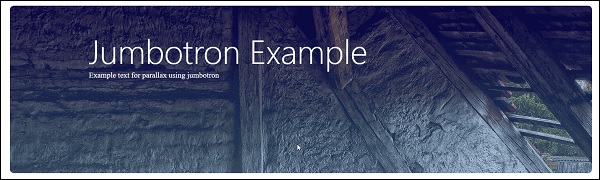
如圖 第 33 行 所示,我們使用 jumbotron 類建立一個 div,以顯示大框,我們將在其中載入我們的特定影像。請注意,這一次沒有影像的直接 URL,我們將使用下載的影像。您可以為示例下載任何高解析度影像,並在 第 16 行 中指定它。
執行上面給出的程式碼時,您將看到的輸出如下 −
廣告