
Nagios - NRPE
Nagios 守護程序會在 NRPE(Nagios 遠端外掛執行程式)中對遠端機器執行檢查。它可讓你在其他機器上遠端執行 Nagios 外掛。你可以監控遠端機器度量指標,如磁碟使用情況、CPU 負載等。透過一些 Windows 代理附加元件,它還可以檢查遠端 Windows 機器度量指標。
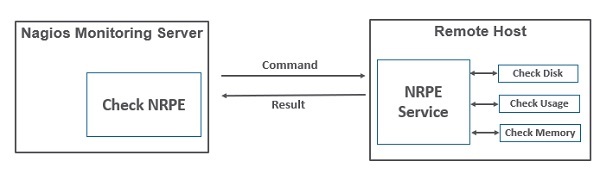
讓我們一步步瞭解如何在需要監控的客戶端機器上安裝和配置 NRPE。
步驟 1 − 執行以下命令在遠端 Linux 機器上安裝 NRPE 以供監控。
sudo apt-get install nagios-nrpe-server nagios-plugins
步驟 2 − 現在,在伺服器目錄內建立一個主機檔案,並放入所有必要的主機定義。
sudo gedit /usr/local/nagios/etc/servers/ubuntu_host.cfg
# Ubuntu Host configuration file

define host {
   use linux-server
   host_name ubuntu_host
   alias Ubuntu Host
   address 192.168.1.10
   register 1
}

define service {
   host_name ubuntu_host
   service_description PING
   check_command check_ping!100.0,20%!500.0,60%
   max_check_attempts 2
   check_interval 2
   retry_interval 2
   check_period 24x7
   check_freshness 1
   contact_groups admins
   notification_interval 2
   notification_period 24x7
   notifications_enabled 1
   register 1
}

define service {
   host_name ubuntu_host
   service_description Check Users
   check_command check_local_users!20!50
   max_check_attempts 2
   check_interval 2
   retry_interval 2
   check_period 24x7
   check_freshness 1
   contact_groups admins
   notification_interval 2
   notification_period 24x7
   notifications_enabled 1
   register 1
}

define service {
   host_name ubuntu_host
   service_description Local Disk
   check_command check_local_disk!20%!10%!/
   max_check_attempts 2
   check_interval 2
   retry_interval 2
   check_period 24x7
   check_freshness 1
   groups admins
   notification_interval 2
   notification_period 24x7
   notifications_enabled 1
   register 1
}

define service {
   host_name ubuntu_host
   service_description Check SSH
   check_command check_ssh
   max_check_attempts 2
   check_interval 2
   retry_interval 2
   check_period 24x7
   check_freshness 1
   contact_groups admins
   notification_interval 2
   notification_period 24x7
   notifications_enabled 1
   register 1
}

define service {
   host_name ubuntu_host
   service_description Total Process
   check_command check_local_procs!250!400!RSZDT
   max_check_attempts 2
   check_interval 2
   retry_interval 2
   check_period 24x7
   check_freshness 1
   contact_groups admins
   notification_interval 2
   notification_period 24x7
   notifications_enabled 1
   register 1
}
步驟 3 − 執行下面顯示的命令來驗證配置檔案。
sudo /usr/local/nagios/bin/nagios -v /usr/local/nagios/etc/nagios.cfg

步驟 4 − 如果沒有錯誤,重新啟動 NRPE、Apache 和 Nagios。
service nagios-nrpe-server restart
service apache2 restart
service nagios restart
步驟 5 − 開啟瀏覽器並進入 Nagios Web 介面。你可以看到需要監控的主機已新增到 Nagios 核心服務。同樣,你可以新增更多主機,讓 Nagios 監控。

廣告