
- MEAN.JS 教程
- MEAN.JS - 首頁
- MEAN.JS - 概述
- MEAN.JS - 架構
- 構建 Node Web 應用
- MEAN.JS - Mean 專案設定
- 構建靜態路由 Node Express
- MEAN.JS - 構建資料模型
- MEAN.JS - REST API
- 使用 Angular 構建前端
- 應用中的 Angular 元件
- 使用 Angular 構建單頁面應用
- 構建 SPA:更高級別
- MEAN.JS 有用資源
- MEAN.JS - 快速指南
- MEAN.JS - 有用資源
- MEAN.JS - 討論
MEAN.JS - REST API
在本節中,我們將看到我們的應用程式如何透過 REST API 與我們的資料庫進行互動,並使用 HTTP 方法。術語REST代表表現層狀態轉移(REpresentational State Transfer),這是一種用於與 Web 服務通訊的架構風格,而API代表應用程式程式設計介面(Application Program Interface),它允許應用程式相互互動。
首先,我們將建立 RESTful API 來獲取所有專案、建立專案和刪除專案。對於每個專案,_id將由 MongoDB 自動生成。下表描述了應用程式如何從 API 請求資料:
| HTTP 方法 | URL 路徑 | 描述 |
|---|---|---|
| GET | /api/students | 用於從 Student 集合中獲取所有學生。 |
| POST | /api/students/send | 用於在 Student 集合中建立一個學生記錄。 |
| DELETE | /api/students/student_id | 用於從 Student 集合中刪除學生記錄。 |
RESTful API 路由
我們首先討論 RESTful API 路由中的 Post 方法。
POST
首先,讓我們透過我們的 REST API 在 Student 集合中建立一個記錄。此特定案例的程式碼可以在server.js檔案中找到。作為參考,此處貼上了部分程式碼:
app.post('/api/students/send', function (req, res) {
   var student = new Student(); // create a new instance of the student model
   student.name = req.body.name; // set the student name (comes from the request)
   student.save(function(err) {
      if (err)
         res.send(err);
         res.json({ message: 'student created!' });
   });
});
執行
您可以從此連結下載此應用程式的原始碼。下載 zip 檔案;將其解壓縮到您的系統中。開啟終端並執行以下命令以安裝 npm 模組依賴項。
$ cd mean-demon-consuming_rest_api
$ npm install
為了解析請求,我們需要 body-parser 包。因此,執行以下命令將其包含在您的應用程式中。
npm install --save body-parser
附加的原始碼已經包含此依賴項,因此無需執行上述命令,這僅供參考。
要執行應用程式,請導航到您新建立的專案目錄,並使用以下命令執行:
npm start
您將獲得如下所示的確認資訊:

有很多工具可以測試 API 呼叫,這裡我們使用 Chrome 的一個使用者友好的擴充套件程式,稱為Postman REST Client。
開啟 Postman REST Client,輸入 URL 為https://:3000/api/students/send,選擇POST 方法。接下來,輸入如下所示的請求資料:
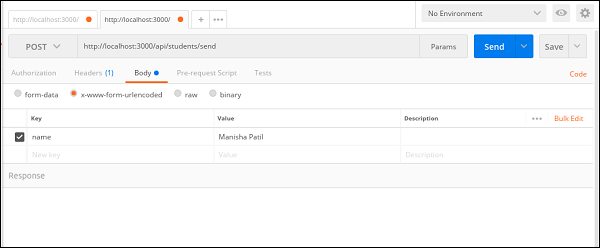
請注意,我們正在將名稱資料作為x-www-form-urlencoded傳送。這會將我們所有資料作為查詢字串傳送到 Node 伺服器。
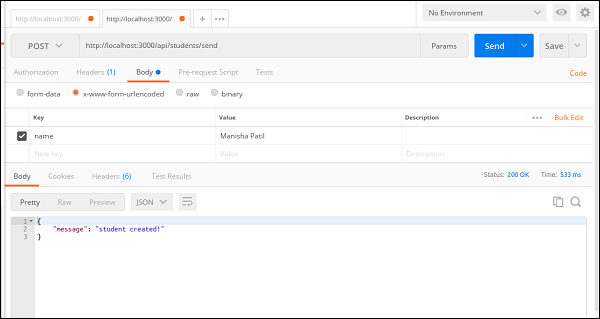
單擊傳送按鈕以建立學生記錄。將出現如下所示的成功訊息:
GET
接下來,讓我們從 mongodb 獲取所有學生記錄。需要編寫以下路由。您可以在server.js檔案中找到完整程式碼。
app.get('/api/students', function(req, res) {
   // use mongoose to get all students in the database
   Student.find(function(err, students) {
      // if there is an error retrieving, send the error.
      // nothing after res.send(err) will execute
      if (err)
         res.send(err);
      res.json(students); // return all students in JSON format
   });
});
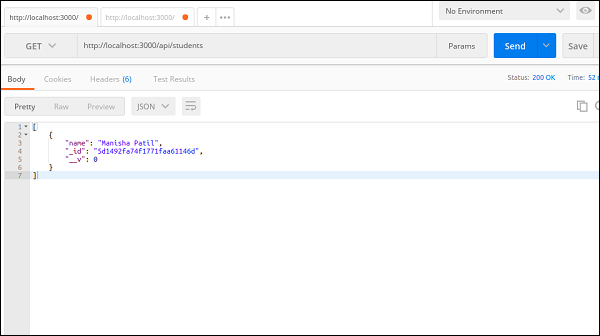
接下來,開啟 Postman REST Client,輸入 URL 為
https://:3000/api/students,選擇GET方法,然後單擊傳送按鈕以獲取所有學生。
DELETE
接下來,讓我們看看如何透過 REST api 呼叫從我們的 mongo 集合中刪除記錄。
需要編寫以下路由。您可以在server.js檔案中找到完整程式碼。
app.delete('/api/students/:student_id', function (req, res) {
   Student.remove({
      _id: req.params.student_id
   }, function(err, bear) {
      if (err)
         res.send(err);
      res.json({ message: 'Successfully deleted' });
   });
});
接下來,開啟 Postman REST Client,輸入 URL 為
https://:3000/api/students/5d1492fa74f1771faa61146d
(此處 5d1492fa74f1771faa61146d 是我們將從 Student 集合中刪除的記錄)。
選擇DELETE方法,然後單擊傳送按鈕以獲取所有學生。
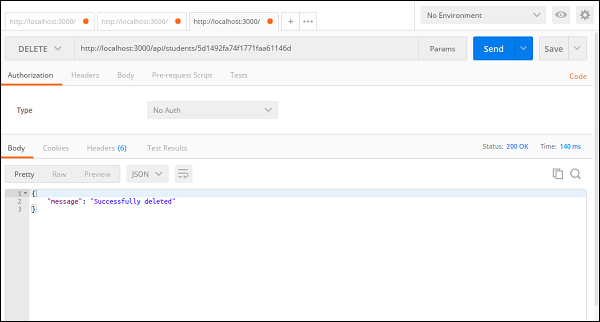
您可以透過對https://:3000/api/students/5d1492fa74f1771faa61146d進行 GET 呼叫來檢查 MongoDB 中已刪除的資料。