
- Materialize 教程
- Materialize - 首頁
- Materialize - 概述
- Materialize - 環境搭建
- Materialize - 顏色
- Materialize - 網格
- Materialize - 輔助工具
- Materialize - 媒體
- Materialize - 陰影
- Materialize - 表格
- Materialize - 排版
- Materialize - 徽章
- Materialize - 按鈕
- Materialize - 麵包屑
- Materialize - 卡片
- Materialize - 晶片
- Materialize - 集合
- Materialize - 頁尾
- Materialize - 表單
- Materialize - 圖示
- Materialize - 導航欄
- Materialize - 分頁
- Materialize - 預載入器
- Materialize - 摺疊面板
- Materialize - 對話方塊
- Materialize - 下拉選單
- Materialize - 標籤頁
- Materialize - 波紋效果
- Materialize 有用資源
- Materialize - 快速指南
- Materialize - 有用資源
- Materialize - 討論
Materialize - 卡片
Materialize 提供不同的 CSS 類來應用各種預定義的視覺和行為增強功能,以顯示各種型別的卡片。下表列出了可用的類及其效果。
| 序號 | 類名及描述 |
|---|---|
| 1 | card 將 div 元素標識為 Materialize 卡片容器。“外部”div 所必需。 |
| 2 | card-content 將 div 標識為卡片內容容器,“內部”div 所必需。 |
| 3 | card-title 將 div 標識為卡片標題容器,“內部”標題 div 所必需。 |
| 4 | card-action 將 div 標識為卡片操作容器,併為操作文字分配適當的文字特徵。“內部”操作 div 所必需;內容直接位於 div 內部,沒有中間容器。 |
| 5 | card-image 將 div 標識為卡片影像容器,“內部”div 所必需。 |
| 6 | card-reveal 將 div 標識為顯示文字容器。 |
| 7 | activator 將 div 標識為顯示文字容器和作為顯示器的影像。用於顯示與影像相關的上下文資訊。 |
| 8 | card-panel 將 div 標識為帶有陰影和填充的簡單卡片。 |
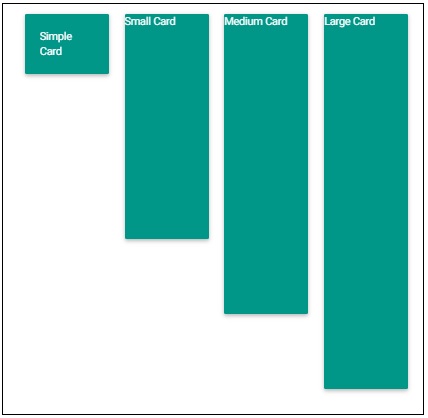
| 9 | card-small 將 div 標識為小型卡片。高度 - 300px; |
| 10 | card-medium 將 div 標識為中型卡片。高度 - 400px; |
| 11 | card-larger 將 div 標識為大型卡片。高度 - 500px; |
示例
以下示例展示了使用卡片類來展示各種型別的卡片。
<!DOCTYPE html>
<html>
   <head>
      <title>The Materialize Cards Example</title>
         <meta name="viewport" content="width=device-width, initial-scale=1">
         <link rel="stylesheet" href="https://fonts.googleapis.com/icon?family=Material+Icons">
         <link rel="stylesheet" href="https://cdnjs.cloudflare.com/ajax/libs/materialize/0.97.3/css/materialize.min.css">
         <script type="text/javascript" src="https://code.jquery.com/jquery-2.1.1.min.js"></script>
         <script src="https://cdnjs.cloudflare.com/ajax/libs/materialize/0.97.3/js/materialize.min.js"></script>
   </head>
   <body class="container">
      <div class="row">
         <div class="col s12 m6">
            <div class="card blue-grey lighten-4">
               <div class="card-content">
                  <span class="card-title"><h3>Learn HTML5</h3></span>
                  <p>HTML5 is the next major revision of the HTML standard superseding HTML 4.01, XHTML 1.0, and XHTML 1.1. HTML5 is a standard for structuring and presenting content on the World Wide Web.</p>
               </div>
               <div class="card-action">
                  <button class="btn waves-effect waves-light blue-grey"><i class="material-icons">share</i></button>
                  <a class="right blue-grey-text" href="https://tutorialspoint.tw">www.tutorialspoint.com</a>
               </div>
            </div>
         </div>
               <div class="col s12 m6">
            <div class="card blue-grey lighten-4">
               <div class="card-image">
                  <img src="html5-mini-logo.jpg">
               </div>
               <div class="card-content">
                  <p>HTML5 is the next major revision of the HTML standard superseding HTML 4.01, XHTML 1.0, and XHTML 1.1. HTML5 is a standard for structuring and presenting content on the World Wide Web.</p>
               </div>
               <div class="card-action">
                  <button class="btn waves-effect waves-light blue-grey"><i class="material-icons">share</i></button>
                  <a class="right blue-grey-text" href="https://tutorialspoint.tw">www.tutorialspoint.com</a>
               </div>
            </div>
         </div>
      </div>
      <div class="row">
         <div class="col s12 m6">
         <div class="card blue-grey lighten-4">
            <div class="card-image waves-effect waves-block waves-light">
               <img class="activator" src="html5-mini-logo.jpg">
            </div>
            <div class="card-content activator">
               <p>Click the image to reveal more information.</p>
            </div>
            <div class="card-reveal">
               <span class="card-title grey-text text-darken-4">HTML5<i class="material-icons right">close</i></span>
               <p>HTML5 is the next major revision of the HTML standard superseding HTML 4.01, XHTML 1.0, and XHTML 1.1. HTML5 is a standard for structuring and presenting content on the World Wide Web.</p>
            </div>
            <div class="card-action">
               <button class="btn waves-effect waves-light blue-grey"><i class="material-icons">share</i></button>
               <a class="right blue-grey-text" href="https://tutorialspoint.tw">www.tutorialspoint.com</a>
            </div>
         </div>
      </div>
   </div>
   <div class="row">
      <div class="col s12 m3">
         <div class="card-panel teal">
            <span class="white-text">Simple Card</span>
         </div>
      </div>
      <div class="col s12 m3">
         <div class="card small teal">
            <span class="white-text">Small Card</span>
         </div>
      </div>
         <div class="col s12 m3">
            <div class="card medium teal">
               <span class="white-text">Medium Card</span>
            </div>
         </div>
         <div class="col s12 m3">
            <div class="card large teal">
               <span class="white-text">Large Card</span>
            </div>
         </div>
      </div>
   </body>
</html>
輸出
驗證輸出。

廣告