
- JBoss Fuse 教程
- JBoss Fuse – 主頁
- JBoss Fuse - ESB 簡介
- 什麼是 Fuse?
- JBoss Fuse – Apache Karaf
- JBoss Fuse – Apache Camel
- JBoss Fuse – Camel 概念
- JBoss Fuse – Apache CXF
- JBoss Fuse – Rest Web 服務
- JBoss Fuse – Apache AMQ
- JBoss Fuse – AMQ 和 Camel
- JBoss Fuse – Fabric
- JBoss Fuse – 子容器
- JBoss Fuse – 問題和解決方案
- JBoss Fuse 有用資源
- JBoss Fuse - 快速指南
- JBoss Fuse - 有用資源
- JBoss Fuse - 討論
JBoss Fuse - AMQ 和 Camel
在本節中,我們將學習有關 ActiveMQ 如何與 Camel 協作工作的基本知識。
配置 ActiveMQ 元件
在我們可以在程式碼中使用 ActiveMQ 佇列或主題之前,我們必須配置 ActiveMQComponent。可以使用如下所示程式來執行 ActiveMQComponent 的最小配置 −
<bean id = "activemq" class = "org.apache.activemq.camel.component.ActiveMQComponent">
   <property name = "brokerURL" value = "tcp://:61616"/>
   <property name = "userName" value = "admin"/>
   <property name = "password" value = "admin"/>
</bean>
brokerURL − 指定 AMQ Broker 的主機和埠。
username − 指定用於連線 AMQ Broker 的使用者名稱。
password − 指定用於連線 AMQ Broker 的密碼。
連線到佇列
既然我們已經配置了 ActiveMQComponent,我們就可以在自己的 CamelContext 中使用它作為端點。
我們將在以下格式中使用 AMQ 端點 −
Activemq:[queue|topic]:[queueName|topicName]
向 AMQ 寫入訊息
<?xml version = "1.0" encoding="UTF-8"?>
<!-- Configures the Camel Context-->
<beans xmlns = "http://www.springframework.org/schema/beans"
   xmlns:xsi = "http://www.w3.org/2001/XMLSchema-instance"
   xsi:schemaLocation = "http://www.springframework.org/schema/beans
   http://www.springframework.org/schema/beans/spring-beans.xsd
   http://camel.apache.org/schema/spring
   http://camel.apache.org/schema/spring/camel-spring.xsd">
在此包部署到 Fuse 容器中後,你應該能夠看到釋出到 AMQ 的訊息,這些訊息作為檔案放置在 D:/src/data 中。
輸入
D:/src/data/input.txt
Test me
輸出
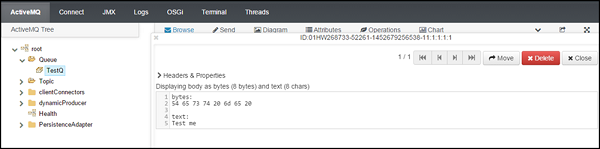
從 AMQ 讀寫
<?xml version = "1.0" encoding = "UTF-8"?>
<!-- Configures the Camel Context-->

<beans xmlns = "http://www.springframework.org/schema/beans"
   xmlns:xsi = "http://www.w3.org/2001/XMLSchema-instance"
   xsi:schemaLocation = "
   http://www.springframework.org/schema/beans
   http://www.springframework.org/schema/beans/spring-beans.xsd
   http://camel.apache.org/schema/spring
   http://camel.apache.org/schema/spring/camel-spring.xsd">

   <camelContext xmlns = "http://camel.apache.org/schema/spring">
      <!-- here is a sample which processes the input files
         (leaving them in place - see the 'noop' flag)
          then performs content based routing on the message using XPath -->

      <route>
         <from uri = "activemq:queue:TestQ"/>
         <to uri = "file:///d:/src"/>
      </route>
   </camelContext>

   <bean id = "activemq" class = "org.apache.activemq.camel.component.ActiveMQComponent">
      <property name = "brokerURL" value = "tcp://:61616"/>
      <property name = "userName" value = "admin"/>
      <property name = "password" value = "admin"/>
   </bean>

</beans>
輸入
部署此包後,你應該看到在 D:/src 中生成檔案並且使用者訊息也被使用。還應該顯示針對該佇列的使用者。
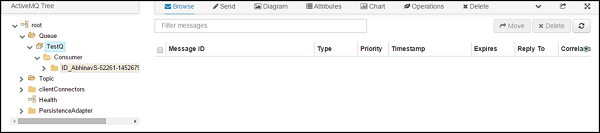
輸出
D:/src
Test me
寫入主題
<?xml version = "1.0" encoding = "UTF-8"?>
<!-- Configures the Camel Context-->
<beans xmlns = "http://www.springframework.org/schema/beans"
   xmlns:xsi = "http://www.w3.org/2001/XMLSchema-instance"
   xsi:schemaLocation = "http://www.springframework.org/schema/beans
   http://www.springframework.org/schema/beans/spring-beans.xsd
   http://camel.apache.org/schema/spring
   http://camel.apache.org/schema/spring/camel-spring.xsd">

   <camelContext xmlns = "http://camel.apache.org/schema/spring">
      <!-- here is a sample which processes the input files
         (leaving them in place - see the 'noop' flag)
          then performs content based routing on the message using XPath -->

      <route>
         <from uri = "file:///d:/src"/>
         <to uri = "activemq:topic:TestTopic” />
      </route>
   </camelContext>

   <bean id = "activemq" class = "org.apache.activemq.camel.component.ActiveMQComponent">
      <property name = "brokerURL" value = "tcp://:61616"/>
      <property name = "userName" value = "admin"/>
      <property name = "password" value = "admin"/>
   </bean>

</beans>
從主題讀寫
<?xml version = "1.0" encoding = "UTF-8"?>
<!-- Configures the Camel Context-->
<beans xmlns = "http://www.springframework.org/schema/beans"
   xmlns:xsi = "http://www.w3.org/2001/XMLSchema-instance"
   xsi:schemaLocation = "
   http://www.springframework.org/schema/beans
   http://www.springframework.org/schema/beans/spring-beans.xsd
   http://camel.apache.org/schema/spring
   http://camel.apache.org/schema/spring/camel-spring.xsd">

   <camelContext xmlns = "http://camel.apache.org/schema/spring">
      <!-- here is a sample which processes the input files
         (leaving them in place - see the 'noop' flag)
         then performs content based routing on the message using XPath -->

      <route>
         <from uri = "activemq:topic:TestTopic"/>
         <to uri = "file:///d:/src2"/>
      </route>
   </camelContext>

   <bean id = "activemq" class = "org.apache.activemq.camel.component.ActiveMQComponent">
      <property name = "brokerURL" value="tcp://:61616"/>
      <property name = "userName" value = "admin"/>
      <property name = "password" value = "admin"/>
   </bean>

</beans>
輸入
D:/src/file1.xml
<order>
   <data>
      <value>value1</value>
   </data>
</order>

<order>
   <data>
      <value>value2</value>
   </data>
</order>

<order>
   <data>
      <value>value3</value>
   </data>
</order>
輸出
D:/src/
<order>
   <data>
      <value>value1</value>
   </data>
</order>

<order>
   <data>
      <value>value2</value>
   </data>
</order>

<order>
   <data>
      <value>value3</value>
   </data>
</order>
廣告