
- JasperReports 教程
- JasperReports - 首頁
- JasperReports - 快速入門
- JasperReports - 環境設定
- JasperReports - 生命週期
- JasperReports - 設計
- JasperReports - 編譯設計
- JasperReports - 填充
- JasperReports - 檢視和列印
- JasperReports - 匯出
- JasperReports - 引數
- JasperReports - 資料來源
- JasperReports - 欄位
- JasperReports - 表示式
- JasperReports - 變數
- JasperReports - 節區
- JasperReports - 分組
- JasperReports - 字型
- JasperReports - Unicode 支援
- JasperReports - 樣式
- JasperReports - 指令碼程式
- JasperReports - 建立子報表
- JasperReports - 建立圖表
- JasperReports - 交叉表
- JasperReports - 國際化
- JasperReports 資源
- JasperReports - 快速指南
- JasperReports - 有用資源
- JasperReports - 討論
報表指令碼程式(Scriptlets)
在我們之前的章節中,我們已經看到,報表上顯示的資料通常是從報表引數和報表欄位中獲取的。可以使用報表變數及其表示式來處理這些資料。在某些情況下,使用報表表示式或變數難以輕鬆實現複雜的功能。例如,複雜的字串操作、記憶體中物件對映或列表的構建,或者使用第三方 Java API 操作日期。對於這種情況,JasperReports 提供了一種簡單而強大的方法,可以使用指令碼程式 (Scriptlets) 來實現。
指令碼程式是每次發生報表事件時都會執行的 Java 程式碼序列。可以透過指令碼程式影響報表變數的值。
指令碼程式宣告
我們可以透過兩種方式宣告指令碼程式:
使用<scriptlet> 元素。此元素具有name 屬性和class 屬性。class 屬性應指定類的名稱,該類擴充套件了JRAbstractScriptlet 類。該類必須在報表填充時在類路徑中可用,並且必須具有一個空建構函式,以便引擎可以動態例項化它。
使用報表模板 (JRXML) 中<jasperReport> 元素的scriptletClass 屬性。透過將此屬性設定為指令碼程式的完全限定名稱(包括整個包名),我們指示我們要使用一個指令碼程式。使用此屬性建立的指令碼程式例項充當指令碼程式列表中的第一個指令碼程式,並具有預定義的名稱 REPORT。
指令碼程式類
指令碼程式是一個 Java 類,它必須擴充套件以下類之一:
net.sf.jasperreports.engine.JRAbstractScriptlet - 此類包含許多必須在每個實現中被覆蓋的抽象方法。這些方法會在適當的時候由 JasperReports 自動呼叫。開發者必須實現所有抽象方法。
net.sf.jasperreports.engine.JRDefaultScriptlet - 此類包含 JRAbstractScriptlet 中每個方法的預設空實現。開發者只需要實現專案所需的那些方法。
下表列出了上述類中的方法。在報表填充階段,這些方法會在適當的時間由報表引擎呼叫。
| 序號 | 方法和描述 |
|---|---|
| 1 | public void beforeReportInit() 報表初始化之前呼叫。 |
| 2 | public void afterReportInit() 報表初始化之後呼叫。 |
| 3 | public void beforePageInit() 初始化每一頁之前呼叫。 |
| 4 | public void afterPageInit() 初始化每一頁之後呼叫。 |
| 5 | public void beforeColumnInit() 初始化每一列之前呼叫。 |
| 6 | public void afterColumnInit() 初始化每一列之後呼叫。 |
| 7 | public void beforeGroupInit(String groupName) 初始化引數中指定的組之前呼叫。 |
| 8 | public void afterGroupInit(String groupName) 初始化引數中指定的組之後呼叫。 |
| 9 | public void beforeDetailEval() 評估報表 detail 部分中的每個記錄之前呼叫。 |
| 10 | public void afterDetailEval() 評估報表 detail 部分中的每個記錄之後呼叫。 |
每個報表可以指定任意數量的指令碼程式。如果未為報表指定指令碼程式,引擎仍然會建立一個 JRDefaultScriptlet 例項並將其註冊到內建的 REPORT_SCRIPTLET 引數。
我們可以向指令碼程式新增任何其他所需的方法。報表可以透過使用內建引數 REPORT_SCRIPTLET 來呼叫這些方法。
全域性指令碼程式
我們可以透過另一種方式將指令碼程式與報表關聯,即全域性宣告指令碼程式。這使得指令碼程式適用於在給定的 JasperReports 部署中填充的所有報表。指令碼程式可以作為擴充套件新增到 JasperReports 中,這使得這一操作非常容易。指令碼程式擴充套件點由net.sf.jasperreports.engine.scriptlets.ScriptletFactory 介面表示。JasperReports 將在執行時載入透過擴充套件程式提供的所有指令碼程式工廠。然後,它將向每個工廠詢問它們想要應用於當前正在執行的報表的指令碼程式例項列表。在請求指令碼程式例項列表時,引擎會提供一些上下文資訊,工廠可以使用這些資訊來決定哪些指令碼程式實際上適用於當前報表。
報表管理器 (Report Governors)
管理器只是全域性指令碼程式的擴充套件,使我們能夠解決報表引擎在執行時生成報表時進入無限迴圈的問題。無效的報表模板在設計時無法檢測到,因為大多數情況下,進入無限迴圈的條件取決於在執行時饋送到引擎的實際資料。報表管理器有助於確定某個報表是否已進入無限迴圈,並可以停止它。這可以防止執行報表的機器資源耗盡。
JasperReports 具有兩個簡單的報表管理器,可以根據指定的最大頁數或指定的超時時間間隔停止報表執行。它們是:
net.sf.jasperreports.governors.MaxPagesGovernor - 這是一個全域性指令碼程式,它查詢兩個配置屬性以決定它是否應用於當前正在執行的報表。配置屬性為:
net.sf.jasperreports.governor.max.pages.enabled=[true|false]
net.sf.jasperreports.governor.max.pages=[整數]
net.sf.jasperreports.governors.TimeoutGovernor - 這也是一個全域性指令碼程式,它查詢以下兩個配置屬性以決定它是否應用。
配置屬性為:
net.sf.jasperreports.governor.timeout.enabled=[true|false]
net.sf.jasperreports.governor.timeout=[毫秒]
這兩個管理器的屬性可以在 jasperreports.properties 檔案中全域性設定,也可以在報表級別作為自定義報表屬性設定。這很有用,因為不同的報表可以具有不同的估計大小或超時限制,而且您可能希望為所有報表啟用管理器,而為某些報表關閉管理器,反之亦然。
示例
讓我們編寫一個指令碼程式類 (MyScriptlet)。檔案 C:\tools\jasperreports-5.0.1\test\src\com\tutorialspoint\MyScriptlet.java 的內容如下:
package com.tutorialspoint;

import net.sf.jasperreports.engine.JRDefaultScriptlet;
import net.sf.jasperreports.engine.JRScriptletException;


public class MyScriptlet extends JRDefaultScriptlet {

   public void afterReportInit() throws JRScriptletException{
      System.out.println("call afterReportInit()");
      // this.setVariableValue("AllCountries", sbuffer.toString());
      this.setVariableValue("someVar", new String("This variable value
         was modified by the scriptlet."));
   }

   public String hello() throws JRScriptletException {
      return "Hello! I'm the report's scriptlet object.";
   }

}
上述指令碼程式類的詳細資訊如下:
在afterReportInit 方法中,我們將一個值設定為變數"someVar" this.setVariableValue("someVar", new String("This variable value was modified by the scriptlet."));
在類的末尾,定義了一個名為'hello' 的額外方法。這是一個示例方法,可以新增到實際返回值而不是設定變數的 Scriptlet 中。
接下來,我們將指令碼程式類引用新增到我們現有的報表模板中(章節 報表設計)。修改後的報表模板 (jasper_report_template.jrxml) 如下所示。將其儲存到 C:\tools\jasperreports-5.0.1\test 目錄:
<?xml version = "1.0"?>
<!DOCTYPE jasperReport PUBLIC
   "//JasperReports//DTD Report Design//EN"
   "http://jasperreports.sourceforge.net/dtds/jasperreport.dtd">

<jasperReport xmlns = "http://jasperreports.sourceforge.net/jasperreports"
   xmlns:xsi = "http://www.w3.org/2001/XMLSchema-instance"
   xsi:schemaLocation = "http://jasperreports.sourceforge.net/jasperreports
   http://jasperreports.sourceforge.net/xsd/jasperreport.xsd"
   name = "jasper_report_template" pageWidth = "595"
   pageHeight = "842" columnWidth = "515"
   leftMargin = "40" rightMargin = "40" topMargin = "50" bottomMargin = "50"
   scriptletClass = "com.tutorialspoint.MyScriptlet">

   <style name = "alternateStyle" fontName = "Arial" forecolor = "red">

      <conditionalStyle>
         <conditionExpression>
            <![CDATA[new Boolean($V{countNumber}.intValue() % 2 == 0)]]>
         </conditionExpression>

         <style forecolor = "blue" isBold = "true"/>
      </conditionalStyle>
   </style>

   <parameter name = "ReportTitle" class = "java.lang.String"/>
   <parameter name = "Author" class = "java.lang.String"/>

   <queryString>
      <![CDATA[]]>
   </queryString>

   <field name = "country" class = "java.lang.String">
      <fieldDescription>
         <![CDATA[country]]>
      </fieldDescription>
   </field>

   <field name = "name" class = "java.lang.String">
      <fieldDescription>
         <![CDATA[name]]>
      </fieldDescription>
   </field>

   <variable name = "countNumber" class = "java.lang.Integer"
      calculation = "Count">
      <variableExpression><
         ![CDATA[Boolean.TRUE]]>
      </variableExpression>
   </variable>

   <variable name = "someVar" class = "java.lang.String">
      <initialValueExpression>
        <![CDATA["This is the initial variable value."]]>
      </initialValueExpression>
   </variable>

   <title>
      <band height = "100">

         <line>
            <reportElement x = "0" y = "0" width = "515" height = "1"/>
         </line>

         <textField isBlankWhenNull = "true" bookmarkLevel = "1">
            <reportElement x = "0" y = "10" width = "515" height = "30"/>

            <textElement textAlignment = "Center">
              <font size = "22"/>
            </textElement>

            <textFieldExpression class = "java.lang.String">
              <![CDATA[$P{ReportTitle}]]>
            </textFieldExpression>

            <anchorNameExpression>
               <![CDATA["Title"]]>
            </anchorNameExpression>
         </textField>

         <textField isBlankWhenNull = "true">
            <reportElement  x = "0" y = "40" width = "515" height = "20"/>

            <textElement textAlignment = "Center">
               <font size = "10"/>
            </textElement>

            <textFieldExpression class = "java.lang.String">
               <![CDATA[$P{Author}]]>
            </textFieldExpression>
         </textField>

         <textField isBlankWhenNull = "true">
            <reportElement  x = "0" y = "50" width = "515"
               height = "30" forecolor = "#993300"/>

            <textElement textAlignment = "Center">
               <font size = "10"/>
            </textElement>

            <textFieldExpression class = "java.lang.String">
               <![CDATA[$V{someVar}]]>
            </textFieldExpression>

         </textField>

      </band>
   </title>

   <columnHeader>
      <band height = "23">

         <staticText>
            <reportElement mode = "Opaque" x = "0" y = "3"
               width = "535" height = "15"
               backcolor = "#70A9A9" />

            <box>
               <bottomPen lineWidth = "1.0" lineColor = "#CCCCCC" />
            </box>

            <textElement />

            <text>
               <![CDATA[]]>
            </text>

         </staticText>

         <staticText>
            <reportElement x = "414" y = "3" width = "121" height = "15" />

            <textElement textAlignment = "Center" verticalAlignment = "Middle">
               <font isBold = "true" />
            </textElement>

            <text><![CDATA[Country]]></text>
         </staticText>

         <staticText>
            <reportElement x = "0" y = "3" width = "136" height = "15" />

            <textElement textAlignment = "Center" verticalAlignment = "Middle">
               <font isBold = "true" />
            </textElement>

            <text><![CDATA[Name]]></text>
         </staticText>

      </band>
   </columnHeader>

   <detail>
      <band height = "16">

         <staticText>
            <reportElement mode = "Opaque" x = "0" y = "0"
               width = "535"	height = "14"
               backcolor = "#E5ECF9" />

            <box>
               <bottomPen lineWidth = "0.25" lineColor = "#CCCCCC" />
            </box>

            <textElement />

            <text>
               <![CDATA[]]>
            </text>
         </staticText>

         <textField>
            <reportElement style = "alternateStyle" x="414" y = "0"
               width = "121" height = "15" />

            <textElement textAlignment = "Center" verticalAlignment = "Middle">
               <font size = "9" />
            </textElement>


            <textFieldExpression class = "java.lang.String">
               <![CDATA[$F{country}]]>
            </textFieldExpression>
         </textField>

         <textField>
            <reportElement x = "0" y = "0" width = "136" height = "15" />
            <textElement textAlignment = "Center" verticalAlignment = "Middle" />

            <textFieldExpression class = "java.lang.String">
               <![CDATA[$F{name}]]>
            </textFieldExpression>
         </textField>

      </band>
   </detail>

   <summary>
      <band height = "45">

         <textField isStretchWithOverflow = "true">
            <reportElement x = "0" y = "10" width = "515" height = "15" />
            <textElement textAlignment = "Center"/>

            <textFieldExpression class = "java.lang.String">
               <![CDATA["There are " + String.valueOf($V{REPORT_COUNT}) +
                  " records on this report."]]>
            </textFieldExpression>
         </textField>

         <textField isStretchWithOverflow = "true">
            <reportElement positionType = "Float" x = "0" y = "30" width = "515"
               height = "15" forecolor = "# 993300" />

            <textElement textAlignment = "Center">
               <font size = "10"/>
            </textElement>

            <textFieldExpression class = "java.lang.String">
               <![CDATA[$P{REPORT_SCRIPTLET}.hello()]]>
            </textFieldExpression>

         </textField>

      </band>
   </summary>

</jasperReport>
修改後的報表模板的詳細資訊如下:
我們在<jasperReport> 元素的scriptletClass 屬性中引用了 MyScriptlet 類。
指令碼程式只能訪問而不能修改報表欄位和引數。但是,指令碼程式可以修改報表變數的值。這可以透過呼叫 setVariableValue() 方法來實現。此方法定義在 JRAbstractScriptlet 類中,該類始終是任何指令碼程式的父類。在這裡,我們定義了一個變數someVar,它將被 MyScriptlet 修改為具有值This value was modified by the scriptlet。
上述報表模板在 Summary band 中有一個方法呼叫,說明如何編寫新方法(在指令碼程式中)並在報表模板中使用它們。($P{REPORT_SCRIPTLET}.hello())
報表填充的 Java 程式碼保持不變。檔案C:\tools\jasperreports-5.0.1\test\src\com\tutorialspoint\JasperReportFill.java 的內容如下:
package com.tutorialspoint;

import java.util.ArrayList;
import java.util.HashMap;
import java.util.Map;

import net.sf.jasperreports.engine.JRException;
import net.sf.jasperreports.engine.JasperFillManager;
import net.sf.jasperreports.engine.data.JRBeanCollectionDataSource;

public class JasperReportFill {
   @SuppressWarnings("unchecked")
   public static void main(String[] args) {
      String sourceFileName =
         "C://tools/jasperreports-5.0.1/test/jasper_report_template.jasper";

      DataBeanList DataBeanList = new DataBeanList();
      ArrayList<DataBean> dataList = DataBeanList.getDataBeanList();

      JRBeanCollectionDataSource beanColDataSource = new
         JRBeanCollectionDataSource(dataList);

      Map parameters = new HashMap();
      /**
       * Passing ReportTitle and Author as parameters
       */
      parameters.put("ReportTitle", "List of Contacts");
      parameters.put("Author", "Prepared By Manisha");

      try {
         JasperFillManager.fillReportToFile(
         sourceFileName, parameters, beanColDataSource);
      } catch (JRException e) {
         e.printStackTrace();
      }
   }
}
POJO 檔案C:\tools\jasperreports-5.0.1\test\src\com\tutorialspoint\DataBean.java 的內容如下:
package com.tutorialspoint;

public class DataBean {
   private String name;
   private String country;

   public String getName() {
      return name;
   }

   public void setName(String name) {
      this.name = name;
   }

   public String getCountry() {
      return country;
   }

   public void setCountry(String country) {
      this.country = country;
   }
}
檔案C:\tools\jasperreports-5.0.1\test\src\com\tutorialspoint\DataBeanList.java 的內容如下:
package com.tutorialspoint;

import java.util.ArrayList;

public class DataBeanList {
   public ArrayList<DataBean> getDataBeanList() {
      ArrayList<DataBean> dataBeanList = new ArrayList<DataBean>();

      dataBeanList.add(produce("Manisha", "India"));
      dataBeanList.add(produce("Dennis Ritchie", "USA"));
      dataBeanList.add(produce("V.Anand", "India"));
      dataBeanList.add(produce("Shrinath", "California"));

      return dataBeanList;
   }

   /**
    * This method returns a DataBean object,
    * with name and country set in it.
    */
   private DataBean produce(String name, String country) {
      DataBean dataBean = new DataBean();
      dataBean.setName(name);
      dataBean.setCountry(country);

      return dataBean;
   }
}
報表生成
我們將使用常規的 ANT 構建過程來編譯和執行上述檔案。檔案 build.xml(儲存在目錄 C:\tools\jasperreports-5.0.1\test 下)的內容如下所示。
匯入檔案 - baseBuild.xml 來自章節 環境設定,應與 build.xml 放在同一目錄下。
<?xml version = "1.0" encoding = "UTF-8"?>
<project name = "JasperReportTest" default = "viewFillReport" basedir = ".">
   <import file = "baseBuild.xml" />

   <target name = "viewFillReport" depends = "compile,compilereportdesing,run"
      description = "Launches the report viewer to preview
      the report stored in the .JRprint file.">

      <java classname = "net.sf.jasperreports.view.JasperViewer" fork = "true">
         <arg value = "-F${file.name}.JRprint" />
         <classpath refid = "classpath" />
      </java>
   </target>

   <target name = "compilereportdesing" description = "Compiles the JXML file and
      produces the .jasper file.">

      <taskdef name = "jrc" classname = "net.sf.jasperreports.ant.JRAntCompileTask">
         <classpath refid = "classpath" />
      </taskdef>

      <jrc destdir = ".">
         <src>
            <fileset dir = ".">
               <include name = "*.jrxml" />
            </fileset>
         </src>
         <classpath refid = "classpath" />
      </jrc>

   </target>

</project>
接下來,讓我們開啟命令列視窗並轉到放置 build.xml 的目錄。最後,執行命令ant -Dmain-class=com.tutorialspoint.JasperReportFill(viewFullReport 是預設目標)如下:
C:\tools\jasperreports-5.0.1\test>ant -Dmain-class=com.tutorialspoint.JasperReportFill
Buildfile: C:\tools\jasperreports-5.0.1\test\build.xml

clean-sample:
   [delete] Deleting directory C:\tools\jasperreports-5.0.1\test\classes
   [delete] Deleting: C:\tools\jasperreports-5.0.1\test\jasper_report_template.jasper
   [delete] Deleting: C:\tools\jasperreports-5.0.1\test\jasper_report_template.jrprint

compile:
   [mkdir] Created dir: C:\tools\jasperreports-5.0.1\test\classes
   [javac] C:\tools\jasperreports-5.0.1\test\baseBuild.xml:28:
   warning: 'includeantruntime' was not set, defaulting to bu
   [javac] Compiling 4 source files to C:\tools\jasperreports-5.0.1\test\classes

compilereportdesing:
   [jrc] Compiling 1 report design files.
   [jrc] log4j:WARN No appenders could be found for logger
   (net.sf.jasperreports.engine.xml.JRXmlDigesterFactory).
   [jrc] log4j:WARN Please initialize the log4j system properly.
   [jrc] log4j:WARN See http://logging.apache.org/log4j/1.2/faq.html#noconfig for more info.
   [jrc] File : C:\tools\jasperreports-5.0.1\test\jasper_report_template.jrxml ... OK.

run:
   [echo] Runnin class : com.tutorialspoint.JasperReportFill
   [java] log4j:WARN No appenders could be found for logger
   (net.sf.jasperreports.extensions.ExtensionsEnvironment).
   [java] log4j:WARN Please initialize the log4j system properly.
   [java] call afterReportInit()
   [java] call afterReportInit()

viewFillReport:
   [java] log4j:WARN No appenders could be found for logger
   (net.sf.jasperreports.extensions.ExtensionsEnvironment).
   [java] log4j:WARN Please initialize the log4j system properly.

BUILD SUCCESSFUL
Total time: 18 minutes 49 seconds
上述編譯的結果是,將開啟一個 JasperViewer 視窗,如下面的螢幕所示:
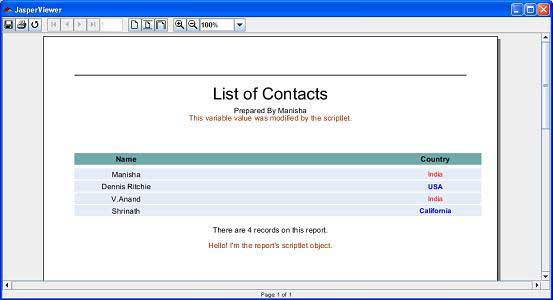
在這裡,我們看到顯示了來自 MyScriptlet 類的兩條訊息:
- 在標題部分 - This variable value was modified by the scriptlet
- 在底部 - Hello! I'm the report's scriptlet object.