
- JasmineJS 教程
- JasmineJS - 首頁
- JasmineJS - 概述
- JasmineJS - 環境搭建
- JasmineJS - 書寫測試用例及執行
- JasmineJS - BDD 架構
- JasmineJS - 測試的構建塊
- JasmineJS - Matchers (匹配器)
- JasmineJS - 跳過塊
- JasmineJS - 等值檢查
- JasmineJS - 布林值檢查
- JasmineJS - 順序檢查
- JasmineJS - 空值檢查
- JasmineJS - 不等式檢查
- JasmineJS - 非數字檢查
- JasmineJS - 異常檢查
- JasmineJS - beforeEach()
- JasmineJS - afterEach()
- JasmineJS - Spies (間諜)
- JasmineJS 有用資源
- JasmineJS - 快速指南
- JasmineJS - 有用資源
- JasmineJS - 討論
JasmineJS - 等值檢查
Jasmine 提供了許多方法,幫助我們檢查任何 JavaScript 函式和檔案的等值性。以下是一些檢查等值條件的示例。
ToEqual()
ToEqual() 是 Jasmine 內建庫中最簡單的匹配器。它只匹配傳遞給此方法的引數操作的結果是否與預期結果匹配。
以下示例將幫助您瞭解此匹配器的工作原理。我們有兩個待測試的檔案,名為 “expectexam.js”,另一個用於測試的檔名為 “expectSpec.js”。
Expectexam.js
window.expectexam = {
   currentVal: 0,
};
ExpectSpec.js
describe("Different Methods of Expect Block",function () {

   it("The Example of toEqual() method",function () {
      //this will check whether the value of the variable
      // currentVal is equal to 0 or not.
      expect(expectexam.currentVal).toEqual(0);
   });
});
成功執行後,這些程式碼段將產生以下輸出。請記住,您需要按照前面示例中的說明,將這些檔案新增到 specRunner.html 檔案的 header 部分。

not.toEqual()
not.toEqual() 的工作方式與 toEqual() 正好相反。當我們需要檢查值是否與任何函式的輸出不匹配時,使用 not.toEqual()。
我們將修改上面的示例以顯示其工作原理。
ExpectSpec.js
describe("Different Methods of Expect Block",function () {

   it("The Example of toEqual() method",function () {
      expect(expectexam.currentVal).toEqual(0);
   });

   it("The Example of not.toEqual() method",function () {
      //negation  testing expect(expectexam.currentVal).not.toEqual(5);
   });
});
Expectexam.js
window.expectexam = {
   currentVal: 0,
};
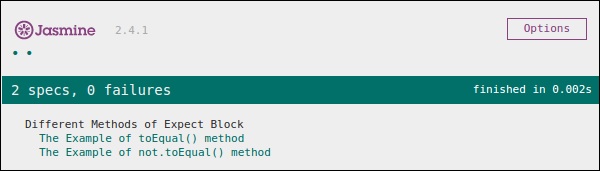
在第二個 expect 塊中,我們檢查 currentVal 的值是否等於 5,由於 currentVal 的值為零,因此我們的測試透過並提供綠色輸出。
ToBe()
toBe() 匹配器的工作方式與 toEqual() 類似,但它們在技術上有所不同。toBe() 匹配器匹配物件型別,而 toEqual() 匹配結果的等價性。
以下示例將幫助您瞭解 toBe() 匹配器的工作原理。此匹配器與 JavaScript 的 “===” 運算子完全等效,而 toEqual() 類似於 JavaScript 的 “==” 運算子。
ExpectSpec.js
describe("Different Methods of Expect Block",function () {

   it("The Example of toBe() method",function () {
      expect(expectexam.name).toBe(expectexam.name1);
   });
});
Expectexam.js
window.expectexam = {
   currentVal: 0,
   name:"tutorialspoint",
   name1:tutorialspoint
};
我們將稍微修改我們的 expectexam JavaScript 檔案。我們添加了兩個新變數,name 和 name1。請注意這兩個新增的變數之間的區別——一個是字串型別,另一個不是字串型別。
下面的截圖是我們的測試結果,紅色的叉號表示這兩個值不相等,而預期它們相等。因此,我們的測試失敗。

讓我們將這兩個變數 name 和 name1 都改為字串型別變數,然後再次執行 SpecRunner.html。現在檢查輸出。它將證明 toBe() 不僅匹配變數的等價性,而且還匹配變數的資料型別或物件型別。
not.toBe()
如前所述,not 只是 toBe() 方法的否定。當預期結果與函式或 JavaScript 檔案的實際輸出匹配時,它將失敗。
以下是一個簡單的示例,將幫助您瞭解 not.toBe() 匹配器的工作原理。
describe("Different Methods of Expect Block",function () {
   it("The Example of not.toBe() method",function () {
      expect(true).not.toBe(false);
   });
});
在這裡,Jasmine 將嘗試將 true 與 false 匹配。由於 true 不能與 false 相同,因此此測試用例將有效並透過。
