
 資料結構
資料結構 網路
網路 關係資料庫管理系統
 作業系統
作業系統 Java
Java MS Excel
 iOS
iOS HTML
HTML CSS
CSS Android
 Python
 C 程式設計
 C++
C++ C#
C# MongoDB
 MySQL
MySQL Javascript
 PHP
PHP 物理
物理 化學
化學 生物
生物 數學
數學 英語
英語 經濟學
經濟學 心理學
心理學 社會科學
社會科學 時尚研究
時尚研究 法律研究
法律研究如何在 Tkinter Listbox 視窗小部件中給特定項著色?
Tkinter ListBox 視窗小部件通常用於建立列表形式的項列表。無論何時單擊特定列表項,都可以使用滑鼠按鈕選擇這些項。ListBox 中的每個項都配置有預設顏色,可以透過在 itemconfig(options) 方法中定義“背景”和“前景色”來更改顏色。
示例
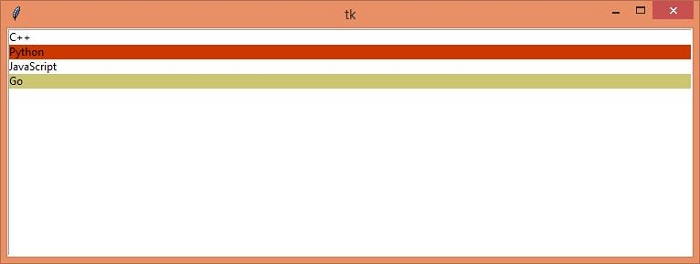
在此示例中,我們將建立一個包含項列表的 ListBox。我們會為部分列表項提供不同的顏色。
#Import required libraries
from tkinter import *
#Create an instance of tkinter frame
win= Tk()

#Define the geometry of the window
win.geometry("750x250")

#Create a ListBox
listbox= Listbox(win)
listbox.pack(expand=True, fill=BOTH)

#Adding Items in the ListBox
for item in ["C++","Python", "JavaScript", "Go"]:
   listbox.insert("end", item)

#Configure the listitems
listbox.itemconfig(1,{'bg':'OrangeRed3'})
listbox.itemconfig(3,{'bg':'khaki3'})

win.mainloop()
執行以上程式碼將顯示帶有列表項的列表框。可以透過更改 ‘bg’ 的值來配置列表項顏色。
輸出

更新於:04-May-2021
2K+ 瀏覽量

廣告