
 資料結構
資料結構 網路
網路 RDBMS
RDBMS 作業系統
作業系統 Java
Java MS Excel
 iOS
iOS HTML
HTML CSS
CSS Android
 Python
 C 程式設計
 C++
C++ C#
C# MongoDB
 MySQL
MySQL Javascript
 PHP
PHP 物理
物理 化學
化學 生物
生物 數學
數學 英文
英文 經濟學
經濟學 心理學
心理學 社會學
社會學 時尚研究
時尚研究 法律研究
法律研究調整視窗大小時,調整 Tkinter Listbox 小部件的大小
Tkinter Listbox 小部件用於顯示垂直堆疊選單的可滾動外框。在視窗中,使用者可以從該小部件選擇一個或多個專案。在 Tkinter 中,所有小部件都垂直或水平對齊,有時當調整視窗大小時,安排小部件的位置看起來很困難。
我們可以使用 expand=True 和 fill=BOTH 屬性配置 Listbox 小部件屬性。這些屬性確保小部件在垂直和水平方向上都能延伸。然而,expand 允許小部件在可用空間中增長。
示例
#Import tkinter library
from tkinter import *
#Create an instance of Tkinter frame or window
win= Tk()
#Set the geometry of tkinter frame
win.geometry("750x250")
listbox=Listbox(win) #Create a listbox widget
listbox.pack(padx=10,pady=10,fill=BOTH, expand=True)
#fill=BOTH stretch the widget both vertically and horizontally
#expand=True, expand the widget in the available space
listbox.insert(1, "Python")
listbox.insert(2, "Java")
listbox.insert(3, "C++")
listbox.insert(4, "Rust")
listbox.insert(5, "GoLang")
listbox.insert(6, "C#")
listbox.insert(7, "JavaScript")
listbox.insert(8, "R")
listbox.insert(9, "Php")
win.mainloop()
輸出
執行以上程式碼將顯示一個程式語言列表。
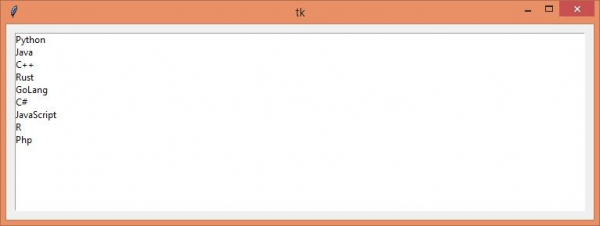
當調整視窗大小時,該 Listbox 將保持其相對於視窗的寬度和高度。

更新日期: 2021 年 4 月 22 日
2K+ 瀏覽量

廣告