
 資料結構
資料結構 計算機網路
計算機網路 關係型資料庫管理系統
 作業系統
作業系統 Java
Java MS Excel
 iOS
iOS HTML
HTML CSS
CSS Android
 Python
 C 語言程式設計
 C++
C++ C#
C# MongoDB
 MySQL
MySQL Javascript
 PHP
PHP 物理
物理 化學
化學 生物
生物 數學
數學 英語
英語 經濟
經濟 心理學
心理學 社會研究
社會研究 時裝研究
時裝研究 法律研究
法律研究如何修改 Tkinter Listbox 項的文字?
為在應用程式中顯示專案列表,Tkinter 提供了一個 Listbox 元件。它用於縱向建立專案列表。當我們希望更改特定 Listbox 專案的文字時,則必須首先透過迭代 over the listbox.curselection()來選擇專案,然後在刪除後插入新專案。若要插入 list 中的專案,你可以使用 listbox.insert(**items).
示例
# Import the required libraries
from tkinter import *
from tkinter import ttk

# Create an instance of tkinter frame or window
win=Tk()

# Set the size of the window
win.geometry("700x350")

# Create a Listbox widget
lb=Listbox(win)
lb.pack(expand=True, fill=BOTH)

# Define a function to edit the listbox ite
def edit():
   for item in lb.curselection():
      lb.delete(item)
      lb.insert("end", "foo")

# Add items in the Listbox
lb.insert("end","item1","item2","item3","item4","item5")

# Add a Button To Edit and Delete the Listbox Item
ttk.Button(win, text="Edit", command=edit).pack()

win.mainloop()
輸出
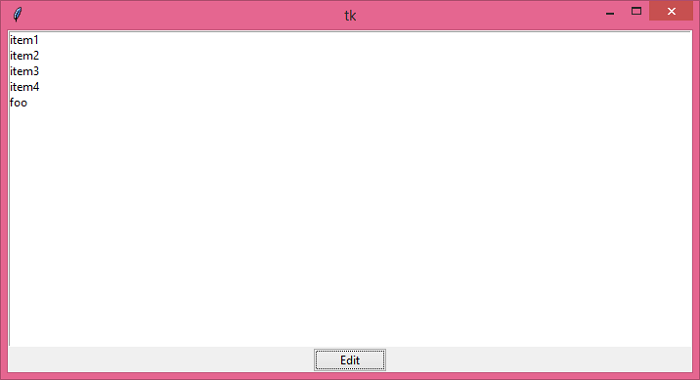
執行以上程式碼將顯示一個包含專案列表的視窗。

現在,從列表中選擇一個專案並單擊“編輯”。它將編輯列表中的所選專案。

更新於: 18-Jun-2021
1K+ 閱讀

廣告