
 資料結構
資料結構 網路
網路 RDBMS
RDBMS 作業系統
作業系統 Java
Java MS Excel
 iOS
iOS HTML
HTML CSS
CSS Android
 Python
 C 程式設計
 C++
C++ C#
C# MongoDB
 MySQL
MySQL Javascript
 PHP
PHP 物理
物理 化學
化學 生物
生物 數學
數學 英語
英語 經濟學
經濟學 心理學
心理學 社會學
社會學 時尚學
時尚學 法律學
法律學如何在 Tkinter 中編輯一個 Listbox 項?
Tkinter Listbox 小部件通常用於建立專案列表。它可以儲存數字、字元列表並支援許多特性,例如選擇和編輯列表項。
為了編輯 Listbox 項,我們必須首先使用listbox.curselection() 函式在迴圈中選擇該項,並在刪除 listbox 中的前一個項之後插入一個新項。要插入新項,可以使用listbox.insert(**items) 函式。
示例
在本例中,將在 listbox 小部件中建立專案列表,並使用一個按鈕來編輯列表中所選專案。
# Import the required libraries
from tkinter import *
from tkinter import ttk

# Create an instance of tkinter frame or window
win = Tk()

# Set the size of the window
win.geometry("700x350")

# Create a Listbox widget
lb = Listbox(win, width=100, height=10, background="purple2", foreground="white", font=('Times 13'), selectbackground="black")

lb.pack()

# Select the list item and delete the item first
# Once the list item is deleted,
# we can insert a new item in the listbox
def edit():
   for item in lb.curselection():
      lb.delete(item)
      lb.insert("end", "foo")

# Add items in the Listbox
lb.insert("end", "item1", "item2", "item3", "item4", "item5")

# Add a Button To Edit and Delete the Listbox Item
ttk.Button(win, text="Edit", command=edit).pack()

win.mainloop()
輸出
執行以上程式碼將允許你選擇和編輯列表項。
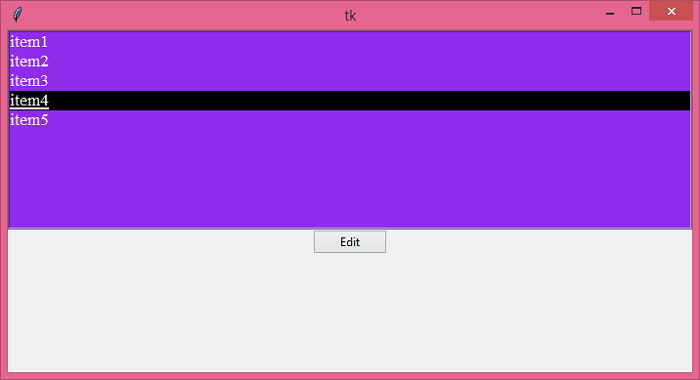
單擊“編輯”按鈕可配置專案列表。


更新於: 2021 年 6 月 19 日
3K+ 瀏覽次數

廣告