
 資料結構
資料結構 網路
網路 關係資料庫管理系統
 作業系統
作業系統 Java
Java MS Excel
 iOS
iOS HTML
HTML CSS
CSS Android
 Python
 C 程式設計
 C++
C++ C#
C# MongoDB
 MySQL
MySQL Javascript
 PHP
PHP 物理學
物理學 化學
化學 生物學
生物學 數學
數學 英語
英語 經濟學
經濟學 心理學
心理學 社會學
社會學 服裝設計
服裝設計 法律研究
法律研究MATLAB 中影像的強度變換操作
MATLAB 中強度變換簡介
在 MATLAB 中,影像的強度變換操作是最基本的影像處理技術之一。它是一種影像處理操作,其結果取決於影像的強度。在 MATLAB 中,影像的強度變換操作用於校正、增強或操作影像畫素的強度。我們有各種內建的 MATLAB 函式來執行影像的強度變換操作。
在本文中,我們將討論一些常用的強度變換操作,並瞭解如何使用 MATLAB 程式設計實現它們。
MATLAB 中的強度變換操作
在本文中,我們將介紹 MATLAB 中所有這些強度變換操作
影像反轉
對數變換
冪律變換
亮度調整
MATLAB 中的影像反轉
在 MATLAB 中,我們使用以下強度變換操作來查詢影像的反轉影像
Negative_image = 255 - input_image
示例
% MATLAB program to demonstrate image negative transformation
% Insert a color input image using imread function
input_image =
imread('https://tutorialspoint.tw/assets/questions/media/14
304-1687425269.jpg');
% Find the negative of the input image
negative_image = 255 - input_image;
% Display the original image and negative image
subplot(1, 2, 1), imshow(input_image), title('Original Image')
subplot(1, 2, 2), imshow(negative_image), title('Negative Image')
% Save the negative image in jpg format
imwrite(negative_image, 'negative_image.jpg');
輸出
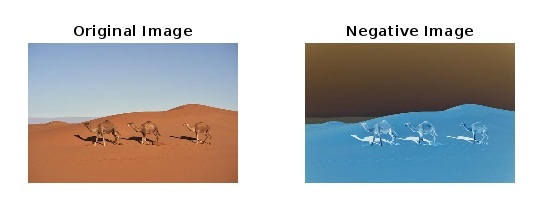
解釋
在這個 MATLAB 程式中,我們透過呼叫 "imread('https://tutorialspoint.tw/assets/questions/media/14304-1687425269.jpg');" 函式輸入彩色影像。此函式將輸入影像儲存在“input_image”變數中。之後,我們透過從 255 中減去每個畫素強度來計算輸入影像的反轉影像。這是透過公式“255 - input_image”完成的,然後結果儲存在“negative_image”變數中。
之後,我們呼叫“subplot”和“imshow”函式並排顯示原始影像和反轉影像。最後,我們呼叫“imwrite”函式將反轉影像儲存為“negative_image.jpg”。
MATLAB 中的影像對數變換
在 MATLAB 中,對數變換操作用於將影像中存在的所有影像畫素值替換為其對數值以增強影像。此強度變換操作擴充套件了影像的暗畫素而不是其較高的畫素值。
以下表達式用於在 MATLAB 中執行影像的對數變換
log_transformation = c * log(1 + input_image)
示例
% MATLAB program to demonstrate log transformation of image
% Input an image
input_image =
imread('https://tutorialspoint.tw/assets/questions/media/14
304-1687425269.jpg');
% Convert the image to double datatype for calculations
input_image = im2double(input_image);
% Constant to determine the nature of the log curve
c = 1;
% Perform the log transformation
log_transformed = c * log(1 + input_image);
% Display the original image and log-transformed image
subplot(1, 2, 1), imshow(input_image), title('Original Image')
subplot(1, 2, 2), imshow(log_transformed), title('Log-Transformed Image')
% Save the log-transformed image
imwrite(log_transformed, 'log_transformed_image.jpg');
輸出
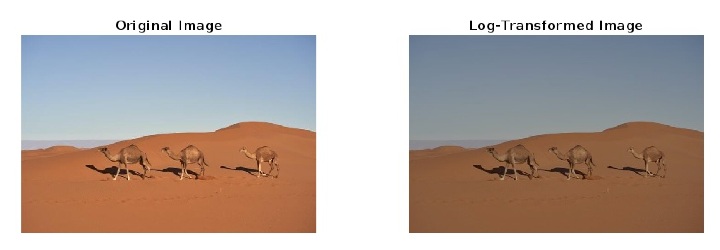
解釋
在這個 MATLAB 程式中,我們呼叫函式“imread”來輸入影像並將其儲存到“input_image”變數中。然後,我們呼叫函式“im2double”將影像資料型別更改為 double 以允許在計算中使用小數。之後定義一個值為“1”的常數“c”來確定對數曲線的性質。然後,使用公式“log_transformed = c * log(1 + input_image)”執行影像的對數變換。然後,我們呼叫函式“subplot”和“imshow”並排顯示原始影像和對數變換影像。最後,我們呼叫函式“imwrite”以名稱“log_transformed_image.jpg”儲存對數變換影像。
MATLAB 中的影像冪律變換
對影像執行冪律變換操作以增強不同型別的顯示裝置。需要此影像變換是因為不同的顯示裝置具有不同的伽馬值。
以下公式用於在 MATLAB 中執行冪律變換操作
power_law_transformed_image = input_image .^ gamma
示例
% MATLAB program to demonstrate power law
transformation of image
% Input an image
input_image =
imread('https://tutorialspoint.tw/assets/questions/media/14
304-1687425269.jpg');
% Convert the image to double datatype for calculations
input_image = im2double(input_image);
%  Set a desired gamma value for the power law transformation
gamma = 0.4;
% Perform the power law transformation of image
power_law_image = input_image .^ gamma;
% Display the original and power law transformed images
subplot(1, 2, 1), imshow(input_image), title('Original Image')
subplot(1, 2, 2), imshow(power_law_image), title('Power Law Transformed Image')
% Save the power law transformed image
imwrite(power_law_image, 'power_law_transformed_image.jpg');
輸出
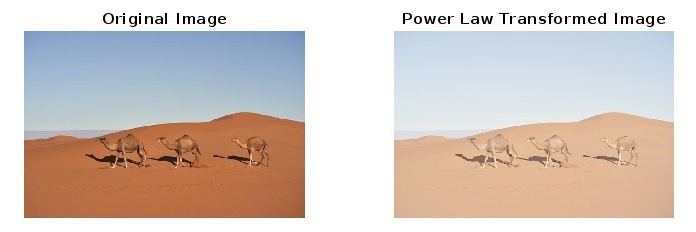
解釋
在這個 MATLAB 程式中,我們呼叫函式“imread”來輸入影像並將其儲存到“input_image”變數中。然後,我們呼叫函式“im2double”將影像資料型別更改為 double 以允許在計算中使用小數。之後根據需要設定所需的伽馬值。如果伽馬值大於 1,則它會增強影像的亮度區域,如果伽馬值小於 1,則它會增強影像的暗色區域。
然後,我們使用公式“power_law_image = input_image .^ gamma”執行影像的冪律變換。然後,我們呼叫函式“subplot”和“imshow”並排顯示原始影像和冪律變換影像。最後,我們呼叫函式“imwrite”以名稱“power_law_transformed_image.jpg”儲存冪律變換影像。
MATLAB 中的影像亮度調整
亮度調整用於變換影像中的光強度。
在 MATLAB 中,我們可以使用以下公式調整影像的亮度
bright_image = input_image + bright_value
示例
% MATLAB program to demonstrate brightness adjustment of image
% Input an image
input_image = imread('https://tutorialspoint.tw/assets/questions/media/14304-1687425269.jpg');
% Set a desired brightness value for the brightness transformation
bright_value = 60;
% Perform the brightness adjustment of the image
bright_image = input_image + bright_value;
% Display the original and brightness adjusted images
subplot(1, 2, 1), imshow(input_image), title('Original Image')
subplot(1, 2, 2), imshow(bright_image), title('Brightness Adjusted Image')
% Save the brightness adjusted image
imwrite(bright_image, 'brightness_adjusted_image.jpg');
輸出
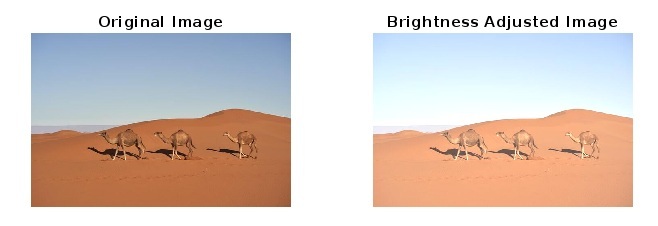
解釋
在這個 MATLAB 程式中,我們呼叫函式“imread”來輸入影像並將其儲存到“input_image”變數中。然後,我們根據需要設定所需的亮度值。之後,我們使用公式“bright_image = input_image + bright_value”執行影像的亮度變換。然後,我們呼叫函式“subplot”和“imshow”並排顯示原始影像和亮度變換影像。最後,我們呼叫函式“imwrite”以名稱“'brightness_adjusted_image.jpg”儲存亮度調整後的影像。
結論
因此,這就是關於 MATLAB 中影像強度變換操作的全部內容。我們可以對影像執行各種強度變換操作以增強它們。在本文的上述部分中,我們藉助示例 MATLAB 程式及其輸出描述了四種常用的強度變換操作。

2K+ 次瀏覽
