
 資料結構
資料結構 網路
網路 RDBMS
RDBMS 作業系統
作業系統 Java
Java MS Excel
 iOS
iOS HTML
HTML CSS
CSS Android
 Python
 C 程式設計
 C++
C++ C#
C# MongoDB
 MySQL
MySQL Javascript
 PHP
PHP 物理學
物理學 化學
化學 生物學
生物學 數學
數學 英語
英語 經濟學
經濟學 心理學
心理學 社會學
社會學 服裝設計
服裝設計 法律研究
法律研究在 MATLAB 中組合兩張影像
MATLAB 允許我們透過各種方法組合兩張影像,例如影像融合、影像拼接、影像連線、影像疊加、影像混合等。在本教程中,我們將探索所有這些組合兩張影像的技術。
使用 `imtile()` 函式在 MATLAB 中組合兩張影像
在 MATLAB 中,我們可以使用 `imtile()` 函式組合兩張影像。此函式允許我們將多張影像排列在平鋪佈局中。
語法
要組合兩張影像,`imtile` 函式採用以下語法
img = imtile({img1, img2}, 'GridSize', [1, 2]);
現在,讓我們透過 MATLAB 程式瞭解 `imtile` 函式的實現。
示例
% MATLAB program to combine two images using `imtile` function
% Read the two input images
img1 = imread('https://tutorialspoint.tw/assets/questions/media/14304-1687425340.jpg');
img2 = imread('https://tutorialspoint.tw/assets/questions/media/14304-1687425236.jpg');
% Call `imtile` function to combine two images in tiled layout
img = imtile({img1, img2}, 'GridSize', [1, 2]);
% Display the combined images
imshow(img); title('Combined Images');
輸出
解釋
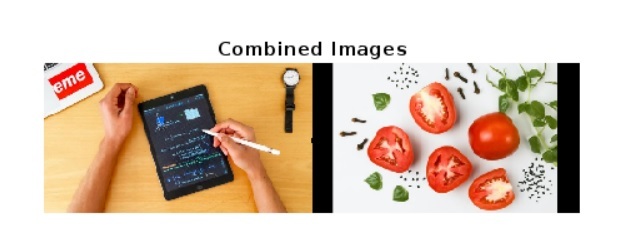
在這個 MATLAB 程式中,我們首先讀取要組合的兩張影像。為此,我們使用 `imread` 函式並將兩個輸入影像儲存在變數 `img1` 和 `img2` 中。然後,我們使用 `imtile` 函式將影像組合成平鋪佈局。在這種情況下,我們使用了 [1, 2],它建立了一個水平平鋪佈局。如果我們想要建立垂直佈局,那麼我們將使用 [2, 1]。最後,我們使用 `imshow` 函式和適當的標題顯示組合的影像。
使用 `cat()` 函式在 MATLAB 中組合兩張影像
在 MATLAB 中,我們可以使用 `cat()` 函式連線兩張影像。`cat()` 函式允許我們水平或垂直組合兩張影像,而無需平鋪。
語法
img = cat(dim, img1, img2);
這裡,`img1` 和 `img2` 是我們要組合的兩張影像。引數 `dim` 定義要沿其操作的維度,即對於垂直方向,其值為 `1`,對於水平方向,其值為 `2`。
以下 MATLAB 程式演示了 `cat()` 函式的實現,用於水平和垂直組合兩張影像。
示例
% MATLAB program to combine two images using `cat` function
% Read the two input images
img1 = imread('https://tutorialspoint.tw/assets/questions/media/14304-1687425308.jpg');
img2 = imread('https://tutorialspoint.tw/assets/questions/media/14304-1687425236.jpg');
% Resize the img2 to match the size of img1
img2 = imresize(img2, size(img1, [1, 2]));
% Concatenate the images horizontally
outimg1 = cat(2, img1, img2);
% Concatenate the images Vertically
outimg2 = cat(1, img1, img2);
% Display the combined images
subplot(1, 2, 1); imshow(outimage1); title('Horizontally Combined Images');
subplot(1, 2, 2); imshow(outimage2); title('Vertically Combined Images');
輸出
解釋
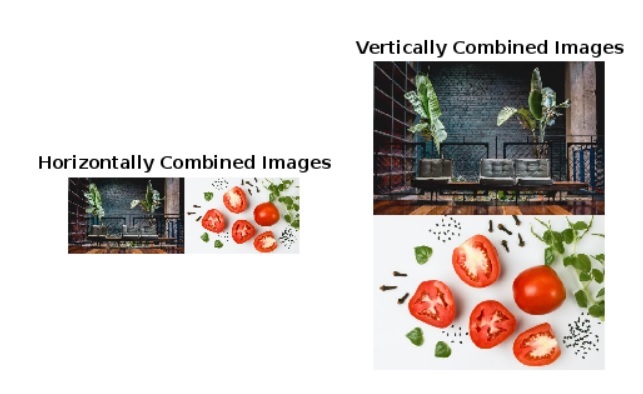
在這個 MATLAB 程式中,我們首先使用 `imread()` 函式讀取兩個輸入影像。然後,我們使用 `imresize` 函式調整第二個影像 `img2` 的大小以匹配第一個影像 `img1` 的大小。接下來,我們使用 `cat` 函式水平和垂直組合兩個影像,並將輸出儲存在 `outimg1` 和 `outimg2` 變數中。最後,我們使用 `imshow` 函式顯示儲存在 `outimg1` 和 `outimg2` 中的影像,並帶有適當的標題。
使用 `imfuse` 函式在 MATLAB 中組合兩張影像
MATLAB 提供了另一個名為 `imfuse` 的內建函式,用於基於不同的融合方法組合兩張影像。
語法
要組合兩張影像,`imfuse` 函式採用以下語法:
img = imfuse(img1, img2, 'FusionMode', 'options');
這裡,`img1` 和 `img2` 是我們要組合的兩張影像,`FusionMode` 指定我們想要用於組合影像的融合方法。
現在讓我們瞭解 `imfuse()` 函式的實現,以使用不同的融合技術組合兩張影像。
示例
% MATLAB program to demonstrate the use of infuse function to combine two images
% Read the two input images
img1 = imread('https://tutorialspoint.tw/assets/questions/media/14304-1687425308.jpg');
img2 = imread('https://tutorialspoint.tw/assets/questions/media/14304-1687425236.jpg');
% Resize img2 to match the size of img1
img2 = imresize(img2, size(img1, [1, 2]));
% Create a false-color composite image
outimg1 = imfuse(img1, img2, 'falsecolor');
% Create a composite image to highlight areas of dissimilarity between the images
outimg2 = imfuse(img1, img2, 'diff');
% Create a blended image
outimg3 = imfuse(img1, img2, 'blend');
% Display the combined images
subplot(1, 3, 1); imshow(outimg1); title('false-color image');
subplot(1, 3, 2); imshow(outimg2); title('difference image');
subplot(1, 3, 3); imshow(outimg3); title('blend image');
輸出
解釋
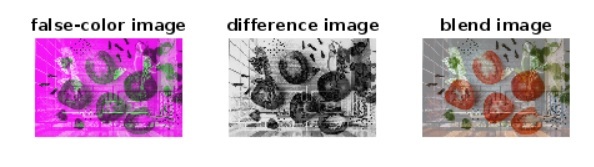
在這個 MATLAB 程式中,我們使用 `imread` 函式讀取兩個輸入影像並存儲在 `img1` 和 `img2` 變數中。接下來,我們將 `img2` 的大小與 `img1` 匹配。之後,我們使用不同的引數(例如 `faslecolor`、`diff` 和 `blend`)呼叫 `imfuse` 函式,以使用不同的融合技術組合兩張影像。最後,我們使用 `imshow` 函式顯示三個輸出影像,並帶有適當的標題。
結論
總之,MATLAB 提供了各種內建函式和技術來組合影像。在本文的上述部分中,我們已經解釋了所有這些技術,並藉助 MATLAB 程式將兩張影像組合在一起。

589 次瀏覽
