
 資料結構
資料結構 網路
網路 關係型資料庫管理系統
 作業系統
作業系統 Java
Java MS Excel
 iOS
iOS HTML
HTML CSS
CSS Android
 Python
 C語言程式設計
 C++
C++ C#
C# MongoDB
 MySQL
MySQL Javascript
 PHP
PHP 物理學
物理學 化學
化學 生物學
生物學 數學
數學 英語
英語 經濟學
經濟學 心理學
心理學 社會學
社會學 時尚研究
時尚研究 法律研究
法律研究如何在MATLAB中建立動畫GIF影像?
GIF 代表圖形交換格式。它是一種影像檔案型別,屬於光柵圖形檔案格式,特別用於 Web 和網路應用程式。GIF 影像格式的重要特徵是它可以支援影像中的靜態和動畫物件。在本教程中,我將解釋如何使用 MATLAB 建立動畫 GIF 影像。
眾所周知,MATLAB 是一種有效的工具,可用於執行各種科學和工程任務,例如影像處理、模擬等。我們可以利用 MATLAB 建立動畫 GIF 影像。
什麼是 GIF 影像?
GIF 影像是一種影像檔案型別,可以支援靜態和動畫內容,並使用光柵圖形檔案格式。它主要用於建立簡單的圖形或動畫影像,因為它使用最多 256 色的有限顏色空間。
但是,這種影像格式使用無失真壓縮技術,因此 GIF 影像在壓縮過程中不會損失質量。GIF 影像檔案還支援迴圈、透明度等其他一些重要屬性。
GIF 影像檔案具有“*.gif”副檔名。但是,GIF 檔案不適用於需要廣泛的顏色和漸變(如攝影)的應用程式。
現在,讓我們看看如何使用 MATLAB 建立動畫 GIF 影像。
如何使用 MATLAB 建立動畫 GIF 影像?
MATLAB 是一種有效的模擬工具,可用於建立動畫 GIF 影像檔案。在 MATLAB 中,要建立動畫 GIF 影像,我們必須使用迴圈來建立一系列多個幀。
在 MATLAB 中,可以按照以下步驟建立 GIF 影像
步驟 (1) - 定義要動畫化的資料。
步驟 (2) - 定義重要引數,例如檔名、影像中的幀數等。例如,
file_name = 'image_animation.gif';
frame_num = 30;
步驟 (3) - 建立一個空圖,用於顯示動畫。使用“figure”選項執行此操作。
步驟 (4) - 建立動畫迴圈。
步驟 (5) - 建立所有幀後,關閉圖以清理計算資源。
步驟 (6) - 開啟並檢視儲存在記憶體中的 GIF 影像。
這就是使用 MATLAB 建立動畫 GIF 影像所涉及的所有步驟。現在讓我們考慮一些示例,以便在實踐中瞭解此過程。
示例 (1) - 從一系列繪圖建立動畫 GIF
% MATLAB code to create an animated GIF image from a series of plots
% Define the data to animate
x = 0:0.1:5;

% Specify a filename for the animated GIF image
file_name = 'myanimate.gif';

% Define the number of frames for the animation
frame_num = 30;

% Create an empty figure to capture and display the animation
figure;

% Loop through different values of frame number ‘f’ for the animation
for f = 1:frame_num
   % Generate the data for y-axis
   y = x.^f;

   % Plot the curve
   plot(x, y);

   % Update the figure with the plot
   drawnow;

   % Capture the current frame as an image
   frame = getframe(gcf);
   img = frame2im(frame);

   % Convert the frame to an indexed image if required
   [imind, cm] = rgb2ind(img, 256);

   % Write the frame to the animated GIF image
   if f == 1
      imwrite(imind, cm, file_name, 'gif', 'Loopcount', inf, 'DelayTime', 0.1);
   else
      imwrite(imind, cm, file_name, 'gif', 'WriteMode', 'append', 'DelayTime', 0.1);
   end
end

% Close the figure
close(gcf);

% Display the conformation message
disp(['The GIF image is saved as ' file_name]);
輸出
GIF 影像另存為 myanimate.gif
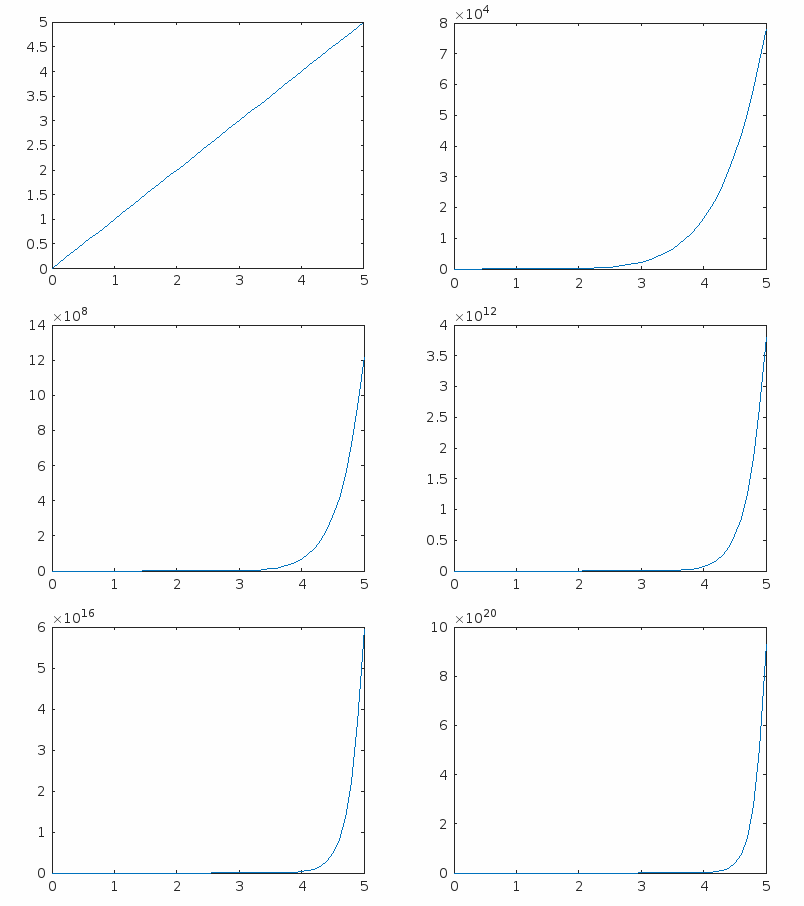
程式碼解釋
在此 MATLAB 程式碼中,我們建立了一個動畫 2D 繪圖,如上圖輸出 GIF 影像所示。在這裡,我們首先定義要動畫化的資料。然後,我們指定檔名和檔案引數,例如影像中的幀數。
之後,我們建立一個空圖來捕獲和顯示 gif 影像。接下來,我們使用動畫迴圈生成 GIF 影像。然後,我們關閉檔案以清理資源並顯示一條確認訊息,表明我們的動畫 gif 已儲存。
讓我們再舉一個例子,建立一個包含動畫文字字串的 GIF 影像。
示例 (2) - 建立顯示文字字串的動畫 GIF
% MATLAB code to create an animated text GIF image (changing color of text)
% Specify the text string to be animated
text_string = 'Tutorials Point';

% Specify the file name
file_name = 'tp_animation.gif';

% Create an empty figure
figure;

% Initialize color index
color_index = 1;

while true
   % Determine text color based on the color index
   if color_index == 1
      text_color = 'g'; % Green
   elseif color_index == 2
      text_color = 'r'; % Red
   else
      text_color = 'b'; % Blue
   end

   % Plot the text on the figure with the selected color
   text(0.5, 0.5, text_string, 'FontSize', 16, 'HorizontalAlignment', 'center','Color', text_color);

   % Specify that figure is centered and axis limits are fixed
   axis([0 1 0 1]);
   axis off;

   % Capture the current frame as an image
   frame = getframe(gcf);
   img = frame2im(frame);

   % Convert the frame to an indexed image
   [imind, cm] = rgb2ind(img, 256);

   % Set the appropriate 'WriteMode'
   if color_index == 1
   % Overwrite for the first frame
      writemode = 'overwrite';
   else
   % Append for subsequent frames
      writemode = 'append';
   end

   % Write the frame to the animated GIF
   imwrite(imind, cm, file_name, 'gif', 'WriteMode', writemode, 'DelayTime', 0.1);

   % Clear the figure for the next frame
   clf;

   % Update color index for the next frame
   color_index = mod(color_index, 3) + 1;
end
輸出

程式碼解釋
此程式碼的實現與前一個程式碼相同。在這裡,我們指定了動畫資料而不是繪圖值。此外,還添加了一些程式碼行,這些程式碼行由其相應的註釋行描述。
結論
總之,GIF 影像是一種影像檔案型別,可以支援靜態和動畫內容。在本教程中,我逐步解釋瞭如何使用 MATLAB 建立動畫 GIF 影像。此外,我還添加了兩個示例程式來在實踐中瞭解這些步驟。

365 次瀏覽
