
 資料結構
資料結構 網路
網路 RDBMS
RDBMS 作業系統
作業系統 Java
Java MS Excel
 iOS
iOS HTML
HTML CSS
CSS Android
 Python
 C 程式設計
 C++
C++ C#
C# MongoDB
 MySQL
MySQL Javascript
 PHP
PHP 物理學
物理學 化學
化學 生物
生物 數學
數學 英語
英語 經濟學
經濟學 心理學
心理學 社會學
社會學 時尚學
時尚學 法律
法律如何使用 Selenium WebDriver 驗證工具提示?
我們可以使用 Selenium webdriver 使用 getAttribute 方法來驗證元素的工具提示。工具提示文字是我們懸停在該元素上時顯示的文字。
當我們把滑鼠移出元素後它就消失了。工具提示文字通常顯示元素的 title 屬性值。首先,我們識別元素然後在元素上應用 getAttribute 方法。傳遞給此方法的引數是 title。
讓我們研究一個具有工具提示文字的元素的 html 程式碼 - 工具。
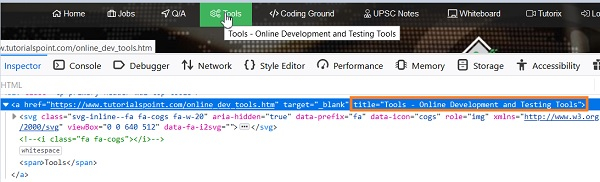
這裡,從工具選單中顯示的工具提示文字是工具 - 線上開發和測試工具,這是 html 中 title 屬性的值。
示例
import org.openqa.selenium.By;
import org.openqa.selenium.WebDriver;
import org.openqa.selenium.WebElement;
import org.openqa.selenium.firefox.FirefoxDriver;
import java.util.concurrent.TimeUnit;
public class TooltipVerfy{
   public static void main(String[] args) {
      System.setProperty("webdriver.gecko.driver",
         "C:\Users\ghs6kor\Desktop\Java\geckodriver.exe");
      WebDriver driver = new FirefoxDriver();
      //implicit wait
      driver.manage().timeouts().implicitlyWait(5, TimeUnit.SECONDS);
      //URL launch
      driver.get("https://tutorialspoint.tw/index.htm");
      //identify element
      WebElement n = driver.findElement(By.linkText("Tools"));

      //obtain title attribute
      String s = n.getAttribute("title");
      //verify tooltip text

      if(s.equals("Tools - Online Development and Testing Tools")) {
         System.out.println("Tooltip text matched");
      }else{
         System.out.println("Tooltip text not matched");
      }
      driver.quit();
   }
}
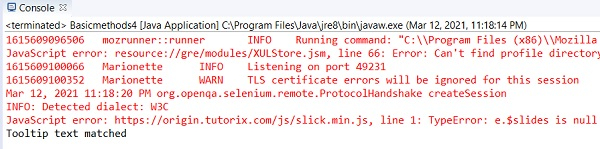
輸出

更新日期:2021 年 4 月 6 日
2K+ 檢視次數

廣告