
 資料結構
資料結構 網路
網路 資料庫管理系統
 作業系統
作業系統 Java
Java Microsoft Excel
 iOS
iOS HTML
HTML CSS
CSS Android
 Python
 C 程式設計
 C++
C++ C#
C# MongoDB
 MySQL
MySQL JavaScript
 PHP
PHP 物理學
物理學 化學
化學 生物學
生物學 數學
數學 英語
英語 經濟學
經濟學 心理學
心理學 社會學
社會學 時尚研究
時尚研究 法律研究
法律研究如何使用 Selenium WebDriver 驗證元素中是否存在屬性?
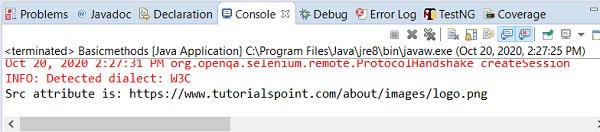
我們可以使用 Selenium webdriver 驗證元素中是否存在屬性。這是藉助getAttribute 方法實現的。在 html 文件中,每個元素使用其標籤與具有其值的元素屬性一起標識。為了獲取屬性值,我們必須將元素屬性作為引數傳遞給 getAttribute 方法。
讓我們看看元素的 html 程式碼並獲得其 src 屬性的值。其 src 屬性的值應該是 /about/images/logo.png。

示例
程式碼實現。
import org.openqa.selenium.By;
import org.openqa.selenium.Keys;
import org.openqa.selenium.WebDriver;
import org.openqa.selenium.WebElement;
import org.openqa.selenium.chrome.ChromeDriver;
import java.util.concurrent.TimeUnit;
public class AttributeVal{
   public static void main(String[] args) {
      System.setProperty("webdriver.chrome.driver", "C:\Users\ghs6kor\Desktop\Java\chromedriver.exe");
      WebDriver driver = new ChromeDriver();
      driver.get("https://tutorialspoint.tw/about/about_careers.htm");
      driver.manage().timeouts().implicitlyWait(5, TimeUnit.SECONDS);
      // identify element
      WebElement l=driver.findElement(By.className("tp-logo"));
      // getAttribute() to get src value
      String value = l.getAttribute("src");
      System.out.println("Src attribute is: "+ value);
      driver.close()
   }
}
輸出

更新日期:2020-10-26
4K+ 檢視

廣告