
 資料結構
資料結構 網路
網路 關係型資料庫管理系統
 作業系統
作業系統 Java
Java MS Excel
 iOS
iOS HTML
HTML CSS
CSS Android
 Python
 C 程式設計
 C++
C++ C#
C# MongoDB
 MySQL
MySQL Javascript
 PHP
PHP 物理學
物理學 化學
化學 生物學
生物學 數學
數學 英語
英語 經濟學
經濟學 心理學
心理學 社會學
社會學 時尚研究
時尚研究 法律研究
法律研究如何使用 Actions 類在 Selenium 中捕獲工具提示?
我們可以使用 Actions 類在 Selenium 中捕獲元素上的工具提示。首先,我們將必須建立 Actions 類的物件,然後將 moveToElement 應用於它。
此方法將滑鼠移動到我們想要捕獲工具提示的元素的中間,然後執行 perform 方法。最後,我們可以藉助 getText 方法獲取工具提示文字。當具有工具提示文字的元素在其 html 程式碼中沒有 title 屬性時,將使用此技術。
語法
WebElement m=driver.findElement(By.linkText("Q/A"));
Actions a = new Actions(driver);
a.moveToElement(m).perform();
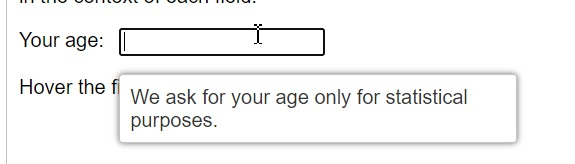
讓我們捕獲工具提示文字 - 我們僅出於統計目的要求您的年齡,在將滑鼠懸停在標籤為“您的年齡”的編輯框上時獲得。
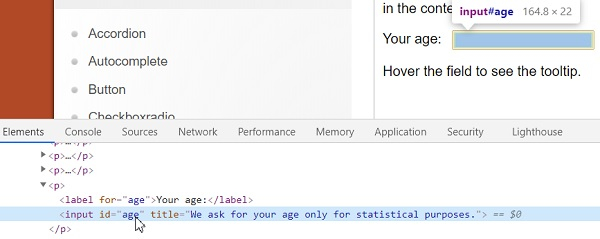
讓我們看一下帶有工具提示的編輯框的 html 程式碼。此元素沒有 title 屬性。
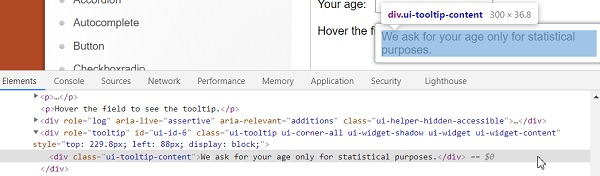
接下來要捕獲工具提示的 html 程式碼,首先點選 F12 在 Chrome 瀏覽器中開啟控制檯。然後按 F8 或 Function + F8 使瀏覽器處於偵錯程式暫停模式。
然後檢查工具提示文字以獲取其 html 屬性。
示例
import org.openqa.selenium.By;
import org.openqa.selenium.WebDriver;
import org.openqa.selenium.WebElement;
import org.openqa.selenium.firefox.FirefoxDriver;
import java.util.concurrent.TimeUnit;
import org.openqa.selenium.interactions.Action;
import org.openqa.selenium.interactions.Actions;
import org.openqa.selenium.JavascriptExecutor;
public class ToolTipActions{
   public static void main(String[] args) {
      System.setProperty("webdriver.gecko.driver",
         "C:\Users\ghs6kor\Desktop\Java\geckodriver.exe");
      WebDriver driver = new FirefoxDriver();
      //implicit wait
      driver.manage().timeouts().implicitlyWait(5, TimeUnit.SECONDS);
      //maximize browser
      driver.manage().window().maximize();
      //URL launch
      driver.get("https://jqueryui.com/tooltip/");
      // identify frame then switch to it
      WebElement f=driver.findElement(By.className("demo-frame"));
      driver.switchTo().frame(f);
      //identify element
      WebElement m=driver.findElement(By.xpath("//input[@id='age']"));
      //scroll to element with JavaScript Executor
      JavascriptExecutor js = (JavascriptExecutor) driver;
      js.executeScript("arguments[0].scrollIntoView(true);", m);
      // object of Actions with method moveToElement
      Actions at = new Actions(driver);
      at.moveToElement(m).perform();
      //identify tooltip element
      WebElement n=driver.findElement(By.xpath("//div[@class='ui-tooltip-content']"));
      //get text of tooltip
      String s = n.getText();
      System.out.println("Tooltip is :"+s);
      driver.quit();
   }
}
輸出


更新於: 2021-04-06
672 次檢視

廣告