
 資料結構
資料結構 網路
網路 RDBMS
RDBMS 作業系統
作業系統 Java
Java MS Excel
 iOS
iOS HTML
HTML CSS
CSS Android
 Python
 C 程式設計
 C++
C++ C#
C# MongoDB
 MySQL
MySQL Javascript
 PHP
PHP 物理學
物理學 化學
化學 生物學
生物學 數學
數學 英語
英語 經濟學
經濟學 心理學
心理學 社會研究
社會研究 時裝研究
時裝研究 法律研究
法律研究如何使用 Selenium 中的 Actions 類向上/向下滾動頁面?
我們可以使用 Selenium webdriver 中的 `Actions` 類向上/向下滾動頁面。首先,我們必須建立這個 `Actions` 類的物件,然後對其應用 `sendKeys` 方法。
現在,要向下滾動頁面,我們必須將引數 `Keys.PAGE_DOWN` 傳遞給這個方法。要再次向上滾動頁面,我們必須將引數 `Keys.PAGE_UP` 傳遞給 ` sendKeys` 方法。最後,我們必須使用 `build` 和 `perform` 方法來實際執行此操作。
語法
Actions a = new Actions(driver);
//scroll down a page
a.sendKeys(Keys.PAGE_DOWN).build().perform();
//scroll up a page
a.sendKeys(Keys.PAGE_UP).build().perform();
範例
import org.openqa.selenium.By;
import org.openqa.selenium.WebDriver;
import org.openqa.selenium.WebElement;
import org.openqa.selenium.firefox.FirefoxDriver;
import java.util.concurrent.TimeUnit;
import org.openqa.selenium.Keys;
import org.openqa.selenium.interactions.Action;
import org.openqa.selenium.interactions.Actions;
public class ScrollUpDownActions{
   public static void main(String[] args) {
      System.setProperty("webdriver.gecko.driver",
         "C:\Users\ghs6kor\Desktop\Java\geckodriver.exe");
      WebDriver driver = new FirefoxDriver();
      //implicit wait
      driver.manage().timeouts().implicitlyWait(5, TimeUnit.SECONDS);
      //URL launch
      driver.get("https://tutorialspoint.tw/index.htm");
      // object of Actions class to scroll up and down
      Actions at = new Actions(driver);
      at.sendKeys(Keys.PAGE_DOWN).build().perform();
      //identify element on scroll down
      WebElement l = driver.findElement(By.linkText("Latest Courses"));
      String strn = l.getText();
      System.out.println("Text obtained by scrolling down is :"+strn);

      at.sendKeys(Keys.PAGE_UP).build().perform();
      //identify element on scroll up
      WebElement m = driver.findElement(By.tagName("h4"));
      String s = m.getText();
      System.out.println("Text obtained by scrolling up is :"+s);
      driver.quit();
   }
}
輸出
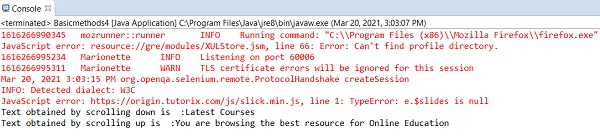

更新於: 07-4 月-2021
11K+ 瀏覽量

廣告