
 資料結構
資料結構 網路
網路 RDBMS
RDBMS 作業系統
作業系統 Java
Java MS Excel
 iOS
iOS HTML
HTML CSS
CSS Android
 Python
 C 程式設計
 C++
C++ C#
C# MongoDB
 MySQL
MySQL JavaScript
 PHP
PHP 物理
物理 化學
化學 生物
生物 數學
數學 英語
英語 經濟
經濟 心理學
心理學 社會學科
社會學科 時尚學科
時尚學科 法律學科
法律學科如何使用 Selenium WebDriver 獲取 HTTP 響應程式碼?
我們可以在 Selenium 驅動程式中獲取一個 HTTP 響應程式碼。在執行測試用例的同時,我們可以檢查資源中的響應程式碼。常見的 HTTP 響應程式碼包括 -
5XX – 伺服器問題。
4XX – 無法確定資源。
3XX - 重定向。
2XX – 正常。
為了獲取 HTTP 響應程式碼,將建立一個 HttpURLConnection 類的物件。要建立到 URL 的連結,應使用 openConnection 方法。接下來,我們將使用 setRequestMethod 並將 HEAD 作為引數傳遞。
對於連線,需要將 connect 方法應用到 HttpURLConnection 類的例項。最後,getResponseCode 方法將獲取響應程式碼。
語法
HttpURLConnection c=(HttpURLConnection)new URL("https://tutorialspoint.tw/index.htm").
.openConnection();
c.setRequestMethod("HEAD");
c.connect();
int r = c.getResponseCode();
示例
程式碼實現。
import org.openqa.selenium.By;
import org.openqa.selenium.WebDriver;
import org.openqa.selenium.WebElement;
import org.openqa.selenium.chrome.ChromeDriver;
import java.util.concurrent.TimeUnit;
import java.io.IOException;
import java.net.HttpURLConnection;
import java.net.MalformedURLException;
import java.net.URL;
import java.net.URLConnection;
public class HttpCodeResponse{
   public static void main(String[] args) throws
   MalformedURLException, IOException {
      System.setProperty("webdriver.chrome.driver", "C:\Users\ghs6kor\Desktop\Java\chromedriver.exe");
      WebDriver driver = new ChromeDriver();
      driver.get("https://tutorialspoint.tw/questions/index.php");
      // wait of 5 seconds
      driver.manage().timeouts().implicitlyWait(5, TimeUnit.SECONDS);
      // establish and open connection with URL
      HttpURLConnection c=
      (HttpURLConnection)new
      URL("https://tutorialspoint.tw/questions/index.php")
      .openConnection();
      // set the HEAD request with setRequestMethod
      c.setRequestMethod("HEAD");
      // connection started and get response code
      c.connect();
      int r = c.getResponseCode();
      System.out.println("Http response code: " + r);
      driver.close();
   }
}
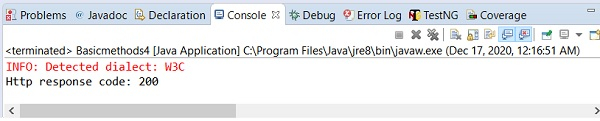
輸出

更新於:2020 年 12 月 28 日
5K+ 瀏覽

廣告