
 資料結構
資料結構 網路
網路 關係型資料庫管理系統
 作業系統
作業系統 Java
Java MS Excel
 iOS
iOS HTML
HTML CSS
CSS Android
 Python
 C 語言程式設計
 C++
C++ C#
C# MongoDB
 MySQL
MySQL Javascript
 PHP
PHP 物理學
物理學 化學
化學 生物學
生物學 數學
數學 英語
英語 經濟學
經濟學 心理學
心理學 社會學
社會學 時尚研究
時尚研究 法律研究
法律研究如何在 Seaborn 中移除繪圖的座標軸脊線?
座標軸脊線,也稱為座標軸線,是定義繪圖座標系邊界或邊框的線。在二維繪圖中,通常有四條座標軸脊線,例如頂部、底部、左側和右側。這些脊線構成了繪圖的框架,並作為資料點的參考線。
每條脊線代表繪圖的四條邊之一。頂部脊線水平穿過頂部,底部脊線水平穿過底部,左側脊線垂直沿著左側延伸,右側脊線垂直沿著右側延伸。
座標軸脊線為資料點提供了視覺參考,並有助於解釋繪圖。它們還可以根據可見性、線型、線寬和顏色進行自定義,以增強整體外觀並強調繪圖的特定方面。
從繪圖中移除座標軸脊線
移除或修改座標軸脊線可用於美觀目的,或者當我們想要強調繪圖的某些特徵時,例如移除不必要的雜亂或將注意力集中在資料本身。
要從使用 Seaborn 建立的繪圖中移除座標軸脊線,我們可以利用 matplotlib 庫,它是 Seaborn 庫的基礎。Matplotlib 提供了各種自定義選項,包括修改座標軸脊線外觀的功能。
以下是有關如何從 Seaborn 繪圖中移除座標軸脊線的逐步指南。
匯入所需的庫
首先,我們必須匯入所有必要的庫來繪製資料。
import seaborn as sns
import matplotlib.pyplot as plt
建立 Seaborn 繪圖
現在,我們必須使用 seaborn 庫以及 matplotlib 為示例資料建立帶有座標軸脊線的繪圖。
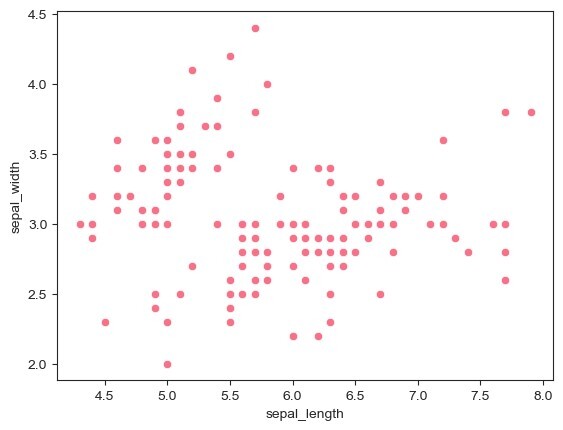
這裡我們使用 Seaborn 庫中可用的Iris資料集,並使用scatterplot()函式繪製sepal_length和sepal_width列的散點圖。
示例
import seaborn as sns
import matplotlib.pyplot as plt

# Generate some example data
data = sns.load_dataset("iris")
# Create a Seaborn plot
sns.scatterplot(x="sepal_length", y="sepal_width", data=data)
plt.show()
輸出
訪問 axes 物件
為了獲取當前的 axes 物件,我們將使用 matplotlib 庫的gca()函式。
# Get the current axes object
ax = plt.gca()
移除所需的脊線
現在,在獲取座標軸脊線後,我們將根據我們的需求和使用情況使用 True 和 False 設定脊線的可見性。如果我們定義為 True,則座標軸脊線將可見,否則它將被移除。
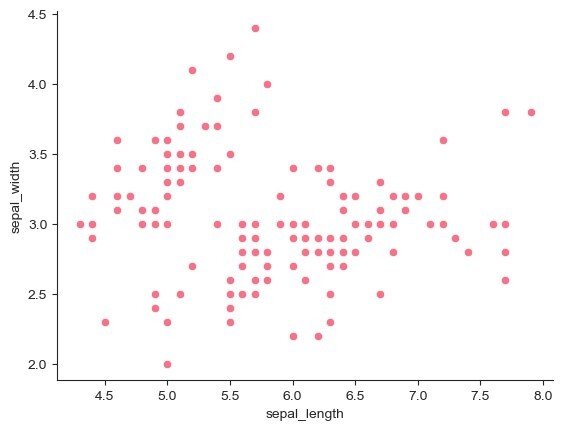
現在,我們透過將其設定為 False 來移除頂部和右側的座標軸脊線。
示例
import seaborn as sns
import matplotlib.pyplot as plt

# Generate some example data
data = sns.load_dataset("iris")
# Create a Seaborn plot
sns.scatterplot(x="sepal_length", y="sepal_width", data=data)

# Get the current axes object
ax = plt.gca()

# Remove the top and right spines
ax.spines["top"].set_visible(False)
ax.spines["right"].set_visible(False)

plt.show()
輸出
自定義剩餘的脊線
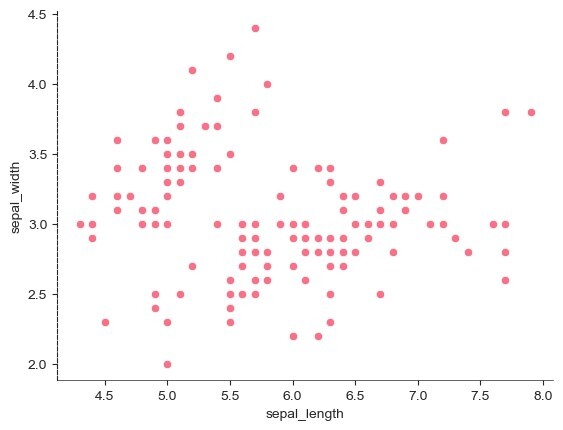
在此步驟中,我們透過設定線寬和線型來自定義剩餘的底部和左側座標軸脊線。
示例
import seaborn as sns
import matplotlib.pyplot as plt

# Generate some example data
data = sns.load_dataset("iris")
# Create a Seaborn plot
sns.scatterplot(x="sepal_length", y="sepal_width", data=data)

# Get the current axes object
ax = plt.gca()

# Customize the appearance of the remaining spines
ax.spines["bottom"].set_linewidth(0.5)  # Set the linewidth of the bottom spine
ax.spines["left"].set_linestyle("--")  # Set the linestyle of the left spine

plt.show()
輸出
注意 -
脊線的特定自定義選項(例如 linewidth、linestyle、color 等)可以根據我們的要求進行調整。

599 次瀏覽
