
 資料結構
資料結構 網路
網路 RDBMS
RDBMS 作業系統
作業系統 Java
Java MS Excel
 iOS
iOS HTML
HTML CSS
CSS Android
 Python
 C 程式設計
 C++
C++ C#
C# MongoDB
 MySQL
MySQL Javascript
 PHP
PHP 物理
物理 化學
化學 生物
生物 數學
數學 英語
英語 經濟
經濟 心理
心理 社會學
社會學 時尚學
時尚學 法律研究
法律研究如何在 Matplotlib 中使用 FuncAnimation 繪製指數衰減函式
我們假設我們想以指數衰減的方式動態顯示一個函式,如 y = a(b)^x,其中 b = 增長因子且 a = 初始值。
一個指數衰減函式看起來像這樣:
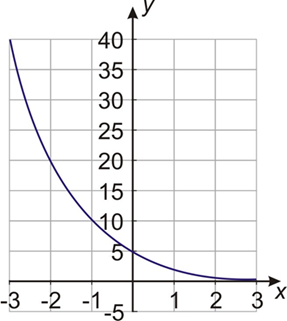
不過,現在我們想動態顯示並繪製指數衰減的正切函式。
首先匯入庫:
import numpy as np
import matplotlib.pyplot as plt
from matplotlib.animation import FuncAnimation
定義座標軸:
fig, a = plt.subplots()
繪製帶有座標軸的空白圖形:
xdata, ydata = [], []
line, = ax.plot(xdata, ydata)
設定網格線的限制:
ax.set_xlim(0, 10)
ax.set_ylim(-3.0, 3.0)
ax.grid()
定義函式以生成資料,這些資料將代替幀數:
def frame_generator(i=0):
   while i < 50:
      i += 0.1
      yield x, np.tan(2*np.pi*x) * np.exp(-x/5.)
定義函式以繪製動畫:
def animate(data):
   x, y = data
   xdata.append(x)
   ydata.append(y)
   xmin, xmax = ax.get_xlim()
   if x >= xmax:
      ax.set_xlim(xmin, 2*xmax)
      ax.figure.canvas.draw()
   line.set_data(xdata, ydata)
   return line
啟用動畫:
ani = FuncAnimation(fig, animate, frame_gen, blit=True, interval=2, repeat=False)
繪製圖形:
plt.show()
輸出


更新於: 23-2-2021
211 次瀏覽

廣告