
 資料結構
資料結構 網路
網路 RDBMS
RDBMS 作業系統
作業系統 Java
Java MS Excel
 iOS
iOS HTML
HTML CSS
CSS Android
 Python
 C 程式設計
 C++
C++ C#
C# MongoDB
 MySQL
MySQL Javascript
 PHP
PHP 物理
物理 化學
化學 生物
生物 數學
數學 英語
英語 經濟
經濟 心理學
心理學 社會學
社會學 時尚研究
時尚研究 法律研究
法律研究如何安裝 PlayOnLinux
Wine 平臺旨在允許你在 Linux 及其他基於 UNIX 的作業系統(MacOS X、FreeBSD、Solaris)上執行 Microsoft Windows 應用程式。PlayOnLinux 是 Wine 的圖形介面,它透過根據需要自動配置 Wine 來簡化在 Wine 平臺上安裝眾所周知的 Windows 應用程式和遊戲的過程。
安裝 PlayonLinux
若要安裝 playOnLinux,請使用以下命令 –
$ sudo apt-get install playonlinux
輸出應如下所示 –
Reading package lists... Done
Building dependency tree
Reading state information... Done
The following packages were automatically installed and are no longer required:
libgail-common liblouis-data liblouis2 python3-brlapi python3-louis
python3-pyatspi python3-speechd qt-at-spi xbrlapi
Use 'apt-get autoremove' to remove them.
The following extra packages will be installed:
mesa-utils
Suggested packages:
scrot
The following NEW packages will be installed:
mesa-utils playonlinux
...........
若要從 Linux 命令終端開啟 playOnLinux,請使用以下命令 –
$ playonlinux
輸出應如下所示 –
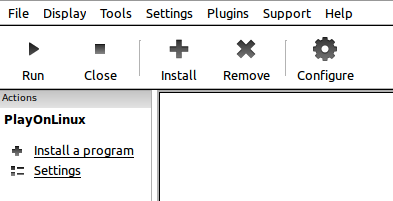
如果你單擊安裝按鈕(+ 按鈕),它將顯示下屏中顯示的結果 –

經過對 Notepad++ 的搜尋,輸出結果應如下所示 –

現在,單擊安裝按鈕。
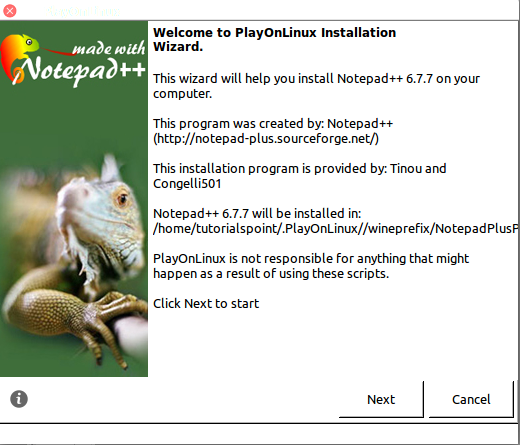
根據常規安裝步驟安裝 notepad++。最後,它將在 Linux 上開啟 Notepad++。輸出結果應如下所示 –

恭喜!現在,你可以下載任何 windows 二進位制檔案。我們將在下一篇 Linux 文章中詳細瞭解這些型別的命令。繼續關注!

更新日期: 2020 年 1 月 23 日
407 次瀏覽

廣告