
 資料結構
資料結構 網路
網路 關係型資料庫管理系統
 作業系統
作業系統 Java
Java MS Excel
 iOS
iOS HTML
HTML CSS
CSS Android
 Python
 C 語言程式設計
 C++
C++ C#
C# MongoDB
 MySQL
MySQL Javascript
 PHP
PHP 物理學
物理學 化學
化學 生物學
生物學 數學
數學 英語
英語 經濟學
經濟學 心理學
心理學 社會學
社會學 服裝設計
服裝設計 法律學
法律學如何獲取 Tkinter 元件的當前 x 和 y 座標?
Tkinter 廣泛用於建立基於 GUI 的應用程式。它提供了許多工具包、函式或模組,可用於定義特定應用程式的不同屬性。對於構建 GUI 應用程式,它提供了一些小部件,包括按鈕、文字框和標籤。我們可以使用其他函式和庫來自定義小部件的位置及其在 tkinter 框架上的座標。
假設我們建立了一個文字標籤小部件,它在 tkinter 框架中佔據某個位置。現在,要獲取小部件的實際座標,可以使用 tkinter 庫中提供的 **geometry** 方法。
我們將使用 **winfo_rootx()** 和 **winfo_rooty()** 函式,它們分別返回小部件相對於框架或視窗的實際座標。
示例
#Import the tkinter library
from tkinter import *

#Create an instance of the tkinter frame
win = Tk()

#Define the geometry of the frame
win.geometry("600x400")

#Define the text-widget
my_text= Text(win, height = 5, width = 52)

# Create label
lab = Label(win, text ="TutorialsPoint.com")

#Configure it using other properties
lab.config(font =("Helvetica", 20))

#Create a button widget
my_button = Button(text="Hello")

#Define the position of the widget
my_button.place(x=100, y=100)

#Update the coordinates with respect to the tkinter frame
win.update()

#Get the coordinates of both text widget and button widget
widget_x1, widget_y1 = my_button.winfo_rootx(),
my_button.winfo_rooty()
widget_x2, widget_y2 = my_text.winfo_rootx(),
my_button.winfo_rooty()

lab.pack()

print(widget_x1, widget_y1)
print(widget_x2, widget_y2)

#Keep the window running
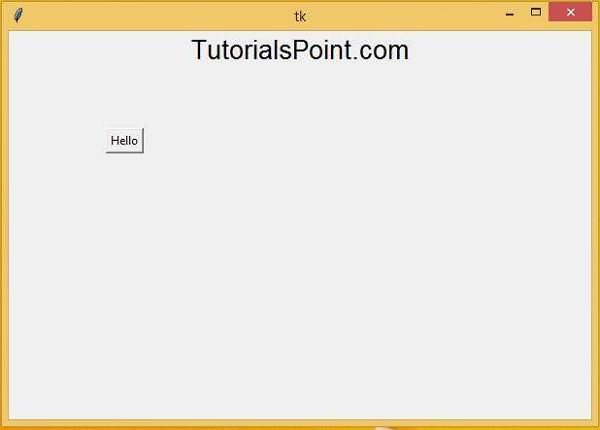
win.mainloop()
輸出
執行以上程式碼片段將列印小部件的當前位置,如下所示:
134 157
0 157

更新於: 2021年3月6日
8K+ 瀏覽量

廣告