
 資料結構
資料結構 網路
網路 關係資料庫管理系統 (RDBMS)
 作業系統
作業系統 Java
Java MS Excel
 iOS
iOS HTML
HTML CSS
CSS Android
 Python
 C語言程式設計
 C++
C++ C#
C# MongoDB
 MySQL
MySQL Javascript
 PHP
PHP 物理學
物理學 化學
化學 生物學
生物學 數學
數學 英語
英語 經濟學
經濟學 心理學
心理學 社會學
社會學 服裝學
服裝學 法學
法學如何在Tkinter Text元件中獲取當前文字長度?
Tkinter中的Text元件支援使用者的多行輸入。我們可以使用**configure()**方法配置Text元件的屬性,例如字型屬性、文字顏色、背景等。
要建立一個應用程式來計算Text元件中當前寫入的字元數,我們可以按照以下步驟操作:
建立一個Text元件並定義其寬度和高度屬性。
需要一個標籤元件來顯示字元總數。
定義一個帶有**<KeyPress>**和**<KeyRelease>**功能的事件,該事件將在標籤元件中顯示更新後的字元計數。
該函式將具有一個標籤配置,該配置將在事件發生時更新。要顯示字元計數,請透過轉換字元長度的值來指定文字的值。
打包小部件並顯示輸出。
示例
# Import the required libraries
from tkinter import *

# Create an instance of tkinter frame or window
win=Tk()

# Set the size of the tkinter window
win.geometry("700x350")

# Define a function to get the length of the current text
def update(event):
   label.config(text="Total Characters: "+str(len(text.get("1.0", 'end-1c'))))

# Create a text widget
text=Text(win, width=50, height=10, font=('Calibri 14'))
text.pack()

# Create a Label widget
label=Label(win, text="", justify=CENTER, font=('11'))
label.pack()

# Bind the buttons with the event
text.bind('<KeyPress>', update)
text.bind('<KeyRelease>', update)

win.mainloop()
輸出
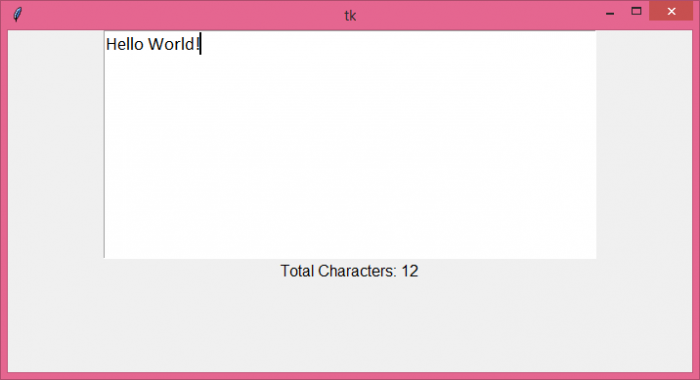
執行以上程式碼將顯示一個文字編輯器和底部的一個標籤元件。每當我們在文字編輯器中鍵入內容時,它都會更新為“總字元數:”計數。

更新於:2021年8月5日
2K+ 瀏覽量

廣告