
 資料結構
資料結構 網路
網路 RDBMS
RDBMS 作業系統
作業系統 Java
Java MS Excel
 iOS
iOS HTML
HTML CSS
CSS Android
 Python
 C 程式設計
 C++
C++ C#
C# MongoDB
 MySQL
MySQL Javascript
 PHP
PHP 物理
物理 化學
化學 生物
生物 數學
數學 英語
英語 經濟
經濟 心理學
心理學 社會學
社會學 時尚學
時尚學 法律學
法律學如何用 JavaFX 編輯 ComboBox?
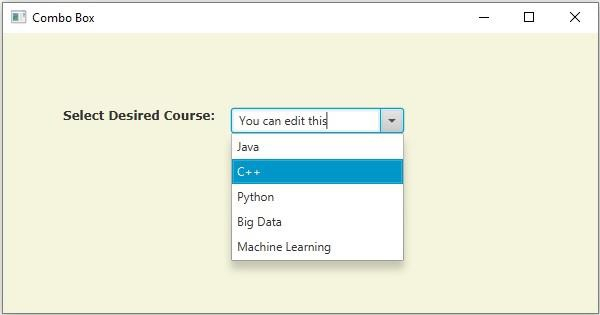
組合框類似於選項框,它包含多項內容,並允許你選擇其中一項。它可以透過在下拉列表中新增捲軸來形成。你可以透過例項化 javafx.scene.control.ComboBox 類來建立組合框。
ComboBox 類有一個名為 editable(布林值)的方法,它指定當前組合框是否允許使用者輸入。你可以使用 setEditable() 方法為該屬性設定值。
因此,要編輯 JavaFX ComboBox,請在它上面呼叫 setEditable() 方法,並傳入布林值 true 作為引數。
例子
import javafx.application.Application;
import javafx.collections.ObservableList;
import javafx.geometry.Insets;
import javafx.scene.Group;
import javafx.scene.Scene;
import javafx.scene.control.ComboBox;
import javafx.scene.control.Label;
import javafx.stage.Stage;
import javafx.scene.layout.HBox;
import javafx.scene.paint.Color;
import javafx.scene.text.Font;
import javafx.scene.text.FontPosture;
import javafx.scene.text.FontWeight;
public class ComboBoxEditable extends Application {
   @Override
   public void start(Stage stage) {
      //Setting the label
      Label label = new Label("Select Desired Course:");
      Font font = Font.font("verdana", FontWeight.BOLD, FontPosture.REGULAR, 12);
      label.setFont(font);
      //Creating a combo box
      ComboBox<String> combo = new ComboBox<String>();
      //Getting the observable list of the combo box
      ObservableList<String> list = combo.getItems();
      //Adding items to the combo box
      list.add("Java");
      list.add("C++");
      list.add("Python");
      list.add("Big Data");
      list.add("Machine Learning");
     //Setting the combo box editable
      combo.setEditable(true);
      HBox hbox = new HBox(15);
      //Setting the space between the nodes of a HBox pane
      hbox.setPadding(new Insets(75, 150, 50, 60));
      hbox.getChildren().addAll(label, combo);
      //Creating a scene object
      Scene scene = new Scene(new Group(hbox), 595, 280, Color.BEIGE);
      stage.setTitle("Combo Box");
      stage.setScene(scene);
      stage.show();
   }
   public static void main(String args[]){
      launch(args);
   }
}
輸出

更新於:2020 年 5 月 18 日
1K+ 次瀏覽

廣告