
 資料結構
資料結構 網路
網路 關係型資料庫管理系統
 作業系統
作業系統 Java
Java Microsoft Excel
 iOS
iOS HTML
HTML CSS
CSS Android
 Python
 C 語言程式設計
 C++
C++ C#
C# MongoDB
 MySQL
MySQL JavaScript
 PHP
PHP 物理
物理 化學
化學 生物
生物 數學
數學 英語
英語 經濟學
經濟學 心理學
心理學 社會研究
社會研究 時尚研究
時尚研究 法律研究
法律研究如何在 JavaFX 中建立 TableView?
TableView 是一種用於建立表格、填充表格和刪除表格中項的元件。你可以透過例項化javafx.scene.control.TableView 類來建立表格檢視。
示例
以下示例演示瞭如何建立 TableView。
import javafx.application.Application;
import javafx.collections.FXCollections;
import javafx.collections.ObservableList;
import javafx.geometry.Insets;
import javafx.scene.Scene;
import javafx.scene.control.Label;
import javafx.scene.control.TableColumn;
import javafx.scene.control.TableView;
import javafx.scene.layout.VBox;
import javafx.scene.text.Font;
import javafx.scene.text.FontPosture;
import javafx.scene.text.FontWeight;
import javafx.stage.Stage;
public class TableViewExample extends Application {
   public void start(Stage stage) {
      //Label for education
      Label label = new Label("File data:");
      Font font = Font.font("verdana", FontWeight.BOLD, FontPosture.REGULAR, 12);
      label.setFont(font);
      //Creating a table view
      TableView<String> table = new TableView<String>();
      //Creating columns
      TableColumn fileNameCol = new TableColumn("File Name");
      TableColumn pathCol = new TableColumn("Path");
      TableColumn imageSizeCol = new TableColumn("Size");
      TableColumn dateCol = new TableColumn("Date Modified");
      dateCol.setPrefWidth(100);
      //Adding data to the table
      ObservableList<String> list = FXCollections.observableArrayList();
      table.setItems(list);
      table.getColumns().addAll(fileNameCol, pathCol, imageSizeCol, dateCol);
      //Setting the size of the table
      table.setMaxSize(350, 200);
      VBox vbox = new VBox();
      vbox.setSpacing(5);
      vbox.setPadding(new Insets(10, 50, 50, 60));
      vbox.getChildren().addAll(label, table);
      //Setting the scene
      Scene scene = new Scene(vbox, 595, 230);
      stage.setTitle("Table View Exmple");
      stage.setScene(scene);
      stage.show();
   }
   public static void main(String args[]){
      launch(args);
   }
}
輸出
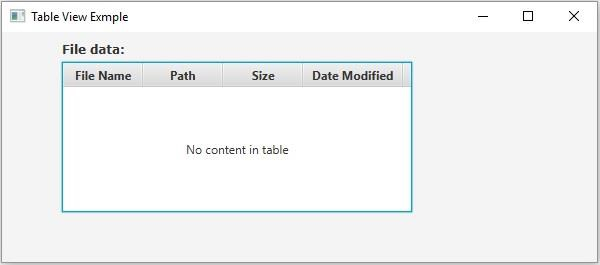

更新於:2020 年 5 月 18 日
3,000 次以上瀏覽

廣告