
 資料結構
資料結構 網路
網路 RDBMS
RDBMS 作業系統
作業系統 Java
Java MS Excel
 iOS
iOS HTML
HTML CSS
CSS Android
 Python
 C 程式設計
 C++
C++ C#
C# MongoDB
 MySQL
MySQL Javascript
 PHP
PHP 物理
物理 化學
化學 生物
生物 數學
數學 英語
英語 經濟
經濟 心理學
心理學 社會研究
社會研究 時尚研究
時尚研究 法律研究
法律研究如何在 Java 中右對齊 ComboBox 中的文字
要右對齊 JComboBox 中的文字,請使用以下程式碼
ComponentOrientation.RIGHT_TO_LEFT
以下是對齊 ComboBox 中文字的示例
示例
import java.awt.Component;
import java.awt.ComponentOrientation;
import javax.swing.DefaultListCellRenderer;
import javax.swing.JComboBox;
import javax.swing.JFrame;
import javax.swing.JList;
public class SwingDemo extends JFrame {
   public SwingDemo() {
      JComboBox<String> combo = new JComboBox<String>();
      combo.setRenderer(new MyListCellRenderer());
      combo.addItem("One");
      combo.addItem("Two");
      combo.addItem("Three");
      combo.addItem("Four");
      combo.addItem("Five");
      getContentPane().add(combo, "North");
      setSize(600, 400);
      setDefaultCloseOperation(EXIT_ON_CLOSE);
   }
   public static void main(String[] args) {
      new SwingDemo().setVisible(true);
   }
}
class MyListCellRenderer extends DefaultListCellRenderer {
   @Override
   public Component getListCellRendererComponent(
      JList list, Object value, int index, boolean isSelected, boolean cellHasFocus) {
      Component c = super.getListCellRendererComponent(list, value, index, isSelected, cellHasFocus);
      c.setComponentOrientation(ComponentOrientation.RIGHT_TO_LEFT);
      return c;
   }
}
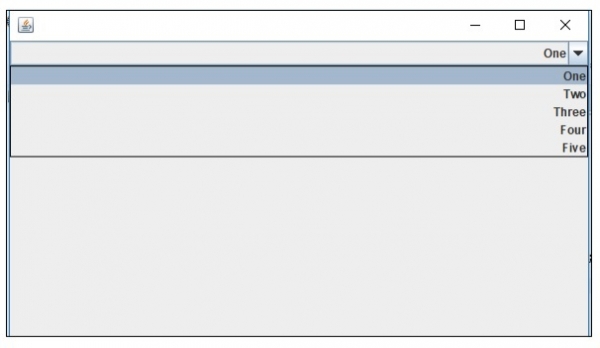
輸出

更新日期:2019 年 7 月 30 日
346 次瀏覽

廣告